- Description
- Reviews
- FAQ
- Customers ()
- Specifications
- Cloud Hosting
- Changelog
ERPNext Multi-Channel Shopify Connector helps businesses connect their Shopify stores with ERPNext and manage all eCommerce operations from one single place.
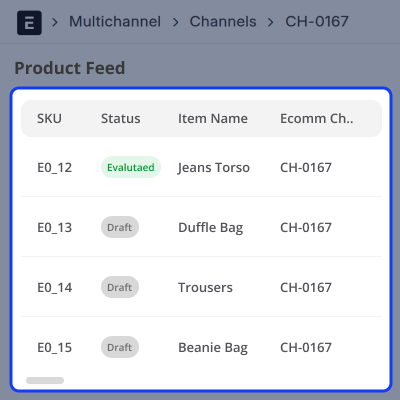
Data from Shopify like categories, products, customers, addresses, and sales orders can all be brought into ERPNext in just a few steps. Every item of synced data is saved as a feed. These feeds can be processed one by one or all at once to create or update records in ERPNext.
Multiple Shopify stores can be connected to one ERPNext system. All stores are managed from one place. There is no need to switch between systems or log into each store one by one.
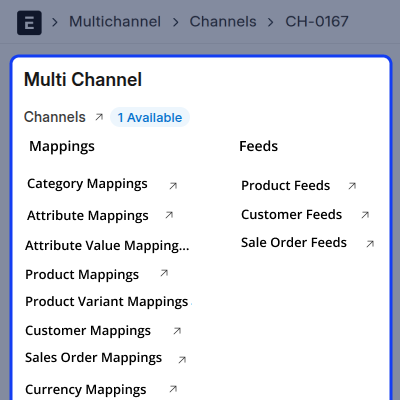
The connector keeps mappings between Shopify and ERPNext records so data always reaches the right place on both platforms.
Both simple and configurable products can be synced from Shopify into ERPNext. Categories and products can also be sent from ERPNext to Shopify any time they are needed.
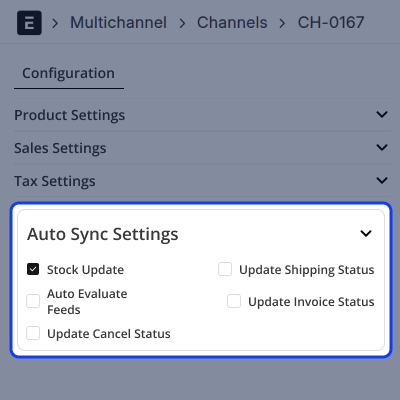
When inventory changes in ERPNext, stock levels in Shopify update on their own. Changes made in one platform can be reflected in the other platform.
Managing orders in ERPNext Multi-Channel Shopify Connector is easy too. Invoice status, shipment updates, and cancellations all sync from ERPNext to Shopify automatically without any manual steps.
Auto Feed Evaluation can be turned on to process synced feeds on their own. This reduces manual work and keeps both systems current and up to date at all times.
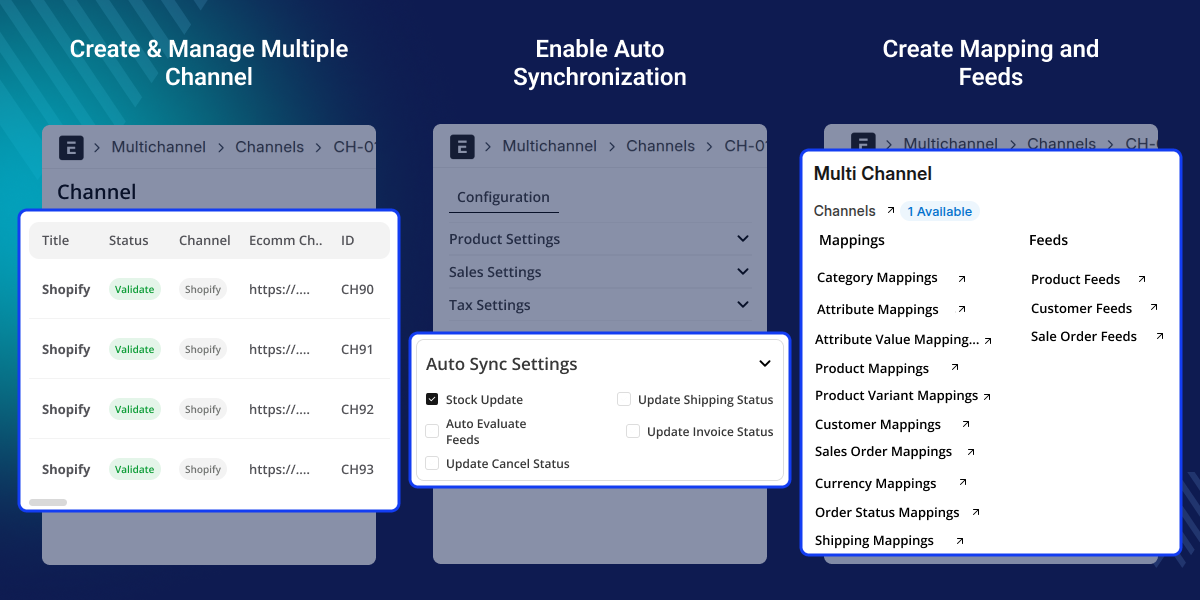
Prerequisites for using ERPNext Multi-Channel Shopify Connector
ERPNext Multi-Channel Shopify Connector works with ERPNext Multi Channel Connector Module. You need to install this module first to use ERPNext Multi-Channel Shopify Connector .
Highlighted Features of ERPNext Multi-Channel Shopify Connector
Multi-Channel Shopify Management
Connect all your Shopify stores to one ERPNext system and run everything from one place.
Product Sync
Sync simple and configurable products from Shopify into ERPNext and keep them accurate and up to date.
Customer and Address Sync
Bring customer details and delivery addresses from Shopify into ERPNext automatically no manual entry needed.
Sales Order Sync
Sync Shopify sales orders into ERPNext using feed-based processing and match them to the right records with ease.
Automatic Stock Updates
Stock changes in ERPNext sync to Shopify right away. Inventory stays correct on both platforms without any manual work.
Order Status Sync
Invoice status, shipment updates, and cancellations move from ERPNext to Shopify on their own, no manual updates required.
Feed Evaluation System
Synced feeds can be processed one at a time or in bulk to create or update records in ERPNext manually or automatically.
Category and Product Export
Send categories and products from ERPNext to any connected Shopify store in just a few clicks.
Why Do We Need ERPNext Multi-Channel Shopify Connector ?
Many businesses use Shopify to sell online and ERPNext to handle their stock, customers, and orders. When these two systems do not talk to each other, workers have to type the same information into both places by hand. This wastes a lot of time and leads to mistakes.
The ERPNext Multi-Channel Shopify Connector fixes this problem by moving data between Shopify and ERPNext automatically. You can even connect and control more than one Shopify store from just one ERPNext account.
Stock updates, order tracking, and data updates all run by themselves. You do not need to do any manual work. Data stays up to date across Shopify and ERPNext without extra manual work
Accurate data sync helps businesses save time and manage multiple Shopify stores more easily.
Use Cases
Multi-Store Shopify Management
A business runs three Shopify stores for the USA, UK, and Canada. All three stores connect to one ERPNext system. Manage products, orders, and inventory from one central location without switching between multiple Shopify stores.
Centralized Inventory Control
A retailer manages stock in ERPNext and sells on Shopify. Every time stock changes in ERPNext, Shopify gets the update right away. Stock numbers stay correct and overselling does not happen.
Automated Order Processing
A Shopify store gets hundreds of orders every day. All orders come into ERPNext on their own. The team takes care of invoicing, shipping, and fulfilment from ERPNext. Both platforms stay in sync the whole time.
Product Catalog Sync
A business updates product details and categories in ERPNext and wants Shopify to show the same data. The connector sends products and categories from ERPNext to Shopify and keeps both platforms in sync at all times.
Feed-Based Data Sync
ERPNext Multi-Channel Shopify Connector brings Shopify data into ERPNext through feed records. These feeds can be checked and processed to create or update records in a simple and controlled way.
- A feed record is created every time data is synced
- Feeds can be processed one at a time or all at once.
- New ERPNext records can be created directly from the feeds
- Records that already exist in ERPNext can be updated through the feeds.
- Data sync stays clean and free from errors.
Mapping Management
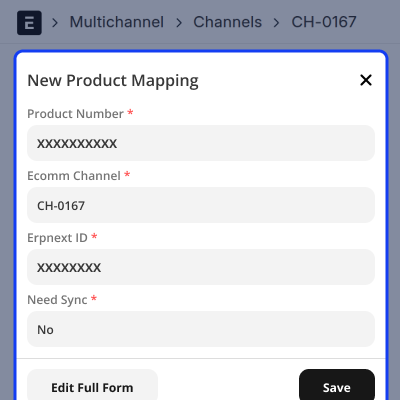
ERPNext Multi-Channel Shopify Connector keeps mappings between Shopify and ERPNext so data always goes to the right place on both platforms.
- Category mappings are created on their own during sync.
- Product mappings stay accurate and up to date.
- Customer mappings are easy to manage.
- Currency and shipping mappings can be set up when needed.
- Order status mappings make sure orders sync correctly.
Product and Catalog Integration
ERPNext Multi-Channel Shopify Connector syncs product catalogs between Shopify and ERPNext including all categories and product types.
- Simple and configurable products can be synced from Shopify.
- Product attributes and values sync along with the products.
- Shopify categories come into ERPNext automatically.
- Categories can be sent from ERPNext to Shopify.
- Products can be exported from ERPNext to Shopify any time.

Automated Inventory Sync
Stock levels sync from ERPNext to Shopify on their own so inventory always stays correct across all connected stores.
- Shopify stock updates automatically from ERPNext.
- Stock numbers stay the same on both platforms.
- Manual stock updates are no longer needed.
- Stock syncs across multiple Shopify stores.
- Stock mismatches are avoided before they cause problems.
Sales Order Processing Workflow
ERPNext Multi-Channel Shopify Connector brings Shopify orders into ERPNext and processes them using the mappings and sync rules that have been set up.
- Sales orders come from Shopify into ERPNext automatically.
- A feed record is created for every order that comes in.
- Each order is processed using the right status mappings.
- Invoice and shipment status sync across both platforms.
- Cancellation status on Shopify updates automatically.
Support
For any query or issue, please create a support ticket here CREATE A TICKET HERE
You may also check our other top-quality ErpNext Modules.
Specifications
FAQ’s
Specification
Detailed technical features and requirements to help you understand the module’s capabilities and ensure smooth integration with your system.
Cloud Hosting
Detailed technical features and requirements to help you understand the module’s capabilities and ensure smooth integration with your system.
Move to Cloud Today
We’re partnered with top-tier, trusted providers!



Default Configuration Details of Server
RAM 1 Core
Processor 30 GB
Hard Disk
Database
Want to know more how exactly we are going to power up your eCommerce Website with Cloud to fasten up your store
* Server Configuration may vary as per application requirements.
