- Description
- Reviews
- FAQ
- Customers ()
- Specifications
- Cloud Hosting
- Changelog
ERPNext Website Store Locator helps businesses display and manage all their store locations directly from ERPNext. Businesses can create store records with all the important details: store name, address, contact information, website, images, and business hours.
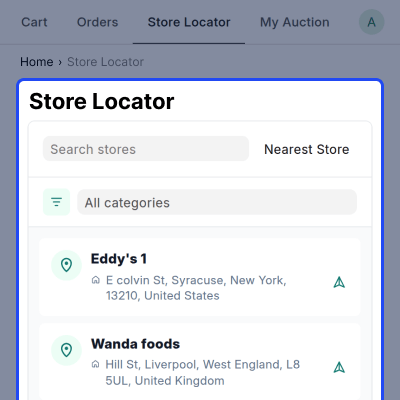
Each store location can be pinned on a map to set the exact latitude and longitude coordinates. This makes sure every store shows up in the right place. Published stores appear on a public store locator page where customers can search, browse, and find nearby locations using an easy-to-use interactive map.
Stores can be grouped using tags and categories. This lets customers filter locations by store type, service category, or any other way the business wants to organize them.
This module also gives customers a direct navigation link so they can get directions to any store in just one click. Website admins can set up the map with a default centre point, zoom level, and map type to make the store-finding experience as smooth as possible.
The Store Locator requires a valid Google Maps API key to display maps, store locations, and navigation features on the website. Without a configured API key, the map view and location-based store search functionality will not work properly.
By bringing store management and location discovery into one system, businesses make it much easier for customers to find the right store quickly.
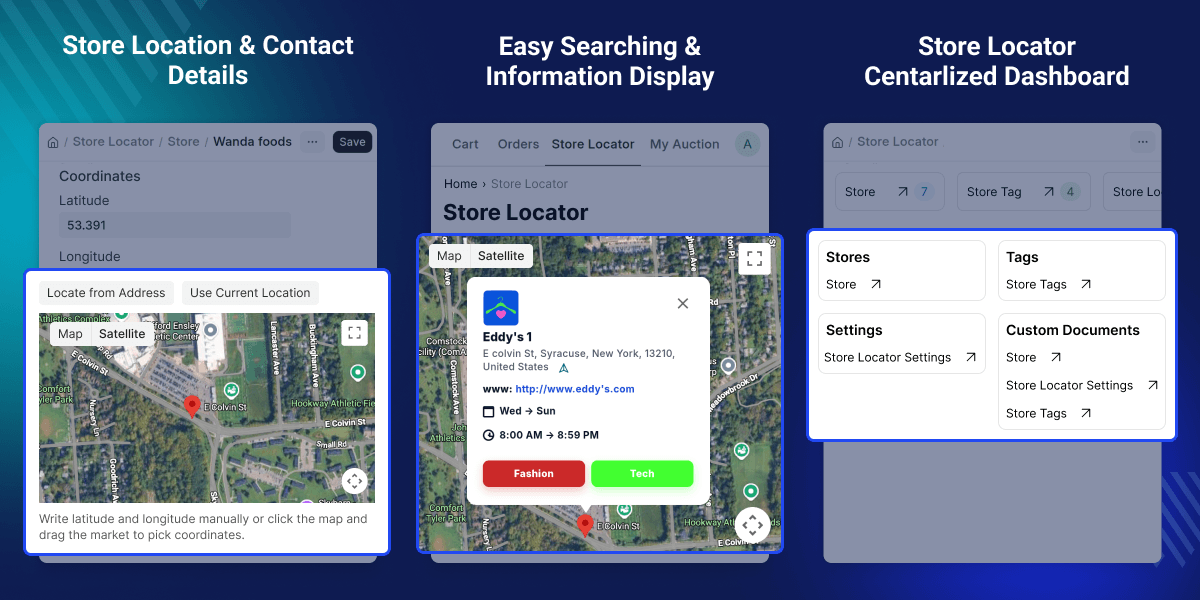
Highlighted Features of ERPNext Website Store Locator
Multiple Store Management
Create and manage all store locations from one single ERPNext system.
Interactive Map Locator
Show all store locations on a public Google Maps-based locator page.
Store Information Management
Keep store addresses, contact details, website links, and images all in one place.
Tag-Based Store Filtering
Let customers search and filter stores using tags and keywords to find what they need faster.
Opening Hours Display
Show store business hours on the website so customers know when to visit.
Directions and Navigation
Give customers a direct navigation link so they can get to any store without any trouble.
Map Configuration
Set the map center, zoom level, and display settings to suit the business needs.
Publishing Control
Decide which stores should appear on the public website and which should stay hidden.
Why Do We Need This Module?
Businesses with many stores often find it hard to help customers locate the nearest one. Customers struggle to find store addresses, check opening hours, or get contact details when there is no proper system in place.
Without a centralized store locator, businesses end up keeping location information spread across many pages. This makes updates hard and leads to outdated information being shown to customers.
ERPNext Website Store Locator fixes this by giving businesses one dedicated system for managing stores with map-based location display, store search, category filters, business hours, and navigation links.
Customers can find the right store quickly, and businesses can manage all location information from one single place.
A well-organised store locator makes store information easier to find and keeps it accurate and up to date at all times.
Use Cases
Retail Store Finder
A retail business with stores in different cities can help customers quickly find the nearest store, view store hours, and get directions from the website.
Service Centre Locator
A company with multiple service centres can display all locations on a map, allowing customers to search nearby centres and contact them easily.
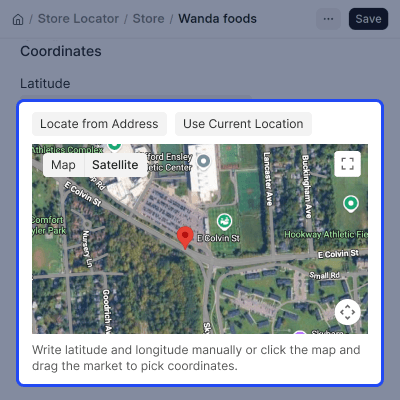
Store Location Management
Store owners can add complete store details, including address and map coordinates, to help customers find the correct location easily.
- Create and manage store locations as needed.
- Add a full address for every store.
- Set store coordinates by picking the location on a map.
- Assign tags to groups and organize stores by category.
- Set working hours for each store.
- Choose which stores are published and visible on the website.
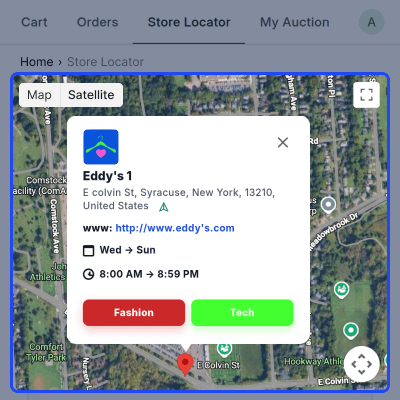
Store Search and Navigation
Customers can easily discover nearby stores and find the most relevant location without manually searching through multiple store listings.
- Search for stores using keywords.
- Filter stores by tags and categories.
- View all stores on an interactive map.
- Find the nearest store based on the current location.
- Get directions to any store with a single click.
- Make store discovery easier on the webshop.
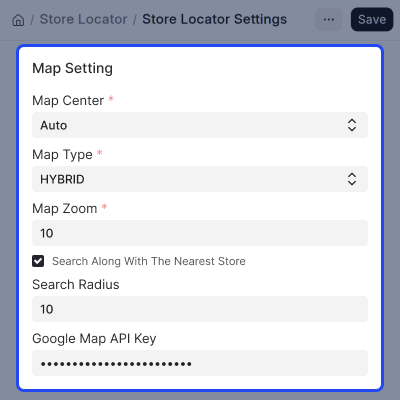
Flexible Store Locator Configuration
Administrators can control map display and location search behaviour without making changes to the website code.
- Set a default centre point for the map
- Choose the preferred map type.
- Configure the zoom level for the map.
- Configure nearest store search options.
- Set the search radius for finding nearby stores.
- Manage all Google Maps settings from ERPNext
Store Images and Contact Information
Customers can view store details before visiting, making it easier to identify the correct location and contact the store when needed.
- Upload images for each store location.
- Add phone numbers and contact details.
- Include a website link for each store.
- Make stores more visible and easier to find.
- Give customers a complete and informative store listing.
Support
For any query or issue, please create a support ticket here CREATE A TICKET HERE
You may also check our other top-quality ErpNext Modules.
Specifications
FAQ’s
Specification
Detailed technical features and requirements to help you understand the module’s capabilities and ensure smooth integration with your system.
Cloud Hosting
Detailed technical features and requirements to help you understand the module’s capabilities and ensure smooth integration with your system.
Move to Cloud Today
We’re partnered with top-tier, trusted providers!



Default Configuration Details of Server
RAM 1 Core
Processor 30 GB
Hard Disk
Database
Want to know more how exactly we are going to power up your eCommerce Website with Cloud to fasten up your store
* Server Configuration may vary as per application requirements.
