USD
  • EUR
  • INR
  • USD
Cart
Cart 0
  • You have no items in your shopping cart.
    Cart
    Cart 0
    • You have no items in your shopping cart.
    Hire a Developer
    ×
    Contact Us!
    Send Again
    Close
    Please Login to Write Your Review

    Krayin CRM Odoo Connector

    Krayin CRM Odoo Connector connects Odoo with Krayin CRM to sync leads, partners, products, and users using real-time actions, bulk operations, and scheduled imports.


    • Advanced settings to manage connector and lead behavior.

    • Real-time create, update, and delete actions from Odoo.

    • Bulk import and export of CRM data between Odoo and Krayin.

    • Map lead stages and lead sources between both systems.

    • Avoid duplicate partners and products during sync.

    • Link existing records using Krayin Record IDs.

    • Import CRM data automatically to Odoo using cron scheduler.

    Screenshots
    $100.00

    * Required Fields

    Add To Cart
    $100.00
    Configure and Buy
    • Description
    • Reviews
    • FAQ
    • Customers ()
    • Specifications
    • Cloud Hosting
    • Changelog

    Krayin CRM Odoo Connector allows you to connect Odoo with Krayin CRM simply and reliably. It lets teams manage CRM data in Odoo while keeping data in Krayin CRM up to date.

    The module supports real-time sync from Odoo to Krayin CRM, bulk import and export, and scheduled imports from Krayin CRM to Odoo. This helps keep data accurate and reduces manual work.

    Krayin CRM Odoo Connector

    Why Do We Need Krayin CRM Odoo Connector?

    Using more than one system for CRM data often creates problems. Data may not match, and duplicate records can appear. Krayin CRM Odoo Connector helps keep data same in both Odoo and Krayin CRM.

    For example, a business may use Krayin CRM for sales and Odoo for daily work. Updating leads, contacts, and products manually is time consuming and may lead to errors.

    With Krayin CRM Odoo Connector, partners and products can be synced from Odoo in real-time. Leads and users are imported from Krayin CRM on a schedule. This helps both teams work with correct and updated data.

    Prerequisites for using Odoo Krayin CRM Odoo Connector

    Odoo Krayin CRM Odoo Connector works in conjunction with the following module:

    Odoo Multi CRM Solution

    You need to install the above module to use Krayin CRM Odoo Connector.

    Highlighted Features of Krayin CRM Odoo Connector

    Centralized Configuration

    Manage connection details, API limits, feeds, and default lead settings from single place.

    Lead Mapping Control

    Map lead stages and lead sources between Odoo and Krayin CRM to keep pipelines aligned.

    Activity Sync Support

    Sync lead activities from Krayin CRM into Odoo for better lead tracking.

    Feed and Log Tracking

    View sync feeds and logs to track successful and failed records using Krayin CRM Odoo Connector.

    Controlled Data Sync

    Use real-time actions, bulk operations, and scheduled imports based on supported flows.

    Automated Imports

    Import updated data from Krayin CRM into Odoo using cron-based scheduling.

    Connector Configuration

    Configure and manage the Krayin CRM connection directly from Odoo. You can control how data is synced between systems.
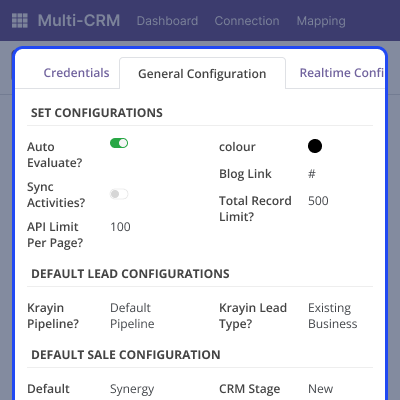
    • Set Krayin CRM base URL and login credentials.
    • Enable lead activity sync from Krayin CRM to Odoo.
    • Turn on real-time create, update, and delete actions from Odoo.
    • Auto-check CRM feeds before importing data.
    • Apply duplicate checks for partners and products.
    Connector Configuration

    Partner Synchronization

    Sync company and contact data between Odoo and Krayin CRM using different sync methods. Existing partners can be linked without duplication.
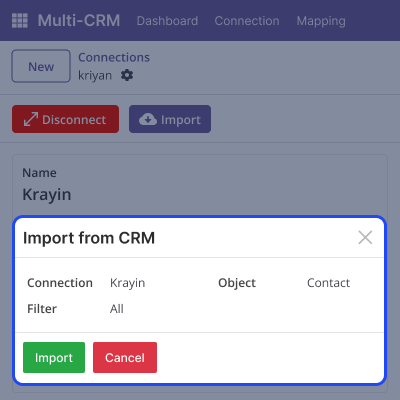
    • Import companies and contacts from Krayin CRM into Odoo in bulk.
    • Export and update partner details from Odoo to Krayin CRM.
    • Link existing partners manually using Krayin Record IDs.
    • Sync partner create and update actions in real time from Odoo.
    • Import partner data automatically using cron jobs.
    Partner Synchronization

    Product Synchronization

    Maintain same product data in both Odoo and Krayin CRM with sync options.
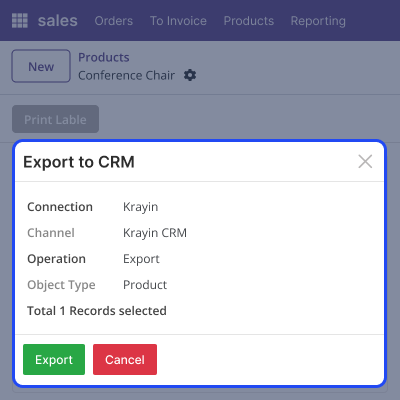
    • Import products from Krayin CRM into Odoo in bulk.
    • Export and update product data from Odoo to Krayin CRM.
    • Map existing products manually using Krayin Record IDs.
    • Sync product create and update actions in real time from Odoo.
    • Import updated products automatically using cron setup.
    Product Synchronization

    Lead and User Synchronization

    Manage leads and users by importing and mapping data from Krayin CRM into Odoo. This helps keep lead ownership correct.
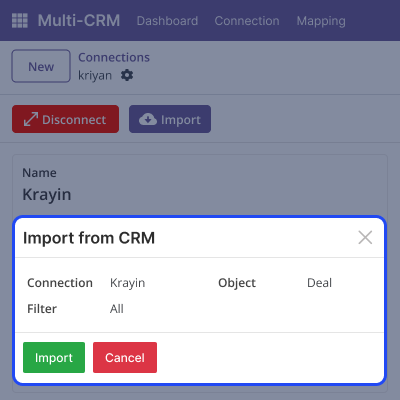
    • Import leads from Krayin CRM into Odoo in bulk.
    • Map existing leads manually using Krayin Record IDs.
    • Import new and updated leads automatically using cron jobs.
    • Import CRM users from Krayin into Odoo using Krayin CRM Odoo Connector.
    • Map users manually to assign leads correctly.
    Lead and User Synchronization

    Logs and Feed Management

    Track all sync activity between Odoo and Krayin CRM using built-in logs and feeds. This helps understand data flow and quickly identify issues.
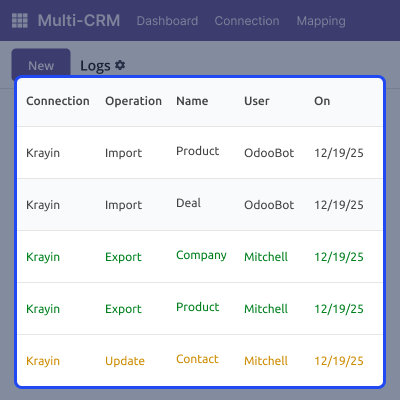
    • View import and export logs for all synced records.
    • Check success and failure status for each sync operation.
    • Monitor CRM feeds before and after evaluation.
    • Identify sync issues using detailed log entries.
    • Improve control over data synchronization.
    Logs and Feed Management

    Support

    For any query or issue, please create a support ticket here CREATE A TICKET HERE

    You may also check our other top-quality Odoo Modules.

    Specifications

    Product Version1.0.0
    Released2 months ago
    CategoryOdoo AppsConnectorsCRMKrayin
    Last UpdatedFebruary 17, 2026 (18 days ago)
    Supported VersionsOdoo  18.x  
    Write a review

    FAQs

     Can I reuse the same template for multiple customers?
    Yes, the same template can be reused for many documents without setting it up again.
     Can I change sign elements after uploading the PDF?
    Yes, sign elements can be moved or resized before you send the document.
     Do customers need to log in to sign documents?
    No, customers can sign documents directly using the email link.
     How does the admin know when a document is signed?
    In Odoo Sign Document, the admin receives an automatic email after the customer signs the Document.
     Can I use the same document for different records?
    Yes, contextual actions allow the same template to be used for different records.
     What happens if the customer does not sign the document?
    The document stays unsigned until the customer completes the signing.

    Move to Cloud Today

    AWS Free tier hosting for one year by amazon web services, for more details please visit AWS Free Tier.

    GCP Free tier hosting for one year with 300 credit points by google cloud platform, for more details please visit GCP Free Tier.

    Azure free tier hosting for one year with 25+ always free services, for more details please visit Azure Free Tier.

    In our default configuration we will provide tremendous configuration for your eCommerce Website which is fast to load and response.

    Default Configuration Details of Server

    • 1 GB RAM
    • 1 Core Processor
    • 30 GB Hard Disk
    • DB with 1 GB RAM and 1 Core Processor

    * Server Configuration may vary as per application requirements.

    Want to know more how exactly we are going to power up your eCommerce Website with Cloud to fasten up your store. Please visit the Cloudkul Services.

    Get Started with Cloud
    Not Available


