- Description
- Reviews
- FAQ
- Customers ()
- Specifications
- Cloud Hosting
- Changelog
Krayin Task Manager provides a centralized space for managing tasks, deadlines, discussions, and work updates within Krayin CRM. Teams can keep task related information organized in one place.
Krayin task management lets managers assign work to team members, set priorities, and track task status throughout the work process. This helps reduce missed follow-ups and confusion.
Task management for Krayin CRM supports group based task assignment and detailed task views. Teams can quickly find task information and stay updated on ongoing work.
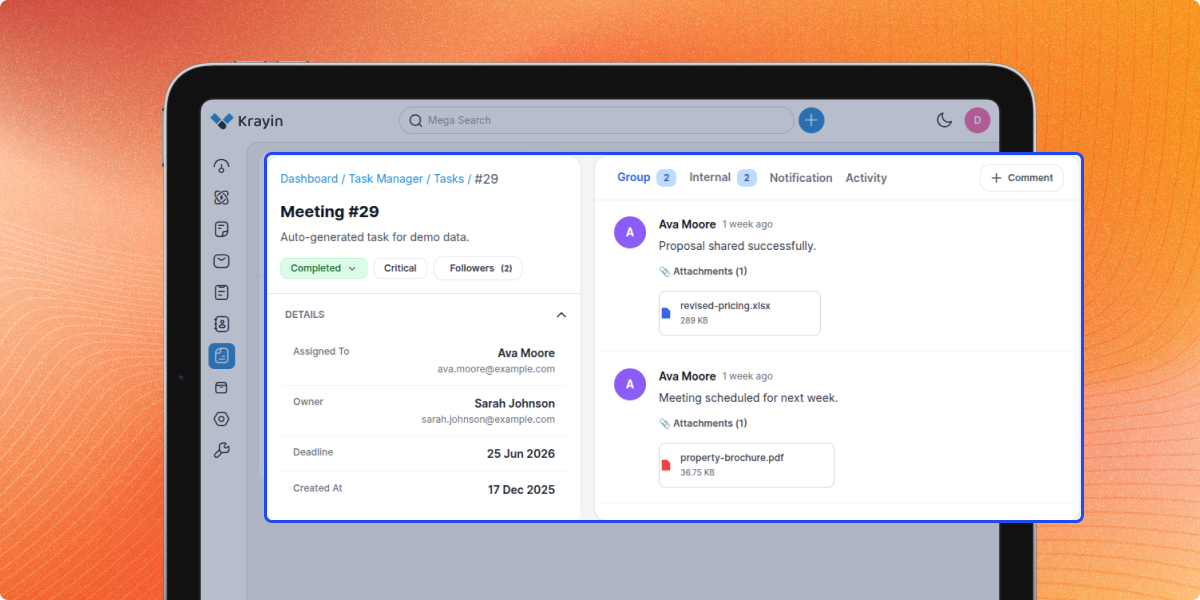
Krayin team collaboration becomes easier with group comments, internal notes, and file attachments. Team members can share updates and discuss work within each task.
Krayin task tracking records updates through task history, alerts, and email messages. This helps teams review progress and stay informed about important changes.
Krayin workflow management supports growing teams that need better control over daily work. This CRM task management system helps improve teamwork and task completion.
Teams that manage inventory movement between locations can also benefit from a structured transfer process, making Krayin Inventory Transfer useful for tracking stock transfers and coordinating related operational tasks.
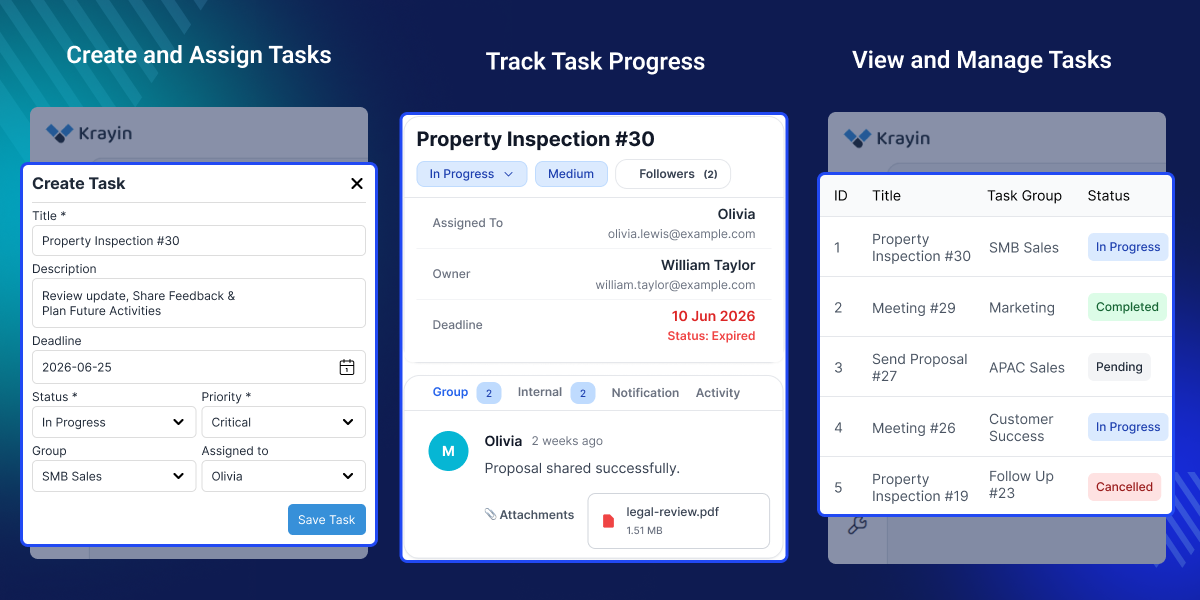
Highlighted Features
Task Assignment Control
Assign tasks to team members with priorities, deadlines, and clear ownership.
Progress Tracking
Track task progress and monitor status updates throughout the work process.
Team Discussions
Share updates, discuss work, and keep task communication in one place.
Activity Monitoring
Review task changes and track all updates through a detailed timeline.
Notifications and Alerts
Receive timely notifications and alerts for task updates and deadlines.
Search and Filter Tools
Find specific tasks quickly using search, sorting, and filtering options.
Why Do We Need Krayin Task Manager?
Krayin Task Manager helps organizations manage internal work directly within Krayin CRM. Without a task system, teams often rely on emails, spreadsheets, or chat messages to assign and track work.
Krayin CRM helps manage customer relationships, but daily tasks can become difficult to track when updates are spread across different tools and conversations.
Manual follow-ups make it harder to track deadlines, task progress, and assigned work. Important updates may be missed, and managers often spend extra time checking status.
Krayin task management gives teams a simple way to assign work, set priorities, and track progress from one place. This helps teams stay organized and informed.
Task management for Krayin CRM supports comments, notifications, activity history, and file sharing. Teams can discuss work and keep updates linked to each task.
Many organizations need a CRM task management system to improve teamwork, task visibility, and daily work tracking. This helps teams stay aligned and complete work on time.
Businesses that manage supplier purchases and approval workflows can also use Krayin Purchase Order to organize procurement activities while keeping related tasks and follow-ups under control.
Use Cases
Follow Up with Customers
Track customer follow-ups and manage related activities through assigned tasks.
Manage Support Tasks
Handle support requests with task assignments, status updates, and deadlines.
Coordinate Team Work
Keep team members aligned through task discussions, updates, and shared information.
Track Project Activities
Assign project tasks, monitor progress, and keep work organized in one place.
Organize Department Tasks
Manage daily tasks across departments and keep work responsibilities clear.
Review Team Progress
Monitor task updates, deadlines, and completed work through task records.
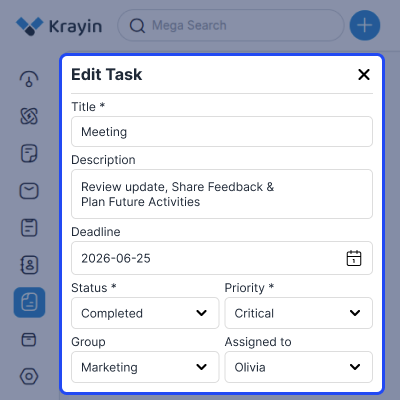
Edit and Update Tasks
Update task details such as status, priority, deadlines, assignees, and descriptions from one place. Keep task information up to date and help teams work with the latest task details.
- Update task titles and descriptions anytime
- Modify deadlines based on project needs
- Change task status as work progresses
- Update priority levels for urgent work
- Reassign tasks to different team members
- Manage task groups and assignments easily
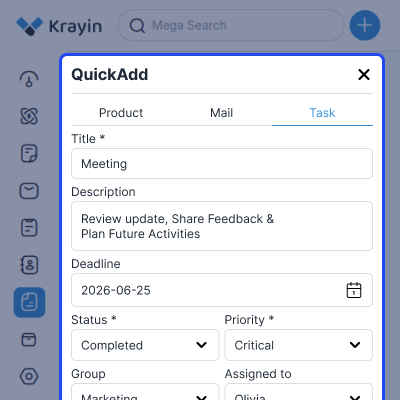
Quick Task Creation
Create new tasks from the Quick Add panel without opening the full task page. Help teams add work quickly, assign users, and set deadlines in less time.
- Create tasks from the header Quick Add menu
- Enter task title and description quickly
- Set deadlines during the task creation process
- Assign priorities based on task urgency
- Select groups and assign responsible users
- Save tasks without navigating away from work
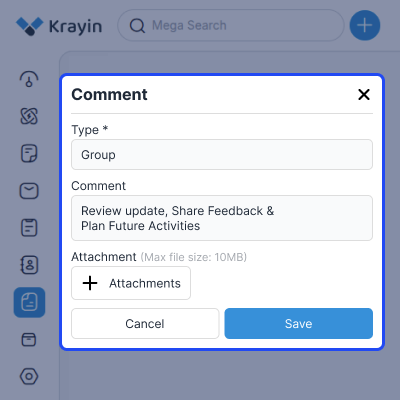
Task Comments and Notes
Add group comments and internal notes to keep task communication in one place. Help teams share updates, discuss work, and keep task details easy to follow.
- Add comments directly within task records
- Create group comments for shared discussions
- Use internal notes for private communication
- Share updates linked to specific tasks
- Upload files while posting task comments
- Keep task conversations organized and accessible
Task Progress Discussions
Track task progress through discussions, updates, and shared files linked to each task. Help managers and team members review work, follow updates, and track progress with ease.
- Review progress updates within task discussions
- Share reports and supporting task documents
- Keep task communication linked to activities
- Monitor completed and ongoing task updates
- Access the discussion history from the task details
- Track work progress through shared comments
Support
After the completion of the Server Setup, we will provide limited period support for 30 days to the customer so that they can check and ensure the configuration.
Our Support Period includes the SLA of around 12 to 24 hours and covers only issues regarding the Server Setup and Configuration (Issues regarding third-party applications or modules are not included in this support). Mode of Communication are Ticket and Email: [email protected]
For any query or issue please create a support ticket here - http://webkul.uvdesk.com
Specifications
Frequently Asked Questions
Specification
Detailed technical features and requirements to help you understand the module’s capabilities and ensure smooth integration with your system.
Cloud Hosting
Detailed technical features and requirements to help you understand the module’s capabilities and ensure smooth integration with your system.
Move to Cloud Today
We’re partnered with top-tier, trusted providers!



Default Configuration Details of Server
RAM 1 Core
Processor 30 GB
Hard Disk
Database
Want to know more how exactly we are going to power up your eCommerce Website with Cloud to fasten up your store
* Server Configuration may vary as per application requirements.
Change Logs
- - Feature Add (+)
- - Feature remove (-)
- - Bug Fixed (!)
- - Modification (*)
- Initial Launch
- Compatibility with Krayin CRM v2.2
