Laravel eCommerce Amazon S3 Extension
Laravel eCommerce Amazon S3 Extension allows the store admin to upload downloadable products, media files, product content, images of all Laravel product types from their local disk to the Amazon S3 server.
- Support all Bagisto product types.
- All media files (product images, description media, editing images, etc.) are stored and retrieved from the Amazon S3 bucket.
- Flexible settings to configure the module.
- Uploads only the single original image to the S3 bucket instead of separate small, medium, and large copies, keeping bucket storage low.
- Generates cache image sizes (small, medium, large) on the fly from the S3 original and stores them in a local cache for fast serving.
- Cached images are served with an ETag and revalidated by the browser, so a changed image is picked up immediately.
- One-click background synchronization of all local media files to the S3 bucket, processed in chunks with already uploaded files skipped.
- One-click "Move Assets to Local" action that pulls every file back from the S3 bucket into local storage with the same folder structure.
- Live progress bar with percentage and processed/total file count for both Synchronize and Move operations.
- Direct /storage URLs fall back to the S3 bucket when the local file is missing, so removing the local public folder does not break images.
- Validates AWS credentials and bucket before any Synchronize or Move operation, with clear error messages.
- Description
- Reviews
- FAQ
- Customers ()
- Specifications
- Cloud Hosting
- Changelog
Laravel eCommerce Amazon S3 Extension: Laravel eCommerce Amazon S3 Extension provides the users to store the static files and media content to be upload on the Amazon S3 bucket and get them retrieved directly from the S3 bucket. We’ve also included the functionality to set an expiration header.
Amazon S3 (Simple Storage Service) is a cloud storage service offered by AWS (Amazon Web Services). Using the module, the store admin can upload downloadable products, media files, product content, images of all Laravel product types from their local disk to the Amazon S3 server.
Important Note:
- A customer must have an Amazon AWS account to access the Amazon S3 services. From this link, users would be able to register here.
- To understand how to get started with Amazon S3, just click here.

Highlighted Features
Instant Loading
Instant page load or accelerate site load times.
Static View Files Settings
One can now save Static files on the Amazon S3 server.
Reduce Latency
Reduce the round trip time of the data packet and thus deliver fast data
Images & Files Support
Product images, logo, WYSIWYG images, videos, category images, editing images, CMS images, Favicons, etc. are supported.
Highly Secure
SSL encryption for secure upload and data download.
Easy Upload
The admin can easily upload the media files on the Amazon server.
Why is Amazon S3 needed in Bagisto?
Assume you have a large online store with a lot of products and data, as well as a large number of customers around the world. However, if a large number of shoppers visit the store, the website will become slow and the server may be unable to react appropriately. Since you encounter many customers each day and store a lot of data on the website, then it is not ideal to rely on host servers in such scenarios.
Using the Amazon S3 bucket system, the media files presented with the product details will get downloaded rapidly. This would undoubtedly boost conversion rates because the user would be able to easily access the images, resulting in increased product loyalty.
The Media file includes all types of products (such as product images, media in the product description, short description, editing images, and so on). It undoubtedly aids customers in gaining a greater understanding of the product.
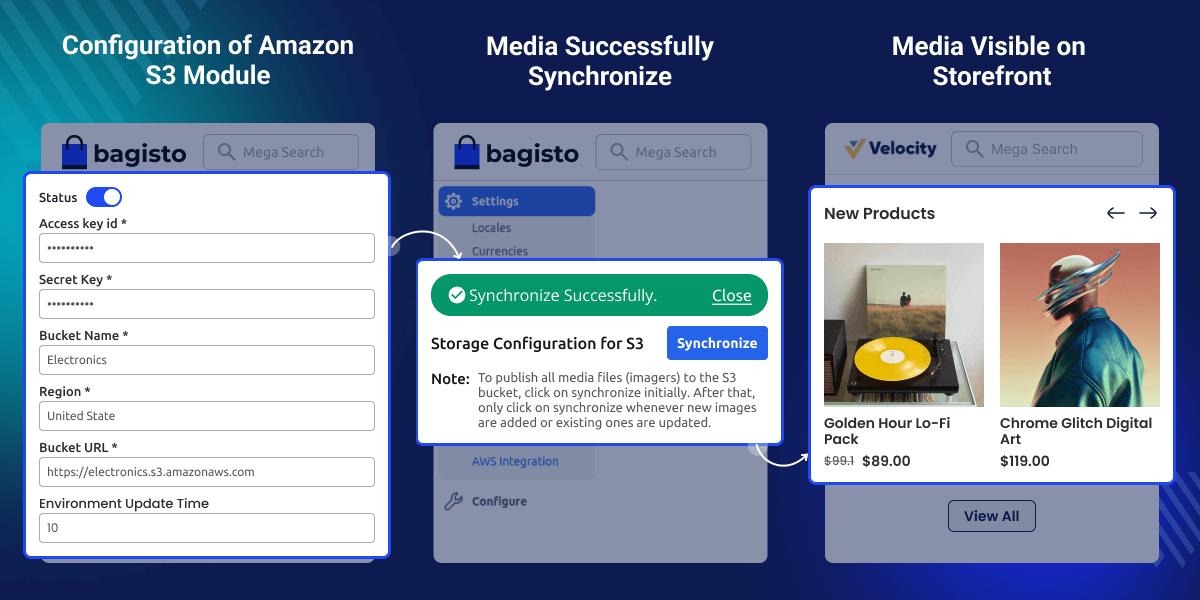
Configuration of Amazon S3 Module
Admin can configure AWS S3 to store product images and media files securely on the cloud.
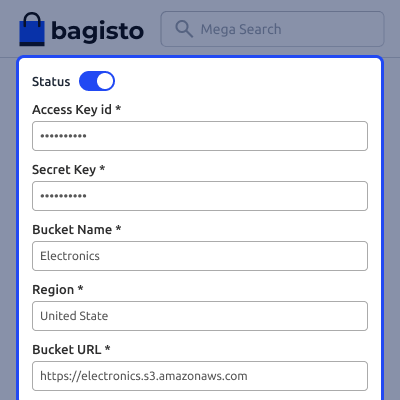
- Enable or disable S3 storage using the status toggle.
- Enter the Access Key ID and Secret Key for authentication.
- Specify the Bucket Name where media files will be stored.
- Select the preferred AWS Region for the bucket.
- Provide the Bucket URL to access stored files.

Success Message of Synchronization
The admin can synchronize store media files to the S3 bucket smoothly.
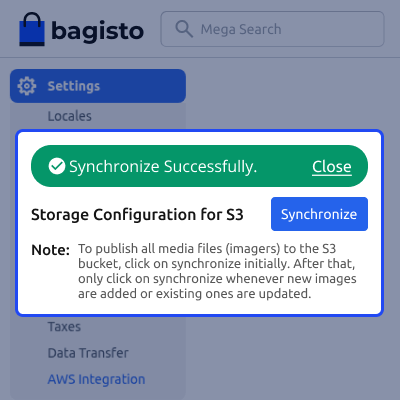
- A success message confirms that the synchronization has completed successfully.
- Admin can manually click Synchronize to upload media files to S3.
- A note guides when to synchronize initially and after media updates.
- Helps ensure all media files remain up-to-date in the S3 storage.

Support
For any issue related to this module, please create a support ticket here or send an email to [email protected]
You may also check our quality Bagisto Extensions.
Specifications
Frequently Asked Questions
Move to Cloud Today
AWS Free tier hosting for one year by amazon web services, for more details please visit AWS Free Tier.
GCP Free tier hosting for one year with 300 credit points by google cloud platform, for more details please visit GCP Free Tier.
Azure free tier hosting for one year with 25+ always free services, for more details please visit Azure Free Tier.
In our default configuration we will provide tremendous configuration for your eCommerce Website which is fast to load and response.
Default Configuration Details of Server
- 1 GB RAM
- 1 Core Processor
- 30 GB Hard Disk
- DB with 1 GB RAM and 1 Core Processor
* Server Configuration may vary as per application requirements.
Want to know more how exactly we are going to power up your eCommerce Website with Cloud to fasten up your store. Please visit the Cloudkul Services.
Get Started with Cloud- + Features
- ~ Compatibility
- + Compatible with Bagisto v2.4.x.
- + Uploads only the single original image to the S3 bucket instead of separate small, medium and large copies to keep bucket storage low.
- + Generates the cache filter sizes (small, medium, large) on the fly from the S3 original and stores them in a local cache for fast subsequent requests.
- + Cached images are served with an ETag and browser revalidation so changed images update immediately and no stale image is served.
- + New uploads go directly to the S3 bucket while AWS is enabled, and to local storage when AWS is disabled.
- + One-click background synchronization of all local media files to S3, processed in chunks with already uploaded files skipped to avoid duplicates.
- + One-click "Move Assets to Local" action that pulls every file back from the S3 bucket into local storage and refreshes the storage link.
- + Live progress bar with percentage and processed/total file count for the Synchronize and Move actions, with only one operation allowed at a time.
- + Direct /storage URLs fall back to the S3 bucket when the local file is missing.
- + Validation of AWS credentials and bucket before any Synchronize or Move operation.
- + Compatible with bagisto v2.3.6.
- + Added cache for images and their sizes.
- ~ Compatible with Bagisto v2.2.2
- ~ Compatible with Bagisto v1.3.3
- + Added Gzip (Text Compression) for all the asset files
- ~ Compatible with Bagisto v1.3.2
- + Publish static content and media files to S3
- + Synchronize changes in static files to S3
- + Admin can set expire header for cache


