USD
  • EUR
  • INR
  • USD
Cart
Cart 0
  • You have no items in your shopping cart.
    Cart
    Cart 0
    • You have no items in your shopping cart.
    Hire a Developer
    ×
    Contact Us!
    Send Again
    Close
    Please Login to Write Your Review

    Laravel eCommerce Size Chart

    Laravel eCommerce Size Chart Module allows the admin to easily create a size chart for their products.


    • Two types of templates can be created – Normal & Configurable Product Template.

    • The admin can add a size chart image.

    • Size Chart Module supports jpg, .png, .jpeg as image formats.

    • The customer will see the size chart on the product page.

    Screenshots
    Laravel eCommerce Size Chart Laravel eCommerce Size Chart Laravel eCommerce Size Chart Laravel eCommerce Size Chart Laravel eCommerce Size Chart Laravel eCommerce Size Chart Laravel eCommerce Size Chart Laravel eCommerce Size Chart
    Show More Hide All
    $0.00
    $0.00
    Configure and Buy
    • Description
    • Reviews
    • FAQ
    • Customers ()
    • Specifications
    • Cloud Hosting
    • Changelog

    Laravel size chart allows the admin to easily create a size chart for their products. The size chart can be referenced by the customers to identify their accurate size.

    This extension will definitely be a help to the customers as they can easily check their fit so that they can accordingly select their product size. Use this module you can create Two types of templates as Normal & Configurable Product Template.

    This module supports .jpg, .png, .jpeg as image formats for the size chart image. Additionally, if you want an extension that provides access to the admin to put some products on daily deals then checkout Laravel eCommerce Daily Deals.
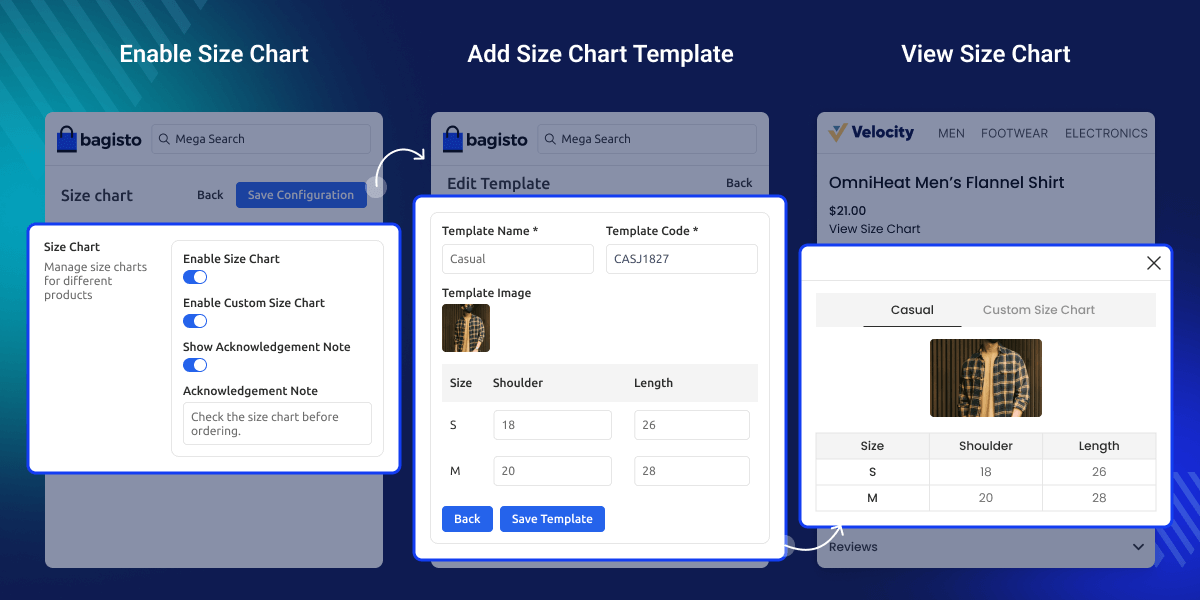
    Laravel eCommerce Size Chart Module

    Highlighted Features of Laravel eCommerce Size Chart

     Easy Backend Management

    Admins can enable or disable the size chart module from the Bagisto admin panel with a simple toggle.

     Template-Based Size Charts

    Create reusable size chart templates for both simple and configurable products, making it easier to manage sizing info across the catalog.

     Assign Charts to Products

    Admins can assign size chart templates directly from the product edit page to display accurate sizing on product pages.

     Customer-Friendly Display

    Customers can view the size chart via a “View Size Chart” button on the product page, shown in a popup for better visibility.

     Custom Size Input

    Supports a custom size chart popup, allowing customers to input their own measurements for more precise size selection.

     Image Format Support

    The module supports .jpg, .jpeg, and .png image formats to visually enhance size chart templates.

    Why do we need Size Chart Module?

    Laravel Size Chart Module helps tackle one of the biggest challenges in selling clothing, footwear, or other size-specific products—helping customers choose the right size. Without clear sizing, shoppers often face confusion, leading to returns and a poor experience.

    Also, if you want an extension that allows the admin to add a Gallery using Images text, then checkout Laravel eCommerce Image Gallery .

    Enable Size Chart

    The admin can easily enable the Size Chart Module from the Bagisto backend and manage product sizing more efficiently.
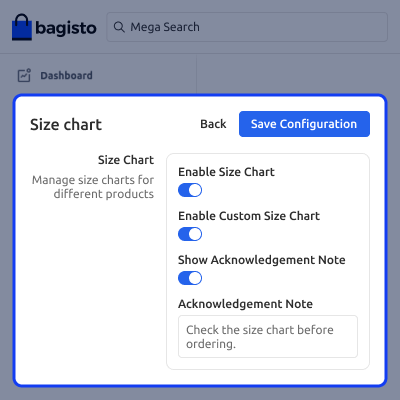
    • Navigate to the Configure in the admin panel.
    • Clicked on sizechart.
    • Toggle to activate the size chart feature.
    Enable Size Chart

    Add Size Chart Template

    The admin can quickly create a Size Chart Template from the backend to display accurate sizing info on product pages.
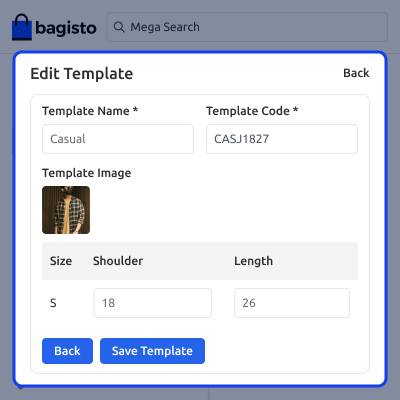
    • Go to the Size Chart section in the admin panel.
    • Click on “Add New Template.”
    • Save the template and assign it to relevant products.
    Add Size Chart Template

    Assign Size Chart to Product

    Once a Size Chart Template is created, the admin can assign it to products directly from the admin panel product edit page.
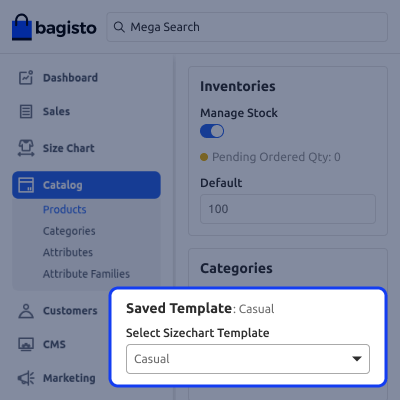
    • Navigate to the product edit page in the admin panel.
    • Select the desired size chart template from the available options.
    • Save the changes to display the size chart on the product page.
    Assign Size Chart

    View Default Size Chart

    Once a default size chart is assigned to a product, customers can easily access it fr om the product page.
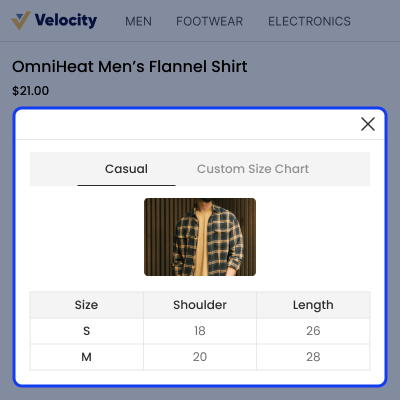
    • A View Size Chart button appears on the product details.
    • Clicking the button opens a popup or section with standard sizing info.
    • Helps customers make informed size choices before purchase.
    View Default Size Chart

    View Custom Size Chart

    When a customer clicks the Custom Size Chart button, a popup appears allowing them to personalize the chart.
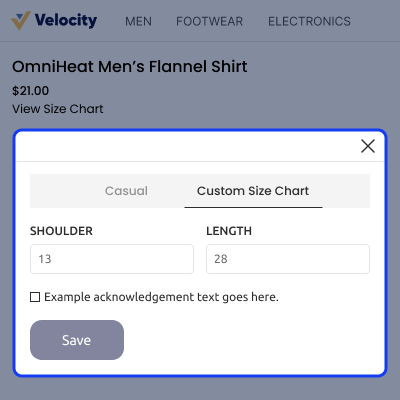
    • A popup displays the custom size chart.
    • Customers can edit the chart based on their own measurements.
    • Helps in selecting the most accurate product size.
    View Custom Size Chart

     Support

    For any issue related to this module, please create a support ticket here or send an email to [email protected]

    You may also check our quality Bagisto Extensions.

    Specifications

    Product Version2.2.3
    Released4 years ago
    CategoryBagisto Laravel
    Last UpdatedAugust 20, 2025 (6 months ago)
    Supported VersionsBagisto  2.2.3  
    Write a review

    Frequently Asked Questions

     Can I assign size charts to individual products?
    Yes, you can assign size chart templates directly from the product edit page.
     
     Is the module compatible with configurable products?
    Yes, it supports both simple and configurable product types.
     
     Can customers view the size chart on the product page?
    Yes, a “View Size Chart” button appears on the product page for customers.
     
     Does it allow customers to input their custom measurements?
    Yes, the module includes a custom size chart popup for customer input.
     
     What image formats are supported for size charts?
    The module supports .jpg, .jpeg, and .png image formats.

    Move to Cloud Today

    AWS Free tier hosting for one year by amazon web services, for more details please visit AWS Free Tier.

    GCP Free tier hosting for one year with 300 credit points by google cloud platform, for more details please visit GCP Free Tier.

    Azure free tier hosting for one year with 25+ always free services, for more details please visit Azure Free Tier.

    In our default configuration we will provide tremendous configuration for your eCommerce Website which is fast to load and response.

    Default Configuration Details of Server

    • 1 GB RAM
    • 1 Core Processor
    • 30 GB Hard Disk
    • DB with 1 GB RAM and 1 Core Processor

    * Server Configuration may vary as per application requirements.

    Want to know more how exactly we are going to power up your eCommerce Website with Cloud to fasten up your store. Please visit the Cloudkul Services.

    Get Started with Cloud
    • - Feature Add (+)
    • - Feature remove (-)
    • - Bug Fixed (!)
    • - Modification (*)
    Version 2.2.3
    • + Compatible with Bagisto v2.2.3
    • + Improved Size Chart UI on the product view page.
    • + Added Custom Size Chart functionality.
    • ! Fixed issue where default Size Chart value was not visible in order details.
    • ! Fixed multi-locale support issues in the module.
    Version 2.0.0
    • + Compatible with Bagisto v2.0.0
    Version 1.4.3
    • + Compatible with Bagisto v1.4.3
    Version 1.3.3
    • + Compatible with Bagisto v1.3.3
    Version 1.3.2
    • + Compatible with Bagisto v1.3.2
    Version 1.2.0
    • + Compatible with Bagisto v1.2.0 version
    • + Two types of templates can be created – Normal & Configurable Product Template
    • + Admin can add a size chart image
    • + Supports .jpg, .png, .jpeg image formats
    • + Customers can view the size chart on the product page
    Version 1.0
    • Initial Launch


