Laravel ONDC Connector
Laravel ONDC Connector connects your Bagisto store with ONDC, India’s government-backed digital commerce network.
- Sync products and categories with ONDC.
- Import ONDC products directly into Bagisto.
- Auto-create Bagisto products after import.
- Map one category to multiple ONDC categories.
- Works with any Bagisto eCommerce setup.
- Description
- Reviews
- FAQ
- Customers ()
- Specifications
- Cloud Hosting
- Changelog
Laravel ONDC Connector links your Bagisto store with the ONDC platform. It makes managing products and categories simple. With this connector, you can import products and categories from ONDC into your store. The system syncs these automatically with your catalog.
You can also map one category to many ONDC categories. This increases your product visibility across the network. By using this connector, sellers save time and reduce manual work. It also helps you reach a larger audience through the ONDC network.
This connector keeps your store updated with ONDC standards and simplifies the selling process. If you also want to sync customers, products, and orders with QuickBooks, you can check out the Bagisto QuickBooks Connector.
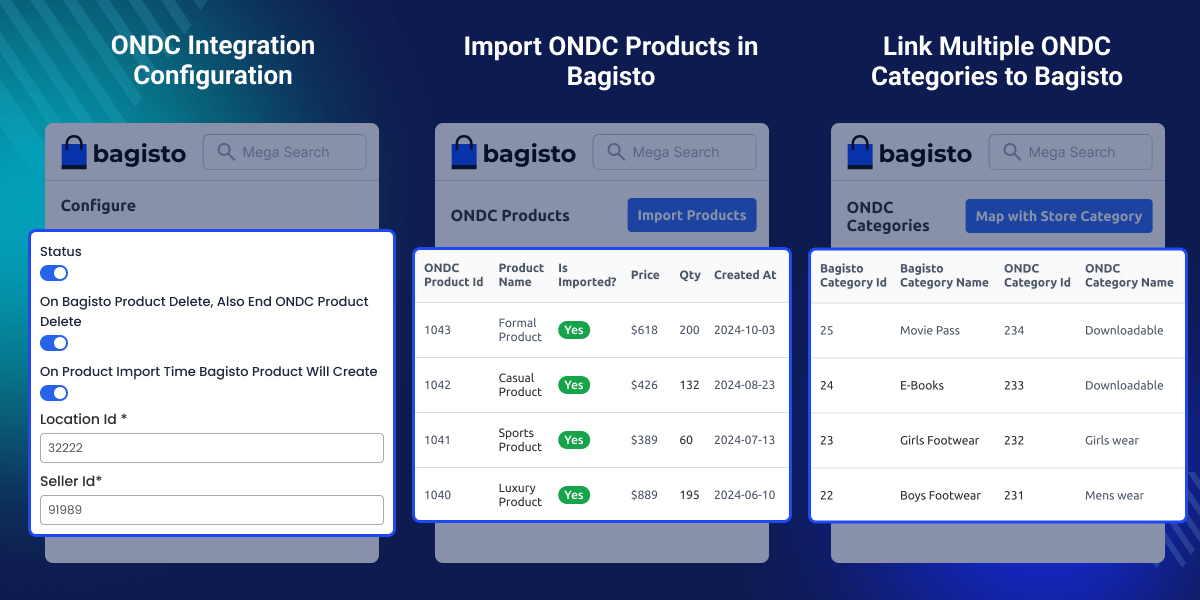
Highlighted Features of Laravel ONDC Connector
Flexible Control
Enable or disable the Laravel ONDC Connector anytime from the admin panel.
Simple Setup
Manage import, export, and product creation using a simple configuration panel.
Full Compatibility
Works with all Bagisto stores and existing eCommerce setups.
Easy Import & Export
Import or export products and categories using options like Import Products, Import Category, and Map with Store Category.
Why do we need Laravel ONDC Connector?
Laravel ONDC Connector helps businesses grow beyond traditional channels. It connects your store with ONDC so you can list products on multiple platforms from one place.
This improves visibility, attracts new customers, and makes managing products easier. It also helps you follow the government-backed ONDC framework.
This framework is shaping the future of online selling in India. By connecting your store to ONDC, you stay ahead in the growing digital marketplace and reach more buyers.
Essential ONDC Configuration Settings
Admins can manage important settings from the panel to connect the Bagisto store with ONDC.
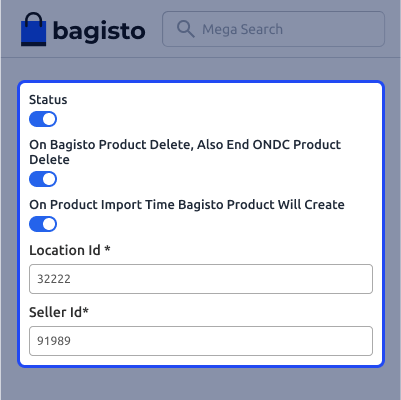
- Enable or disable the ONDC Connector anytime.
- Auto-delete ONDC products when removed from Bagisto.
- Auto-create Bagisto products when imported from ONDC.
- Add ONDC Location ID for store mapping.
- Add Seller ID for authentication and data sync.
Import ONDC Products into Bagisto
Admins can import ONDC products directly into the Bagisto store from the admin panel.
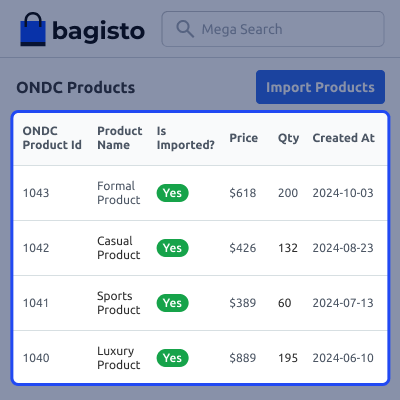
- Go to ONDC Connector, ONDC Products.
- View available ONDC product listings.
- Select required products.
- Click Import to add products to Bagisto.
Import ONDC Categories into Bagisto
Admins can import and map ONDC categories with store categories for better product control.
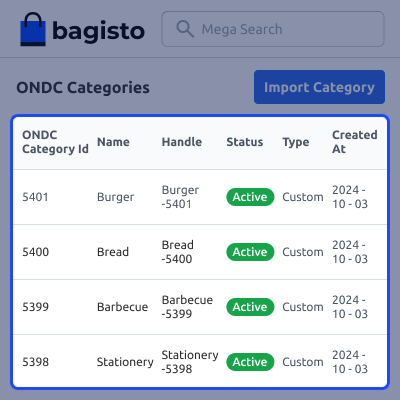
- Go to ONDC Categories from the admin panel.
- Search categories by name or ID.
- View details like ID, code, status, type, and date.
- Import categories one by one or in bulk.
- Map ONDC categories with store categories.
Support
For any issue related to this module, please create a support ticket here or send an email to [email protected]
You may also check our quality Bagisto Extensions.
Specifications
Frequently Asked Questions
Move to Cloud Today
AWS Free tier hosting for one year by amazon web services, for more details please visit AWS Free Tier.
GCP Free tier hosting for one year with 300 credit points by google cloud platform, for more details please visit GCP Free Tier.
Azure free tier hosting for one year with 25+ always free services, for more details please visit Azure Free Tier.
In our default configuration we will provide tremendous configuration for your eCommerce Website which is fast to load and response.
Default Configuration Details of Server
- 1 GB RAM
- 1 Core Processor
- 30 GB Hard Disk
- DB with 1 GB RAM and 1 Core Processor
* Server Configuration may vary as per application requirements.
Want to know more how exactly we are going to power up your eCommerce Website with Cloud to fasten up your store. Please visit the Cloudkul Services.
Get Started with Cloud- + Features
- - Bugs
- + Made the module compatible with Bagisto v2.2.0.
- + In the Custom Field section → Filter, custom field values are now provided in a dropdown.
- + Enabled calendar-based date selection.
- + Updated button colors to match the core Bagisto theme.
- + Updated the ONDC Connector icon in the admin panel.
- - Fixed an issue where the category name appeared multiple times when mapping to the ONDC category.
- - Resolved a navigation issue: clicking the back button on the Map Category with ONDC Category page now correctly returns to the previous page instead of the ONDC configuration page.
- - Mandatory fields now properly display validation messages.
- - Fixed an error encountered when creating products from the Catalog section.
- - Resolved an exception thrown during category import.
- - Fixed an issue where product images and assigned categories were removed after importing products created with images and assigned categories.


