USD
  • EUR
  • INR
  • USD
Cart
Cart 0
  • You have no items in your shopping cart.
    Magento 2 Extensions
    Cart
    Cart 0
    • You have no items in your shopping cart.
    Hire a Developer
    ×
    Contact Us!
    Send Again
    Close
    Please Login to Write Your Review
    Magento 2 Audio Player

    Magento 2 Audio Player

    x
    Free

    * Required Fields

    $149.00
    Add To Cart

    Magento 2 Audio Player allows the store admin to add audio content to their product description. This feature enables the customers to effortlessly listen to the audio content.


    • The admin can enable or disable the Audio Player module.

    • Admin can manage custom audio player color schemes.

    • Admin can choose the default or custom audio player.

    • Admin can set sample audio for a particular product.

    • Customers can check and download purchased audio files.

    • Guest users can check and download purchased audio files.

    • Added support for MP3, WAV, M4A, FLAC, and OGG audio formats.

    • Admin can set Yes/No to Drag To Seek

    Magento 2 Audio Player
    Magento 2 Audio Player
    $149.00
    30 Days Refund
    GraphQL Compatible
    Check How It Works
    $149.00
    Configure and Buy
    X
    • Description
    • Reviews
    • FAQ
    • Customers ()
    • Specifications
    • Cloud Hosting
    • Changelog

    Magento 2 Audio Player is very effective, same as other Magento 2 Extensions, It greatly improves the shopping experience of customers. By seamlessly integrating the Magento 2 Audio Player Extension into your online store, the admin can add audio content during the product creation.

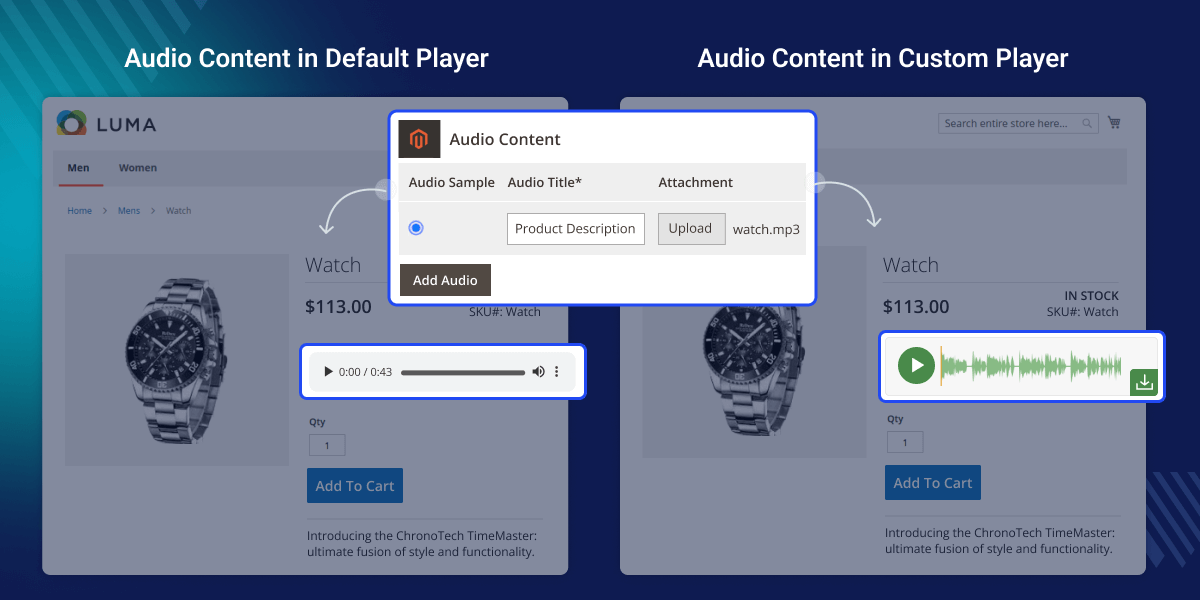
    The admin can set the default audio for a particular product and the same will shown on the front end.

    Note: If you are looking for the video player on the product page you can check Magento 2 Video Player Extension.
    Magento 2 Audio Player

    Highlighted Feature Of Magento 2 Audio Player

     Audio Upload

    The admin can upload the audio file for the product page.

     Color Set

    Admin can manage custom audio player color schemes from System Configuration.

     Download Audio File

    The customer and the guest user can check and download the audio files.

     Audio Format

    The extension supports MP3, WAV, M4A, FLAC, and OGG audio formats.

    Why Do We Need Magento 2 Audio Player?

    Magento 2 Audio Player assists customers in getting relevant information quickly without reading the whole product description. For instance, Let’s assume you are operating an online store using Magento 2 with this extension.

    Customers can easily listen to the product description and it helps them in product differentiation. This extension will improve the customer's overall shopping experience and help them choose the right product as per their need.

    This extension will improve the customer's overall shopping experience and help them choose the right product as per their need. Also, you can generate product descriptions using AI on the product in your Magento 2 store, you can check the Magento 2 Multi Vendor ChatGPT Content Generator.

    Audio Player Configuration

    After the installation of the extension, the admin can configure the module.
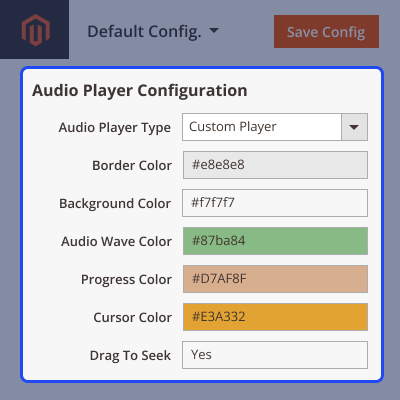
    • The admin can enable or disable the module by setting it to Yes/No.
    • Choose between the default or custom audio player.
    • Manage custom audio player color schemes.
    • Sets Yes or No the drag to seek.
    • Also, set the button text color and background color.
    Audio Player Configuration

    Adding Audio Content

    Here the admin adds the audio file for the product.
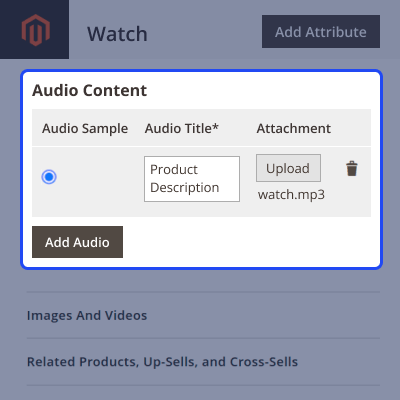
    • Select the audio for a particular product.
    • Add audio title.
    • Upload the audio file.
    • Delete the unnecessary audio section.
    Adding Audio Content

    Storefront Workflow

    Here the store admin and customer can listen to the audio content.

    • The admin can play to check the audio.
    • The customer can listen to the audio by clicking on it.
    • Also, the customers can download the audio content.
    Storefront Workflow

    Support

    For any query or issue please create a support ticket here http://webkul.uvdesk.com/.

    You may also check our quality Adobe Commerce Extensions.

    Specifications

    Product Version4.0.2
    Released2 years ago
    CategoryMagento 2
    Last UpdatedJuly 14, 2026 (27 days ago)
    Supported VersionsMagento  2.0.x  2.1.x  2.2.x  2.3.x  2.4.x  

    Ratings

    We'd love to hear your thoughts! Share your feedback and help us craft an even better experience tailored just for you.

    Write a review

    Frequently Asked Questions

     What audio format does the extension support?
    The extension currently supports MP3, WAV, M4A, FLAC, and OGG audio formats.
     
     Can I add multiple audio files to a single product?
    Yes, you can upload multiple audio files but the extension allows only one default audio per product.
     
     Where does the audio player appear to the customers?
    The audio is shown on the product page below the price section.
     
      Can I customize the appearance of the audio player?
    Yes, you can customize the background, text color, and border color from the extension configuration.
     
     Can the admin delete the audio content?
    Yes, the store admin can delete the audio content.

    Specification

    Detailed technical features and requirements to help you understand the module’s capabilities and ensure smooth integration with your system.

    Cloud Hosting

    Detailed technical features and requirements to help you understand the module’s capabilities and ensure smooth integration with your system.

    Default Configuration Details of Server

    1 GB
    RAM
    1 Core
    Processor
    30 GB
    Hard Disk
    1 GB RAM & 1 Core Processor
    Database

    Want to know more how exactly we are going to power up your eCommerce Website with Cloud to fasten up your store

    * Server Configuration may vary as per application requirements.

    Change Logs

    • + Features
    • - Bugs
    Version 4.0.2
    • + Compatible with Magento 2.4.9 and PHP 8.5
    Version 4.0.1
    • + Compatible with Magento 2.4.8 and PHP 8.4
    • - Fixed the issue of the 'Add Audio Section' button not working on the product edit page.
    Version 4.0.0
    • + Compatible with Magento 2.4.6 version.
    • + Admin can manage custom audio player color scheme from system Configuration.
    • + Admin can choose default or custom audio player from system Configuration.
    • + Admin can set sample audio for a particular product.
    • + Customers can check and download purchased audio files.
    • + Guest user can check and download purchased audio files.
    • + Added support for MP3, WAV, M4A, FLAC, and OGG audio formats.


