USD
  • EUR
  • INR
  • USD
Cart
Cart 0
  • You have no items in your shopping cart.
    Cart
    Cart 0
    • You have no items in your shopping cart.
    Hire a Developer
    ×
    Contact Us!
    Send Again
    Close
    Please Login to Write Your Review
    Product Image
    Technology Partner Awards.
    Top Selling Extension Winner
    2 times in a row

    Magento 2 Beauty Try On

    Magento 2 Beauty Try On extension allows customer to try beauty products virtually. This enables a store like experience for customers.


    • Admin can enable or disable virtual try on as per requirement.

    • Simple and Configurable types of products is supported.

    • It supports Eyewear, Lipsticks and Bindi try on products.

    • Admin can set the color for Lipstick type of product.

    • Admin can specify if a product is beauty try on product or not.

    • Section in back end for admin to upload product image file.


    Technology Partner Awards.
    Top Selling Extension Winner
    2 times in a row
    Screenshots
    Magento 2 Beauty Try On Magento 2 Beauty Try On Magento 2 Beauty Try On Magento 2 Beauty Try On Magento 2 Beauty Try On Magento 2 Beauty Try On Magento 2 Beauty Try On
    Show More Hide All
    $299.00

    * Required Fields

    Add To Cart
    $299.00
    Configure and Buy
    • Description
    • Reviews
    • FAQ
    • Customers ()
    • Specifications
    • Cloud Hosting
    • Changelog

    Magento 2 Beauty Try On extension lets store admin offer a virtual try-on experience for beauty products. Admin can enable or disable the feature as needed and support both simple and configurable products.

    It works with eyewear, lipsticks, and bindi products. Admin can set lipstick colors and mark any item as a beauty try-on product. A dedicated back-end section lets admin upload product images and configure the virtual try-on settings. This makes setup quick and management seamless.

    Apart from this, you can also check the Magento 2 Jewellery Try On extension and let store customers try jewellery virtually.
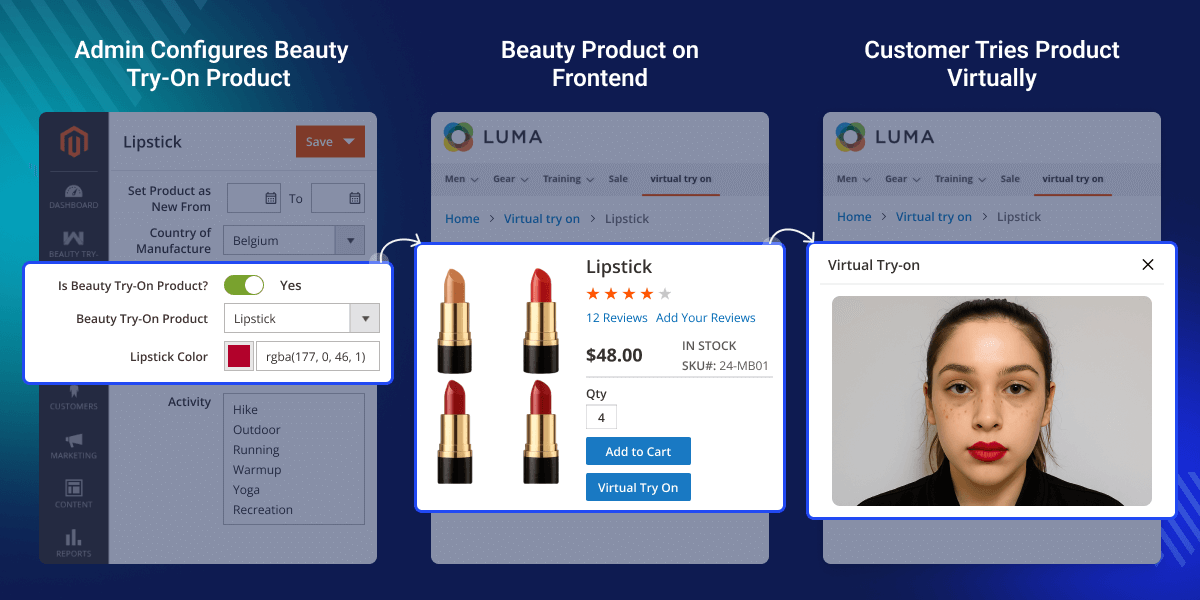
    Magento 2 Beauty Try On

    Highlighted Features of Magento 2 Beauty Try On

     Toggle Try-On

    Enable or disable the virtual try-on feature with a single switch.

     Product Compatibility

    Supports both simple and configurable product types seamlessly.

     Beauty Categories

    Works with eyewear, lipsticks, and bindi try-on products.

     Color Picker

    Set and preview custom lipstick shades directly in the admin panel.

     Try-On Flagging

    Mark any product as a beauty try-on item for easy management.

     Image Upload

    Use the back end section to upload and manage product image files.

    Why Do We Need Magento 2 Beauty Try On?

    Magento 2 Beauty Try On bridges the gap between in-store and online shopping. It lets customers preview products on themselves before buying.

    This feature boosts customer confidence and reduces return rates. Shoppers can experiment with eyewear, lipstick shades, or bindis without hesitation.

    By offering an interactive experience, stores stand out in a crowded market. Admins gain a competitive edge and drive higher engagement and sales.

    Additionally, if you want to allow customers to upload their images and try products virtually, then do check Virtual Try On for Magento 2.

    Configure Beauty Try On Products

    After admin enables this extension, admin can configure their beauty products for virtual try on. Initially, they add and edit a product. Here, they can:
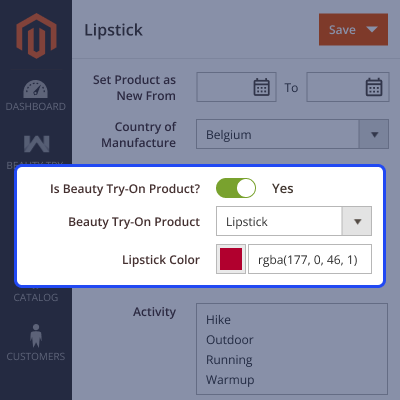
    • Enable or Disable product for virtual try on.
    • Select type of try on product from Sunglasses, Lipstick or Bindi.
    • If Lipstick type is selected, then they can choose color as well.
    • Upload image of product for virtual try on.
    Configure Beauty Try On Products

    Virtual Try On for Lipsticks

    Admin can enable virual try on for lipsticks. Using this feature customers can try lipstick shades virtually and purchase right product as per there need.
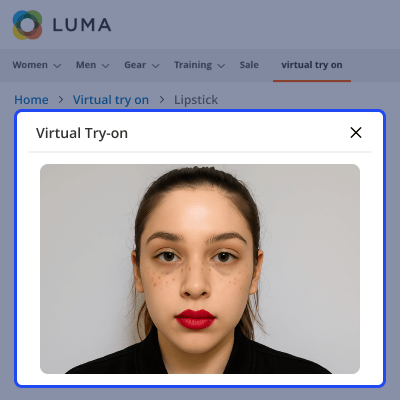
    • Admin selects Lipstick as Beauty Try On type.
    • Admin sets the shade of Lipstick colors based on RGB color code.
    • On the storefront, Customers can try Lipstick shade virtually.
    Storefront Virtual Try on for Customers

    Virtual Try on for Sunglasses

    Admin can enable customers to virtually try sunglasses before proceeding to purchase. This boosts the confidence of customers.
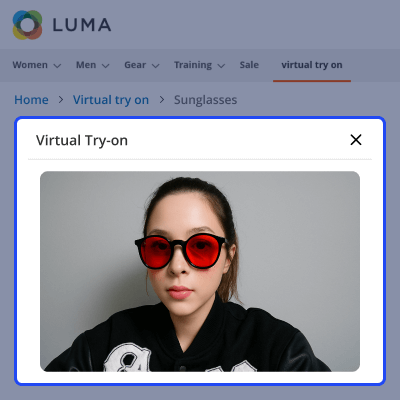
    • Admin sets the Beauty Try On Type to Sunglasses on the product.
    • Next, they'll upload images of the sunglasses and save the product.
    • Further, customers can try the sunglasses virtually from the storefront.
    Sunglasses Virtual Try On

    Virtual Try On for Bindi

    You can allow customers to virtually try a bindi before making a purchase. Customers can check which color looks better on them and make the purchase accordingly.
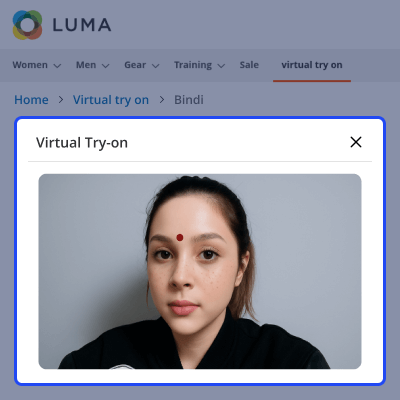
    • Admin selects the Beauty Try On Type as Bindi for the product.
    • Admin needs to upload the product images.
    • Finally, customers can virtually try the bindi from the storefront.
    Bindi Virtual Try On

    Support

    For any query or issue please create a support ticket here http://webkul.uvdesk.com/

    You may also check our top-quality Magento 2 Extensions.

    Specifications

    Product Version4.0.0
    Released6 months ago
    CategoryMagento 2
    Last UpdatedFebruary 6, 2026 (25 days ago)
    Supported VersionsMagento  2.0.x  2.1.x  2.2.x  2.3.x  2.4.x  
    Write a review
     What product types does the Beauty Try On extension support?
    It works with both simple and configurable products, including eyewear, lipsticks, and bindi items.
     
     How do I enable or disable the virtual try-on feature?
    Admin can toggle the feature on or off globally or per product from the backend settings.
     
     Can I set custom lipstick shades for virtual trials?
    Yes, when a product is marked as “Lipstick,” you can choose its exact color in the admin panel.
     
     How to upload images for try-on products?
    Use the dedicated backend section to upload each product’s image file for virtual try-on.
     
     How do customers access virtual try-on on the storefront?
    Shoppers click the “Virtual Try On” button, grant camera access in a pop-up, and try eyewear, lipsticks, or bindis in real time.

    Move to Cloud Today

    AWS Free tier hosting for one year by amazon web services, for more details please visit AWS Free Tier.

    GCP Free tier hosting for one year with 300 credit points by google cloud platform, for more details please visit GCP Free Tier.

    Azure free tier hosting for one year with 25+ always free services, for more details please visit Azure Free Tier.

    In our default configuration we will provide tremendous configuration for your eCommerce Website which is fast to load and response.

    Default Configuration Details of Server

    • 1 GB RAM
    • 1 Core Processor
    • 30 GB Hard Disk
    • DB with 1 GB RAM and 1 Core Processor

    * Server Configuration may vary as per application requirements.

    Want to know more how exactly we are going to power up your eCommerce Website with Cloud to fasten up your store. Please visit the Cloudkul Services.

    Get Started with Cloud
    • + Features
    • - Bugs
    Version 4.0.0
    • + Compatible upto Magento 2.4.X.
    • + Admin can enable/disable module.
    • + Customer can try product virtually.
    • + Compatible with simple & configurable product.


