USD
  • EUR
  • INR
  • USD
Cart
Cart 0
  • You have no items in your shopping cart.
    Cart
    Cart 0
    • You have no items in your shopping cart.
    Hire a Developer
    ×
    Contact Us!
    Send Again
    Close
    Please Login to Write Your Review
    Product Image
    Technology Partner Awards.
    Top Selling Extension Winner
    2 times in a row

    Magento 2 Call For Price Extension

    Magento 2 Call For Price extension allows the store admin to hide the product price and add a customized button for their store users.


    • The store admin can hide Product prices.

    • Supports all types of products.

    • The add to cart button is replaced with the Custom button for a popup.

    • Add a custom label to the button by admin.

    • Admin can add content to the popup.

    • Categories based on price hiding by the admin from module configuration.

    • Admin able to select customer groups to hide prices from specific customer groups.

    • Hide the price for each product separately by the admin.

    Technology Partner Awards.
    Top Selling Extension Winner
    2 times in a row
    Screenshots
    Magento 2 Call For Price Extension Magento 2 Call For Price Extension Magento 2 Call For Price Extension Magento 2 Call For Price Extension Magento 2 Call For Price Extension Magento 2 Call For Price Extension Magento 2 Call For Price Extension Magento 2 Call For Price Extension
    Show More Hide All
    $179.00

    * Required Fields

    Add To Cart
    $179.00
    Configure and Buy
    • Description
    • Reviews
    • FAQ
    • Customers ()
    • Specifications
    • Cloud Hosting
    • Changelog

    Call For Price for Magento 2 module allows the store admin to replace the Add to Cart button with the custom button to add redirected links or an image at the storefront.

    With Adobe Commerce Call For Price, the customer will not be able to get the product price on the storefront and also get the popup whenever they click on the custom button.

    Merchants offer a variety of goods and services, some of which should have hidden prices. It's crucial for a variety of reasons. These products are either free, temporarily unavailable or have variable prices that must be confirmed by the customize button content.

    Also, if you want to allow customers to quote for the products in the store then you can also check Magento 2 Quote Extension.
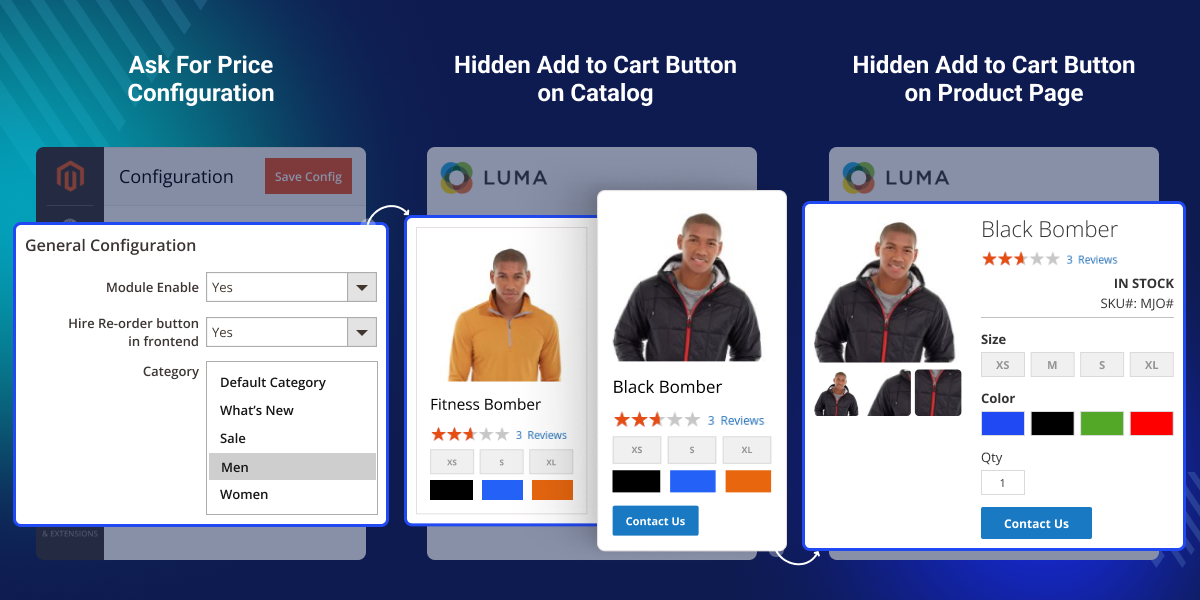
    Magento 2 Call For Price Extension

    Highlighted feature of Magento 2 Call For Price Extension

     Hide Product price

    The customers will not be able to see the prices on the storefront.

     Support All Product Type

    It provides support for a wide range of product types, such as Simple, Configurable, Virtual, Grouped, Bundle, and Downloadable Products.

     Custom Button

    The add-to-cart button will be replaced with a custom button that is used by the admin to hide product prices on the storefront.

     Pop-up Content

    The customer will get the pop-up content regarding the product by tapping on the custom button.

    Why do we need Magento 2 Call For Price Extension?

    Adobe Commerce Call For Price extension is an amazing tool that hides the price of a product from the store front end. You own a Magento 2 web store and you have the Call For Price module for Magento 2 enabled in your store.

    Then, the customers who visit your website will not be able to see the price directly, and in the Pop-up section, the admin can offer various deals and goodies to their customers.

    If you want to create customized price rules according to product, category, minimum quantity, and minimum price for your customer, you can also check the Magento 2 Pricelist extension.

    Module Configuration

    Magento 2 Call For Price extension is an effective tool for the eCommerce store to hide product prices and also to add a custom button for popups.
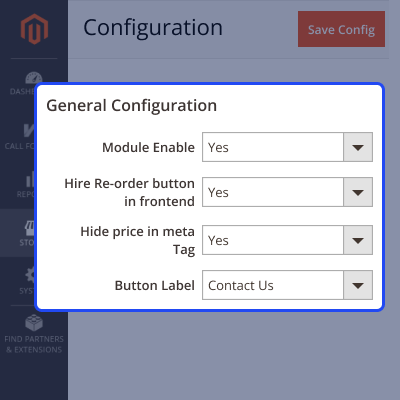
    • Enable/Disable the module.
    • Set the label for the custom button.
    • Create dynamic content shown on the popup.
    Module Configuration

    Category Based Price Hiding

    Store admin can easily hide product prices for selected categories, enabling targeted pricing strategies.
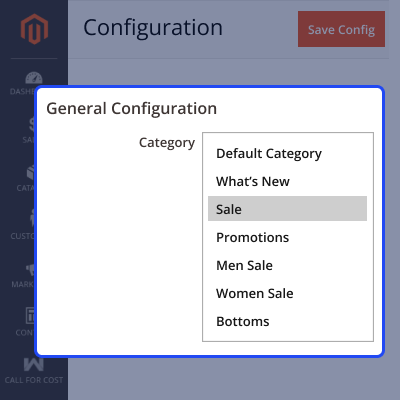
    • Control price visibility by category.
    • Hide pricing on multiple Categories.
    • Protect sensitive pricing information.
    Category Based Price Hiding

    Customer Group Based Price Hiding

    Hide product prices for specific customer groups thereby allowing the setting up of new prices as required.
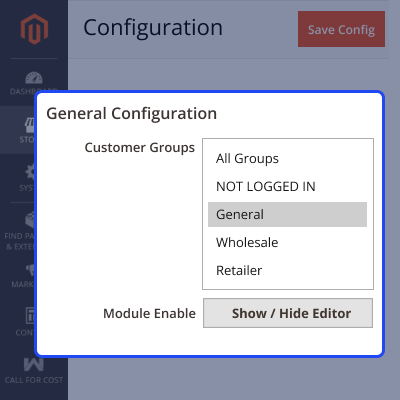
    • Customize price visibility based on customer group.
    • Hide product prices for multiple customer groups.
    • Allow special prices to specific customer groups.
    Customer Group Based Price Hiding

    Storefront Workflow

    When this module is enabled in the store, the product price will not be visible at the store directly.

    • Show the custom button instead of the Add to Cart button.
    • Hide the product price.
    • Show dynamic content on the popup.
    Storefront Workflow

    Support

    For any query or issue please create a support ticket here at Help Desk. You may also check our quality Magento 2 Extensions.

    Specifications

    Product Version5.0.0
    Released1 year ago
    CategoryMagento 2
    Last UpdatedFebruary 6, 2026 (1 month ago)
    Supported VersionsMagento  2.0.x  2.1.x  2.2.x  2.3.x  2.4.x  
    Write a review

    Frequently Asked Questions

     Can the admin hide the product price using this Magento 2 Call For Price?
    Yes, the module enables you to hide product prices from the storefront.
     
     Does the module support all product types?
    Yes, it supports Simple, Configurable, Virtual, Grouped, Bundle, and Downloadable Products.
     
     Can the store admin customize the label of the custom button?
    Yes, the admin can add a custom label to the button.
     
     Can the admin add content to the popup?
    Yes, admin can configure the content displayed in the popup.
     
     Can the custom button perform different tasks?
    Yes, the custom button can be configured to perform flexible tasks like the admin can add a redirected link or an image at the storefront based on your requirements.

    Move to Cloud Today

    AWS Free tier hosting for one year by amazon web services, for more details please visit AWS Free Tier.

    GCP Free tier hosting for one year with 300 credit points by google cloud platform, for more details please visit GCP Free Tier.

    Azure free tier hosting for one year with 25+ always free services, for more details please visit Azure Free Tier.

    In our default configuration we will provide tremendous configuration for your eCommerce Website which is fast to load and response.

    Default Configuration Details of Server

    • 1 GB RAM
    • 1 Core Processor
    • 30 GB Hard Disk
    • DB with 1 GB RAM and 1 Core Processor

    * Server Configuration may vary as per application requirements.

    Want to know more how exactly we are going to power up your eCommerce Website with Cloud to fasten up your store. Please visit the Cloudkul Services.

    Get Started with Cloud
    • + Features
    • - Bugs
    Version 5.0.0
    • + Compatible with magento ^2.4.7
    • + Hide Product price
    • + Add to cart button is replaced with the Custom button for popup
    • + Admin can add custom label to the button
    • + Admin can add content to the popup
    • + Admin can select categories to hide price from module configuration
    • + Admin can select customer group to hide price from specific customer group
    • + Admin can hide price for each product separately product product edit form.
    Version 4.0.0
    • + Compatible with magento ^2.4.7
    • + Hide Product price
    • + Add to cart button is replaced with the Custom button for popup
    • + Admin can add custom label to the button
    • + Admin can add content to the popup
    • + Admin can select categories to hide price from module configuration
    • + Admin can select customer group to hide price from specific customer group
    • + Admin can hide price for each product separately product product edit form.


