USD
  • EUR
  • INR
  • USD
Cart
Cart 0
  • You have no items in your shopping cart.
    Cart
    Cart 0
    • You have no items in your shopping cart.
    Hire a Developer
    ×
    Contact Us!
    Send Again
    Close
    Please Login to Write Your Review
    Product Image
    Technology Partner Awards.
    Top Selling Extension Winner
    2 times in a row

    Magento 2 Image Background Removal

    Magento 2 Image Background Removal extension enables admins to easily remove or replace image backgrounds directly while uploading images from the Magento 2 backend.


    • Admin can easily remove the background from category images, product images, header logo, and favicon.

    • Allows admins to remove or replace image backgrounds effortlessly.

    • Displays clean, background-free category and product images on the storefront.

    • This extension supports images in jpg, jpeg, and png formats.

    Technology Partner Awards.
    Top Selling Extension Winner
    2 times in a row
    Screenshots
    Magento 2 Image Background Removal Magento 2 Image Background Removal Magento 2 Image Background Removal Magento 2 Image Background Removal Magento 2 Image Background Removal Magento 2 Image Background Removal Magento 2 Image Background Removal Magento 2 Image Background Removal Magento 2 Image Background Removal Magento 2 Image Background Removal
    Show More Hide All
    $199.00

    * Required Fields

    Add To Cart
    $199.00
    Configure and Buy
    • Description
    • Reviews
    • FAQ
    • Customers ()
    • Specifications
    • Cloud Hosting
    • Changelog

    Magento 2 Image Background Removal module allows admins to easily remove or replace backgrounds from images. Admins can remove backgrounds from single or multiple images as required, directly from the Magento 2 backend.

    This extension ensures background removal without compromising image quality. It supports background removal for category images, product images, header logo, and favicon (shortcut icon), helping maintain a clean and professional storefront appearance.

    Also, if you want to add/manage images into various galleries and galleries into various groups according to requirements, check out this Magento 2 Image Gallery.
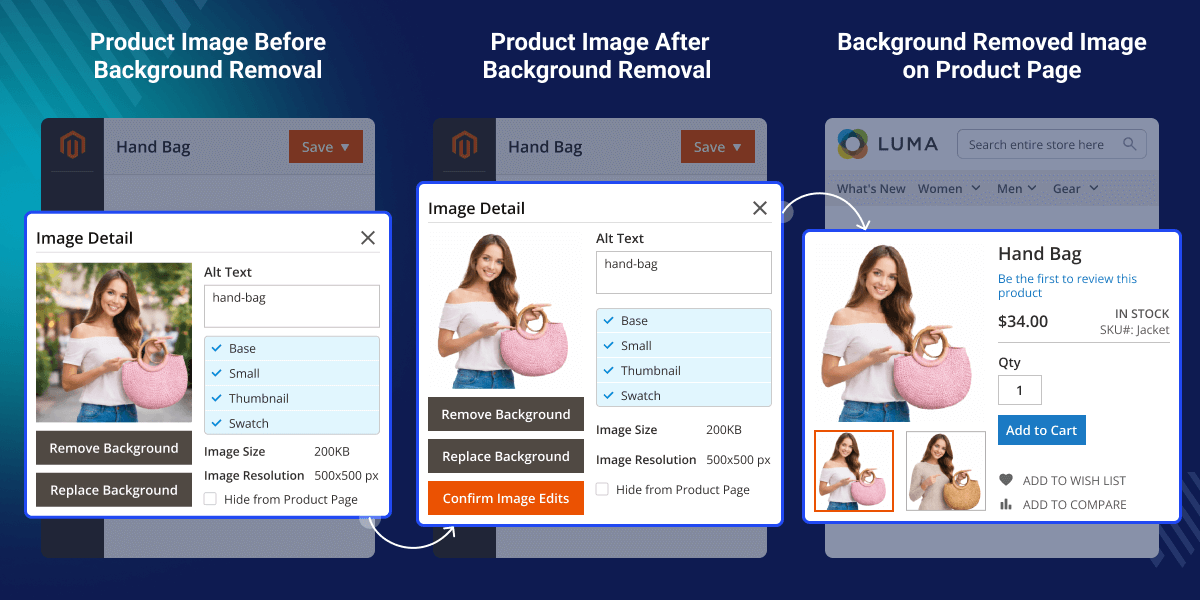
    Magento 2 Image Background Removal

    Highlighted Feature of Magento 2 Image Background Removal

     Produce High-Quality Images

    This extension does not degrade the image quality while removing the image's background.

     Single and Multiple Images

    Here the admin can remove background from single and multiple images in just one click.

     Remove Background via LLM API

    LLM is a statistical language model trained on large amounts of data that can and generate text and other context.

     Supported image formats

    This extension supports images in formats jpg, jpeg, and png.

    Why Do We Need Magento 2 Image Background Removal?

    Magento 2 Image Background Removal allows you to isolate the primary subject of an image by removing or replacing the background. Using the Magento 2 Image Background Removal module, the admin can highlight product images and eliminate unnecessary elements, ensuring better focus on the products.

    Background removal and replacement improve image visibility while maintaining image quality. This helps create a clean and professional storefront appearance that enhances the customer browsing experience.

    Also, if you want to provide the functionality to search products using the images feature to your customers, then check the Product Search Via Image for Magento 2 extension.

    Magento 2 Image Background Removal Configuration

    After installing the Magento 2 Image Background Removal extension, the admin must configure the initial settings before managing image backgrounds.
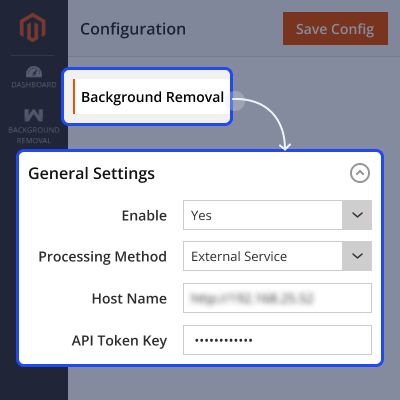
    • Enable or disable the module as required.
    • Select the image processing method – External Service or Client-side processing.
    • Enter the hostname for the background removal service if External Service is selected.
    • Provide the API token key required for background removal.
    • Start removing or replacing image backgrounds directly from the Magento 2 backend.
    Magento 2 Image Background Removal Configuration

    Remove Background from Category Image

    The admin can also remove or replace backgrounds from category images.
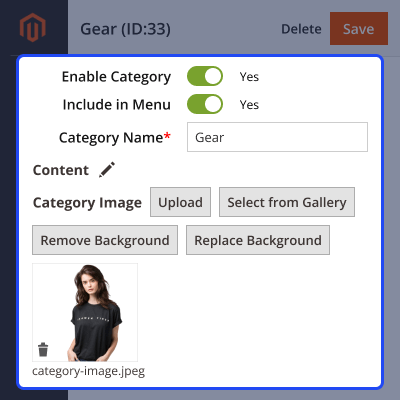
    • Click on Remove Background or Replace Background for the category image.
    • The selected category image is processed instantly.
    • Customers can view the updated category image on the storefront.
    Remove Background from Category Image

    Remove Background from Product Images

    The admin can remove or replace backgrounds for both new and existing product images.
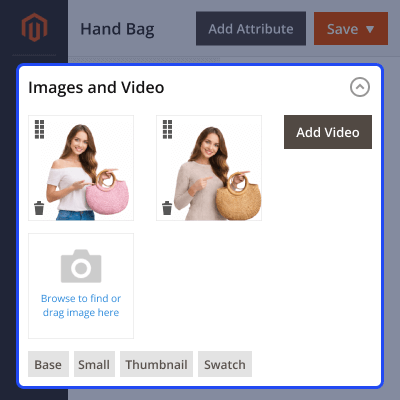
    • Select and upload one or multiple product images.
    • Click on Remove Background or Replace Background.
    • Process backgrounds for single or multiple images in one click.
    Remove Background from Product Images

    Customer View without Background Images

    Once the background is removed or replaced, customers see clean and professional images on the storefront.

    • Customers view high-quality, background-free images.
    • Images look clean, sharp, and well-focused.
    • Improved image presentation helps improve the shopping experience.
    Customer View without Background Images

    Support

    For any query or issue please create a support ticket here at Help Desk. You may also check our quality Magento 2 Extensions.

    Specifications

    Product Version4.0.1
    Released1 year ago
    CategoryMagento 2
    Last UpdatedDecember 23, 2025 (2 months ago)
    Supported VersionsMagento  2.0.x  2.1.x  2.2.x  2.3.x  2.4.x  
    Write a review

    Frequently Asked Questions

     What is Magento 2 Image Background Removal extension?
    Magento 2 Image Background Removal is a module that helps to remove the background from categories, products, header logos, and header shortcut icons images.
     
      What types of images does Magento 2 Image Background Removal support?
    Magento 2 Image Background Removal supports images in jpg, jpeg, and png formats.
     
      Which technology is used to remove background from the images?
    This extension used LLM API to remove the background from the images.
     
     Does it provide high-quality images?
    Yes, Magento 2 Image Background Removal module provides high-quality and focused images.
     
     Is It possible to remove the background from multiple images?
    Yes, It is possible. Magento 2 Image Background Removal removes the background from single and multiple images in one click.

    Move to Cloud Today

    AWS Free tier hosting for one year by amazon web services, for more details please visit AWS Free Tier.

    GCP Free tier hosting for one year with 300 credit points by google cloud platform, for more details please visit GCP Free Tier.

    Azure free tier hosting for one year with 25+ always free services, for more details please visit Azure Free Tier.

    In our default configuration we will provide tremendous configuration for your eCommerce Website which is fast to load and response.

    Default Configuration Details of Server

    • 1 GB RAM
    • 1 Core Processor
    • 30 GB Hard Disk
    • DB with 1 GB RAM and 1 Core Processor

    * Server Configuration may vary as per application requirements.

    Want to know more how exactly we are going to power up your eCommerce Website with Cloud to fasten up your store. Please visit the Cloudkul Services.

    Get Started with Cloud
    • + Features
    • - Bugs
    Version 4.0.1
    • + Compatible with PHP ^8.4 and Magento ^2.4.8
    • + Added background replace functionality.
    • + Client side image processing added.
    Version 4.0.0
    • + Compatible with Magento 2.4.* & PHP 8.2
    • + Admin can Enable/Disable the module.
    • + Admin can Set Host dynamically.
    • + Background removal module supports jpg, jpeg, and png images type.
    • + Background removal can remove background of Product images single and multiple at admin end.
    • + Background removal can remove background of category images
    • + Background removal can remove background of header logo and head shortcut icon.


