Send Again
Close
Magento 2 OpenStreetMap Address AutoComplete Extension gives buyers and admins instant address hints as they type, so forms fill fast and orders carry fewer errors.
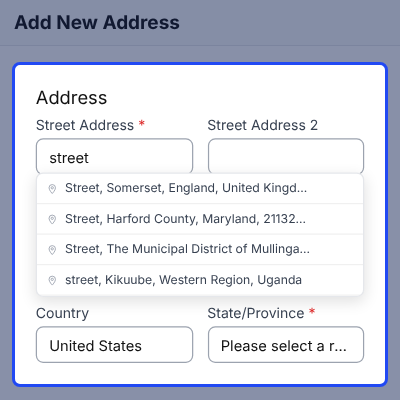
Buyers type a few letters and pick a match, and the street, city, postcode, country, and region fill in from that one pick, which saves time at checkout.
Admins get the same help in the backend, so when they create orders or edit customer addresses, they can pick a hint for both billing and shipping details.
Merchants can limit searches to chosen countries, filter by result type, set a language, and favor a viewbox that fits their main market, so hints stay local.
Every search goes through a Magento proxy, so the browser never calls the provider, and stores can use the public Nominatim service or run a private server.
Hyvä stores get a companion module for Alpine.js and Magewire checkout pages, which keeps the region field in sync once the country and state lists finish loading.
A debounce delay, a minimum letter count, and in-memory caching cut repeat queries, and if the provider fails, the page keeps working while each event goes to a log.
Developers can add other search services through the provider interface. If you also want to use map pins for address entry, check out the Magento 2 Google Maps Pin Address extension.
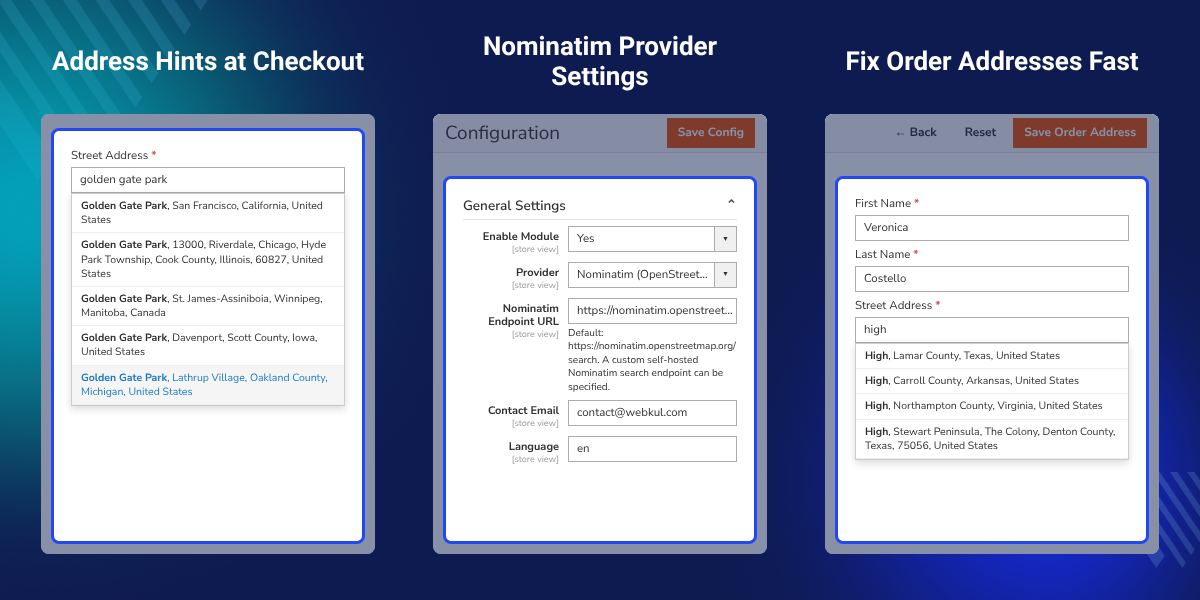
Shows matching addresses while buyers or admins type in street fields.
Completes related address fields the moment a buyer picks a result.
Helps staff add billing and shipping addresses when they create backend orders.
Adds hints when customers create or update saved addresses in their account.
Lets merchants keep the public service or enter a private Nominatim URL.
Offers country limits, result types, language, and geographic search bias.
Connects autocomplete to Alpine.js and Magewire pages on Hyvä checkout.
Sends cleaned searches from Magento to the provider and avoids CORS issues.
Magento 2 OpenStreetMap Address AutoComplete Extension fixes a gap in default address entry, where shoppers must type every street, city, region, and postcode by hand.
Long forms mean more typing and more mistakes, so checkout slows down, and support teams then lose time fixing bad addresses on orders and customer records.
One pick fills every related field, and teams that edit orders each day see the gain fast. If you also want a one-page checkout, check out the Magento 2 One Step Checkout extension.
Buyers enter a few letters and pick a match, so the form fills the rest of the address fields for them.
Account holders find their street fast when they add a saved address, or they fix an old one without retyping it.
Order teams pick hints while they type billing and shipping details, which cuts manual entry on each order.
Support staff fix billing or shipping addresses on existing orders, then review the values before they save.
Merchants limit searches by country and favor one market, so the hints stay relevant for local buyers.
Stores with their own Nominatim server route address queries through it instead of the public service.
Magento 2 OpenStreetMap Address AutoComplete Extension adds address hints to checkout and account address forms, so buyers type less on each supported page.
Buyers type a set number of letters and pick a result from the list, and the fields then update from Nominatim data, which makes checkout quick for every buyer.
Key Features:
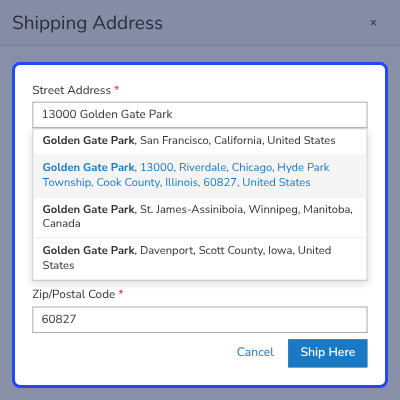
Magento 2 OpenStreetMap Address AutoComplete Extension brings address hints to admin order and customer screens, so staff can enter address details fast.
Admins pick a result while they create orders or edit addresses, and they then check the filled values on screen before they save the customer or order record.
Key Features:
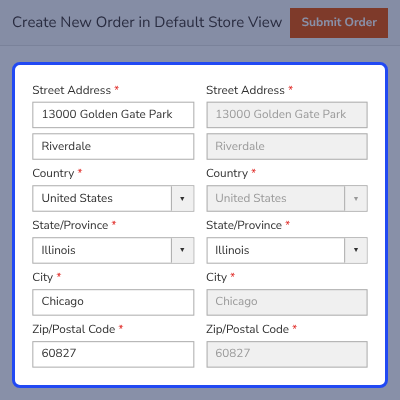
Magento 2 OpenStreetMap Address AutoComplete Extension links Magento with Nominatim for structured address search, and every call runs from the server.
Merchants can keep the public endpoint or set a private Nominatim URL, which gives store teams control over routing and address search traffic in private setups.
Key Features:
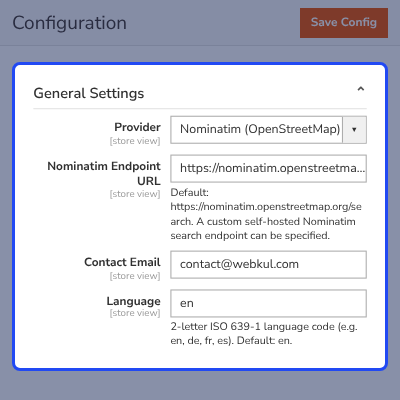
Magento 2 OpenStreetMap Address AutoComplete Extension lets merchants shape results with country, result type, language, and viewbox rules for each market.
These rules keep hints on target for active markets, and geographic bias ranks local addresses higher while it still lets useful matches from elsewhere show up.
Key Features:
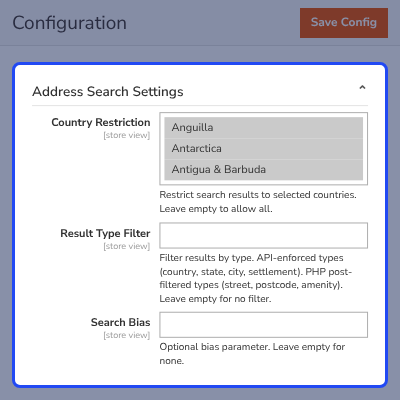
Magento 2 OpenStreetMap Address AutoComplete Extension works with a Hyvä companion module for storefront and checkout pages built on Alpine.js and Magewire.
The Hyvä layer replaces the Luma RequireJS code and handles region updates in live checkout parts, and it also uses CSP-aware inline scripts for address entry.
Key Features:
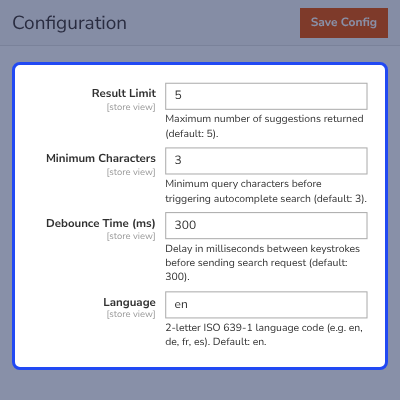
Magento 2 OpenStreetMap Address AutoComplete Extension routes every search through a Magento backend proxy, so provider calls stay away from the browser.
Searches wait for a letter threshold and a debounce delay, and cached results serve repeat queries, so if the provider times out, shoppers can keep typing.
Key Features:
For any query or issue, please create a support ticket here http://webkul.uvdesk.com/.
You may also check our top-quality Magento 2 Extensions.
Detailed technical features and requirements to help you understand the module’s capabilities and ensure smooth integration with your system.
Detailed technical features and requirements to help you understand the module’s capabilities and ensure smooth integration with your system.
We’re partnered with top-tier, trusted providers!
Want to know more how exactly we are going to power up your eCommerce Website with Cloud to fasten up your store
* Server Configuration may vary as per application requirements.



