Send Again
Close
Magento 2 Zoho SSO Extension brings the Zoho single sign-on experience buyers already expect. They enter your store with their existing Zoho account instead of creating a separate Magento password. This keeps sign-in quick and familiar for buyers who already use Zoho apps daily.
Zoho OAuth login extension handles the entire authentication handshake in the background. Buyers click one login button and authenticate through Zoho. They land back in their Magento account within seconds, without creating or remembering a new password.
Store owners benefit just as much, with login friction dropping right after setup. Fewer buyers get stuck at checkout, and fewer support tickets arrive for routine password reset requests.
New buyers aren't left out either. If Magento doesn't recognize a Zoho email, this extension creates a customer account instantly and completes the login in that same step.
Setup happens entirely from Magento Admin. Store owners configure the Zoho region, add app credentials, and manage the callback URI. None of this needs a single line of code.
This extension also works across US, EU, IN, AU, CN, and JP Zoho data centers. It's a practical fit for stores running Zoho apps registered in different regions.
Every login also passes through OAuth state validation. Magento accepts only genuine callback responses, so the entire sign-in path stays secure at all times.
The result is a login experience that feels faster for buyers and stays easy to manage for admins. No extra password ever gets added to the store.
If you want to give buyers even more sign-in choices beyond Zoho, such as Facebook, Google, LinkedIn, and other social accounts, check out Magento 2 Social Login.
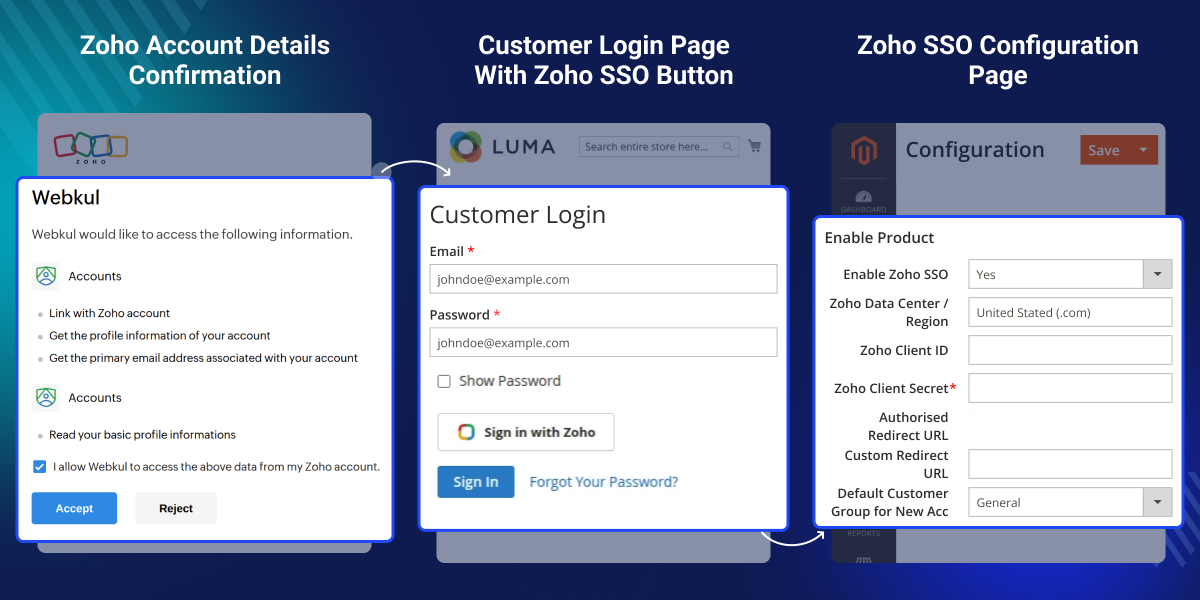
This Zoho SSO integration lets buyers skip the Magento password step entirely. Instead, they log in using their existing Zoho account, which makes sign-in faster and more familiar for returning shoppers.
New Zoho emails get a Magento account created instantly. First-time buyers can complete sign-in without any manual registration step slowing them down.
Every login callback gets checked before Magento accepts it. This keeps the sign-in flow protected from invalid or spoofed authentication responses.
This extension works with US, EU, IN, AU, CN, and JP Zoho regions. A single setup fits stores operating across several international markets at once.
Magento 2 Zoho SSO Extension exists because Magento has no built-in way to let buyers sign in with a Zoho account. Buyers get stuck creating and remembering yet another store password.
That extra password step slows buyers down at checkout. It also adds ongoing work for support teams handling reset requests and locked-out accounts.
This extension removes that friction by giving buyers one secure login route. Once Zoho confirms the login, Magento handles the customer session automatically.
New buyer onboarding gets easier too. This extension creates a Magento account on the spot whenever a new Zoho email tries to sign in for the first time.
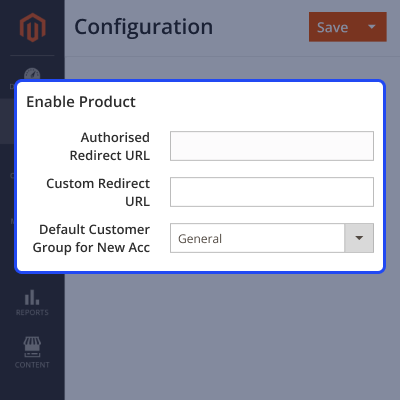
Setup stays practical for admins as well. The Zoho app details, redirect URI, and customer group all get managed directly from the Magento backend.
This extension also supports JP and other Zoho regions. It holds up well once a store scales past a single market and starts operating across multiple Zoho data centers.
Additionally, if your store also needs to support enterprise buyers who sign in with their company identity provider, check out Magento 2 Azure AD Login Extension.
Zoho customer login for Magento works in one click. Buyers sign in with their Zoho account and land in their Magento account within seconds, without typing a separate store password.
A new Magento customer account gets created the moment a first-time Zoho email logs in. No manual signup step holds up the buyer.
Admins connect Magento to the correct Zoho region, including JP, directly from the backend. This matches how the business actually operates.
Every OAuth response gets validated before Magento logs the buyer in. This keeps the storefront protected from invalid login attempts.
Turning Zoho SSO on starts with the core setup. This covers the Zoho region, app credentials, and the default customer group, all from a single admin screen.
This keeps the base configuration simple. Admins get the login flow running without digging through multiple settings menus first.
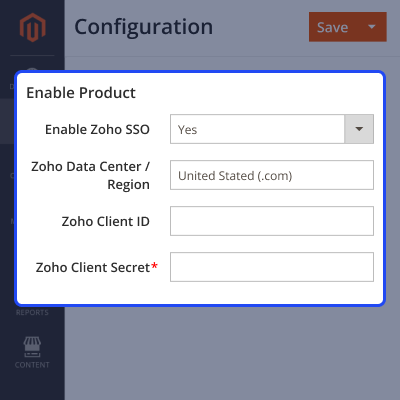
Connecting Magento to Zoho correctly depends on one thing. The redirect URI and region must match what's already registered in Zoho Console.
Getting this right the first time helps admins avoid failed logins and callback errors later on.
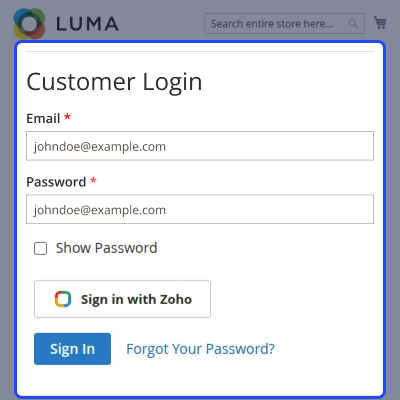
This is what buyers actually experience: the Zoho login button, the redirect to Zoho, and the return trip back into Magento.
A smooth flow here directly reduces drop-off at login. It also speeds up checkout for returning buyers.
For any query or issue, please create a support ticket here http://webkul.uvdesk.com/.
You may also check our top-quality Magento 2 Extensions.
It lets buyers log in to Magento using their existing Zoho account, so they reach the store faster and without extra password friction at all.
The Sign in with Zoho button is the main buyer-facing feature, and it starts the entire login flow directly from the storefront every time.
Yes, if the Zoho email isn't already in Magento, this extension creates the customer account instantly and logs the buyer in right away automatically.
Yes, buyers can choose to log in with Zoho anytime they want, giving them a self-service login path that doesn't need any admin involvement.
New buyers join the default customer group set inside General Settings, so admins control group assignment without any manual step being needed.
Magento receives the buyer's verified Zoho email address, and it uses that same email to log in an existing buyer or create a brand new account.
Magento stops the login right away and sends the buyer back to the login page, which keeps the entire authentication flow secure at all times.
Admins can check the custom log file located at var/log/zohosso.log to review any login-related issues affecting the storefront quickly and easily.
Yes, as long as each website's redirect URI gets added to the same Zoho app configuration inside the Zoho Console settings area correctly.
Detailed technical features and requirements to help you understand the module’s capabilities and ensure smooth integration with your system.
Detailed technical features and requirements to help you understand the module’s capabilities and ensure smooth integration with your system.
We’re partnered with top-tier, trusted providers!
Want to know more how exactly we are going to power up your eCommerce Website with Cloud to fasten up your store
* Server Configuration may vary as per application requirements.



