USD
  • INR
  • USD
Cart
Cart 0
  • You have no items in your shopping cart.
    Cart
    Cart 0
    • You have no items in your shopping cart.
    Hire a Developer
    ×
    Contact Us!
    Send Again
    Close
    Please Login to Write Your Review

    Odoo Advance Catalog Approval Management


    Odoo Advanced Catalog Approval Management allows admin users to approve or reject products and categories before they go live on the website.


    • Approve and control product catalog submissions with ease.

    • Reject or reset product and category submissions.

    • Approve e-commerce category requests with admin rights.

    • Admins can track product request status at every step.

    • Assign a person to manage the catalog.

    • Provide rejection reasons for user clarity.


    Screenshots
    Odoo Advance Catalog Approval Management Odoo Advance Catalog Approval Management Odoo Advance Catalog Approval Management Odoo Advance Catalog Approval Management Odoo Advance Catalog Approval Management Odoo Advance Catalog Approval Management
    Show More Hide All
    $59.00

    * Required Fields

    Add To Cart
    $59.00
    Configure and Buy
    • Description
    • Reviews
    • FAQ
    • Customers ()
    • Specifications
    • Cloud Hosting
    • Changelog

    Odoo advance Catalog Approval Management offers a simple yet powerful way to control the quality of product listings and category additions made by users. It ensures that only approved and admin-reviewed content gets published on the eCommerce website.

    By using this module, businesses can keep their product catalog organized, professional, and error-free. Admins can immediately act on user submissions by approving, rejecting, or resetting them.
    Odoo POS Table Reservation From Website

    Why do we need Odoo advance Catalog Approval Management?

    Without catalog approaval mechanisms, user-generated content can result in duplicate, low quality or misaligned listings. Odoo advance catalog approval management ensures a streamlined process by letting admins decide what goes live.

    Lets say your company has multiple employees who add new products and categories to the website. Without a proper approval process, incorrect or unverified items might go live, affecting the stores quality.

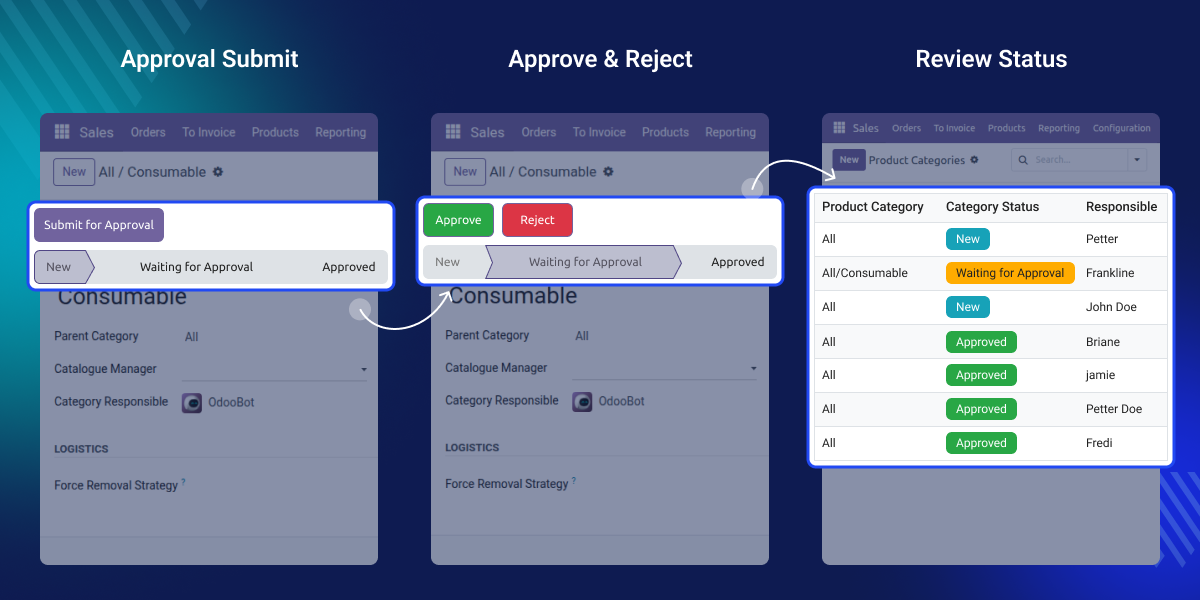
    With Odoo advance Catalog Approval Management, the admin can review each product or category before it’s live on the website. The admin can also assign a team member to manage approvals, reject entries that don’t meet the standards, or send them back for corrections.

    Highlighted Features of Odoo advance Catalog Approval Management

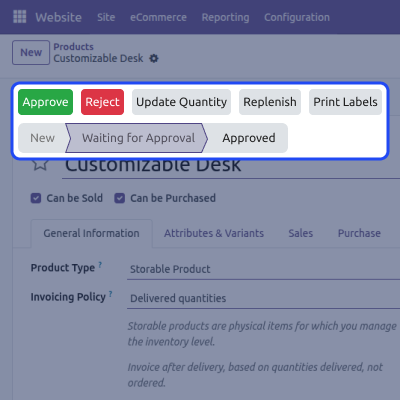
    Assign Catalog Manager for Approval

    Assign a person to review and approve catalog entries.

    Approve or Reject in Bulk

    Select and approve or reject as many products as possible in a single section.

    Add Rejection Reason for Users

    Provide rejection reasons to guide users in improving the product or category before resubmission.

    Track Approval Progress

    Check if a request is new, approved, rejected, or awaiting review.

    Moderate Catalog With Full Control

    Gain centralised control over what products & categories get published. Admins can review and filter user submissions efficiently
    • Keep the product catalog clean and organised.
    • Prevent low-quality listings from going live.
    • Minimize errors and maintain brand consistency.
    • Easily revert changes or reject requests.
    • Improve collaboration between users and reviewers.
    Moderate Catalog With Full Control

    Transparent Approval Process

    A clear workflow ensures both admins and users understand the status of each submission at each step.
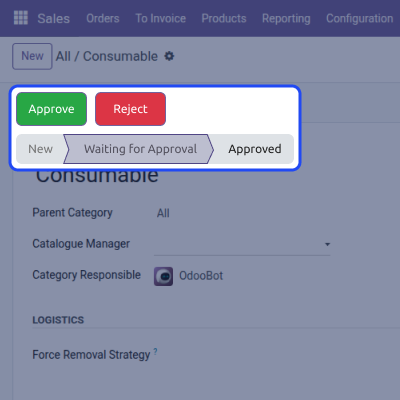
    • View product status like New, Approved, or Rejected.
    • Users can resubmit requests with necessary changes.
    • Real-time status updates for users and admins.
    • Clear communication between creators and approvers.
    • Full visibility over submitted and pending entries.
    Transparent Approval Process

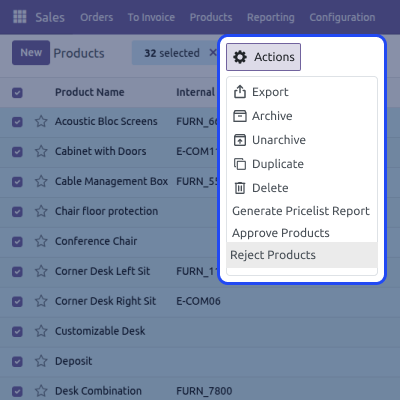
    Efficient Bulk Actions

    Simplify the approval workload by taking action on multiple entries at once.
    • Save time by processing in batches.
    • Allows bulk approval or rejection of multiple items.
    • Speeds up the process and reduces manual work.
    • Works perfectly during seasonal or high-volume uploads.
    Efficient Bulk Actions

    Easy Product & Category Reset

    Let users revise their submissions after admin feedback using the reset option.
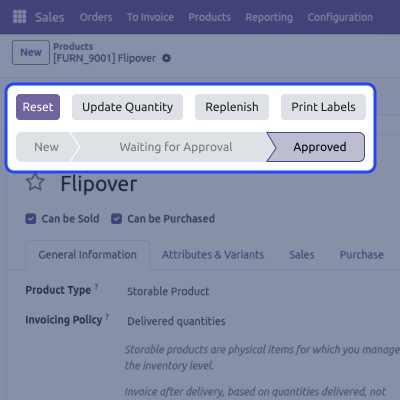
    • Reset entries that need minor corrections.
    • Avoid outright rejections when not needed.
    • Improve user experience through constructive feedback.
    • Maintain smooth collaboration in the process.
    Easy Product & Category Reset

    Support

    For any query or issue, please create a support ticket here CREATE A TICKET HERE

    You may also check our other top-quality Odoo Modules.

    Specifications

    Product Version1.0.1
    Released8 months ago
    CategoryOdoo AppsMarketplace
    Last UpdatedJanuary 7, 2026 (28 days ago)
    Supported VersionsOdoo  16.x  17.x  18.x  19.x  
    Write a review

    Frequently Asked Questions

     What happens after a user submits a product for approval?
    The request enters the “Waiting for Approval” stage. Admins can then choose to approve, reject, or reset the submission for changes.
     Can I assign different managers to approve categories?
    Yes, Odoo Advanced Catalog Approval Management lets you assign catalog responsibilities to specific users for better delegation.
      Will rejected entries get removed permanently?
    No, rejected entries stay in the system with a rejection reason. Users can modify and resubmit the same product or category.
     How will users know why their submission was rejected?
    Admins can add a rejection reason that is visible to the user, allowing them to correct and resubmit accordingly.

    Move to Cloud Today

    AWS Free tier hosting for one year by amazon web services, for more details please visit AWS Free Tier.

    GCP Free tier hosting for one year with 300 credit points by google cloud platform, for more details please visit GCP Free Tier.

    Azure free tier hosting for one year with 25+ always free services, for more details please visit Azure Free Tier.

    In our default configuration we will provide tremendous configuration for your eCommerce Website which is fast to load and response.

    Default Configuration Details of Server

    • 1 GB RAM
    • 1 Core Processor
    • 30 GB Hard Disk
    • DB with 1 GB RAM and 1 Core Processor

    * Server Configuration may vary as per application requirements.

    Want to know more how exactly we are going to power up your eCommerce Website with Cloud to fasten up your store. Please visit the Cloudkul Services.

    Get Started with Cloud
    Not Available


