USD
  • EUR
  • INR
  • USD
Cart
Cart 0
  • You have no items in your shopping cart.
    Cart
    Cart 0
    • You have no items in your shopping cart.
    Hire a Developer
    ×
    Contact Us!
    Send Again
    Close
    Please Login to Write Your Review

    Odoo Advance Inventory Dashboard

    Odoo Advance Inventory Dashboard helps you understand your stock with clear charts and simple reports. It shows overstock, product movement, turnover, inventory ageing, and product speed in one simple dashboard.


    • View all inventory analytics in one dashboard

    • Use interactive charts with modern Chart.js graphs

    • Export dashboard reports to Excel and PDF

    • Use role-based access for users and managers

    • Change analysis thresholds in settings

    • Use native list, pivot, and graph views


    Screenshots
    Odoo Advance Inventory Dashboard Odoo Advance Inventory Dashboard Odoo Advance Inventory Dashboard Odoo Advance Inventory Dashboard Odoo Advance Inventory Dashboard Odoo Advance Inventory Dashboard Odoo Advance Inventory Dashboard Odoo Advance Inventory Dashboard Odoo Advance Inventory Dashboard Odoo Advance Inventory Dashboard
    Show More Hide All
    $199.00

    * Required Fields

    Add To Cart
    $199.00
    Configure and Buy
    • Description
    • Reviews
    • FAQ
    • Customers ()
    • Specifications
    • Cloud Hosting
    • Changelog

    Odoo Advance Inventory Dashboard helps businesses understand inventory in a very simple way. It shows stock data with clear charts and simple reports in one smart dashboard.

    The dashboard shows key insights such as overstock level, stock rotation, turnover ratio, product speed, and inventory ageing. All analytics appear in one place. Managers can read stock data fast.

    Odoo Advance Inventory Dashboard uses interactive charts and data. This helps managers see inventory performance fast and plan stock better.
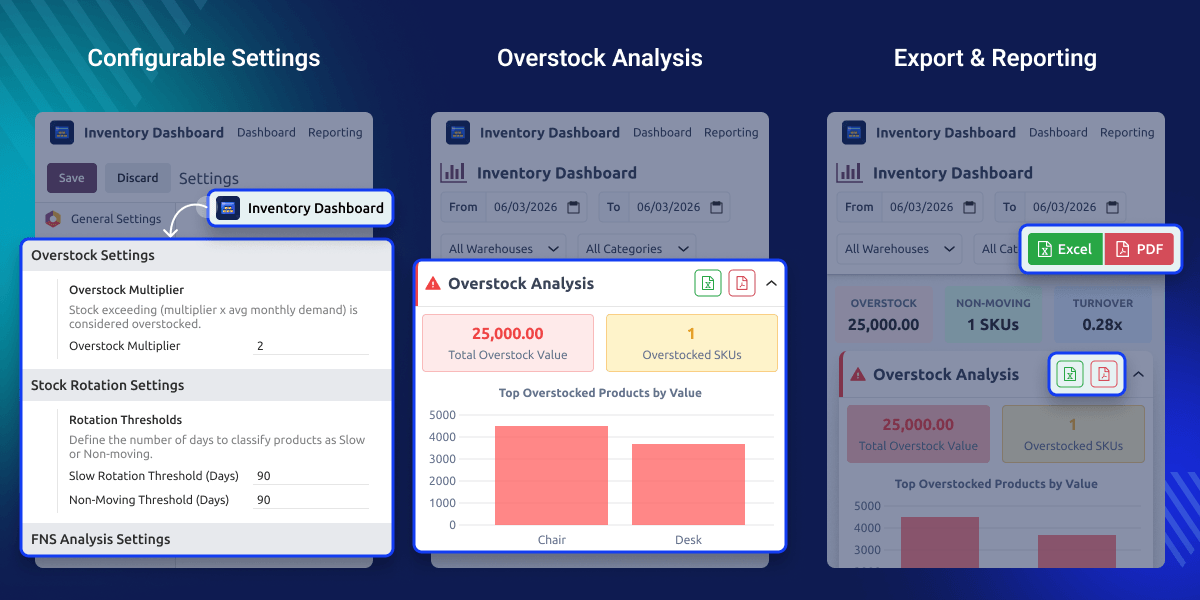
    Odoo Advance Inventory Dashboard

    Why do we need Odoo Advance Inventory Dashboard?

    Many businesses find inventory data hard to read. Large stock records make insights hard to see.

    Odoo Advance Inventory Dashboard solves this problem with a visual dashboard. It shows inventory data with clear charts and simple reports.

    Managers can quickly see slow products, extra stock, and stock trends. This helps businesses reduce excess stock, improve product movement, and make better purchase decisions

    Highlighted Features of Odoo Advance Inventory Dashboard

    Smart Inventory Dashboard

    Odoo Advance Inventory Dashboard shows all inventory analytics in one clean and simple dashboard screen.

    Interactive Data Charts

    View inventory data with bar charts, pie charts, and line charts for a clear data view.

    Export Reports Easily

    Export inventory analytics reports to Excel and PDF for easy use and sharing.

    Flexible Configuration

    Change analysis settings and thresholds easily based on your business needs.

    Overstock Inventory Analysis

    This feature finds products where stock is higher than demand. It compares the current stock with the average monthly demand.
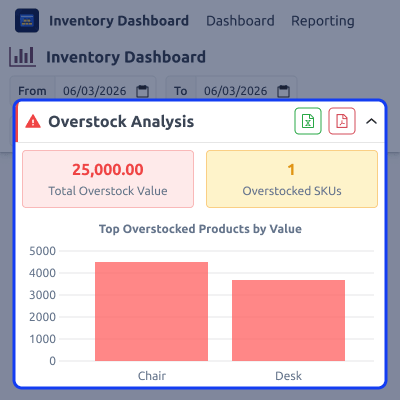
    • Detect products with excess stock
    • View overstock value in charts
    • Track overstock quantity and ratio
    Overstock Inventory Analysis

    Stock Rotation Analysis

    Stock rotation shows how fast products move in the warehouse. It checks the last movement date for each product.
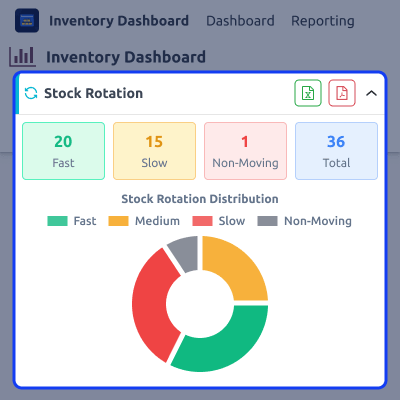
    • Identify fast-moving products
    • Detect slow and non-moving stock
    • Reduce dead inventory
    Stock Rotation Analysis

    Automatic Nextcall Update

    This feature shows how well inventory works. It tracks how often stock is sold and restocked.
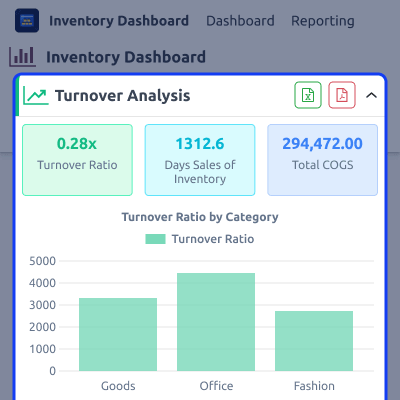
    • View inventory turnover ratio
    • Track days sales of inventory (DSI)
    • Monitor monthly turnover trends
    Automatic Nextcall Update

    FNS Product Classification

    FNS analysis groups products by sales speed. Products are marked as Fast, Normal, or Slow.Inventory Ageing AnalysisInventory Ageing Analysis.
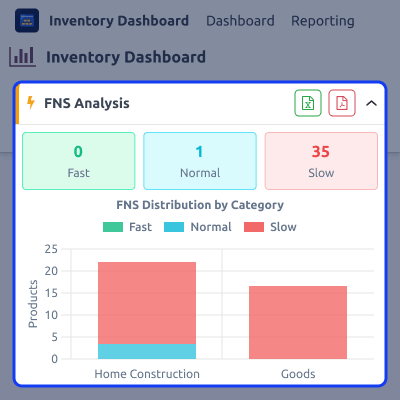
    • Find fast-selling products
    • Find slow-selling products
    • See product sales speed
    FNS Product Classification

    Inventory Ageing Analysis

    In Odoo Advance Inventory Dashboard, inventory ageing shows how long products stay in the warehouse. It helps find old or inactive stock.
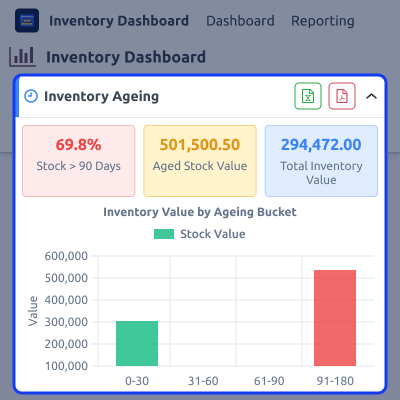
    • Track stock age by days
    • Find old stock quickly
    • See stock value by age
    Inventory Ageing Analysis

    Support

    For any query or issue, please create a support ticket here CREATE A TICKET HERE

    You may also check our other top-quality Odoo Modules.

    Specifications

    Product Version1.0.0
    Released3 days ago
    Last UpdatedMarch 20, 2026 (3 days ago)
    Supported VersionsOdoo  18.x  19.x  
    Write a review

    FAQ’s

     What does the Odoo Advance Inventory Dashboard do?
    It shows inventory analytics such as overstock, turnover, product movement, and inventory ageing in one dashboard.
     Can I export dashboard reports?
    Yes, You can export analytics reports to Excel and PDF.
     Does the module support interactive charts?
    Yes, The dashboard uses bar charts, line charts, and pie charts for a clear data view.
     Can I change the analysis settings?
    Yes, You can change thresholds and parameters in the settings menu.
     Does the module support multiple warehouses?
    Yes, You can filter analytics by warehouse, category, or date range.

    Move to Cloud Today

    AWS Free tier hosting for one year by amazon web services, for more details please visit AWS Free Tier.

    GCP Free tier hosting for one year with 300 credit points by google cloud platform, for more details please visit GCP Free Tier.

    Azure free tier hosting for one year with 25+ always free services, for more details please visit Azure Free Tier.

    In our default configuration we will provide tremendous configuration for your eCommerce Website which is fast to load and response.

    Default Configuration Details of Server

    • 1 GB RAM
    • 1 Core Processor
    • 30 GB Hard Disk
    • DB with 1 GB RAM and 1 Core Processor

    * Server Configuration may vary as per application requirements.

    Want to know more how exactly we are going to power up your eCommerce Website with Cloud to fasten up your store. Please visit the Cloudkul Services.

    Get Started with Cloud
    Not Available


