Send Again
Close
Odoo AI Semantic Search helps users find the right search items more easily by understanding what they are searching for, even when they do not use the exact words.
This module shows relevant products based on the meaning of the search instead of only matching keywords.
Businesses can generate AI embeddings to improve search quality and provide more accurate results to customers.
Search suggestions appear instantly while users type, helping them find products more quickly.
When no exact product is found, the system can show related products and similar search results.
Admins can set the search threshold to control how closely results should match a search query.
This module also saves search terms and helps businesses see which keywords customers search for most often.
By providing better search results and smart suggestions, this module helps customers find products faster and improves the overall website search experience.
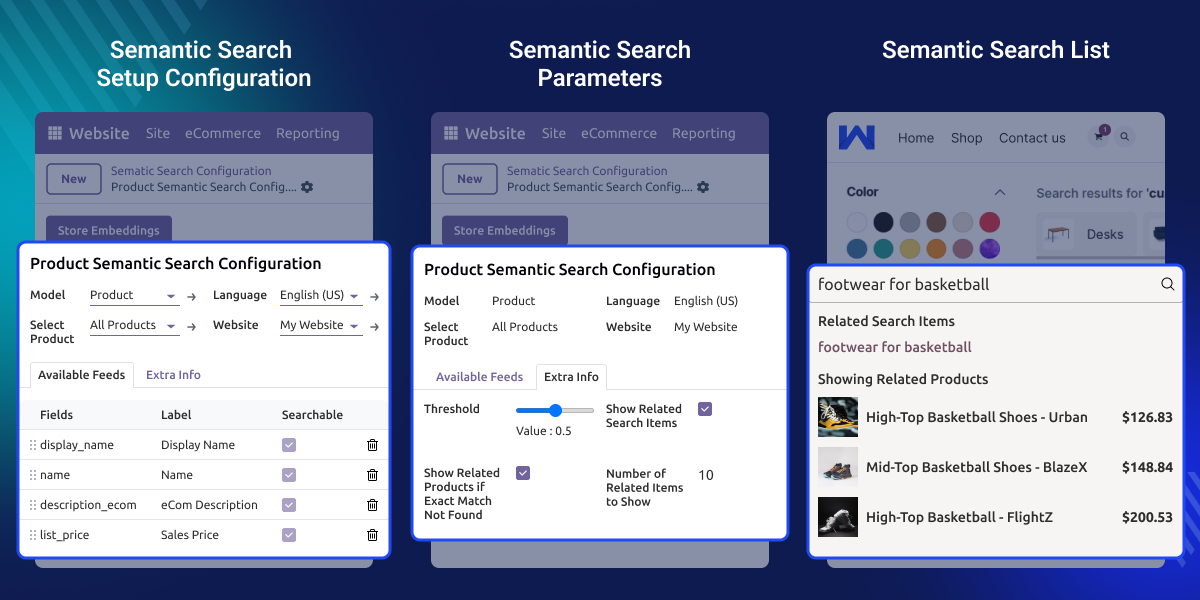
Enable or disable semantic search directly from the backend.
Configure search behavior according to your business requirements.
Create AI embeddings to deliver more relevant search results.
Show products based on search intent rather than exact keywords.
Provide real-time search recommendations while users are typing.
Record search terms and monitor frequently searched keywords.
Odoo AI Semantic Search helps users find the right records quickly and easily.
Traditional Odoo search depends on exact keywords. Users often need to type the correct words to get the required results.
The default search system may not understand the meaning of a search query. Because of this, relevant records can be missed when different words or phrases are used.
Modern businesses need a more flexible and automated search system that can deliver accurate results without relying only on exact keyword matches.
Odoo AI Semantic Search solves this challenge by understanding the intent and meaning behind a search query. It shows relevant records, smart suggestions, and related recommendations to improve the search experience.
Help customers find products more quickly.
Make product searches easier across many items.
Help buyers locate products with less effort.
Improve product discovery through smarter search.
Make it easier to find products across categories.
Deliver a faster and better search experience.
Manage semantic search directly from the backend and apply it to different models as needed.

Show related search suggestions when no exact result is found, and set how many suggestions to display.

It saves customer search terms, monitors popular keywords, and sets the threshold value using a simple slider.

For any query or issue, please create a support ticket here CREATE A TICKET HERE
You may also check our other top-quality Odoo Modules.
Detailed technical features and requirements to help you understand the module’s capabilities and ensure smooth integration with your system.
Detailed technical features and requirements to help you understand the module’s capabilities and ensure smooth integration with your system.
We’re partnered with top-tier, trusted providers!
Want to know more how exactly we are going to power up your eCommerce Website with Cloud to fasten up your store
* Server Configuration may vary as per application requirements.



