USD
  • EUR
  • INR
  • USD
Cart
Cart 0
  • You have no items in your shopping cart.
    Cart
    Cart 0
    • You have no items in your shopping cart.
    Hire a Developer
    ×
    Contact Us!
    Send Again
    Close
    Please Login to Write Your Review

    Odoo All-in-One WhatsApp Live Chat Integration

    Odoo All-in-One WhatsApp Live Chat Integration module helps businesses chat with customers on WhatsApp directly from Odoo.


    • Requires a WhatsApp Business account.

    • Instant messaging with customers inside Odoo.

    • Track message delivery, read status, and replies.

    • Share documents, images, and files via WhatsApp.

    • Manage multiple chats in one place.

    • Admin can create templates; approved ones can be used in chats.

    • Admin can message any Odoo contact on WhatsApp.


    Screenshots
    Odoo All-in-One WhatsApp Live Chat Integration Odoo All-in-One WhatsApp Live Chat Integration Odoo All-in-One WhatsApp Live Chat Integration Odoo All-in-One WhatsApp Live Chat Integration Odoo All-in-One WhatsApp Live Chat Integration Odoo All-in-One WhatsApp Live Chat Integration Odoo All-in-One WhatsApp Live Chat Integration Odoo All-in-One WhatsApp Live Chat Integration
    Show More Hide All
    $199.00

    * Required Fields

    Add To Cart
    $199.00
    Configure and Buy
    • Description
    • Reviews
    • FAQ
    • Customers ()
    • Specifications
    • Cloud Hosting
    • Changelog

    Odoo All-in-One WhatsApp Live Chat Integration module lets businesses talk to their customers on WhatsApp without leaving Odoo.

    It helps users send and receive WhatsApp messages right inside Odoo, making chatting faster and easier. You can talk to both saved contacts and new numbers without any hassle.

    This module also supports message templates. Once WhatsApp approves these templates, you can use them to send quick replies, saving time and keeping your messages clear and professional.

    With this integration, your team can manage all WhatsApp conversations in one place, improving customer support and making communication smooth and organized.
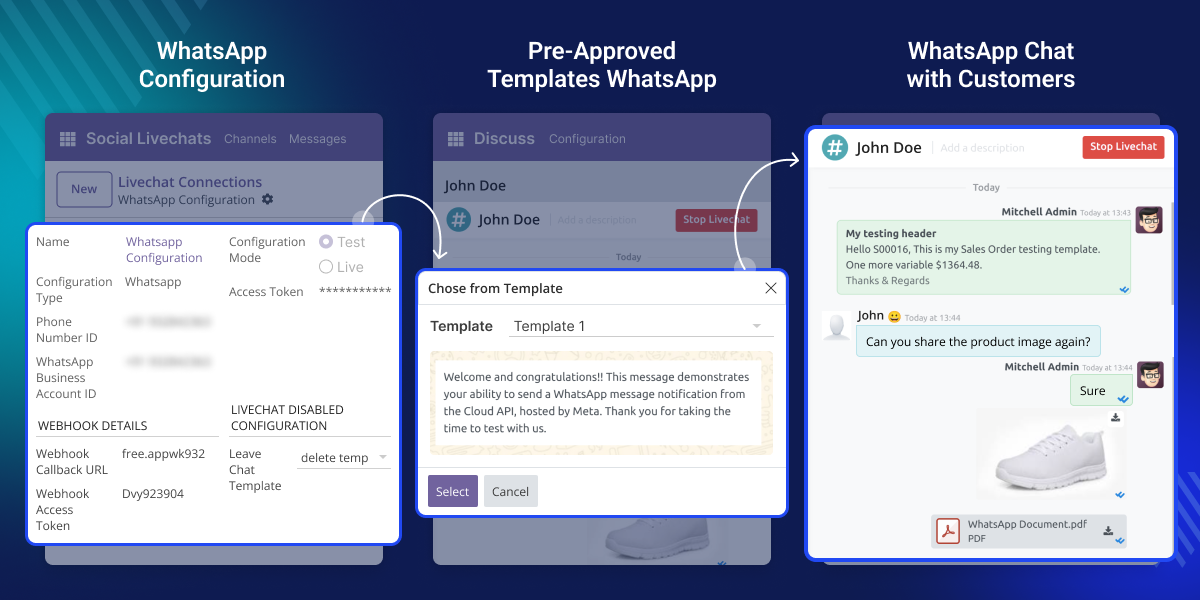
    Odoo All-in-One WhatsApp Live Chat Integration

    Why Do We Need Odoo All-in-One WhatsApp Live Chat Integration?

    Odoo All-in-One WhatsApp Live Chat Integration helps businesses easily connect with customers on WhatsApp.

    It speeds up communication, helps track all chats, and allows quick replies with easy access to past conversations for better support.

    By keeping everything in Odoo, teams can work more efficiently, respond faster, and offer better customer service.

    Highlighted Features of Odoo All-in-One WhatsApp Live Chat Integration

    Seamless Integration

    Connect WhatsApp with Odoo for easy communication inside Odoo.

    Real-Time Communication

    Send and receive WhatsApp messages right away for quick replies.

    Instant Message Notifications

    Get alerts as soon as you receive new WhatsApp messages.

    WhatsApp Message Status

    See if your WhatsApp messages are delivered, sent, or read in Odoo.

    Send Attachments

    Send pictures, videos, documents, and files easily through WhatsApp in Odoo.

    Template Preview

    Create and use approved WhatsApp message templates for simple communication.

    Seamless WhatsApp Integration with Odoo

    In Odoo WhatsApp Live Chat Integration, you can easily link your WhatsApp Business account with Odoo. It lets you handle all your customer chats from one place, stay organized, and respond to messages more quickly..
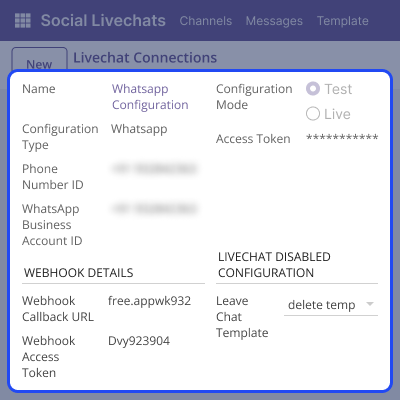
    • A WhatsApp Business account and API are required to connect with Odoo.
    • Once set up, you can chat directly with customers from within Odoo.
    • Start WhatsApp conversations instantly with any saved or new contact.
    • All customer chats are stored in one place, making it easier to track.
    Seamless WhatsApp Integration with Odoo

    Better Ways to Message Customers

    Odoo’s WhatsApp Live Chat Integration helps you talk to customers quickly and share pictures, documents, and files easily.
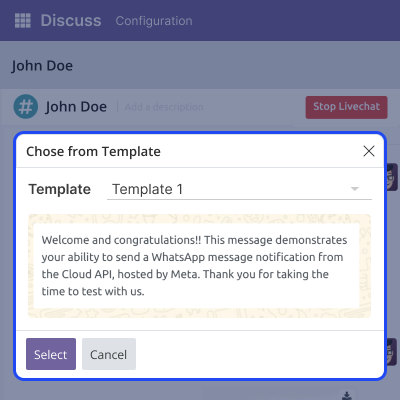
    • Chat with customers in real time without any delay.
    • Send pictures, documents, and files directly through WhatsApp in Odoo.
    • Use WhatsApp-approved message templates to keep your messages clear.
    • Reply fast using saved templates for common questions.
    • See past chats to give quicker and better support.
    Better Ways to Message Customers

    Support

    For any query or issue, please create a support ticket here CREATE A TICKET HERE

    You may also check our other top-quality Odoo Modules .

    Specifications

    Product Version1.0.0
    Released2 months ago
    Last UpdatedJanuary 27, 2026 (1 month ago)
    Supported VersionsOdoo  17.x  18.x  19.x  
    Write a review

    FAQs

      How does the Odoo All-in-One WhatsApp Live Chat integration help?
    It keeps all your WhatsApp messages in Odoo, so you can reply faster, stay organized, and offer better customer support.
      Can I message contacts that aren’t saved?
    Yes, you can chat with both saved contacts and new phone numbers.
      Can I see if my message was delivered or read?
    Yes, you can check the status of your messages  sent, delivered, or read  directly in Odoo.
      Will I get notified about new messages?
    Yes, you’ll receive instant alerts for every new WhatsApp message.
      Is it easy to set up the Odoo All-in-One WhatsApp Live Chat integration?
    Yes, once your WhatsApp Business account and API are ready, setup is quick and simple.

    Move to Cloud Today

    AWS Free tier hosting for one year by amazon web services, for more details please visit AWS Free Tier.

    GCP Free tier hosting for one year with 300 credit points by google cloud platform, for more details please visit GCP Free Tier.

    Azure free tier hosting for one year with 25+ always free services, for more details please visit Azure Free Tier.

    In our default configuration we will provide tremendous configuration for your eCommerce Website which is fast to load and response.

    Default Configuration Details of Server

    • 1 GB RAM
    • 1 Core Processor
    • 30 GB Hard Disk
    • DB with 1 GB RAM and 1 Core Processor

    * Server Configuration may vary as per application requirements.

    Want to know more how exactly we are going to power up your eCommerce Website with Cloud to fasten up your store. Please visit the Cloudkul Services.

    Get Started with Cloud
    Not Available


