USD
  • EUR
  • INR
  • USD
Cart
Cart 0
  • You have no items in your shopping cart.
    Cart
    Cart 0
    • You have no items in your shopping cart.
    Hire a Developer
    ×
    Contact Us!
    Send Again
    Close
    Please Login to Write Your Review

    Odoo Asterisk VoIP Connector

    Odoo Asterisk VoIP Connector connects Asterisk (FreePBX) with CRM to manage calls, logs, and recordings using secure WebSocket (WSS) communication inside Odoo.


    • Click-to-call dialing from CRM records

    • Automatic call logging with complete details

    • Call recording sync with chatter integration

    • Inbound caller popup with customer details

    • Secure WebSocket communication (WSS protocol)

    • Agent-wise call tracking and monitoring

    Screenshots
    $399.00

    * Required Fields

    Add To Cart
    $399.00
    Configure and Buy
    • Description
    • Reviews
    • FAQ
    • Customers ()
    • Specifications
    • Cloud Hosting
    • Changelog

    Odoo Asterisk VoIP Connector connects Asterisk (FreePBX) with CRM to handle calls inside Odoo. It lets users make calls, log calls, and save recordings using secure WebSocket (WSS) communication.

    Odoo Asterisk VoIP Connector uses Asterisk to manage voice calls and FreePBX to set up extensions. Users get PJSIP extensions to make and receive calls easily.
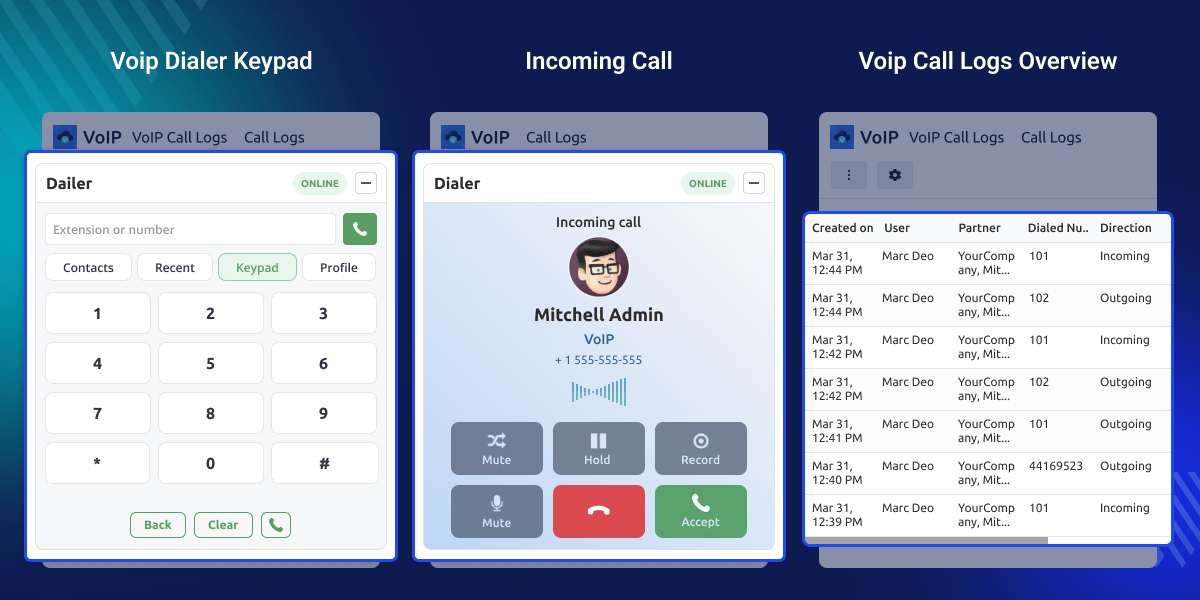
    Odoo Asterisk VoIP Connector

    Why do we need an Odoo Asterisk VoIP Connector?

    Odoo Asterisk VoIP Connector helps businesses handle calls inside CRM without using any external calling tools. It keeps all call work in one place.

    This VoIP setup makes call handling simple. Calls are logged and recorded automatically using secure WebSocket (WSS), which helps in easy tracking and better communication.

    When a sales agent makes or receives a call, customer details show instantly. The system also saves call logs and recordings, so teams can track calls and follow up easily.

    Highlighted Features of Odoo Asterisk VoIP Connector

    Seamless PBX Integration

    Securely connects Asterisk with CRM via WSS for real-time call communication.

    Built-in VoIP Dialer

    Provides dialer with keypad, contacts, and recent calls for easy call handling.

    Automatic Call Logging

    Automatically logs all call details—user, partner, status, direction, and duration.

    Call Recording Management

    Attaches call recordings to call logs and chatter for easy playback and tracking.

    User Extension Mapping

    Maps PJSIP extensions with users for proper inbound and outbound calls handling.

    Trunk Configuration Setup

    Allows SIP/PJSIP trunk setup in FreePBX to connect external lines for call routing.

    Asterisk Configuration

    Odoo Asterisk VoIP Connector needs extensions to be set in FreePBX so users can connect and make calls through the PBX system.
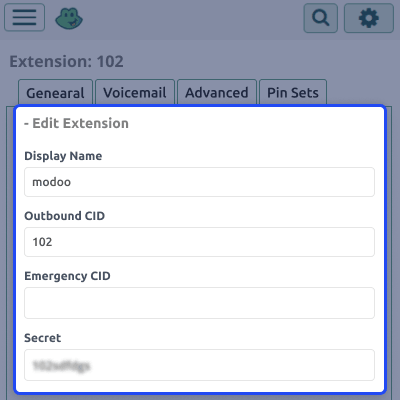
    • Log in to the FreePBX admin panel.
    • Go to Applications → Extensions.
    • Create an extension using PJSIP.
    • Enter extension number and secret (password).
    • Save and apply the configuration.
    Asterisk Configuration

    VoIP Provider Setup

    The module lets you connect FreePBX as a VoIP provider so it can communicate with CRM easily.
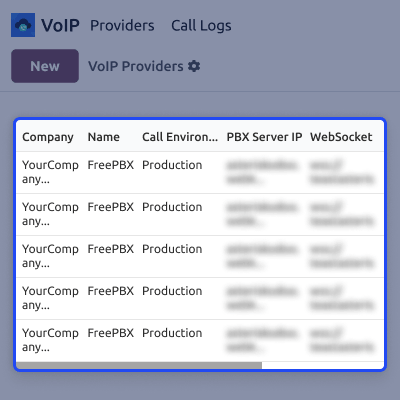
    • Enter the PBX server IP.
    • Set the WebSocket URL using WSS.
    • Choose the recording policy.
    • Connect FreePBX as a provider.
    • Save the configuration.
    VoIP Provider Setup

    VoIP Dialer Usage

    The module gives a built-in dialer so users can make calls inside the system without using any external tools.
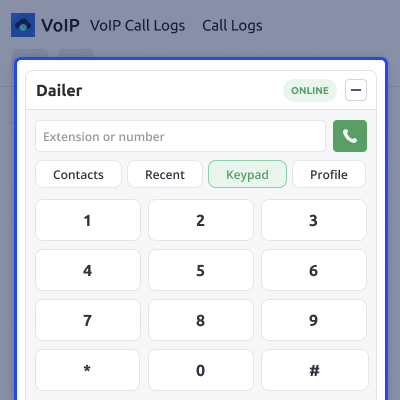
    • Open the dialer from the VoIP panel.
    • Enter a number or extension.
    • Use the keypad to dial.
    • View contacts and recent calls.
    • Switch between tabs easily.
    VoIP Dialer Usage

    Call Logs & Recording

    The module saves all call details automatically so users can track and manage communication easily.
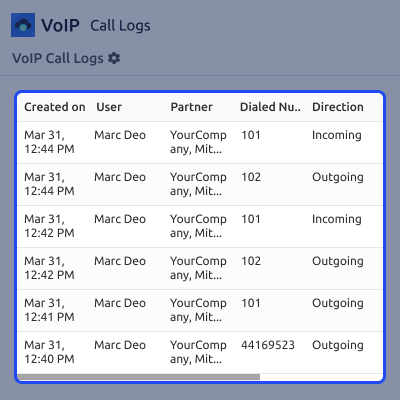
    • Open call logs from the VoIP menu.
    • Check call direction and status.
    • See call duration and partner details.
    • Open call recordings.
    • View recordings in Chatter.
    Call Logs & Recording

    Support

    For any query or issue, please create a support ticket here CREATE A TICKET HERE

    You may also check our other top-quality Odoo Modules.

    Specifications

    Product Version1.0.0
    Released2 days ago
    Last UpdatedApril 23, 2026 (1 day ago)
    Supported VersionsOdoo  15.x  16.x  17.x  18.x  19.x  
    Write a review

    FAQs

     Does Odoo Asterisk VoIP Connector support inbound and outbound calls?
    Yes, it supports both incoming and outgoing calls using Asterisk.
     Is FreePBX required for this module?
    Yes, FreePBX is used as a GUI to configure and manage Asterisk extensions.
     What type of extensions are used?
    PJSIP extensions are used for SIP communication.
     Are call recordings stored in the system?
    Yes, call recordings are attached to call logs and also available in Chatter.
     Is manual call logging required?
    No, all calls are logged automatically by the system.
     What protocol is used for connection?
    WebSocket Secure (WSS) is used for communication..
     Can multiple users use this module?
    Yes, each user can configure their own extension.
     Where can I view call history?
    Call history is available in VoIP Call Logs with details like status and duration.

    Move to Cloud Today

    AWS Free tier hosting for one year by amazon web services, for more details please visit AWS Free Tier.

    GCP Free tier hosting for one year with 300 credit points by google cloud platform, for more details please visit GCP Free Tier.

    Azure free tier hosting for one year with 25+ always free services, for more details please visit Azure Free Tier.

    In our default configuration we will provide tremendous configuration for your eCommerce Website which is fast to load and response.

    Default Configuration Details of Server

    • 1 GB RAM
    • 1 Core Processor
    • 30 GB Hard Disk
    • DB with 1 GB RAM and 1 Core Processor

    * Server Configuration may vary as per application requirements.

    Want to know more how exactly we are going to power up your eCommerce Website with Cloud to fasten up your store. Please visit the Cloudkul Services.

    Get Started with Cloud
    Not Available


