USD
  • EUR
  • INR
  • USD
Cart
Cart 0
  • You have no items in your shopping cart.
    Cart
    Cart 0
    • You have no items in your shopping cart.
    Hire a Developer
    ×
    Contact Us!
    Send Again
    Close
    Please Login to Write Your Review

    Odoo BPoint Payment Acquirer

    Odoo BPoint Payment Acquirer helps businesses accept secure card payments through BPOINT-hosted checkout with real-time updates and safe transaction management.


    • Accept BPOINT payments directly from website checkout pages

    • Secure hosted payment page by Commonwealth Bank

    • Support Visa, Mastercard, and other card payments

    • Real-time transaction status updates in backend records

    • Separate Sandbox and Production payment environments

    • Multi-currency payment support based on merchant setup

    • Automatic payment confirmation after successful transactions

    • Centralized payment monitoring and transaction management

    Screenshots
    Odoo BPoint Payment Acquirer Odoo BPoint Payment Acquirer Odoo BPoint Payment Acquirer Odoo BPoint Payment Acquirer Odoo BPoint Payment Acquirer Odoo BPoint Payment Acquirer Odoo BPoint Payment Acquirer Odoo BPoint Payment Acquirer Odoo BPoint Payment Acquirer
    Show More Hide All
    $69.00

    * Required Fields

    Add To Cart
    $69.00
    Configure and Buy
    • Description
    • Reviews
    • FAQ
    • Customers ()
    • Specifications
    • Cloud Hosting
    • Changelog

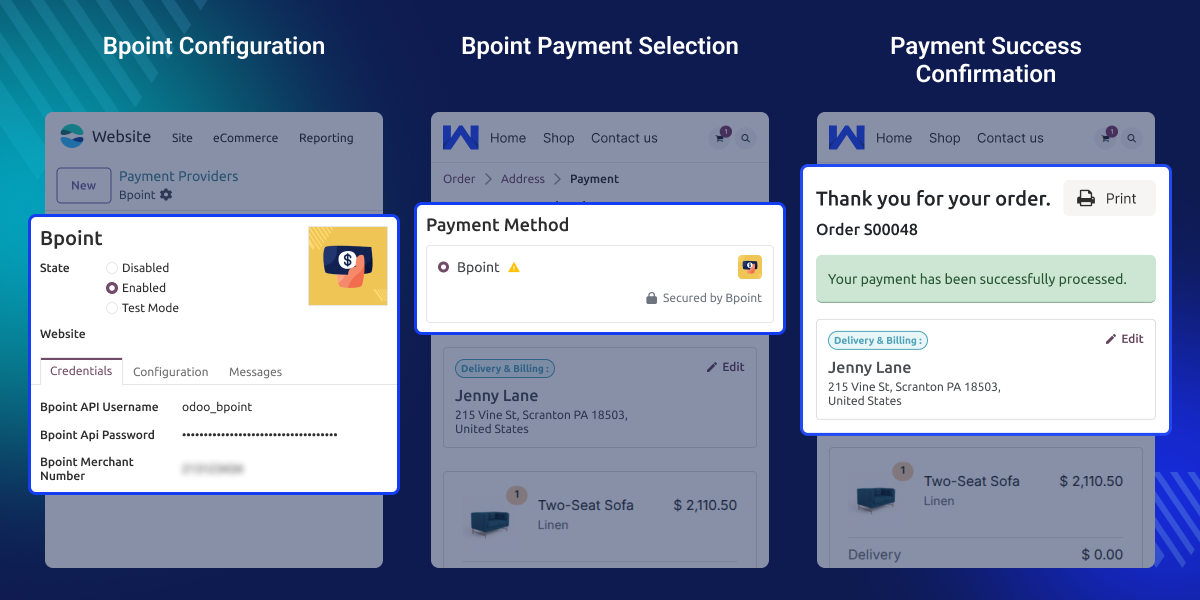
    Odoo BPoint Payment Acquirer helps businesses take safe online payments from their website checkout. When a customer pays, they go to a safe hosted payment page to finish the payment.

    The module lets customers pay by credit or debit card through BPOINT. They can use Visa, Mastercard, or other supported cards. They do not type their card details on your website; they do it on the safe page.

    Payment status updates on its own in the backend after each payment. You can see which payments are approved or pre-authorised from the payment section.

    The module has two separate modes, one for testing and one for live payments. You can test how payments work before you go live with real customers.

    Businesses can also take payments in different currencies. This depends on how your merchant account and payment facility are set up.

    Odoo BPoint Payment Acquirer makes checkout safer with a hosted payment page, auto payment confirmation, and secure data transfer between your site and BPOINT.
    Odoo BPoint Payment Acquirer

    Highlighted Features of Odoo BPoint Payment Acquirer

      BPOINT Checkout Option

    Customers can choose BPOINT as a payment method during the website checkout process.

      Credit and Debit Card Support

    Customers can pay using Visa, Mastercard, and other supported payment cards safely.

      Real-Time Transaction Updates

    Payment statuses update automatically after successful payment processing and transaction approval.

      Secure Payment Communication

    Payment information stays secure during communication between the website and BPOINT services.

      Centralized Payment Monitoring

    Businesses can track and manage payment transactions directly from backend payment records.

      Sandbox and Production Modes

    Separate testing and live environments help businesses validate payment workflows securely in Odoo BPoint Payment Acquirer.

    Why do we need Odoo BPoint Payment Acquirer?

    Many online stores still use basic payment methods or handle payments by hand. This makes payments slow and harder to keep track of. This module is built for real businesses where safe payments and a smooth checkout experience matter.

    Basic checkout tools may not have safe hosted payment pages or live payment updates. This can increase manual tasks and reduce customer confidence during online payments.

    Odoo BPoint Payment Acquirer helps businesses take safe online payments using a Commonwealth Bank-hosted payment page. It keeps payments secure and makes tracking them much easier.

    Use Cases

      Online Store Payments

    Customers can complete secure online card payments directly from the website checkout page.

      Secure Hosted Checkout

    Businesses can use Commonwealth Bank-hosted payment pages for secure transaction processing.

      Real-Time Payment Tracking

    Admins can monitor payment statuses and transaction updates directly from backend records.

      Multi-Currency Transactions

    Businesses can accept supported international payments based on merchant account configurations.

    Sandbox Environment Setup

    This helps businesses set up BPOINT safely for both test and live payments.
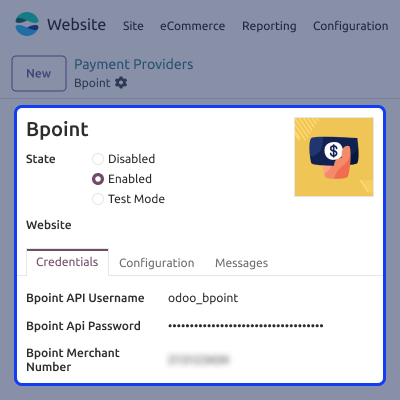
    • Add your merchant login details and account settings
    • Choose Test or Live payment mode
    • Turn on BPOINT at checkout
    • Keep payment data transfer safe
    • Manage all payment settings with ease
    Sandbox Environment Setup

    Secure Payment Checkout

    Customers go to a safe, hosted payment page to finish paying. This gives businesses a secure way to take online card payments.
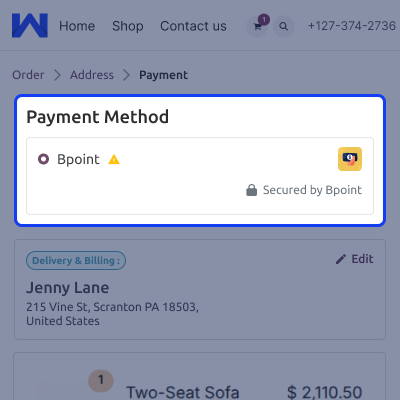
    • Pick BPOINT at checkout
    • Open the secure hosted payment page
    • Enter card details on the secure page
    • Return to the website after payment
    • Improve customer trust and payment security
    Secure Payment Checkout

    Real-Time Transaction Updates

    The module updates payment status on its own in the backend. This helps businesses track all payment activity with ease.
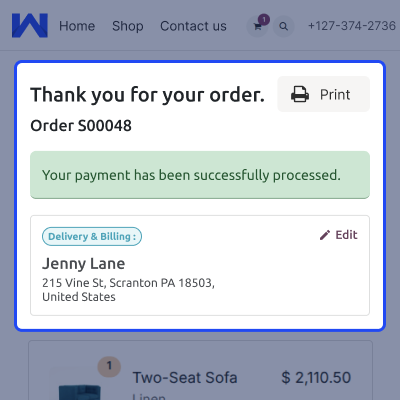
    • Payment status updates happen automatically
    • Shows the approved payment status
    • Shows pre-authorised payment status
    • Payment details sync automatically
    • Track all transactions in real time
    Real-Time Transaction Updates

    Backend Payment Management

    The module saves payment records on its own after each successful payment. This helps businesses manage payments more easily.
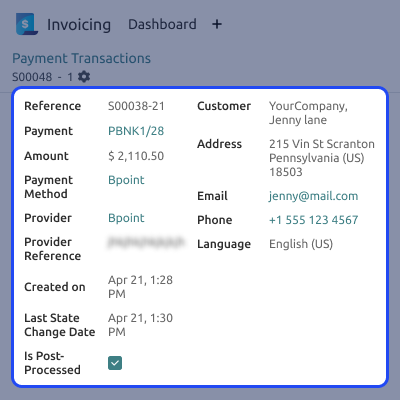
    • Payment records are created automatically
    • Payment references are stored securely
    • Track all payments from one place
    • View full transaction details easily
    • Make payment verification faster and simpler
    Backend Payment Management

    Support

    For any query or issue, please create a support ticket here CREATE A TICKET HERE

    You may also check our other top-quality Odoo Modules.

    Specifications

    Product Version1.0.0
    ReleasedToday
    CategoryOdoo AppsPayment
    Last UpdatedMay 26, 2026 (Today)
    Supported VersionsOdoo  16.x  17.x  18.x  19.x  
    Write a review

    FAQ’s

      What is Odoo BPoint Payment Acquirer?
    It helps businesses accept secure online payments through BPOINT-hosted payment pages.
     Which payment methods are supported?
    The module supports credit and debit card payments using Visa and Mastercard cards.
     Does the module support Sandbox and Production modes?
    Yes, businesses can use separate testing and live payment environments.
     Is customer card information stored on the website?
    No, customers enter payment details on secure Commonwealth Bank-hosted payment pages.
     Can businesses track payment statuses in real time?
    Yes, payment statuses update automatically inside backend payment transaction records.
     Does the module support multi-currency payments?
    Yes, multi-currency support depends on merchant account and payment facility settings.
     Are customers redirected automatically after payment?
    Yes, customers return automatically after successful payment confirmation and processing.
     Can businesses verify payment transactions from backend records?
    Yes, businesses can monitor and verify payment transactions directly from backend sections.

    Move to Cloud Today

    AWS Free tier hosting for one year by amazon web services, for more details please visit AWS Free Tier.

    GCP Free tier hosting for one year with 300 credit points by google cloud platform, for more details please visit GCP Free Tier.

    Azure free tier hosting for one year with 25+ always free services, for more details please visit Azure Free Tier.

    In our default configuration we will provide tremendous configuration for your eCommerce Website which is fast to load and response.

    Default Configuration Details of Server

    • 1 GB RAM
    • 1 Core Processor
    • 30 GB Hard Disk
    • DB with 1 GB RAM and 1 Core Processor

    * Server Configuration may vary as per application requirements.

    Want to know more how exactly we are going to power up your eCommerce Website with Cloud to fasten up your store. Please visit the Cloudkul Services.

    Get Started with Cloud
    Not Available


