USD
  • EUR
  • INR
  • USD
Cart
Cart 0
  • You have no items in your shopping cart.
    Cart
    Cart 0
    • You have no items in your shopping cart.
    Hire a Developer
    ×
    Contact Us!
    Send Again
    Close
    Please Login to Write Your Review

    Odoo Dachser Shipping Integration

    Odoo Dachser Shipping Integration connects Dachser shipping with the shipping process. It helps users get shipping rates, create shipments, print labels, and track deliveries.


    • Get Real-Time Shipping Rates From Dachser

    • Create And Print PDF Shipping Labels

    • Track Shipments Using Dachser Tracking Number

    • Support For Multiple Package Shipments

    • Easy Dachser Carrier Setup And Configuration


    Screenshots
    Odoo Dachser Shipping Integration Odoo Dachser Shipping Integration Odoo Dachser Shipping Integration Odoo Dachser Shipping Integration Odoo Dachser Shipping Integration Odoo Dachser Shipping Integration Odoo Dachser Shipping Integration Odoo Dachser Shipping Integration Odoo Dachser Shipping Integration
    Show More Hide All
    $149.00

    * Required Fields

    Add To Cart
    $149.00
    Configure and Buy
    • Description
    • Reviews
    • FAQ
    • Customers ()
    • Specifications
    • Cloud Hosting
    • Changelog

    Odoo Dachser Shipping Integration connects Dachser with the shipping process. It helps businesses manage shipments in an easy way.

    Users can get shipping rates from Dachser automatically. They can also create shipments and print shipping labels.

    The module also helps track shipments from delivery orders. This helps businesses handle shipments faster and with less effort.
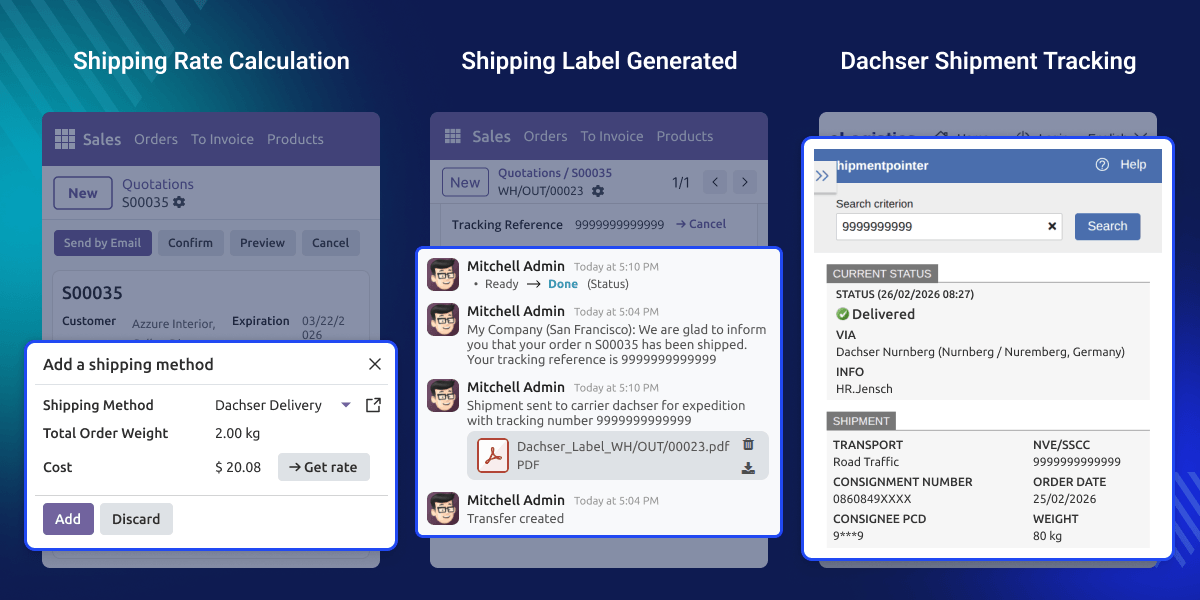
    Odoo Dachser Shipping Integration

    Why do we need an Odoo Dachser Shipping Integration?

    Odoo Dachser Shipping Integration lets a business ship orders with Dachser from Odoo. When shipping work is done by hand, it takes more time and can lead to errors in shipment or tracking data.

    A store with many daily orders needs to check the shipping rate and create a shipping label for each order.

    With this module, the shipping rate, shipment creation, label generation, and tracking are all managed directly from the delivery order in Odoo.

    Highlighted Features of Odoo Dachser Shipping Integration

    Automated Label Generation

    Odoo Dachser Shipping Integration creates shipping labels automatically in PDF format after delivery validation.

    Real-Time Shipping Rates

    The system fetches shipping rates automatically from the Dachser API during checkout.

    Shipment Tracking Access

    Each shipment creates a tracking number that opens the Dachser tracking page.

    Multiple Package Handling

    The system reads package details and creates shipments based on packaged products.

    Service Product Selection

    Admins can choose Dachser shipping services like targospeed, targofix, targoflex, or classicline.

    Flexible Carrier Configuration

    Admins can easily configure Dachser credentials, delivery terms, and shipping settings.

    Configure Dachser Carrier

    Odoo Dachser Shipping Integration lets admins add Dachser as a delivery carrier. All carrier settings can be managed from the shipping setup.
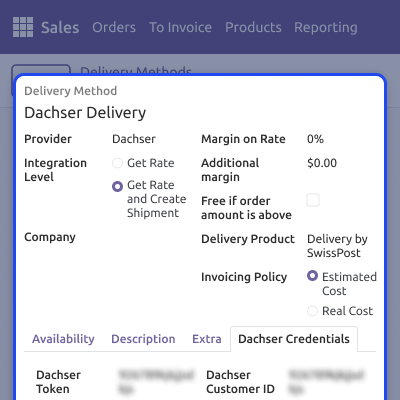
    • Open shipping methods in the Sales module
    • Select Dachser as the carrier
    • Enter Dachser Token and Customer ID
    • Choose the division and service product
    Configure Dachser Carrier

    Calculate Shipping Rates

    Shipping rates are fetched when the Dachser carrier is selected. The system requests the price from the Dachser API.
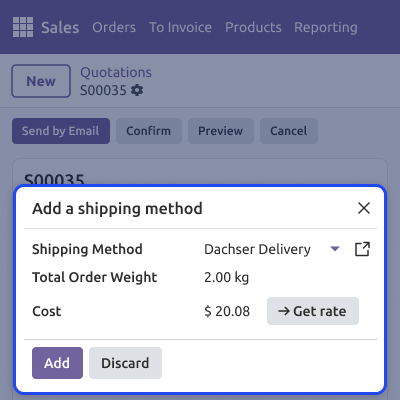
    • Select the Dachser carrier in the sales order
    • Click the Get Rate button
    • The system requests the shipping price
    • The rate appears in the order total
    Calculate Shipping Rates

    Create Shipments And Labels

    Shipments can be created from the delivery order. The system also generates the shipping label automatically.
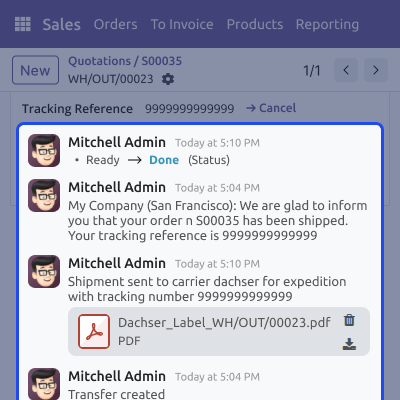
    • Confirm the sales order to create the delivery order
    • Pack products using Put in Pack
    • Validate the delivery order to create the shipment
    • PDF shipping label is generated automatically
    Create Shipments And Labels

    Track Dachser Shipments

    Each shipment gets a tracking number after creation. Users can open the tracking page directly.
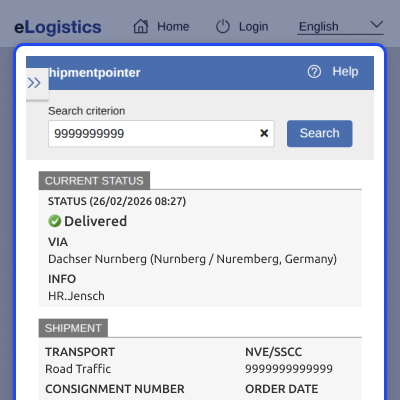
    • Tracking number generated automatically
    • Tracking stored in the delivery order
    • Click the tracking link
    • Open the Dachser tracking page
    Track Dachser Shipments

    Support

    For any ry or issue, please create a support ticket here CREATE A TICKET HERE

    You may also check our other top-quality Odoo Modules.

    Specifications

    Product Version1.0.0
    Released9 days ago
    CategoryOdoo AppsShipping
    Last UpdatedMarch 30, 2026 (9 days ago)
    Supported VersionsOdoo  18.x  19.x  
    Write a review

    FAQ’s

     What is Odoo Dachser Shipping Integration?
    Odoo Dachser Shipping Integration connects Dachser shipping services with the shipping workflow. It helps businesses create shipments, generate labels, and track deliveries easily.
     How are shipping rates calculated with Odoo Dachser Shipping Integration?
    The module sends a request to the Dachser API when the Dachser carrier is selected in the sales order. The shipping rate is calculated automatically based on shipment details.
     How are shipping labels generated in Odoo Dachser Shipping Integration?
    Shipping labels are created automatically in PDF format after validating the delivery order. The label is attached to the delivery order for download or printing.
     Can I track shipments using Odoo Dachser Shipping Integration?
    Yes, The module generates a tracking reference number after shipment creation. Clicking the tracking link opens the Dachser tracking page.
     Does Odoo Dachser Shipping Integration support multiple packages?
    Yes, Products can be packed using the Put in Pack option before validating the delivery order. The module reads package details during shipment creation.
     What credentials are required to configure Odoo Dachser Shipping Integration?
    You need the Dachser Token, Customer ID, and Branch ID to configure the Dachser shipping carrier.

    Move to Cloud Today

    AWS Free tier hosting for one year by amazon web services, for more details please visit AWS Free Tier.

    GCP Free tier hosting for one year with 300 credit points by google cloud platform, for more details please visit GCP Free Tier.

    Azure free tier hosting for one year with 25+ always free services, for more details please visit Azure Free Tier.

    In our default configuration we will provide tremendous configuration for your eCommerce Website which is fast to load and response.

    Default Configuration Details of Server

    • 1 GB RAM
    • 1 Core Processor
    • 30 GB Hard Disk
    • DB with 1 GB RAM and 1 Core Processor

    * Server Configuration may vary as per application requirements.

    Want to know more how exactly we are going to power up your eCommerce Website with Cloud to fasten up your store. Please visit the Cloudkul Services.

    Get Started with Cloud
    Not Available


