USD
  • EUR
  • INR
  • USD
Cart
Cart 0
  • You have no items in your shopping cart.
    Cart
    Cart 0
    • You have no items in your shopping cart.
    Hire a Developer
    ×
    Contact Us!
    Send Again
    Close
    Please Login to Write Your Review

    Odoo Direct Refund from Braintree

    Odoo Direct Refund from Braintree allows refunds to be processed directly from invoices in Odoo. It supports credit note validation, full or partial refunds, and complete transaction traceability.


    • Refund Braintree payments directly from invoices.

    • Mandatory credit note validation for every refund.

    • Full and partial refund flexibility for customers.

    • Track refunds with linked child transactions.

    • Each refund requires a reason added through a wizard.

    • Secure, accurate, and reliable refund processing.

    Screenshots
    Odoo Direct Refund from Braintree Odoo Direct Refund from Braintree Odoo Direct Refund from Braintree Odoo Direct Refund from Braintree Odoo Direct Refund from Braintree Odoo Direct Refund from Braintree
    Show More Hide All
    $209.00

    * Required Fields

    Add To Cart
    $209.00
    Configure and Buy
    • Description
    • Reviews
    • FAQ
    • Customers ()
    • Specifications
    • Cloud Hosting
    • Changelog

    Odoo Direct Refund from Braintree lets you handle refunds quickly and easily within Odoo. You no longer need to switch between Odoo and Braintree. Now, you can issue refunds directly from the invoice screen in just a few clicks.

    Each refund includes a credit note for accurate store records. The module works for both full and partial refunds, making it simple to handle any customer request without mistakes or confusion.

    All refunds get logged as child transactions, with clear logs for each one. This module keeps refunds easy and reliable, saving time for your team and building customer trust.
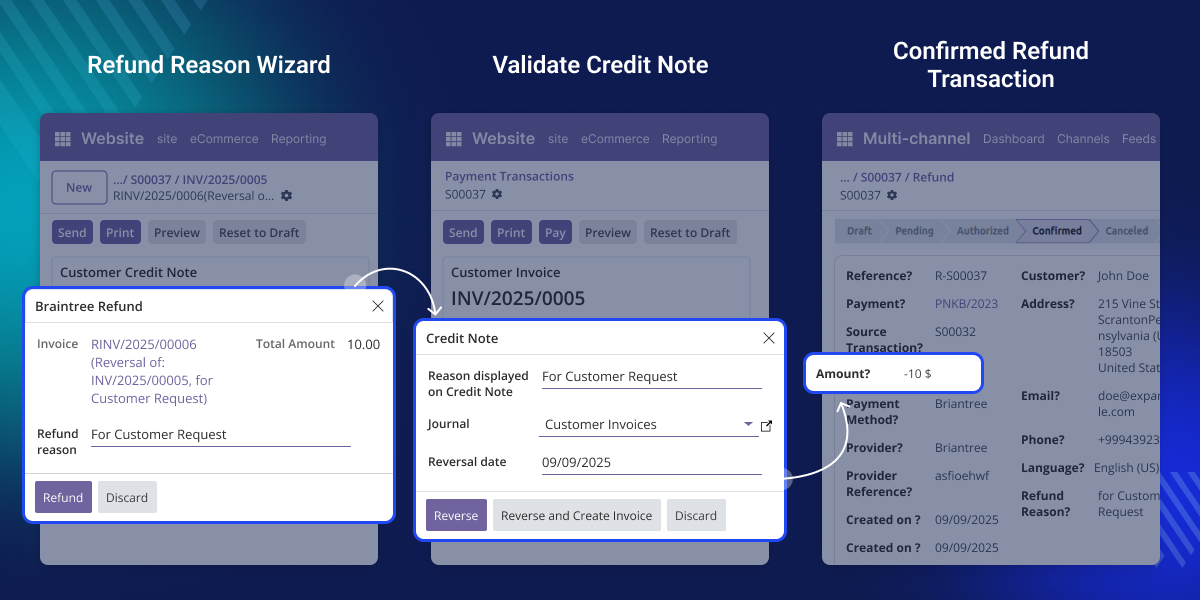
    Odoo Direct Refund from Braintree

    Why do we need Odoo Direct Refund from Braintree?

    Refunds outside Odoo often take more time and effort. Extra manual steps can lead to errors and slow down the process. This module lets you process refunds quickly, all within Odoo.

    For example, if a customer needs a partial refund on a cancelled order, it allows you to add a credit note and give exact refund amount directly from invoice.

    The refund is processed instantly, tied to original payment, and stored in the system. It helps to keep payment records accurate and prevents errors. Both the customer and your team can see the outcome, making the process smooth and reliable.

    Prerequisites for using Odoo Direct Refund from Braintree

    This module works in conjunction with the following module:

    Odoo Website Braintree Payment Acquirer

    You need to install the module mentioned above to use Odoo Direct Refund from Braintree.

    Highlighted Features of Odoo Direct Refund from Braintree

    Refund directly from Invoice

    Start refunds quickly from invoices or payments without leaving Odoo. Everything is done directly on Invoice screen in just a few steps.

    Mandatory Credit Note

    Every refund needs a confirmed credit note. It ensures your records are accurate and prevents mistakes.

    Full or Partial Refunds

    Refund amount according to customer's need. You can also issue multiple partial refunds until full payment is covered.

    Transaction Traceability

    Each refund connects with its original payment. It keeps every reversal simple to track and review.

    Check Refund Status

    View the status of each refund in real time. See whether it succeeded, failed, or is still pending.

    Simplified Refund Handling

    In Odoo Direct Refund from Braintree module, the refunds can be easily initiated from your invoice view without changing platforms.
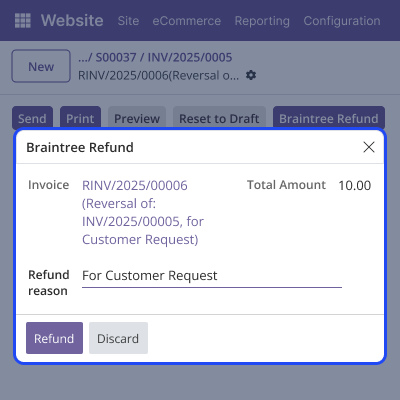
    • Enter a refund reason through the wizard interface without extra steps.
    • Direct refund button is available on all eligible invoices.
    • Refund reason links automatically to Invoice or payment.
    • Refund transaction status updates to Confirmed once it is processed successfully.
    • Refunds are processed faster, making the process quick and reliable.
    Simplified Refund Handling

    Credit Note Validation

    Ensure proper accounting by linking every refund with a credit note.
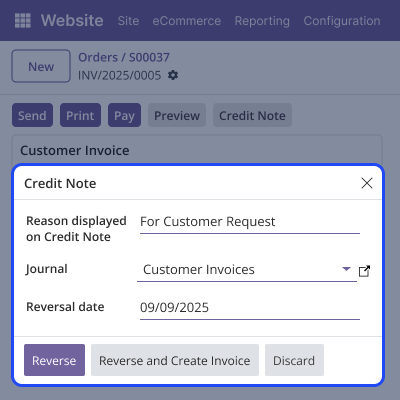
    • Refunds cannot process without entering a credit note.
    • Wizard ensures Credit note matches the correct invoice.
    • Every refund includes a reason for proper tracking.
    • Linking the credit note to each refund helps prevent mistakes.
    • All refund reasons are stored for easy future reference.
    Credit Note Validation

    Full and Partial Refunds

    Handle customer cases with flexible refund options.
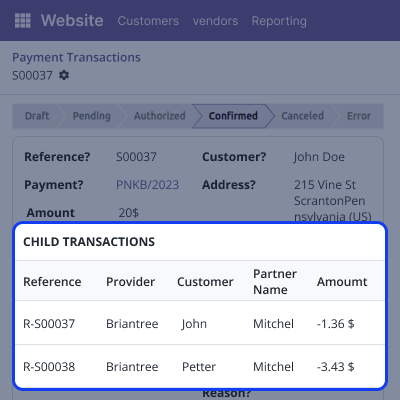
    • Multiple partial refunds allowed until full amount is refunded.
    • Partial refunds noted under original payment transaction.
    • Process full payment refunds instantly in one step.
    • Enter Refund reason using the dedicated wizard window.
    • Prevent mistakes by avoiding over-refunding any transaction.
    Full and Partial Refunds

    Complete Refund Traceability

    Get clear visibility of all refund transactions in one place.
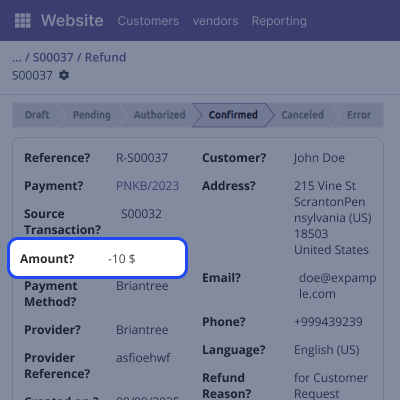
    • Shows refund date and refunded amount clearly.
    • Refunds are linked as child transactions to original payments.
    • Displays all refund transactions in a clear history list.
    • Makes it easy to view all refund activities.
    • Keeps refund operations transparent and easy to understand.
    Complete Refund Traceability

    Support

    For any query or issue, please create a support ticket here CREATE A TICKET HERE

    You may also check our other top-quality Odoo Modules.

    Specifications

    Product Version1.0.0
    Released1 year ago
    CategoryOdoo AppsPayment
    Last UpdatedOctober 8, 2025 (4 months ago)
    Supported Versions15.x  16.x  17.x  18.x  19.x  
    Write a review

    Frequently Asked Questions

     Can I issue a refund without a credit note?
    No, every refund needs a confirmed credit note to process correctly.
     
     How do I refund a specific invoice?
    Simply select invoice in the wizard and enter the refund reason.
     
     Can I issue multiple partial refunds for one payment?
    Yes, Odoo Direct Refund from Braintree allows to process partial refunds until the total paid amount is refunded.
     
     How do I enter a reason for each refund?
    Enter the refund reason through the wizard during refund processing.
     
     Are refunds linked to the original invoice or payment?
    Yes, every refund creates a child record under the original payment.
     Can I see all refund transactions in one place?
    Yes, our module shows a clear history of all refund transactions.
     
     How do I know if a refund was successful?
    Yes, Refund transaction status updates to Confirmed once it is processed successfully.

    Move to Cloud Today

    AWS Free tier hosting for one year by amazon web services, for more details please visit AWS Free Tier.

    GCP Free tier hosting for one year with 300 credit points by google cloud platform, for more details please visit GCP Free Tier.

    Azure free tier hosting for one year with 25+ always free services, for more details please visit Azure Free Tier.

    In our default configuration we will provide tremendous configuration for your eCommerce Website which is fast to load and response.

    Default Configuration Details of Server

    • 1 GB RAM
    • 1 Core Processor
    • 30 GB Hard Disk
    • DB with 1 GB RAM and 1 Core Processor

    * Server Configuration may vary as per application requirements.

    Want to know more how exactly we are going to power up your eCommerce Website with Cloud to fasten up your store. Please visit the Cloudkul Services.

    Get Started with Cloud
    Not Available


