USD
  • EUR
  • INR
  • USD
Cart
Cart 0
  • You have no items in your shopping cart.
    Cart
    Cart 0
    • You have no items in your shopping cart.
    Hire a Developer
    ×
    Contact Us!
    Send Again
    Close
    Please Login to Write Your Review

    Odoo Direct Refund From PayPlug


    Odoo Direct Refund from Payplug allows you to process Payplug payment refunds directly within Odoo. It automatically creates a credit note and links it to the correct record, making refunds easy and organized.


    • Instantly create credit notes for Payplug refunds.

    • A pop-up prompts for a reason before processing the refund.

    • Associate refunds with transactions for easy tracking and record-keeping.

    • Refund Payplug payments with a single click.

    • Ensure a smooth and streamlined refund process in Odoo.

    • Maintain accurate records and error-free refund records.

    • No extra tools are required, as refunds are processed automatically.


    Screenshots
    Odoo Direct Refund From PayPlug Odoo Direct Refund From PayPlug Odoo Direct Refund From PayPlug Odoo Direct Refund From PayPlug Odoo Direct Refund From PayPlug Odoo Direct Refund From PayPlug Odoo Direct Refund From PayPlug
    Show More Hide All
    $58.00

    * Required Fields

    Add To Cart
    $58.00
    Configure and Buy
    • Description
    • Reviews
    • FAQ
    • Customers ()
    • Specifications
    • Cloud Hosting
    • Changelog

    The Odoo Direct Refund for Payplug module enables users to refund Payplug payments directly within Odoo. It simplifies the refund process, making it quicker and more efficient.

    Users are guided to enter a reason for the refund through an easy pop-up, which helps reduce mistakes. It ensures refunds are processed more accurately.

    The module also maintains clear and organized accounting by linking refunds to their original payments. It makes tracking and managing transactions much easier.
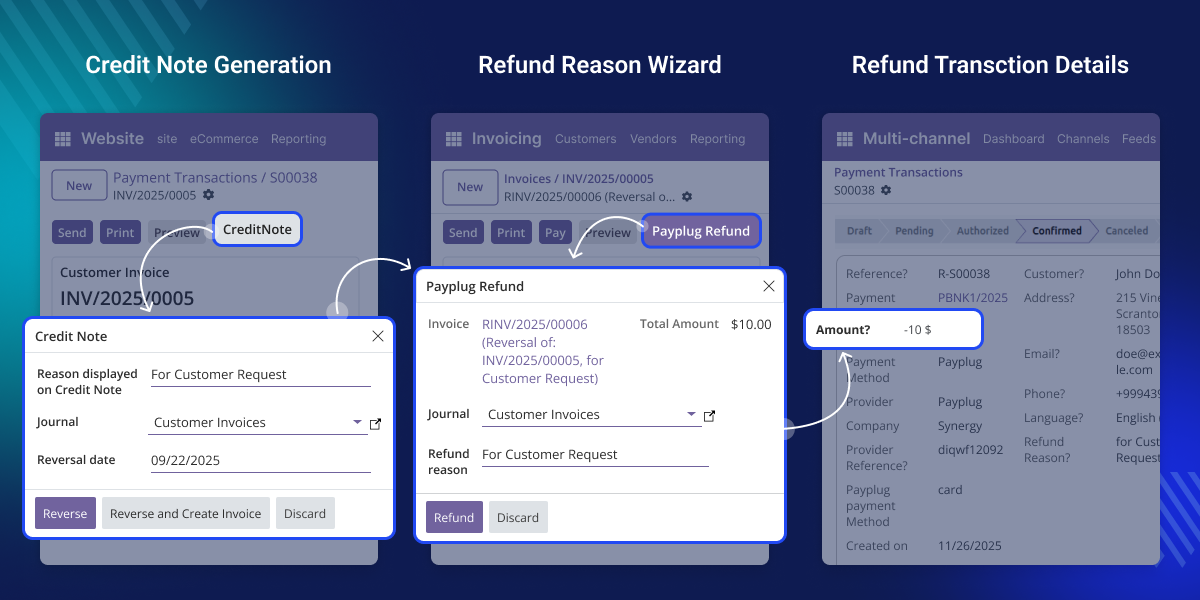
    Odoo Direct Refund for Payplug

    Why Do We Need Odoo Direct Refund for Payplug

    A retail company using Direct Refund from PayPlug for customer payments can easily handle return requests. Refunds are processed instantly with just one click.

    A credit note is generated automatically, with the refund recorded as a child transaction linked to the original payment. By prompting for the reason through a pop-up, it promotes transparency.

    This module helps track transaction history and saves time. It builds customer trust by making refunds simple and easily traceable within Odoo.

    Prerequisites for using Odoo Direct Refund from PayPlug

    This module is designed to be used alongside the following module:

    Odoo PayPlug Payment Connect

    To use Odoo Direct Refund From PayPlug, you must install the module listed above.

    Highlighted Features of Odoo Direct Refund From PayPlug

     Easy Refund Pop-up

    The refund pop-up prompts collect the reason for the refund, ensuring records are clear and easy to track within Payplug.

     Linked Refund Tracking

    This module quickly generates a credit note when processing a Payplug refund. A credit note is linked to the original invoice, ensuring accurate records.

     Simple One-Click Refunds

    Refunds can be completed with just a single click, saving time and making Payplug refunds fast and effortless.

     Fast Credit Note Creation

    This module quickly generates a credit note when processing a Payplug refund. A credit note is linked to the original invoice, ensuring accurate records.

    Pop-up guided refund management.

    When processing a refund, the module displays a pop-up asking for the reason behind the refund. It ensures clarity and keeps the Payplug refund process organized.
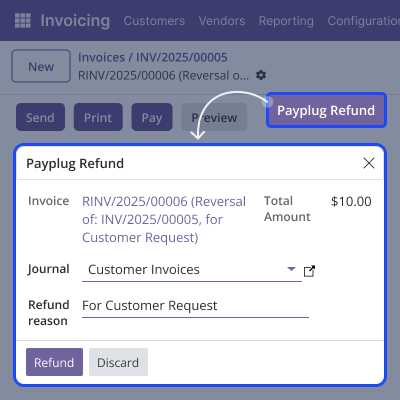
    • Prompt for a reason before completing the refund.
    • Saves the reason with the refund record.
    • Helps the team track why the refund was made.
    • Minimizes confusion in accounting.
    Pop-up guided refund management.

    Credit Note Generation

    When a refund is processed, a credit note is generated and connected to the original invoice. It speeds up the refund process, saves time, and reduces errors.
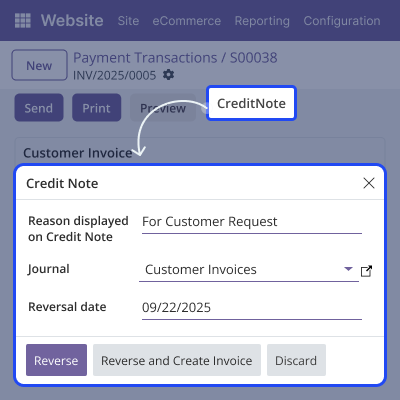
    • Credit note linked to the original invoice.
    • No additional tool or app required.
    • Records are updated automatically.
    • Applies to all Payplug payments.
    Credit Note Generation

    Linked Child Transaction

    Each refund is linked to the original transaction. Odoo Direct Refund from Payplug helps keep records neat and makes it easy to follow the history of a sale and its refund.easily trace the history of any sale and its refund.
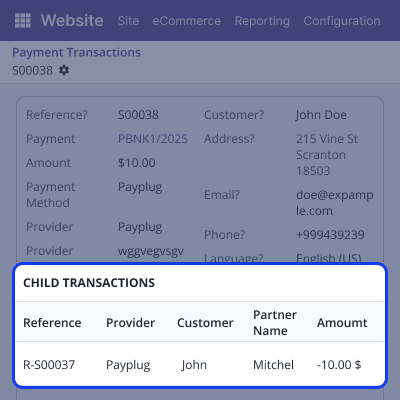
    • The refund shows up as a smaller transaction under the main one.
    • Makes it simple to see the full transaction history.
    • Helps connect related actions together.
    • Keeps records clear and easy to understand.
    Linked Child Transaction

    Support

    For any query or issue, please create a support ticket here CREATE A TICKET HERE

    You may also check our other top-quality Odoo Modules.

    Specifications

    Product Version
    Released3 months ago
    CategoryOdoo AppsPayment
    Last UpdatedJanuary 22, 2026 (1 month ago)
    Supported VersionsOdoo  18.x  19.x  
    Write a review

    FAQs

     How do I access the refund option for PayPlug payments?
    The refund option is accessible on the Odoo invoice page for orders paid via PayPlug with just a single click.
     Can I cancel a refund after generating the credit note?
    No, once a credit note is created and posted, it follows Odoo’s standard workflow and cannot be canceled.
     What happens if I forget to enter a reason in the pop-up?
    A reason must be provided before the refund is processed. It ensures your records remain accurate and complete.
     Are refunds tracked in accounting reports?
    Yes, all refunds and credit notes are recorded and visible in your Odoo financial reports.
     Can this module work without PayPlug Payment Integration?
    No, this module is crafted to work exclusively with PayPlug Payment in Odoo.

    Move to Cloud Today

    AWS Free tier hosting for one year by amazon web services, for more details please visit AWS Free Tier.

    GCP Free tier hosting for one year with 300 credit points by google cloud platform, for more details please visit GCP Free Tier.

    Azure free tier hosting for one year with 25+ always free services, for more details please visit Azure Free Tier.

    In our default configuration we will provide tremendous configuration for your eCommerce Website which is fast to load and response.

    Default Configuration Details of Server

    • 1 GB RAM
    • 1 Core Processor
    • 30 GB Hard Disk
    • DB with 1 GB RAM and 1 Core Processor

    * Server Configuration may vary as per application requirements.

    Want to know more how exactly we are going to power up your eCommerce Website with Cloud to fasten up your store. Please visit the Cloudkul Services.

    Get Started with Cloud
    Not Available


