Send Again
Close
Odoo Docx Report Builder streamlines the creation of docx reports in Odoo by allowing users to upload custom docx templates in their desired format.
This flexibility allows users to easily create custom reports for sales orders, quotations, invoices, and more, in any format they need for generating DOCX reports. he module supports multiple languages, meaning users can upload docx templates in different languages for localized reports.

Odoo Docx Report Builder is essential for businesses that need to create customizable reports in docx format. It allows them to upload templates in their desired language and format.
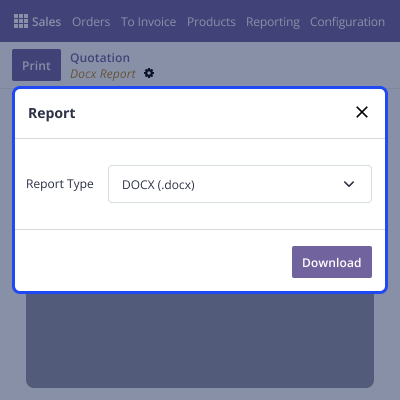
Once the docx template is uploaded, they can easily generate reports of sale orders, quotations, and invoices in the desired Docx format. Users can replace the template with a new version or delete it when necessary, providing control over the templates used for reporting.
Odoo Docx Report Builder makes it easy for users to create and organize reports, saving their time and effort.
Users can upload their docx templates to create Custom Reports in Odoo in the way they want.
Users can upload templates in different languages, so reports can be created in the language they need.
Users can easily download, change, or delete your templates whenever they want, giving them full control.
In Odoo Report Builder, businesses can upload docx templates in their desired format. The process is simple, and the system supports template replacement and deletion.
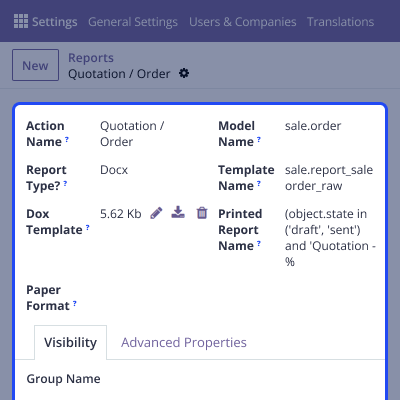
Odoo Docx Report Builder simplifies the creation of Docx reports for sales orders, quotations, invoices, etc, allowing users to generate reports in their preferred format directly within Odoo.
For any query or issue please create a support ticket here CREATE A TICKET HERE
You may also check our other top-quality Odoo Modules.
Detailed technical features and requirements to help you understand the module’s capabilities and ensure smooth integration with your system.
Detailed technical features and requirements to help you understand the module’s capabilities and ensure smooth integration with your system.
We’re partnered with top-tier, trusted providers!
Want to know more how exactly we are going to power up your eCommerce Website with Cloud to fasten up your store
* Server Configuration may vary as per application requirements.



