USD
  • EUR
  • INR
  • USD
Cart
Cart 0
  • You have no items in your shopping cart.
    Odoo Apps Extensions
    Cart
    Cart 0
    • You have no items in your shopping cart.
    Hire a Developer
    ×
    Contact Us!
    Send Again
    Close
    Please Login to Write Your Review
    Odoo DPD Germany Shipping Integration

    Odoo DPD Germany Shipping Integration

    x
    Free

    * Required Fields

    $149.00
    Add To Cart

    Odoo DPD Germany Shipping Integration connects Odoo with DPD Germany to calculate shipping charges using rule-based pricing, create shipments, generate shipping labels, and track deliveries from one place.


    • Configure your DPD Germany account from the Odoo backend.

    • Create rule-based pricing with different conditions.

    • Calculate shipping charges automatically.

    • Create shipments directly from Delivery Orders.

    • Generate downloadable PDF shipping labels.

    • Track shipment status from the Delivery Order.

    • Configure package type, weight, and delivery settings.

    • Manage shipping operations without leaving Odoo.

    • Reduce manual shipping tasks and improve accuracy.

    • Process deliveries faster with an organized shipping workflow.


    Odoo DPD Germany Shipping Integration
    Odoo DPD Germany Shipping Integration
    $149.00
    Odoo Silver Partner
    Odoo Functional Certified Experts
    Check How It Works
    $149.00
    Configure and Buy
    X
    • Description
    • Reviews
    • FAQ
    • Customers ()
    • Specifications
    • Cloud Hosting
    • Changelog

    Managing shipping by hand takes time and can lead to mistakes. Odoo DPD Germany Shipping Integration links Odoo with DPD Germany to make shipping easier. Set up your DPD Germany account from the Odoo backend. Add your account details and delivery settings in one place. This keeps your shipping setup simple and organized.

    Create pricing rules with different conditions to calculate shipping charges automatically. This module applies the correct shipping charges for each order. After you confirm a sales order, create a shipment from the Delivery Order. Add the package details, complete the shipment, and download the PDF shipping label.

    Use the Tracking button in the Delivery Order to check the latest shipment status. You can track deliveries without opening the DPD Germany portal. You can also manage package type, shipment weight, and units of measure. This helps you prepare shipments based on your business needs.

    Whether you process a few shipments or many orders every day, this module helps save time, reduce manual work, and keep your shipping process simple.
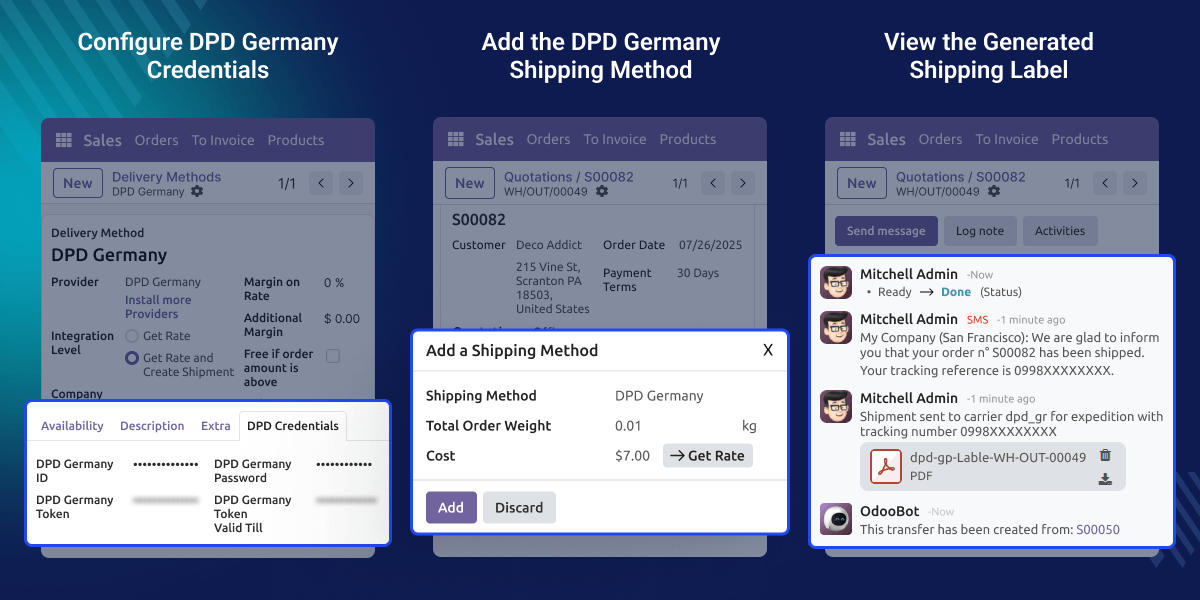
    Odoo DPD Germany Shipping Integration

    Highlighted Features of Odoo DPD Germany Shipping Integration

      Rule-Based Pricing

    Create simple pricing rules with different conditions. This module applies the right shipping charges for each order.

      Shipment Creation & Shipping Labels

    Create shipments from the Delivery Order after confirming a sales order. Get a PDF shipping label ready to download with every shipment.

      Real-Time Shipment Tracking

    Track shipments from the Delivery Order with the Tracking button. Check the latest shipment status without opening the DPD Germany portal.

      Flexible Delivery & Package Management

    Set the package type, shipment weight, units, and delivery settings in Odoo. Prepare shipments that match your business needs.

    Why Do We Need This Module?

    Managing shipping by hand takes time and can lead to incorrect shipping charges. Businesses need a simple way to create shipments, generate shipping labels, and track deliveries from one place.

    Odoo does not connect with DPD Germany by default. As a result, shipping tasks take more time and require extra manual work.

    Manual shipping charges can also lead to incorrect delivery costs. This module uses rule-based pricing to calculate shipping charges automatically and improve accuracy.

    Odoo DPD Germany Shipping Integration connects Odoo with DPD Germany to simplify shipping. Create shipments, generate shipping labels, and track deliveries without leaving Odoo.

    Whether you process a few shipments or many orders each day, this module helps save time, reduce manual work, and keep your shipping process simple.

    Use Cases

      E-Commerce Businesses

    Online stores can create shipments from the Delivery Order and generate labels in a few clicks. This helps save time and keeps order processing simple.

      Wholesale & Distribution Businesses

    Businesses handling bulk orders can use rule-based pricing to calculate shipping charges. This helps reduce manual work and keeps delivery charges accurate.

      High-Volume Shipping Operations

    Businesses processing a large number of shipments can manage package details, track deliveries, and monitor shipping activities from one place. This helps save time and improves overall shipping efficiency.

    DPD Germany Configuration

    Connect Odoo with your DPD Germany account to simplify shipping management. Keep your shipping configuration organized for smooth order processing.
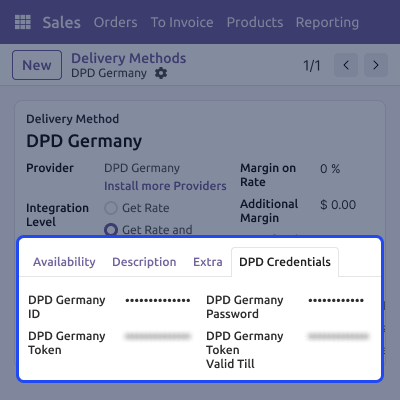
    • Configure your DPD Germany account with the required details.
    • Manage delivery settings from a single screen.
    • Link Odoo with your DPD Germany shipping account.
    • Save the configuration to start shipping operations.
    DPD Germany Configuration

    Rule-Based Pricing

    Manage shipping charges with flexible pricing rules that fit your business needs. This helps save time, reduce manual work, and improve pricing accuracy.
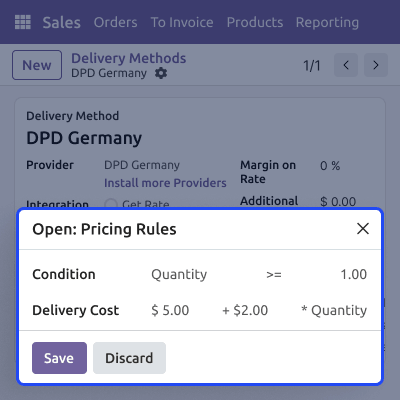
    • Set up pricing rules with simple conditions.
    • Add different shipping charges for each rule.
    • Apply the right shipping charges automatically.
    • Get the correct shipping charges for every order
    Rule-Based Pricing

    Shipment Processing

    Manage your daily shipping from one place inside Odoo. This helps save time, reduce extra work, and keep every shipment organized.
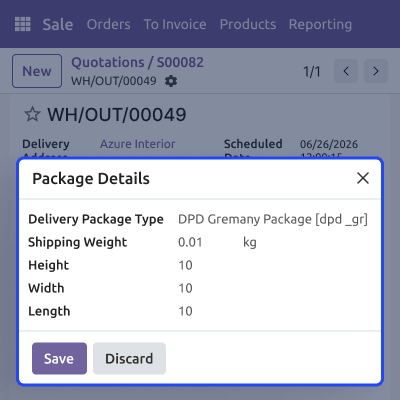
    • Create shipments from the Delivery Order.
    • Add package details before creating a shipment.
    • Generate PDF shipping labels automatically.
    • Complete the shipment in just a few steps.
    Shipment Processing

    Shipment Tracking & Label Management

    Keep all your shipping information in one place for easy access. This helps you stay updated, reduce manual work, and manage daily deliveries with ease.
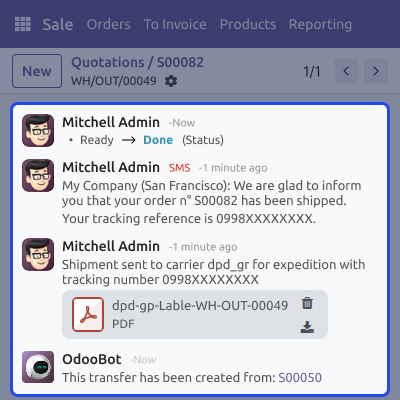
    • Track shipments from the Delivery Order.
    • Check the latest shipment status.
    • Download shipping labels as PDF files.
    • View shipment details in one place.
    Shipment Tracking & Label Management

    Support

    For any query or issue, please create a support ticket here CREATE A TICKET HERE

    You may also check our other top-quality Odoo Modules.

    Specifications

    Product Version1.0.0
    Released1 month ago
    CategoryOdoo AppsShipping
    Last UpdatedJuly 16, 2026 (1 month ago)
    Supported VersionsOdoo  19.x  

    Ratings

    We'd love to hear your thoughts! Share your feedback and help us craft an even better experience tailored just for you.

    Write a review

    FAQ’s

     What is Odoo DPD Germany Shipping Integration?
    It links Odoo with DPD Germany. You can create shipments, generate shipping labels, track deliveries, and manage shipping from one place.
      How do I set up Odoo DPD Germany Shipping Integration?
    Open the DPD Germany delivery method. Add your account details, choose your delivery settings, and save your changes to connect your account.
     Does this module support rule-based pricing?
    Yes, Create simple pricing rules with different conditions. This module picks the right rule and applies the correct shipping charges automatically.
     How are shipping charges calculated?
    This module uses the pricing rules you create. It checks the matching rule and applies the correct shipping charges to your order.
      How do I create shipments in Odoo?
    Confirm the sales order and open the Delivery Order. Complete the shipment to send the details to your DPD Germany account.
     Does this module create shipping labels automatically?
    Yes, This module creates a shipping label after each shipment. You can download the PDF label from the Delivery Order.
     Can I track shipments directly from Odoo?
    Yes, Open the Delivery Order and click the Tracking button. You can check the latest shipment status without opening the DPD Germany portal.
     Can I add package details before creating a shipment?
    Yes, Select the package type, enter the shipment weight, and add other package details before you create the shipment.

    Specification

    Detailed technical features and requirements to help you understand the module’s capabilities and ensure smooth integration with your system.

    Cloud Hosting

    Detailed technical features and requirements to help you understand the module’s capabilities and ensure smooth integration with your system.

    Default Configuration Details of Server

    1 GB
    RAM
    1 Core
    Processor
    30 GB
    Hard Disk
    1 GB RAM & 1 Core Processor
    Database

    Want to know more how exactly we are going to power up your eCommerce Website with Cloud to fasten up your store

    * Server Configuration may vary as per application requirements.

    Change Logs

    Not Available


