USD
  • EUR
  • INR
  • USD
Cart
Cart 0
  • You have no items in your shopping cart.
    Cart
    Cart 0
    • You have no items in your shopping cart.
    Hire a Developer
    ×
    Contact Us!
    Send Again
    Close
    Please Login to Write Your Review

    Odoo Dynamic Field Value Generator

    Odoo Dynamic Field Value Generator lets administrators set rules that fill in field values automatically. This makes managing data easier and cuts down on the amount of work that needs to be done by hand.


    • Auto-fill field values based on custom rules.

    • Use filters (domains) to target specific records.

    • Support for bulk and single record updates.

    • Add prefixes, suffixes, and separators to field values.

    • Choose text style: uppercase, lowercase, or capitalized.

    • Trigger updates instantly with server actions.

    • Access control for rule management (Admins/Managers only).

    Screenshots
    Odoo Dynamic Field Value Generator Odoo Dynamic Field Value Generator Odoo Dynamic Field Value Generator Odoo Dynamic Field Value Generator Odoo Dynamic Field Value Generator Odoo Dynamic Field Value Generator Odoo Dynamic Field Value Generator
    Show More Hide All
    $49.00

    * Required Fields

    Add To Cart
    $49.00
    Configure and Buy
    • Description
    • Reviews
    • FAQ
    • Customers ()
    • Specifications
    • Cloud Hosting
    • Changelog

    Odoo Dynamic Field Value Generator helps fill in fields automatically. The admin can set rules with filters to update the records they want.

    This reduces manual work and saves time. With a simple action, the tool can update one or many records at the same time.

    The module also lets you choose the text style (capital letters, small letters, or first letter capital), and add a prefix, suffix, or separator to change how the data looks.

    Odoo Dynamic Field Value Generator

    Why Do We Need Odoo Dynamic Field Value Generator?

    Manual data entry takes a lot of time, can cause errors, and is not efficient, especially when there is a lot of data or repeated fields to fill. This module fixes that problem by using rules to fill in field values automatically.

    It helps keep your data clean and consistent, improves accuracy, and saves time. With this, your team can focus on more important tasks while the system handles the routine and repetitive work.

    Highlighted Features of Odoo Dynamic Field Value Generator

    Custom Rule Configuration

    Odoo Dynamic Field Value Generator lets users make custom rules to fill in field values automatically for any model. This makes data entry faster and works well for your business needs.

    Server Action Execution

    Admins can run rules instantly using server actions directly from the model view. They can choose to apply the rules to a single record or multiple records at once. There’s no need to switch screens, making the process fast and easy.

    Flexible Field Formatting

    Admin can change how values look by adding text before or after them or using separators. They can also make the text all uppercase, all lowercase, or capitalized.

    Role-Based Access

    Only Managers and Admins can create and manage rules. Regular users have limited access and can only use the rules, not change them.

    Rule Management with Access Control

    Rule Management with Access Control

    Only managers or administrators have the ability to develop, modify, and oversee automation rules using Odoo Dynamic Field Value Generator. This prevents unwanted alterations and maintains the system safe.

    • Only authorized roles can create or manage rules.
    • Regular users can only view or apply rules.
    • Users without roles won’t see the module at all.

    Rule Logic with Domain Filtering

    Rule Logic with Domain Filtering

    Admins can set filters (called domains) to decide where rules apply. This makes sure values are generated only for matching records, improving accuracy. It keeps automation focused and prevents unwanted changes.
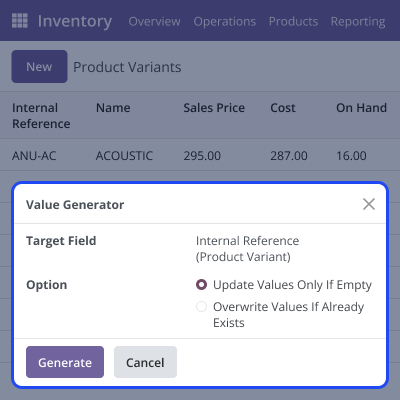
    • Target specific records using conditions.
    • Avoid accidental updates to wrong records.
    • Create rules once and use them in many places.

    Server Action Integration for Execution

    Server Action Integration for Execution

    Admins can use server actions to create values directly from models and run rules right away. Rules can be started manually for single or many records. This makes automation smooth and flexible.
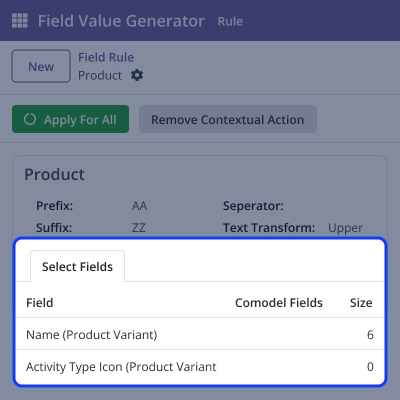
    • Apply to one or many records at once.
    • Adjust actions to fit different business needs.
    • Delivers seamless and versatile automation.

    Flexible Field Value Styling

     Flexible Field Value Styling

    Admins can change how generated values look in target fields with this module. They can add prefixes, suffixes, separators, and choose text style. This keeps data clear and easy to manage.

    • Add prefixes or suffixes to give context.
    • Choose uppercase, lowercase, or capitalized text.
    • Use separators to make values easier to read.

    Support

    For any query or issue, please create a support ticket here CREATE A TICKET HERE

    You may also check our other top-quality Odoo Modules.

    Specifications

    Product Version1.0.0
    Released8 months ago
    CategoryOdoo AppsMarketplace
    Last UpdatedDecember 8, 2025 (2 months ago)
    Supported VersionsOdoo  16.x  17.x  18.x  19.x  
    Write a review

    Frequently Asked Questions

     What is the Odoo Dynamic Field Value Generator used for?
    It helps automatically fill in field values based on set rules. This saves time and keeps your data accurate.
     Who can create or manage rules?
    Only users with Manager or Admin access can create and manage rules. Other users can see and use the rules but can't change them.
     Can I apply rules to many records at once?
    Yes, you can use the rules for one record or many at the same time. This makes it easy to update a lot of data quickly.
      How flexible are the field values that are created?
    You can change how the values look by adding things like prefixes, suffixes, separators, and choosing whether the text is in capital, small, or title case.
     Does the Odoo Dynamic Field Value Generator allow rules based on conditions?
    Yes, you can set rules to apply only to records that meet certain conditions. This way, the right data gets updated automatically.

    Move to Cloud Today

    AWS Free tier hosting for one year by amazon web services, for more details please visit AWS Free Tier.

    GCP Free tier hosting for one year with 300 credit points by google cloud platform, for more details please visit GCP Free Tier.

    Azure free tier hosting for one year with 25+ always free services, for more details please visit Azure Free Tier.

    In our default configuration we will provide tremendous configuration for your eCommerce Website which is fast to load and response.

    Default Configuration Details of Server

    • 1 GB RAM
    • 1 Core Processor
    • 30 GB Hard Disk
    • DB with 1 GB RAM and 1 Core Processor

    * Server Configuration may vary as per application requirements.

    Want to know more how exactly we are going to power up your eCommerce Website with Cloud to fasten up your store. Please visit the Cloudkul Services.

    Get Started with Cloud
    Not Available


