USD
  • EUR
  • INR
  • USD
Cart
Cart 0
  • You have no items in your shopping cart.
    Cart
    Cart 0
    • You have no items in your shopping cart.
    Hire a Developer
    ×
    Contact Us!
    Send Again
    Close
    Please Login to Write Your Review

    Odoo Dynamic Form View Manager


    Odoo Dynamic Form View Manager allows administrators to customize Odoo form views on the screen by adding buttons, fields, and tabs without requiring any coding.


    • Create dynamic actions for form changes.

    • Add buttons to support workflows.

    • Insert fields on form without coding.

    • Create tabs for better organization.

    • Manage all actions from one place.

    • Set custom behavior for each action.

    • Use secure access and permission control.

    Screenshots
    Odoo Dynamic Form View Manager Odoo Dynamic Form View Manager Odoo Dynamic Form View Manager Odoo Dynamic Form View Manager Odoo Dynamic Form View Manager Odoo Dynamic Form View Manager Odoo Dynamic Form View Manager
    Show More Hide All
    $149.00

    * Required Fields

    Add To Cart
    $149.00
    Configure and Buy
    • Description
    • Reviews
    • FAQ
    • Customers ()
    • Specifications
    • Cloud Hosting
    • Changelog

    Odoo Dynamic Form View Manager is a powerful module that lets administrators customize form views without writing any code.

    It helps users add buttons, fields, and tabs directly from the UI, helping businesses to create simple or advanced workflows quickly.

    Odoo Dynamic Form View Manager centralizes all dynamic actions in one place. This makes it easy to create, update, or manage the add-ons added to any form.

    The module reduces the need for XML edits and offers full flexibility through a complete no-code setup within Odoo.
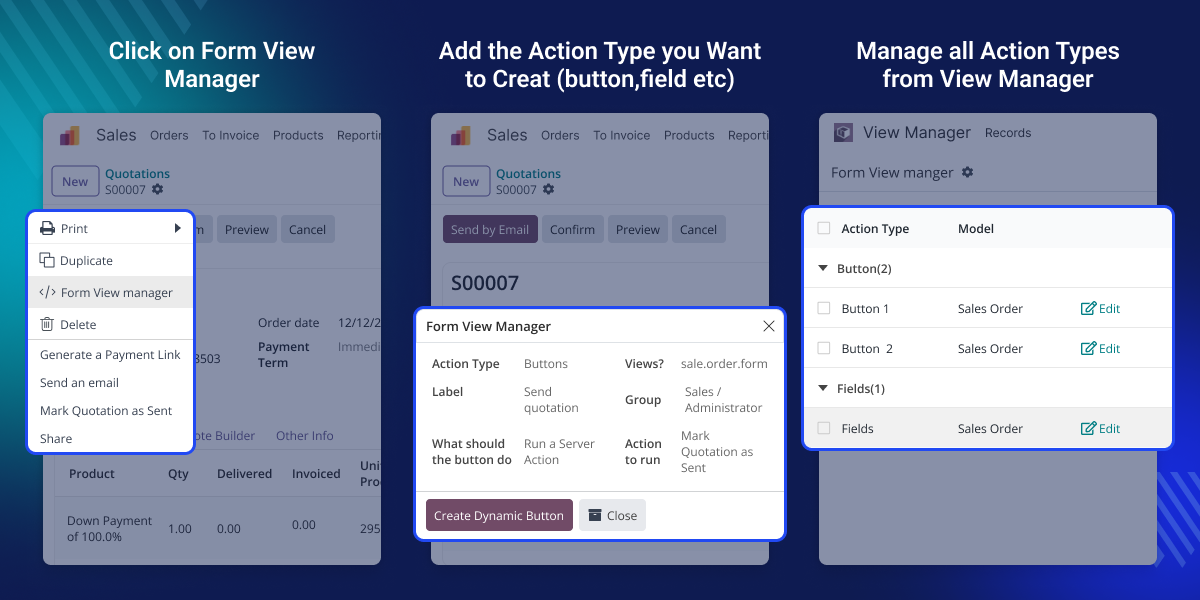
    Odoo Dynamic Form View Manager

    Why Do We Need Odoo Dynamic Form View Manager?

    Odoo Dynamic Form View Manager is useful because many Odoo customizations normally need XML coding.

    Teams often need quick changes on the screen but cannot rely on developers every time. This module lets administrators add workflows, move fields, or adjust forms within minutes.

    For example, a manager can add a “Request Approval” button, connect it to a server action, and allow only selected users to see it.

    Another example is adding new tabs to show information more clearly. HR teams can create tabs on employee forms for certificates, policy files, or internal notes.

    Highlighted Features of Odoo Dynamic Form View Manager

     Easy Button Creation

    Create your own buttons on any Odoo form with a simple setup, helping you trigger actions or workflows instantly.

     Dynamic Field Insertion

    Add new fields anywhere on a form without coding, so you can capture extra information whenever needed.

     Custom Notebook Tabs

    Make new tabs inside forms to organize data neatly and keep related information easy to find.

     Central Action Management

    See and manage all your custom buttons, fields, and actions from one place for faster control and updates.

    Dynamic Action Creation

    Odoo Dynamic Form View Manager lets you easily create custom actions like buttons, fields, or tabs, directly from the system. These actions help you arrange information better, make forms simpler to use, and support different workflows.
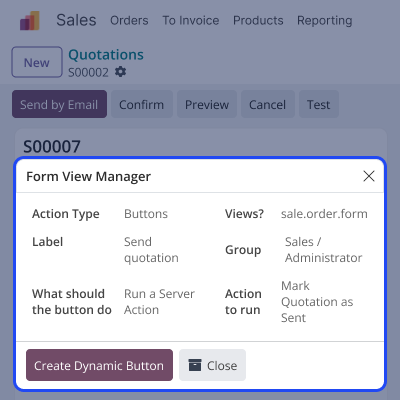
    • Create button-based actions for workflows.
    • Add fields on forms without coding.
    • Make multiple notebook tabs.
    • Apply actions to any Odoo model.
    • Set behaviors and methods easily.
    Dynamic Action Creation

    Centralized Action Management

    Odoo Dynamic Form View Manager gives you one place to see and manage all actions. This makes it simple to change how forms work without opening any technical settings.
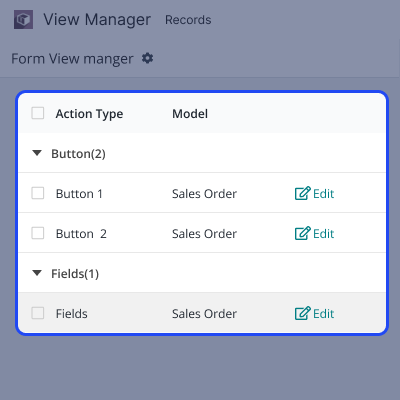
    • View all actions in a single list.
    • Edit or update any dynamic action.
    • Search and filter your actions.
    • Change behaviors whenever needed.
    • Keep all customizations organized.
    Centralized Action Management

    High Flexibility & Customization

    Odoo Dynamic Form View Manager allows you to edit or delete the actions you previously created.
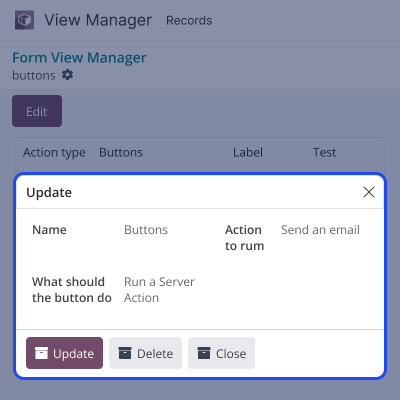
    • Edit any action from the view manager.
    • Make the field with the required and the non-required.
    • Improve the layout of any model.
    • Delete the action that is not needed.
    High Flexibility & Customization

    Support

    For any query or issue, please create a support ticket here CREATE A TICKET HERE

    You may also check our other top-quality Odoo Modules.

    Specifications

    Product Version1.0.0
    Released2 months ago
    CategoryOdoo AppsTool
    Last UpdatedJanuary 22, 2026 (1 month ago)
    Supported VersionsOdoo  14.x  15.x  16.x  17.x  18.x  19.x  
    Write a review

    FAQs

     Can non-technical users use Odoo Dynamic Form View Manager?
    Yes. The module is designed for admins who may not know coding. They can add buttons, fields, and tabs directly from the system.
     Will dynamic actions affect existing Odoo custom modules?
    No. Dynamic actions are added on top of existing views. They do not disturb custom modules unless both try to change the same place.
     Can I restrict certain users from seeing added buttons or fields?
    Yes. You can use user groups to decide who can see or use the added actions.
     Does the module support server actions?
    Yes. Any button-type action can belinked to a server action, allowing you to run methods or automate tasks easily.
     Will these changes remain after upgrading Odoo?
    Yes. All actions are saved in the database, so they stay active after an upgrade as long as the module is installed.
     Can I remove or edit actions after creating them?
    Yes. You can edit or delete any action from the View Manager without affecting other modules.

    Move to Cloud Today

    AWS Free tier hosting for one year by amazon web services, for more details please visit AWS Free Tier.

    GCP Free tier hosting for one year with 300 credit points by google cloud platform, for more details please visit GCP Free Tier.

    Azure free tier hosting for one year with 25+ always free services, for more details please visit Azure Free Tier.

    In our default configuration we will provide tremendous configuration for your eCommerce Website which is fast to load and response.

    Default Configuration Details of Server

    • 1 GB RAM
    • 1 Core Processor
    • 30 GB Hard Disk
    • DB with 1 GB RAM and 1 Core Processor

    * Server Configuration may vary as per application requirements.

    Want to know more how exactly we are going to power up your eCommerce Website with Cloud to fasten up your store. Please visit the Cloudkul Services.

    Get Started with Cloud
    Not Available


