USD
  • EUR
  • INR
  • USD
Cart
Cart 0
  • You have no items in your shopping cart.
    Odoo Apps Extensions
    Cart
    Cart 0
    • You have no items in your shopping cart.
    Hire a Developer
    ×
    Contact Us!
    Send Again
    Close
    Please Login to Write Your Review
    Odoo Employee Profile Page

    Odoo Employee Profile Page

    x
    Free

    * Required Fields

    $49.00
    Add To Cart

    Odoo Employee Profile Page helps businesses show employees on their website. Visitors can find employees, open their profiles, check current attendance status, and view the organization chart.


    • Show Employee Profiles on the Website
    • Add Employee Details and Profile Tabs
    • Choose Table or Tabs Layouts
    • Search Employees by Name
    • Show Live Search Suggestions
    • Display Responsive Employee Cards
    • Show Employee Attendance Status
    • View the Organization Chart
    • Control Employee Email Visibility

    Odoo Employee Profile Page
    Odoo Employee Profile Page
    $49.00
    Check How It Works

    Need Help Deciding?

    Support answers within one business day.

    Open a ticket
    $49.00
    Configure and Buy
    X
    • Description
    • Reviews
    • FAQ
    • Customers ()
    • Specifications
    • Cloud Hosting
    • Changelog

    Odoo Employee Profile Page helps businesses show employees on their website. Visitors can view profiles and find useful employee details.

    Businesses can choose the employee fields to display. They can also set the field order and create custom profile tabs. You can add tabs such as Personal Information and Work Information. Set the tab order and add custom icons for each tab.

    The module offers Table and Tabs layouts for employee profiles. You can also add a custom cover image to an employee profile. Visitors can search employees by name with live suggestions. Results can show details, job positions, departments, and attendance status.

    Responsive employee cards work on desktop, tablet, and mobile screens. The module also shows managers and subordinates through the organization chart with hierarchy levels and counts.

    Additionally, you can use Odoo Employee Organizational Chart to manage and display employee hierarchies in Odoo.
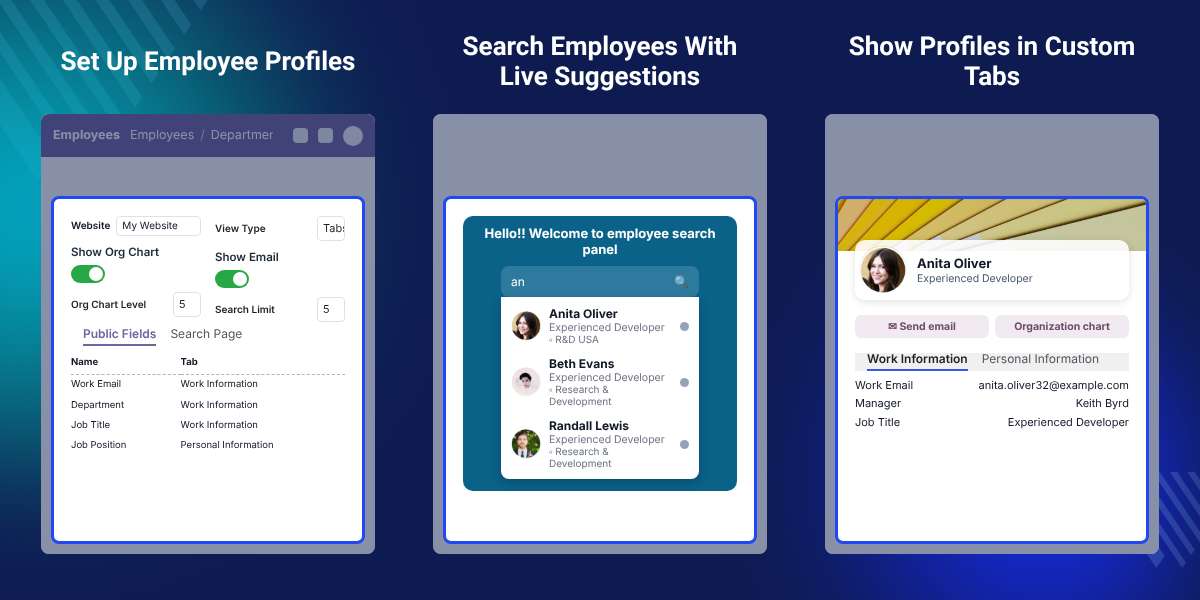
    Odoo Employee Profile Page

    Highlighted Features

    Custom Profile Tabs

    Create custom tabs to group employee details and add custom icons.

    Employee Profile Pages

    Show employee images, names, job positions, and selected details on the website.

    Custom Employee Details

    Choose the employee fields to show and set their display order on profiles.

    Profile Layouts

    Choose the Table layout or the Tabs layout for employee profiles.

    Employee Search

    Let visitors search for employees by name with live search suggestions.

    Responsive Employee Cards

    Show employee cards that work well on desktop, tablet, and mobile screens.

    Attendance Status

    View an employee's current attendance status on website views.

    Organization Chart

    Show managers and subordinates through an interactive organization chart.

    Why Do We Need This Module?

    Businesses need a simple way to show employee information on their website. Odoo Employee Profile Page gives each employee a clear and dedicated profile.

    You can choose the employee details shown on each profile and set their order for a better view. Custom tabs help group employee information clearly. Visitors can find employees through the search page, where live suggestions appear as they type.

    Responsive employee cards display information across different screen sizes. The organization chart helps visitors view managers and their subordinates. To manage and track employees' daily work reports, you can check Odoo Employee Daily Work Report.

    Use Cases

    Organize Employee Details

    Choose employee fields and set the order in which they appear.

    Show Employee Profiles

    Show employee images, names, job positions, departments, and selected details on the website.

    Create Profile Tabs

    Group employee details into custom tabs for easier viewing.

    Find Employees

    Let visitors search for employees by name and use live suggestions.

    Show Attendance

    Display an employee as Present or Absent on supported views.

    Show Company Hierarchy

    Show managers and subordinates through the interactive organization chart.

    Descriptive Features

    Set Up Employee Profiles

    Odoo Employee Profile Page lets you set the main options for employee profiles on your website.
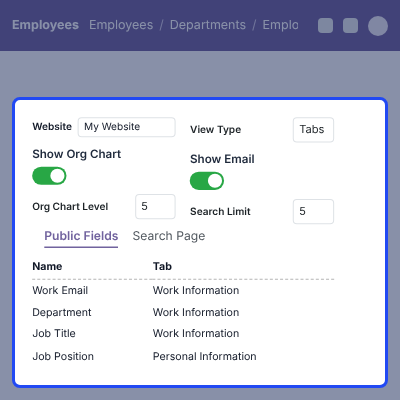
    • Select Odoo website for the profile.
    • Choose Table or Tabs as the layout.
    • Enable the organization chart.
    • Set the hierarchy levels.
    • Control employee email visibility.
    Set Up Employee Profiles

    Add Custom Profile Tabs

    Create tabs to keep employee details clear and easy to view.
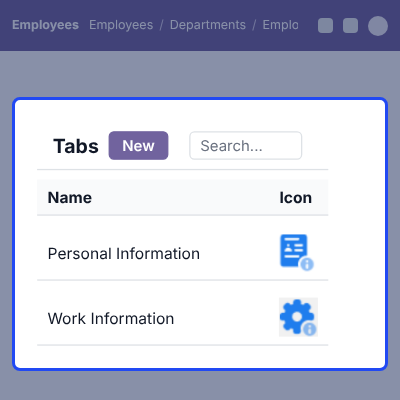
    • Create custom profile tabs.
    • Add Personal Information and Work Information tabs.
    • Assign employee fields to each tab.
    • Set the order of profile fields.
    • Add custom icons to the tabs.
    Add Custom Profile Tabs

    Search for Employees

    Odoo Employee Profile Page helps visitors find employees through a simple search page.
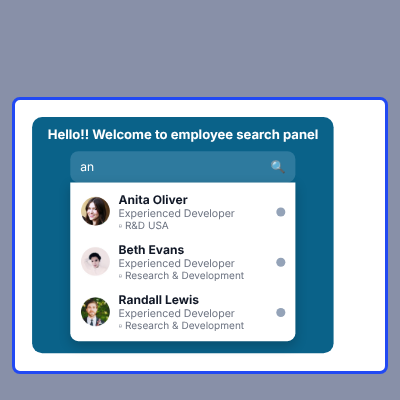
    • Search employees by name.
    • Show matching employees in the results.
    • Show job positions and departments.
    • View an employee's current attendance status with search results.
    • Use Show All to view employee results.
    Search for Employees

    Show Employee Cards

    Display employee details through responsive profile cards.
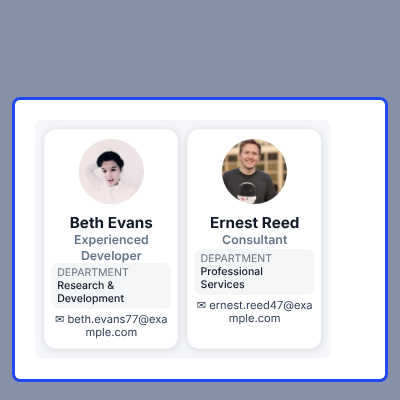
    • Show employee images and names.
    • Show job positions and departments.
    • Show work emails when enabled.
    • Open a profile by clicking the card.
    • Support desktop, tablet, and mobile screens.
    Show Employee Cards

    View the Organization Chart

    Show the employee hierarchy in an interactive chart.
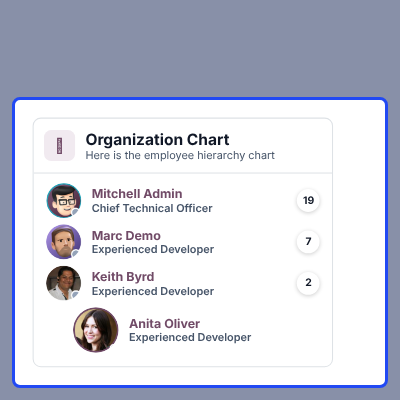
    • View managers and subordinates.
    • Set the number of hierarchy levels.
    • Show direct subordinate counts.
    • Show indirect and total subordinate counts.
    • View attendance status in supported chart views.
    View the Organization Chart

    Support

    For any query or issue, please create a support ticket here CREATE A TICKET HERE

    You may also check our other top-quality Odoo Modules.

    Specifications

    Product Version1.0.0
    Released5 years ago
    Last UpdatedOctober 16, 2026 (12 days ago)
    Supported Versions8.x  9.x  10.x  11.x  12.x  13.x  14.x  15.x  16.x  17.x  18.x  19.x  20.x  

    Ratings

    We'd love to hear your thoughts! Share your feedback and help us craft an even better experience tailored just for you.

    5.0
    2 Reviews
    based on verified customer feedback
    Write a review
    Joey Hanzel

    Excellent Product and Support

    Posted On - September 13, 2024

    We have purchased one of Webkul's Odoo modules. The experience was very easy and the support has been great. We ran into a few small issues integrating the module and the support has been reponsive and friendly and was able to get us up and running very quickly.

    Joey Hanzel

    Excellent Product and Support

    Posted On - September 13, 2024

    We have purchased one of Webkul's Odoo modules. The experience was very easy and the support has been great. We ran into a few small issues integrating the module and the support has been reponsive and friendly and was able to get us up and running very quickly.

    FAQs

      What does Odoo Employee Profile Page do?
    It shows employees from your Odoo organization on the website. Visitors can search for employees and view their profiles.
      Can I choose the employee details shown on profiles?
    Yes, you can select the employee fields to display. You can also set their order.
      Can I create custom profile tabs?
    Yes, you can create profile tabs and assign employee fields to them. You can also set the tab order and add icons.
      How can visitors search for employees?
    Visitors can search by employee name. Live suggestions appear while they type.
      Does it support mobile screens?
    Yes, employee cards and profiles work on desktop, tablet, and mobile screens.
      Can I show employee attendance?
    Yes, the module can show an employee as Present or Absent on supported views.
      What can I see in the organization chart?
    The chart shows managers and subordinates. It can also show direct, indirect, and total subordinate counts.
      Can I hide employee email addresses?
    Yes, you can control employee work email visibility from the profile settings. When enabled, the profile can show a Send Email option.

    Specification

    Detailed technical features and requirements to help you understand the module’s capabilities and ensure smooth integration with your system.

    Cloud Hosting

    Detailed technical features and requirements to help you understand the module’s capabilities and ensure smooth integration with your system.

    Default Configuration Details of Server

    1 GB
    RAM
    1 Core
    Processor
    30 GB
    Hard Disk
    1 GB RAM & 1 Core Processor
    Database

    Want to know more how exactly we are going to power up your eCommerce Website with Cloud to fasten up your store

    * Server Configuration may vary as per application requirements.

    Change Logs

    Not Available


