USD
  • EUR
  • INR
  • USD
Cart
Cart 0
  • You have no items in your shopping cart.
    Odoo Apps Extensions
    Cart
    Cart 0
    • You have no items in your shopping cart.
    Hire a Developer
    ×
    Contact Us!
    Send Again
    Close
    Please Login to Write Your Review
    Odoo Employee Reward System
    Odoo Employee Reward System
    x
    Free

    * Required Fields

    $45.00
    Add To Cart

    Now, grant rewards to your employees for their work with Odoo Employee Reward System!


    • Provides an easy and settled way to grant rewards to the employees.

    • Way to appreciate the employees for their hard work.

    • Admin can assign credit as well as debit points to the employee according to their performance.

    • Debit points are assigned in case of redemption.

    • Motivate employees to work well and receive the reward.

    • Helps you to build employer-employee relationships.

    Odoo Employee Reward System
    Odoo Employee Reward System
    $45.00
    Odoo Silver Partner
    Odoo Functional Certified Experts
    Check How It Works
    $45.00
    Configure and Buy
    X
    • Description
    • Reviews
    • FAQ
    • Customers ()
    • Specifications
    • Cloud Hosting
    • Changelog

    Odoo Employee Reward System- Employee appreciation contributes to a positive and adaptable workplace culture. It helps the employer to connect their employees with the organization more efficiently.

    Moreover, employee reward programs help an organization to increase employee performance by up to 11% on average.

    For employee appreciation, organizations just need to have a transparent reward system which helps the user to create transparency among the employees.

    The Odoo Employee Reward System is an excellent tool for encouraging and motivating your staff to contribute to the company's growth. It helps the user to grant reward points to the employees.

    Reward systems are critical for increasing the organization's productivity. It allows you to communicate with your staff and build a sustainable employer-employee relationship.

    Reward systems benefit not only you and your company, but also your staff because they receive recognition for their efforts, which in turn motivates them to work hard and effectively.
    Odoo Employee Reward System

     Odoo Employee Reward System Features

    A DIGITAL WAY TO ASSIGN REWARD

    • To keep the employees motivated, it is vital to acknowledge their efforts.
    • Assign rewards to the employees for their performance in Odoo.
    • Make the employees aware that they are getting recognition for their efforts and others to work hard to achieve the same.

     ASSIGN REWARDS TO EMPLOYEES

    • Managers can assign the reward to the employees for their good work as appreciation.
    • HR manager, Department manager and Reporting manager can assign the reward to the employees.

    INCREASE THE TRANSPARENCY AMONG THE EMPLOYEES

    • Reward Credit Points to the employees who have done a great job.
    • Assign Debit points to the employees in case of redemption of the reward points.

     CHECK THE RECORDS OF THE ASSIGNED REWARD

    • Employees can see their own records.
    • Followers of the corresponding reward can check the record.

    Create Rewards for the Employees

    • Create Rewards for the different employees easily.
    • Manager can assign Credit as well as debit reward points.
    • These reward points are very helpful to motivate employees.
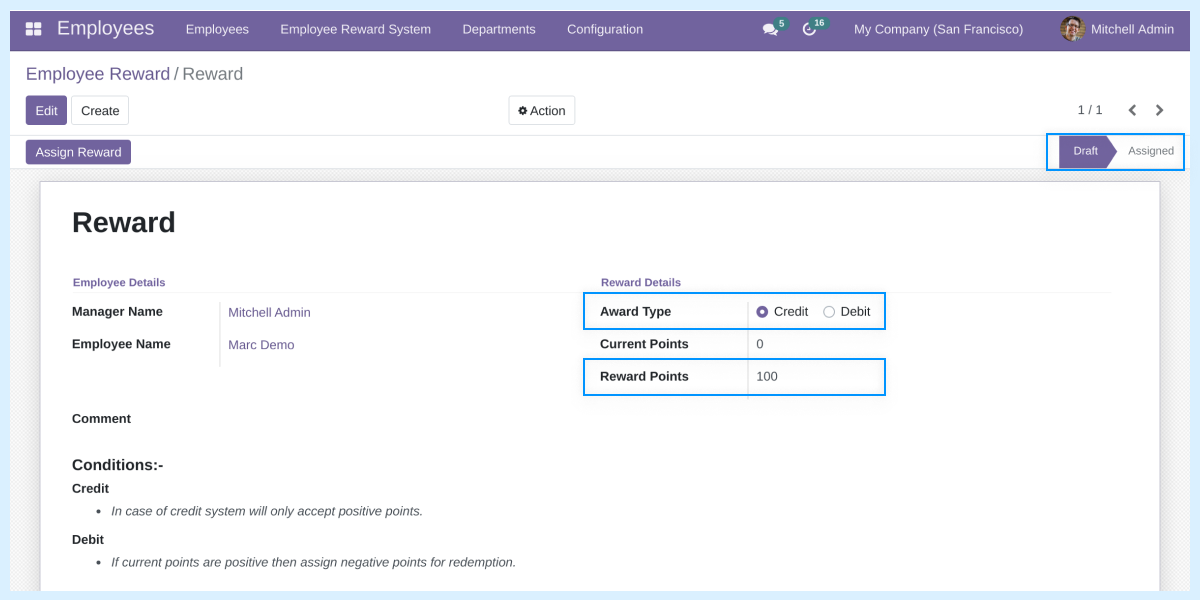
    • Manager can first add the reward in draft state and after confirmation, he/she can assign it to the employee.
    • Assigned Possitive Reward Points are shown in Green Color; whereas, assigned negative points are shown in red color.
    • The reward points stated in the draft state are shown in blue color; color differentiation helps the manager to analyze the rewards given easily.
    • As a token of Good Work, the manager can credit reward points for the employee.
    • For the future reference, employee name, manager name, award type and reward points are shown.
    • The access is provided to the Employees can see their own records.
    • Moreover, the Followers of the corresponding reward can also check the record.
    reward

     Assign Rewards to the Employees

    reward
    • Create Rewards for the Employees on the basis of their performance.
    • Manager needs to go to the Employee Reward System tab and click on the ‘Create’ button to create an new Employee Reward.
    • Here, the manager needs to add Reward Name, Employee Name, after adding the name of the employee the field related to the department of the related employee is automatically filled.
    • After that, manager needs to Select the reward type as Credit or Debit and add a comment related to the Reward and Award type.
    • If the assigned Reward type is credit then only the positive points can be assigned to the user otherwise it throws an error.
    • Corresponding Employee can check the assigned reward and the followers of the reward can also check the reward.
    • Summing up, manager can praise an employee with these reward points if he/she is doing good or give negative points if the employee is not doing well in work so that he/she can improve in future.

    Also, check other Odoo Enterprise Resource Management Modules-

    Dedicated Support For Your Odoo Employee Reward System-

    Webkul's dedicated support provides you with the customizations and troubleshooting solutions for Odoo Employee Reward System. For any query or issue please CREATE A TICKET HERE

    You may also check our other top-quality Odoo Plugins.

    Specifications

    Product Version1.0.0
    Released4 years ago
    CategoryOdoo AppsTool
    Last UpdatedOctober 8, 2025 (9 months ago)
    Supported VersionsOdoo  12.x  13.x  14.x  15.x  16.x  17.x  18.x  19.x  

    Ratings

    We'd love to hear your thoughts! Share your feedback and help us craft an even better experience tailored just for you.

    Write a review

    Specification

    Detailed technical features and requirements to help you understand the module’s capabilities and ensure smooth integration with your system.

    Cloud Hosting

    Detailed technical features and requirements to help you understand the module’s capabilities and ensure smooth integration with your system.

    Default Configuration Details of Server

    1 GB
    RAM
    1 Core
    Processor
    30 GB
    Hard Disk
    1 GB RAM & 1 Core Processor
    Database

    Want to know more how exactly we are going to power up your eCommerce Website with Cloud to fasten up your store

    * Server Configuration may vary as per application requirements.

    Change Logs

    Not Available


