Conveniently download pricelists with Odoo Export Pricelists!
- It permits you to download pricelists from Odoo.
- You can send the downloaded pricelist via mail.
- Export pricelists in Excel, pdf, or CSV format.
- It allows pricelist export of vendors, pricelists, and customers.
- The Odoo app adds the pricelist report submenu in Odoo.
- You can download the pricelists of multiple vendors, customers, and pricelists.
- Description
- Reviews
- FAQ
- Customers ()
- Specifications
- Cloud Hosting
- Changelog
Keep a record of the pricelist with Odoo Export Pricelists!
Downloading a price list has several benefits as it allows getting relevant pricelist details in a single place. Also, you get a condensed portable file format, filter, search, and format it. Additionally, you can export specific data into your purchasing system.
Odoo Export Pricelist facilitates you to export pricelist from Odoo. It can export the pricelist in PDF, Excel, or CSV Format. The admin can choose whether to download the selected file format or send it via mail to the user or themselves. Moreover, you can export customers, vendors, and pricelists through this module.
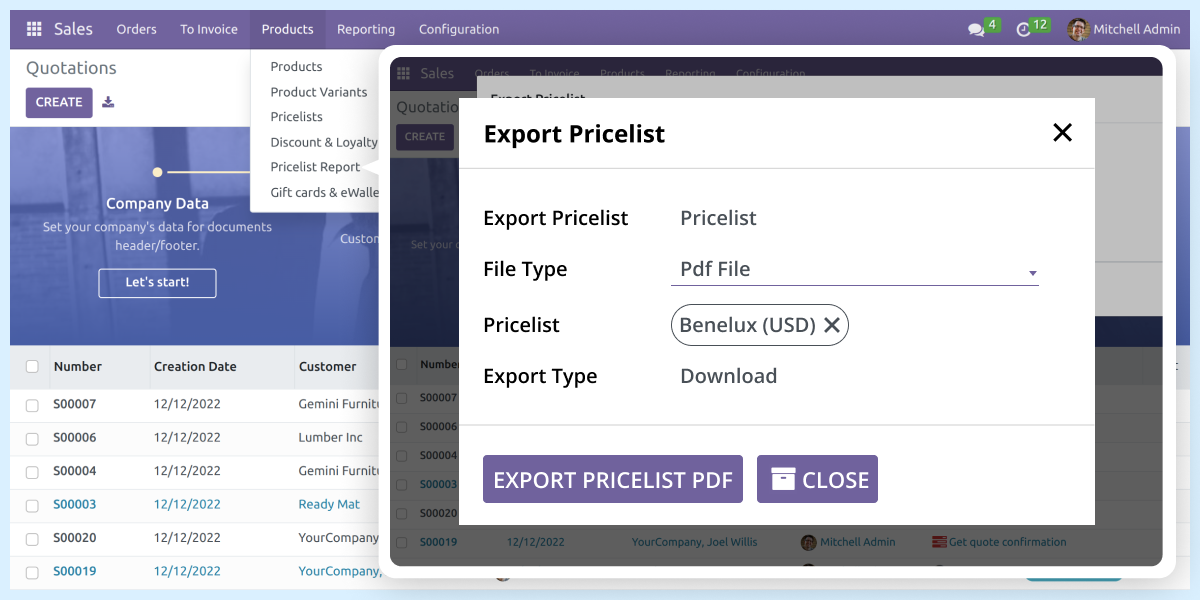
Odoo Export Pricelist Features
Select Various Report Formats in Odoo
- This Odoo app provides different formats for pricelist reports.
- Select from the available pdf, Excel, and CSV formats.
Option to Select Export Type
- The Export pricelist module permits you to choose from the different export types.
- You can download or email the report according to your need.
Download Different Eport Type
- The Odoo app permits choosing from different pricelists.
- It facilitates downloading pricelists of customers, pricelists, or vendors.
Download Pricelist Individually or in Bulk
- The module permits you to download or mail individual pricelists.
- Or you can download or mail pricelists in bulk.
Exporting Pricelist from Odoo
- You can choose from customer, vendor, or pricelist while exporting.
- The module provides various file-type options to download.
- Choose from pdf, excel, or CSV according to your need.
- Select the number of customers you want to send or download the report.
- You can choose the export type means you can download or send it via mail.
- You can check the downloaded or sent file.
- The downloaded file contains details according to the selected format.
- Easy to use and configure export pricelist module.

Check Other Odoo Apps
Odoo Export Pricelist
Webkul's dedicated support provides you with the customizations and troubleshooting solutions for Odoo Export Pricelist.
For any query or issue please CREATE A TICKET HERE
Specifications
Specification
Detailed technical features and requirements to help you understand the module’s capabilities and ensure smooth integration with your system.
Cloud Hosting
Detailed technical features and requirements to help you understand the module’s capabilities and ensure smooth integration with your system.
Move to Cloud Today
We’re partnered with top-tier, trusted providers!
Default Configuration Details of Server
RAM 1 Core
Processor 30 GB
Hard Disk
Database
Want to know more how exactly we are going to power up your eCommerce Website with Cloud to fasten up your store
* Server Configuration may vary as per application requirements.


