USD
  • EUR
  • INR
  • USD
Cart
Cart 0
  • You have no items in your shopping cart.
    Cart
    Cart 0
    • You have no items in your shopping cart.
    Hire a Developer
    ×
    Contact Us!
    Send Again
    Close
    Please Login to Write Your Review

    Odoo Gantt View Quick Copy Paste For Enterprise

    Odoo Gantt View Quick Copy Paste for enterprise allows users to duplicate and transfer tasks within a Gantt chart quickly and enhances workflow efficiency.


    • Quickly copy and paste tasks within the Gantt chart.

    • Select and duplicate multiple activities simultaneously.

    • Maintains linked tasks and relationships within the Gantt Chart.

    • Handles visual styles for better organization.

    • Save copied activities as templates for future use.

    • Modify copied tasks instantly without extra steps.

    • Easily move copied tasks across the timeline.

    Screenshots
    Odoo Gantt View Quick Copy Paste For Enterprise Odoo Gantt View Quick Copy Paste For Enterprise Odoo Gantt View Quick Copy Paste For Enterprise Odoo Gantt View Quick Copy Paste For Enterprise Odoo Gantt View Quick Copy Paste For Enterprise
    Show More Hide All
    $99.00
    Add To Cart
    $99.00
    Configure and Buy
    • Description
    • Reviews
    • FAQ
    • Customers ()
    • Specifications
    • Cloud Hosting
    • Changelog

    Odoo Gantt View Quick Copy Paste for enterprise is a project management feature that allows users to duplicate and move tasks quickly within a Gantt chart.

    It helps maintain task dependencies, schedules, and resource assignments while eliminating the need for manual data entry. It is more useful for large-scale project planning and is often available in enterprise project management solutions.

    If you want to track multiple projects at once then check out Odoo Gantt View Project.

    Odoo Gantt View Quick Copy Paste for enterprise

    Why Do We Need Odoo Gantt View Quick Copy Paste For Enterprise?

    A software development team is working on a project that involves multiple phases, including development, testing, and deployment.

    The team follows the same workflow for every platform, but manually recreating each task, along with dependencies and assigned team members, would be time-consuming. With this, the project manager can duplicate the entire task sequence for any required platform or project.

    Highlighted Features Of Odoo Gantt View Quick Copy Paste For Enterprise

      Fast Task Duplication

    Quickly copy and paste tasks without manual re-entry.

      Copy Entire Record

    Duplicate multiple tasks or entire project phases simultaneously.

      Auto Adjust Scheduling

    Smartly updates start/end dates to fit the new timeline.

      Keep Formatting & Resources

    Retains task colors, labels, and assigned team members.

    Set Up Records

    These settings help Odoo Gantt View Quick Copy Paste for enterprise work smoothly for different projects while keeping data safe and organized.
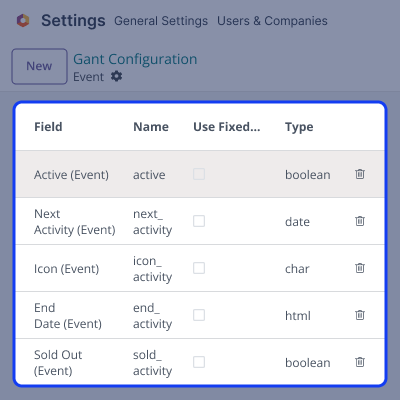
    • Choose which details should be copied.
    • Make sure records are set up correctly.
    • Use automatic updates to keep data fresh.
    • Decide if all users or only some can copy and paste.
    • Keep your project data secure and well-managed.
    Set Up Records

    Quick Task Duplication

    Odoo Gantt View Quick Copy Paste for enterprise lets you copy and paste tasks easily, saving time and effort.
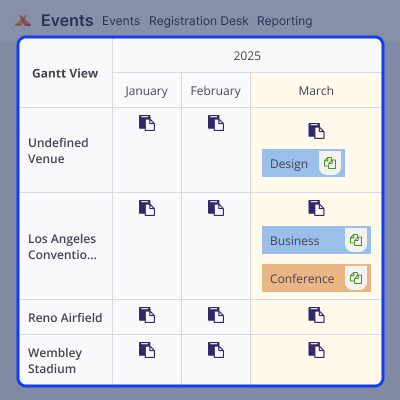
    • Copy tasks instantly instead of creating them from scratch.
    • Avoid entering the same details again and again.
    • Plan projects faster with quick task duplication.
    • Make workflows smoother so teams can focus on work.
    • Some tools even allow one-click task duplication.
    Quick Task Duplication

    Add or Remove Fields

    Odoo Gantt View Quick Copy Paste for enterprise makes it easy to customize tasks by adding or removing details as needed.
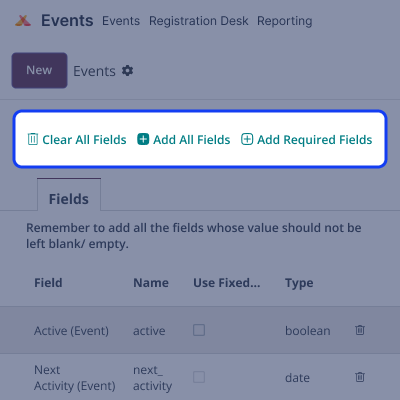
    • Each user can choose which details to see based on their role.
    • Show only important information to keep things simple.
    • Remove extra or duplicate fields to keep the chart clear.
    • Add new details by importing structured data.
    • Keep your project organized with only the necessary information.
    Add or Remove Fields

    Support

    For any query or issue, please create a support ticket here CREATE A TICKET HERE

    You may also check our other top-quality Odoo Modules.

    Specifications

    Product Version1.0.0
    Released10 months ago
    Last UpdatedOctober 7, 2025 (4 months ago)
    Supported VersionsOdoo  16.x  17.x  18.x  19.x  
    Write a review

    Frequently Asked Questions

     What is Odoo Gantt View Quick Copy Paste For Enterprise?
    It lets users copy and move tasks easily in the Gantt chart.
     How does Gantt View Quick Copy Paste help in project management?
    It saves time by removing the need to create tasks again, making work faster.
      Does Quick Copy-Paste also copy assigned resources?
    You need to assign an activity first, then you can copy and move a task to another resource.
     Is this feature available for all users?
    Some enterprise versions may limit access based on user roles and permissions.
     Can I paste tasks into different projects?
    No, you can only copy and paste tasks within the Gantt view.

    Move to Cloud Today

    AWS Free tier hosting for one year by amazon web services, for more details please visit AWS Free Tier.

    GCP Free tier hosting for one year with 300 credit points by google cloud platform, for more details please visit GCP Free Tier.

    Azure free tier hosting for one year with 25+ always free services, for more details please visit Azure Free Tier.

    In our default configuration we will provide tremendous configuration for your eCommerce Website which is fast to load and response.

    Default Configuration Details of Server

    • 1 GB RAM
    • 1 Core Processor
    • 30 GB Hard Disk
    • DB with 1 GB RAM and 1 Core Processor

    * Server Configuration may vary as per application requirements.

    Want to know more how exactly we are going to power up your eCommerce Website with Cloud to fasten up your store. Please visit the Cloudkul Services.

    Get Started with Cloud
    Not Available


