USD
  • EUR
  • INR
  • USD
Cart
Cart 0
  • You have no items in your shopping cart.
    Odoo Apps Extensions
    Cart
    Cart 0
    • You have no items in your shopping cart.
    Hire a Developer
    ×
    Contact Us!
    Send Again
    Close
    Please Login to Write Your Review
    Odoo Hospital Management System

    Odoo Hospital Management System

    x
    Free

    * Required Fields

    $499.00
    Add To Cart

    Odoo Hospital Management System helps hospitals and clinics manage patients, appointments, prescriptions, admissions, and nursing care from one Odoo database.


    • Keep patient records with an MRN, medical notes, and linked visit history.

    • Book appointments with the right doctor, department, and time slot.

    • Add prescriptions and order procedures during OPD visits and admissions.

    • Admit patients to rooms and beds, transfer beds, and initiate discharge.

    • Log emergency cases with arrival mode, triage level, and chief complaint.

    • Build nursing care plans with activities, shifts, and a nurse in charge.

    • Give patients a portal to book visits, view prescriptions, and pay bills.

    • Watch live queues, beds, and doctors on duty from the dashboard.

    Odoo Hospital Management System
    Odoo Hospital Management System
    $499.00
    Check How It Works

    Need Help Deciding?

    Support answers within one business day.

    Open a ticket
    $499.00
    Configure and Buy
    X
    • Description
    • Reviews
    • FAQ
    • Customers ()
    • Specifications
    • Cloud Hosting
    • Changelog

    Odoo Hospital Management System is an Odoo module that helps hospitals and clinics run patient care, appointments, admissions, and billing in Odoo. It replaces paper registers and separate files with linked records.

    Reception staff register a patient, who gets a Medical Record Number (MRN). From the patient form they click Book Appointment, choose the doctor and a free slot, then pick Save or Save and Confirm.

    Doctors handle OPD visits with Add Prescription and Add Procedure buttons. For inpatients, the Admissions form holds the bed, treatment package, vital signs, nursing plans, and the discharge checklist.

    The module adds a Hospital Management app with Dashboard, Patients, Staff, Emergency, IPD, Pharmacy, and Procedures menus. Doctors and nurses get their own dashboards, and patients get a portal.

    Staff records cover doctors, nurses, leaves, and timesheets. Reports cover patients, appointments, prescriptions, and medical tests.

    Additionally, if you also want customers to book paid appointments on your website, you can check our module Odoo Website Appointment Management System.
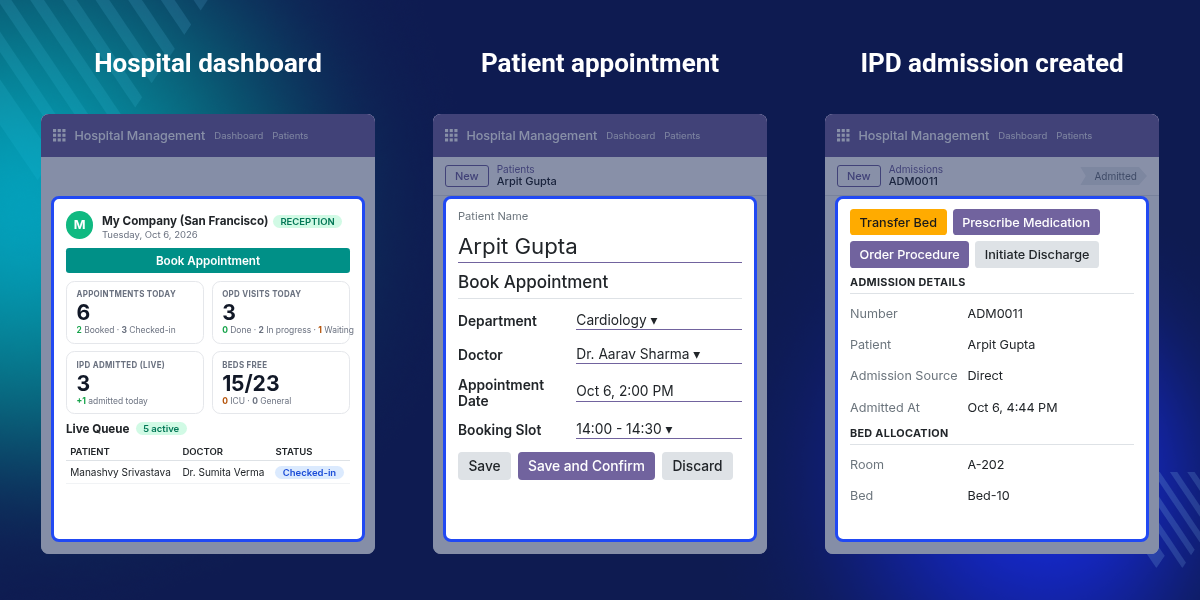
    Odoo Hospital Management System

    Highlighted Features of Odoo Hospital Management System

     Patient Record Management

    Create patient records with an MRN, contact details, allergy notes, and chronic condition notes in one place.

     Appointment Management

    Book visits with a chosen doctor and free slot, then confirm them from the same window.

     Prescription Management

    Add medicines with dose, frequency, route, duration, and quantity, then create a pharmacy order or print.

     IPD and Bed Management

    Admit patients to a ward, transfer beds, order procedures, and initiate discharge.

     Emergency Case Handling

    Record arrival mode, triage level, bed, medico-legal status, and the chief complaint for each emergency case.

     Nursing Care Plans

    Plan nursing activities by frequency and shift, and assign a nurse in charge for each admission.

     Patient Portal

    Patients book consultations, view visits and prescriptions, check admissions, and pay bills from their account.

     Hospital Dashboard

    See appointments, OPD visits, admissions, ICU cases, free beds, live queues, and doctors on duty.

    Why Do We Need Odoo Hospital Management System?

    A hospital handles patient details, appointments, treatments, and admissions every day. When these sit in separate files, staff search several places to answer one question about one patient.

    The default Odoo setup does not cover the full healthcare flow. Staff still lack one place for patients, appointments, prescriptions, admissions, beds, and nursing records.

    Odoo Hospital Management System puts these tasks in one module. Every record links back to the patient, so the doctor, nurse, and billing desk read the same data.

    In practice, a receptionist types an MRN, phone number, or name in the dashboard search box and reaches the patient in one step. Check-in, new OPD visit, and Register New Patient sit beside it as quick actions.

    Use Cases

    •  Multi-Ward Hospital

      A hospital with general wards and an ICU tracks admissions, beds, and transfers on one screen. Staff see free beds out of the total on the dashboard.

    •  Outpatient Clinic

      A clinic books doctor visits, records each OPD consultation, and prints prescriptions. Reception watches the live queue and checks patients in.

    •  Emergency Intake Desk

      The emergency desk creates a case for a walk-in patient, sets the triage level, assigns a bed, and notes the chief complaint.

    •  Ward Nursing Rounds

      A head nurse creates a care plan per admission, adds daily checks by shift, and assigns pending interventions to nurses in bulk.

    Hospital Dashboard for Reception

    The Dashboard menu gives reception a live view of the day. It refreshes every 60 seconds, so staff always see the current queue and bed count.

    A search box finds patients by MRN, phone number, or name, and a Book Appointment button sits on the same screen.
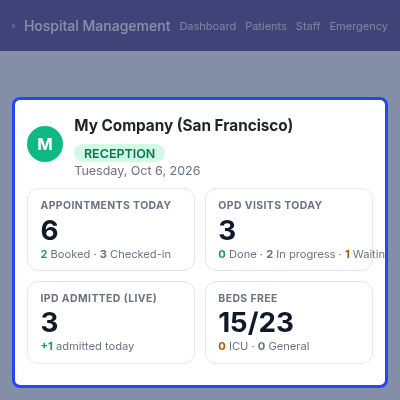
    • Cards for Appointments Today, OPD Visits Today, IPD Admitted (Live), ICU Admitted, Emergency Cases Today, and Beds Free.
    • Quick actions: Register New Patient, Check-in, Ordered Procedures, and New OPD Visit.
    • Live Queue table with token, patient, doctor, status, and action.
    • Doctors On Duty panel with shift hours, booked count, next free time, and a Book button.
    • A separate doctor dashboard with Total Appointments, New Patients, Follow Ups, and Scheduled Procedures.
    Hospital Dashboard for Reception

    Patient Record and Appointment Booking

    The Patients form holds the person and their medical notes. From it, staff open the Book Appointment window and save the visit without leaving the record.

    Smart buttons on the form count the patient's Appointments, OPD visits, and IPD admissions.
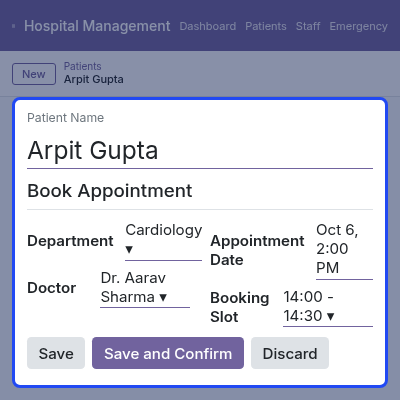
    • Patient form with name, MRN, age, mobile, and email.
    • Medical Details tab with Allergy Notes and Chronic Condition Notes.
    • Book Appointment window with fields for Department, Doctor, Appointment Date, and Booking Slot.
    • Save keeps the appointment, and Save and Confirm books it at once.
    • Grant Portal Access button to give the patient a portal login.
    Patient Record and Appointment Booking

    IPD Admission and Bed Management

    Each inpatient stay lives in one Admissions record. It shows the patient, doctor, department, bed, and billing plan, with action buttons across the top.

    The status bar moves from Draft to Admitted once staff click Admit.
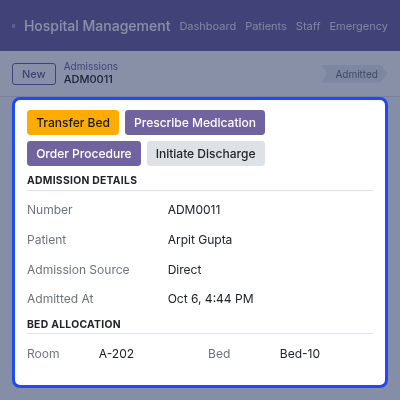
    • Admission Details: number, patient, admission source, and Admitted At.
    • Clinical Information: doctor, department, Provisional Diagnosis, and Final Diagnosis.
    • Bed Allocation section, and a Transfer Bed window for Room, ICU, or OT with a reason.
    • Treatment Package with Configure Package Charges for Admission, Bed, Nursing, Diet, and Ambulance.
    • Prescribe Medication and Order Procedure buttons on the admission.
    • Initiate Discharge checklist with a type of Routine, Against Medical Advice (AMA), Refer, or Deceased.
    IPD Admission and Bed Management

    Patient Portal Appointment Booking

    Patients book consultations from their own account on the Odoo Website. A four-step bar guides them through Department, Doctor, Date, and Time Slot.

    The doctor card shows years of experience and the consultation fee before the patient picks a date.
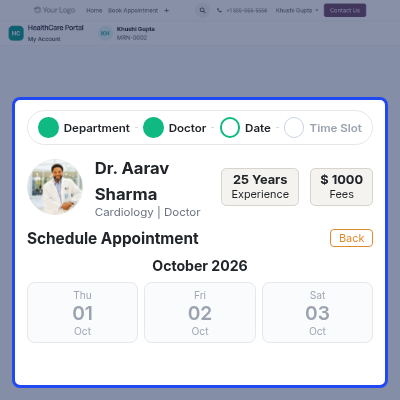
    • Portal menu with Overview, Book Appointment, My Appointments, Visits & Prescriptions, My Bills, My Admissions, and My Profile.
    • My Appointments list with All, Upcoming, and Past filters.
    • My Bills page with Pay Now, Pay All Pending Bills, and an Invoice download.
    • My Admissions history with status and discharge date.
    • My Profile with read-only medical details such as blood group, allergies, and chronic conditions.
    Patient Portal Appointment Booking

    Nursing Care Plans

    A nursing plan links to an admission and lists what each nurse must do. Staff activate the plan with one click once the activities are set.

    Nursing Interventions can also be assigned in bulk. Select several rows, choose Actions, and use the Assign Nurse window.
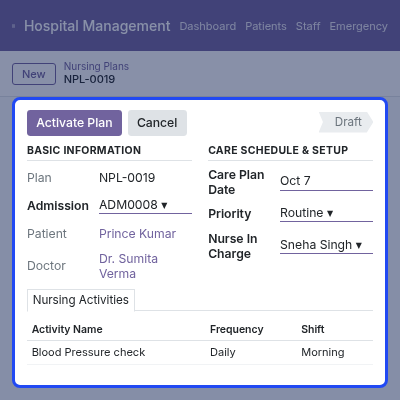
    • Basic Information: plan number, admission, patient, doctor, and hospital.
    • Care Plan Date, Priority, and Nurse In Charge fields.
    • Assessment Notes and Special Instructions, such as a liquid diet.
    • Nursing Activities with Activity Name, Frequency, Shift, Notes, and an Active checkbox.
    • Activate Plan and Cancel buttons, with a Draft status.
    Nursing Care Plans

    Emergency Case Management

    The Emergency menu holds one record per case. Staff capture who arrived, how, and how urgent it is, then click Start Observation.

    The same flow reaches a Death Record, which stores the declaration and handover details when a case ends that way.
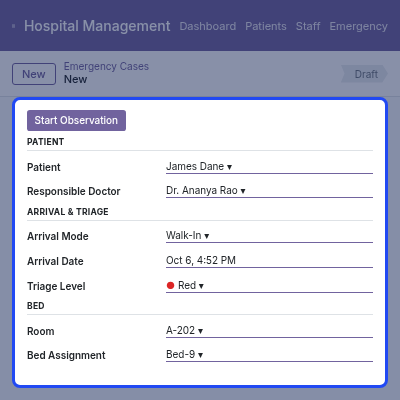
    • Patient section with Patient, an Unidentified Patient checkbox, and Responsible Doctor.
    • Arrival & Triage with Arrival Mode, Arrival Date, and Triage Level.
    • Bed section with a room and the Bed Assignment field.
    • Medico-Legal Case checkbox and a Chief Complaint field.
    • Death Record fields for Cause of Death, Death Certificate Number, Post-Mortem status, and Body Handed Over To.
    Emergency Case Management

    Support

    For any query or issue, please create a support ticket here CREATE A TICKET HERE

    You may also check our top-quality Odoo Apps.

    Specifications

    Product Version1.0.0
    Released2 days ago
    Last UpdatedOctober 16, 2026 (2 days ago)
    Supported Versions19.x  20.x  

    Ratings

    We'd love to hear your thoughts! Share your feedback and help us craft an even better experience tailored just for you.

    Write a review

    Frequently Asked Questions

     What does Odoo Hospital Management System do?
    Odoo Hospital Management System manages patients, appointments, prescriptions, admissions, beds, nursing care, emergency cases, and bills for hospitals and clinics in Odoo.
     
     Can I manage patient records with this module?
    Yes, Staff create patient records with an MRN, contact details, allergy notes, and chronic condition notes, and see each patient's appointments, OPD visits, and admissions from the form.
     
     Can I book patient appointments?
    Yes, Staff fill in the appointment window, then click Save or Save and Confirm.
     
     Can doctors create patient prescriptions?
    Yes, Doctors add medicines with dose, frequency, route, duration, and quantity on an OPD visit or an admission, then create a pharmacy order or print the prescription.
     
     Can I manage hospital admissions and beds?
    Yes, Staff assign a bed, transfer beds, set a treatment package, order procedures, and initiate discharge from the Admissions record.
     
     Can I create nursing care plans?
    Yes, A nursing plan links to an admission and holds a nurse in charge, a priority, and activities with frequency, shift, notes, and active status.
     
     Can I manage emergency patient cases?
    Yes, Staff create an emergency case, assign a doctor, room, and bed, record the arrival mode and triage level, and add the chief complaint.
     
     Can patients book appointments through the portal?
    Yes, Patients work through four portal steps, and they see the doctor's experience and consultation fee first.
     
     Can patients pay their bills in the portal?
    The My Bills page lists each invoice with a status, a Pay Now button, and an invoice download, plus a Pay All Pending Bills button for the total outstanding amount.
     
     Can I manage doctors, nurses, and staff?
    Yes, You can keep doctor and nurse records and manage staff details, leaves, and timesheets in Odoo.

    Specification

    Detailed technical features and requirements to help you understand the module’s capabilities and ensure smooth integration with your system.

    Cloud Hosting

    Detailed technical features and requirements to help you understand the module’s capabilities and ensure smooth integration with your system.

    Default Configuration Details of Server

    1 GB
    RAM
    1 Core
    Processor
    30 GB
    Hard Disk
    1 GB RAM & 1 Core Processor
    Database

    Want to know more how exactly we are going to power up your eCommerce Website with Cloud to fasten up your store

    * Server Configuration may vary as per application requirements.

    Change Logs

    Not Available


