USD
  • EUR
  • INR
  • USD
Cart
Cart 0
  • You have no items in your shopping cart.
    Cart
    Cart 0
    • You have no items in your shopping cart.
    Hire a Developer
    ×
    Contact Us!
    Send Again
    Close
    Please Login to Write Your Review

    Odoo Islamic Calendar

    Odoo Islamic Calendar helps you choose how you want to see dates. You can look at dates in the normal calendar (Gregorian) or the Islamic calendar (Hijri). The date picker is easy to use, and it changes the dates everywhere for you.


    • Pick Islamic dates easily with a simple date box.

    • Switch between Islamic and normal calendars anytime.

    • All dates change automatically when you switch.

    • Users can modify even a single date field according to their needs.

    • Islamic dates show clearly on every screen.

    • Works nicely with all parts of odoo.

    • Nothing extra to set up after installing.

    Screenshots
    $49.00

    * Required Fields

    Add To Cart
    $49.00
    Configure and Buy
    • Description
    • Reviews
    • FAQ
    • Customers ()
    • Specifications
    • Cloud Hosting
    • Changelog

    Odoo Islamic Calendar adds a simple Islamic Date Picker that shows Hijri dates wherever a date is used in Odoo. When users choose Islamic or Gregorian in their settings, the calendar changes right away so all dates match their choice.

    The goal of Odoo Islamic Calendar is to make date selection easy and clear for everyone. It keeps the screen neat, avoids confusion, and helps teams who use Islamic dates plan their work with confidence.
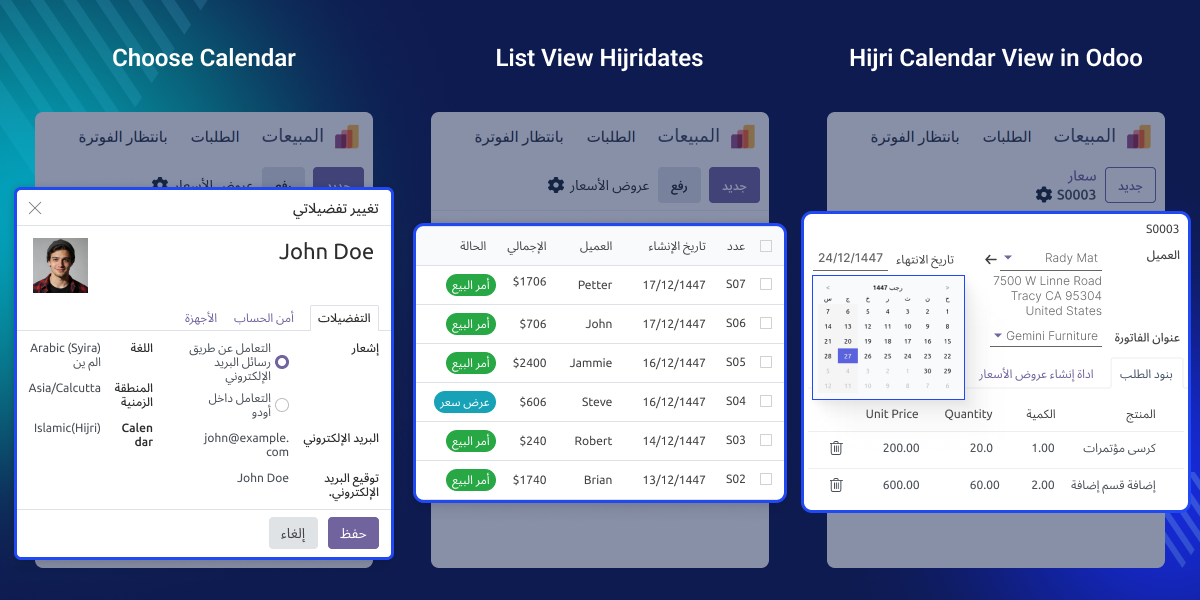
    Odoo Islamic Calendar

    Why do we need Odoo Islamic Calendar?

    Odoo Islamic Calendar is helpful for people who need to use both normal dates and Islamic (Hijri) dates. Many teams use Hijri dates for events, holidays, and work schedules. This module lets them switch calendars easily without changing how they normally work.

    For example, a team planning events using Islamic months can use the Hijri Date Picker to avoid mistakes. Another team working with people in different countries can use Gregorian dates. odoo Islamic Calendar gives everyone a simple and flexible way to use the calendar they prefer.

    Highlighted Features of Odoo Islamic Calendar

    Smooth calendar switching

    Odoo Islamic Calendar lets users pick Islamic or Gregorian mode, and all date fields change right away to match the chosen calendar.

    Clean Islamic date view

    Odoo Islamic Calendar shows Islamic dates clearly in the Islamic Date Picker, making daily work easy for users who prefer the Hijri Calendar.

    No extra setup needed

    Odoo Islamic Calendar works with all existing forms and views, so the Islamic Date Picker appears automatically without any extra steps.

    Islamic Date Picker for Easy Date Selection

    Odoo Islamic Calendar provides a clear Hijri Date Picker that works on both date and datetime fields. It keeps Islamic dates readable and simple for daily workflows.
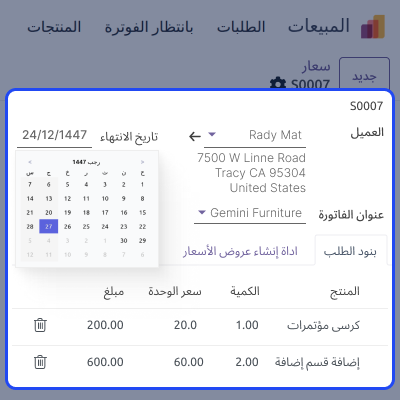
    • Shows Islamic Hijri dates clearly on the picker.
    • Supports date and datetime fields.
    • Works with all standard views.
    • Auto-converts based on user preference.
    • Loads instantly after installation.
    Islamic Date Picker for Easy Date Selection

    User Preference Calendar Control

    Users can switch between Gregorian and Islamic modes anytime from their profile. odoo Islamic Calendar applies the selected calendar across the system instantly.
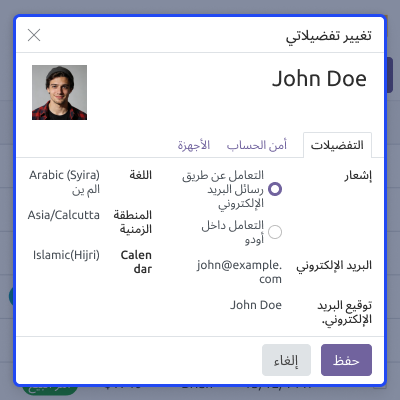
    • Choose the Gregorian or Islamic calendar.
    • Update preference at any time.
    • Applies across all date fields.
    • Instant Calendar Switching on all views.
    • No need for developer configuration.
    User Preference Calendar Control

    Adaptive Rendering for All Forms

    Odoo Islamic Calendar updates date display based on the user’s choice and also lets users apply the Islamic date widget to specific fields as needed.
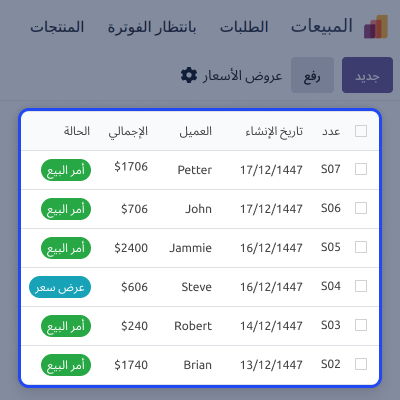
    • Date view changes to match what the user picks.
    • Works well with all kinds of modules.
    • Helps in simple and difficult tasks.
    • Shows dates the same way on every screen.
    • Reduces confusion between Hijri and Gregorian.
    Adaptive Rendering for All Forms

    Support

    For any query or issue, please create a support ticket here CREATE A TICKET HERE

    You may also check our other top-quality Odoo Modules.

    Specifications

    Product Version1.0.0
    Released2 months ago
    Last UpdatedJanuary 28, 2026 (1 month ago)
    Supported VersionsOdoo  16.x  17.x  18.x  
    Write a review

    FAQs

     Does Odoo Islamic Calendar replace the default date widget?
    Yes. Odoo Islamic Calendar changes the normal date box and shows the Islamic Date Picker instead.
     Can users choose their own calendar mode?
    Yes. Every user can switch between the Islamic and Gregorian calendars anytime from their settings.
     Does Odoo Islamic Calendar update all date fields automatically?
    Yes. All date and datetime fields change instantly based on the user’s selected calendar.
     Is extra setup needed after installation?
    No. Odoo Islamic Calendar works right away with all existing forms.
     Does the module support custom forms?
    Yes. Odoo Islamic Calendar works on both standard Odoo forms and custom modules that use date fields.

    Move to Cloud Today

    AWS Free tier hosting for one year by amazon web services, for more details please visit AWS Free Tier.

    GCP Free tier hosting for one year with 300 credit points by google cloud platform, for more details please visit GCP Free Tier.

    Azure free tier hosting for one year with 25+ always free services, for more details please visit Azure Free Tier.

    In our default configuration we will provide tremendous configuration for your eCommerce Website which is fast to load and response.

    Default Configuration Details of Server

    • 1 GB RAM
    • 1 Core Processor
    • 30 GB Hard Disk
    • DB with 1 GB RAM and 1 Core Processor

    * Server Configuration may vary as per application requirements.

    Want to know more how exactly we are going to power up your eCommerce Website with Cloud to fasten up your store. Please visit the Cloudkul Services.

    Get Started with Cloud
    Not Available


