USD
  • EUR
  • INR
  • USD
Cart
Cart 0
  • You have no items in your shopping cart.
    Cart
    Cart 0
    • You have no items in your shopping cart.
    Hire a Developer
    ×
    Contact Us!
    Send Again
    Close
    Please Login to Write Your Review

    Odoo Login As Another User


    Odoo Login As Another User allows administrators to log in as another Odoo user to check permissions, fix access issues, support users, and understand real workflows.


    • Admin can log in as another user

    • No password sharing between users is required

    • See exact menus and access rights

    • Helpful for admin support and training

    • Fix issues using the real user view

    • Test workflows across different user roles

    • Reduce support time and user confusion

    Screenshots
    $15.00

    * Required Fields

    Add To Cart
    $15.00
    Configure and Buy
    • Description
    • Reviews
    • FAQ
    • Customers ()
    • Specifications
    • Cloud Hosting
    • Changelog

    Odoo Login As Another User module lets authorized admins access Odoo as another user without needing the user’s password. This keeps accounts safe and secure.

    Many Odoo issues depend on user roles and permissions. Admins can now see the system exactly as the user sees it. This removes confusion and speeds up problem-solving.
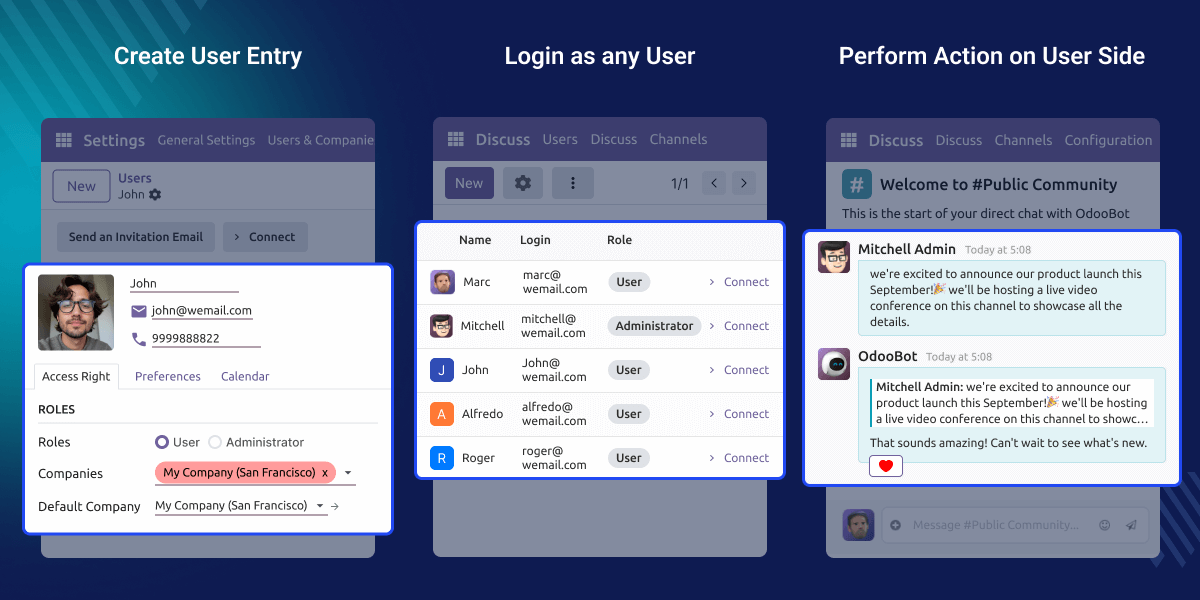
    Odoo Login As Another User

    Why Do We Need Odoo Login As Another User?

    Users often report missing menus or blocked actions. Explaining these issues through messages takes time and causes delays.

    This module allows admins to see the problem directly. It helps them fix access issues faster and with better accuracy.

    Highlighted Features of Odoo Login As Another User

     Instant User Switching

    Admins can log in as another user with one simple action without logging out of their own account.

     Real User View

    Admins see the system exactly as the user sees it, making problems easier to understand.

     Safe Admin Access

    Only authorized admins can use this feature. Normal users cannot access it, and all Odoo security rules still apply.

     Easy User Training

    Admins can guide users using real screens while users see their own menus during training.

    User Impersonation Feature

    Odoo Login As Another User allows administrators to log in as another Odoo user. Admins can clearly see the menus, actions, and data available to that user.
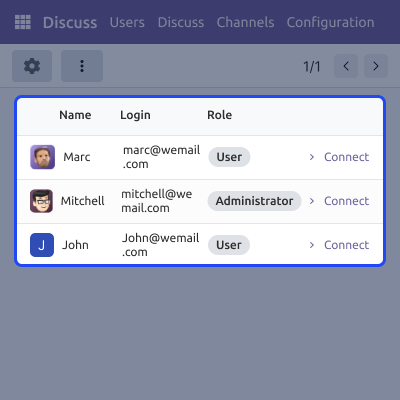
    • Secure session-based access
    • An exact user-level view with no sharing of user credentials
    • Easy role validation and safe admin usage
    User Impersonation Feature

    Support and Troubleshooting

    Many user issues happen due to missing access rights or role settings. Admins can directly view the issue instead of guessing from messages.
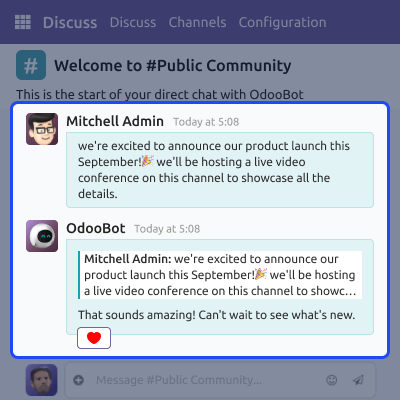
    • Faster issue resolution with clear permission checks
    • Reduced support messages and better issue clarity
    • Improved support results
    Support and Troubleshooting

    Training and Onboarding

    New users often struggle to understand Odoo screens and workflows. Admins can guide users inside their real working environment for better learning.

    • Easy feature explanation and reduced training effort
    • Faster learning process with better user confidence
    • Real workflow training
    Training and Onboarding

    Support

    For any query or issue, please create a support ticket here CREATE A TICKET HERE

    You may also check our other top-quality Odoo Modules.

    Specifications

    Product Version1.0.1
    Released16 days ago
    CategoryOdoo AppsTool
    Last UpdatedFebruary 19, 2026 (16 days ago)
    Supported VersionsOdoo  15.x  16.x  17.x  18.x  19.x  
    Write a review

    FAQs

     Who can log in as another user in Odoo?
    Only administrators or approved users can use this feature, and normal users do not get access to log in as others.
     Can admins make changes while logged in as another user?
    Yes, admins can perform actions while logged in as another user. However, actions follow the permissions of that user only.
     Does this module show or store user passwords?
    No, this module never shows user passwords, and it also does not store or change passwords in any way.
     Is this module useful for support teams?
    Yes, this module is very useful for support teams. They can see the issue directly instead of guessing from messages.
     Is this module suitable for large organizations?
    Yes, this module works well for large teams. It is helpful when many users have different roles; admins can quickly check access issues across departments.

    Move to Cloud Today

    AWS Free tier hosting for one year by amazon web services, for more details please visit AWS Free Tier.

    GCP Free tier hosting for one year with 300 credit points by google cloud platform, for more details please visit GCP Free Tier.

    Azure free tier hosting for one year with 25+ always free services, for more details please visit Azure Free Tier.

    In our default configuration we will provide tremendous configuration for your eCommerce Website which is fast to load and response.

    Default Configuration Details of Server

    • 1 GB RAM
    • 1 Core Processor
    • 30 GB Hard Disk
    • DB with 1 GB RAM and 1 Core Processor

    * Server Configuration may vary as per application requirements.

    Want to know more how exactly we are going to power up your eCommerce Website with Cloud to fasten up your store. Please visit the Cloudkul Services.

    Get Started with Cloud
    Not Available


