USD
  • EUR
  • INR
  • USD
Cart
Cart 0
  • You have no items in your shopping cart.
    Cart
    Cart 0
    • You have no items in your shopping cart.
    Hire a Developer
    ×
    Contact Us!
    Send Again
    Close
    Please Login to Write Your Review

    Odoo Low Stock Notification for Product

    Odoo Low Stock Notification for Product checks your stock automatically. It sends alerts when the stock is low.


    • Automatic low stock checking

    • Reordering rule-based alerts

    • Email and Discuss notifications

    • Single or combined stock reports


    Screenshots
    Odoo Low Stock Notification for Product Odoo Low Stock Notification for Product Odoo Low Stock Notification for Product Odoo Low Stock Notification for Product Odoo Low Stock Notification for Product Odoo Low Stock Notification for Product Odoo Low Stock Notification for Product Odoo Low Stock Notification for Product
    Show More Hide All
    $99.00

    * Required Fields

    Add To Cart
    $99.00
    Configure and Buy
    • Description
    • Reviews
    • FAQ
    • Customers ()
    • Specifications
    • Cloud Hosting
    • Changelog

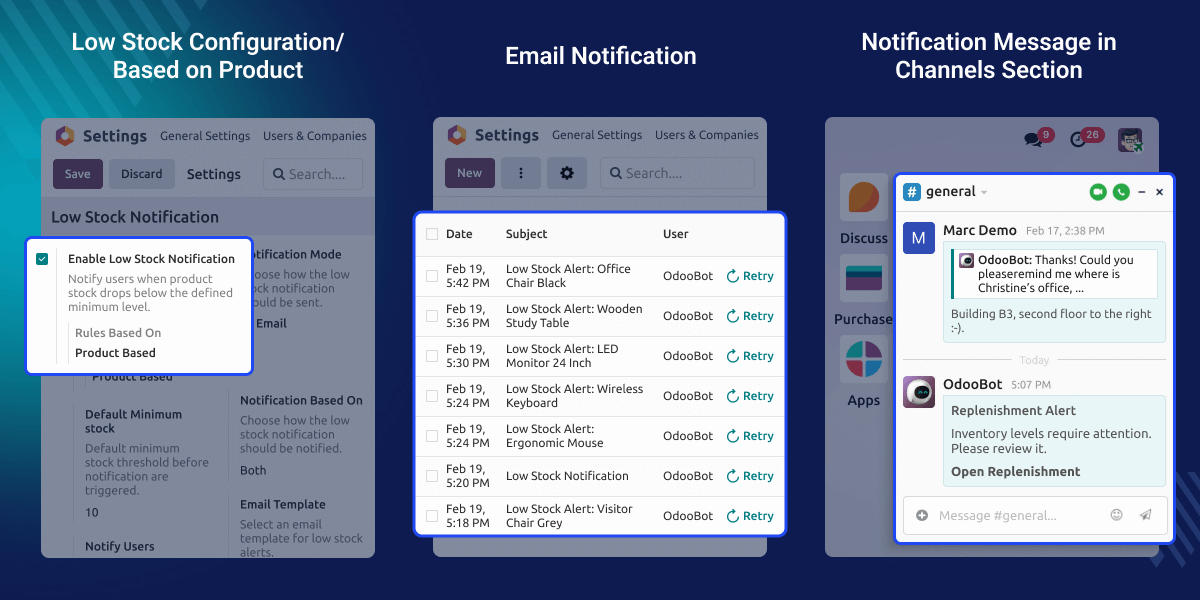
    Odoo Low Stock Notification for Product helps you manage stock easily. It checks product quantity using minimum stock levels and reordering rules.

    When the stock reaches the set limit, the system sends an alert right away. This helps you refill products on time. It also helps prevent stockouts.

    You can receive alerts by email or in Discuss. You can get alerts for each product or a combined report. This makes stock control simple and clear.
    Odoo Low Stock Notification

    Why do we need Odoo Low Stock Notification for Product?

    Think about a shop with many products in different warehouses. The manager cannot check every item every day.

    This module checks stock automatically. When the stock goes below the set level, it sends alerts by email and Discuss.

    If a reordering rule shows a quantity to order more than zero, the purchase team gets an alert. This helps them order products on time. It prevents stock shortages during busy periods.

    Highlighted Features of Odoo Low Stock Notification

    Automated Stock Monitoring

    The system checks product quantity and reordering rules automatically. It sends alerts without manual work.

    Flexible Notification Options

    Send alerts for each product separately. Or send one combined stock report to selected users.

    Discuss Channel Integration

    Send replenishment alerts in Discuss. Use the direct link to check stock details quickly.

    Product & Global Configuration

    Set a minimum quantity for each product. Or use global notification settings. Setup is simple and easy.

    Product-Based Rule Alerts

    Monitor stock using minimum quantity rules. The system sends alerts when the product quantity reaches the set limit.
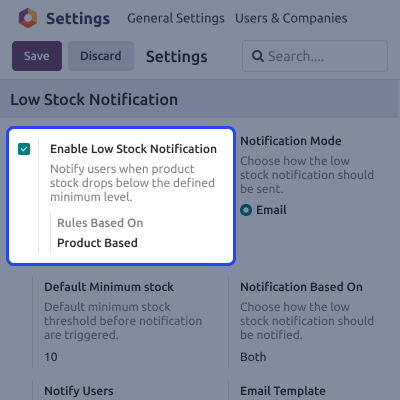
    • Set minimum stock per product
    • Detect low quantity automatically
    • Alert when the limit is reached
    • Prevent running out of stock
    Product-Based Rule Alerts

    Reordering Rule Alerts

    Track products that use reordering rules. Send alerts when replenishment is needed.
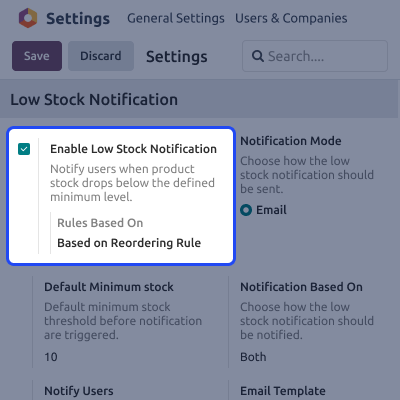
    • Check the quantity to order
    • Send reordering alerts
    • Reduce manual stock checking
    • Improve purchase planning
    Reordering Rule Alerts

    Notification Management

    Control how and when alerts are sent.
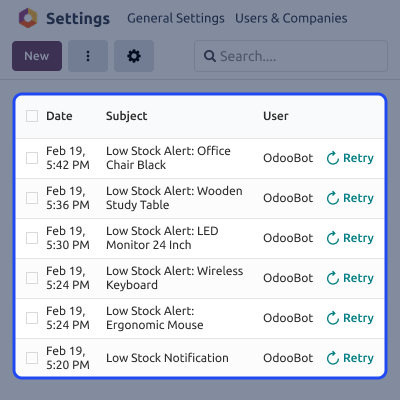
    • Select users for alerts
    • Send individual product alerts
    • Send one combined stock report
    • Flexible alert settings
    Notification Management

    Discuss Channel Integration

    Send low stock alerts to Discuss. This helps teams act faster.
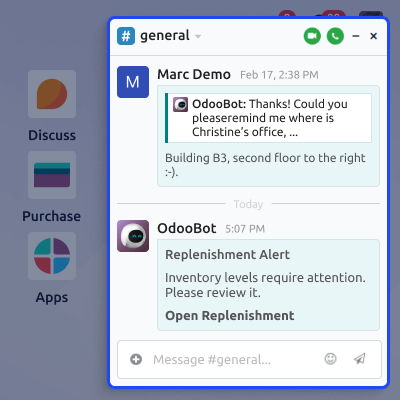
    • Post alerts in Discuss
    • Direct link to replenishment page
    • Quick stock checking
    • Better team coordination
    Discuss Channel Integration

    Support

    For any query or issue, please create a support ticket here CREATE A TICKET HERE

    You may also check our other top-quality Odoo Modules.

    Specifications

    Product Version1.0.0
    ReleasedToday
    CategoryOdoo AppsTool
    Last UpdatedMarch 9, 2026 (Today)
    Supported VersionsOdoo  17.x  18.x  19.x  
    Write a review

    FAQ’s

     Can I configure low stock notification for selected products only?
    Yes. You can set a minimum quantity for specific products. Only those products will send alerts.
     How frequently does the system check product quantity?
    The system checks stock automatically. It sends alerts when limits or reordering rules are triggered.
     What happens if multiple products become low on stock at the same time?
    You can choose to receive one combined report instead of many separate emails.
     Can different users receive different notifications?
    Yes. You can choose which users receive email and Discuss alerts.
     Does the module support multi-warehouse inventory?
    Yes. If stock tracking is set correctly in Odoo Inventory, it works across warehouses.
     Is manual intervention required after configuration?
    No. After setup, the system works automatically.
     Can I disable notifications temporarily?
    Yes. Administrators can change or turn off notifications at any time.

    Move to Cloud Today

    AWS Free tier hosting for one year by amazon web services, for more details please visit AWS Free Tier.

    GCP Free tier hosting for one year with 300 credit points by google cloud platform, for more details please visit GCP Free Tier.

    Azure free tier hosting for one year with 25+ always free services, for more details please visit Azure Free Tier.

    In our default configuration we will provide tremendous configuration for your eCommerce Website which is fast to load and response.

    Default Configuration Details of Server

    • 1 GB RAM
    • 1 Core Processor
    • 30 GB Hard Disk
    • DB with 1 GB RAM and 1 Core Processor

    * Server Configuration may vary as per application requirements.

    Want to know more how exactly we are going to power up your eCommerce Website with Cloud to fasten up your store. Please visit the Cloudkul Services.

    Get Started with Cloud
    Not Available


