USD
  • EUR
  • INR
  • USD
Cart
Cart 0
  • You have no items in your shopping cart.
    Cart
    Cart 0
    • You have no items in your shopping cart.
    Hire a Developer
    ×
    Contact Us!
    Send Again
    Close
    Please Login to Write Your Review

    Odoo MCP Server Integration

    Odoo MCP Server Integration safely connects AI tools with Odoo ERP, allowing VS Code AI extensions and GitHub Copilot (in MCP-enabled environments) to interact securely without direct database access.


    • Secure external MCP Server with API management

    • AI chatbot integrated inside Odoo Discuss

    • Supports multiple LLM providers like OpenAI, Google Gemini, and Groq.

    • Control allowed Create, Read, Update, Delete operations

    • A single MCP Server serves multiple AI clients

    • AI actions follow Odoo user permissions automatically


    Screenshots
    Odoo MCP Server Integration Odoo MCP Server Integration Odoo MCP Server Integration Odoo MCP Server Integration Odoo MCP Server Integration Odoo MCP Server Integration
    Show More Hide All
    $99.00

    * Required Fields

    Add To Cart
    $99.00
    Configure and Buy
    • Description
    • Reviews
    • FAQ
    • Customers ()
    • Specifications
    • Cloud Hosting
    • Changelog

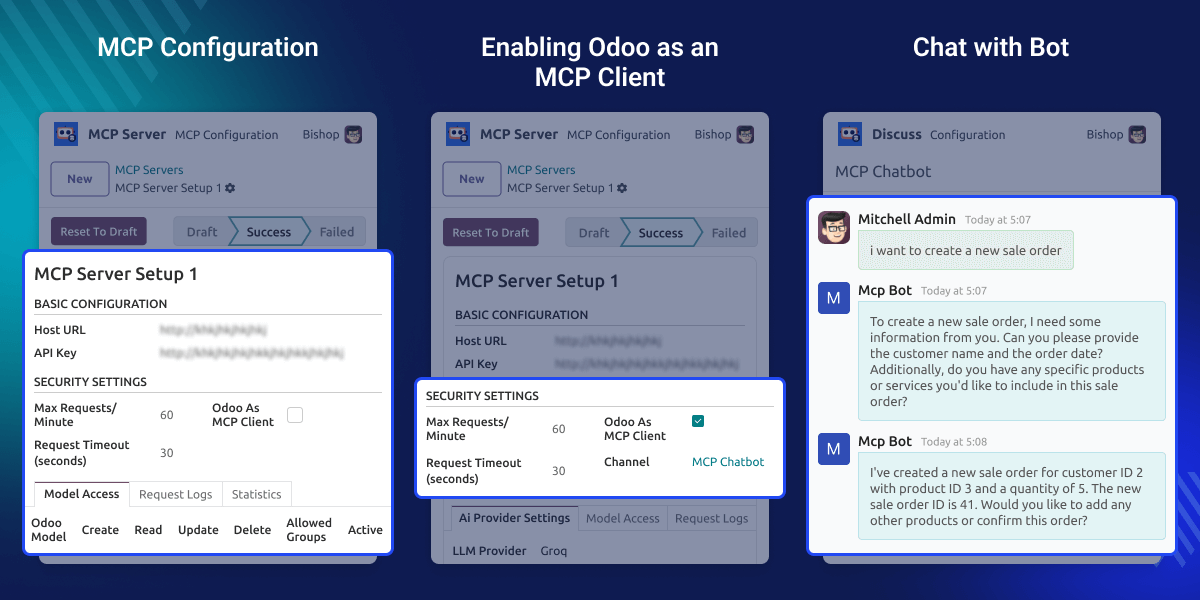
    Odoo MCP Server Integration helps businesses use AI safely with Odoo ERP. The MCP Server runs separately and allows only approved actions, keeping ERP data secure.

    Odoo acts as an MCP client. Users can ask AI to perform tasks inside Odoo Discuss. Other AI tools like VS Code AI or GitHub Copilot can also use the same MCP Server. This makes the setup flexible and easy to scale.

    AI decides what actions to request, while Odoo performs only allowed actions. This separation keeps the system secure and ensures ERP operations run smoothly.
    Odoo MCP Server Integration

    Why Do We Need Odoo MCP Server Integration?

    AI needs a safe way to work with ERP systems. Our Odoo MCP Server Integration module provides a controlled interface for AI, ensures actions follow permissions, and prevents direct database access.

    For example, a sales manager can ask AI in Odoo Discuss to create a product using simple language. The AI picks the correct tool, sends the request to the MCP Server, and creates the product safely.

    At the same time, a developer can use VS Code AI to get sales data from the same MCP Server, without accessing the database directly.

    Highlighted Features of Odoo MCP Server Integration

    Secure MCP Server

    MCP Server manages authentication, API keys, and AI actions safely.

    Integrated Chatbot Interface

    AI chatbot works inside Odoo Discuss with real-time responses.

    Flexible LLM Providers

    Supports OpenAI, Google Gemini, and Groq with configurable models.

    Permission-Controlled AI Actions

    All AI actions follow Odoo permissions and access rules.

    MCP Server Configuration

    The MCP Server ensures safe AI use by managing authentication, tools, and LLM provider access.
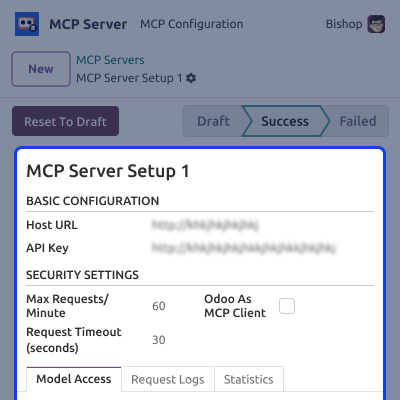
    • Generate secure API keys for AI client authentication.
    • Set the external MCP Server URL for communication.
    • Select LLM providers like OpenAI, Google Gemini, or Groq.
    • Control which tools and models AI clients can access.
    MCP Server Configuration

    Odoo as MCP Client

    In our module Odoo Discuss works as an MCP client, letting users interact with AI inside Odoo.
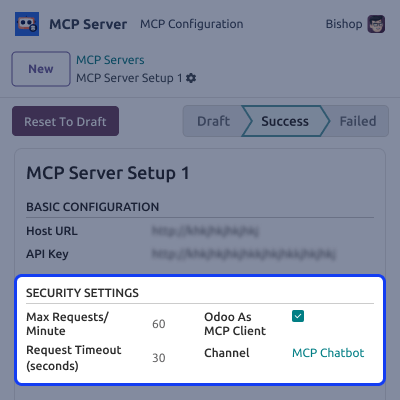
    • Use natural language commands to perform ERP tasks.
    • Execute tasks safely using approved MCP tools.
    • Get real-time AI responses inside Odoo Discuss.
    • No external interface or extra software is required.
    Odoo as MCP Client

     Model Access Control

    In the Odoo MCP Server Integration module, you can control which Odoo models AI can access and what actions it can perform, ensuring safe and controlled automation.
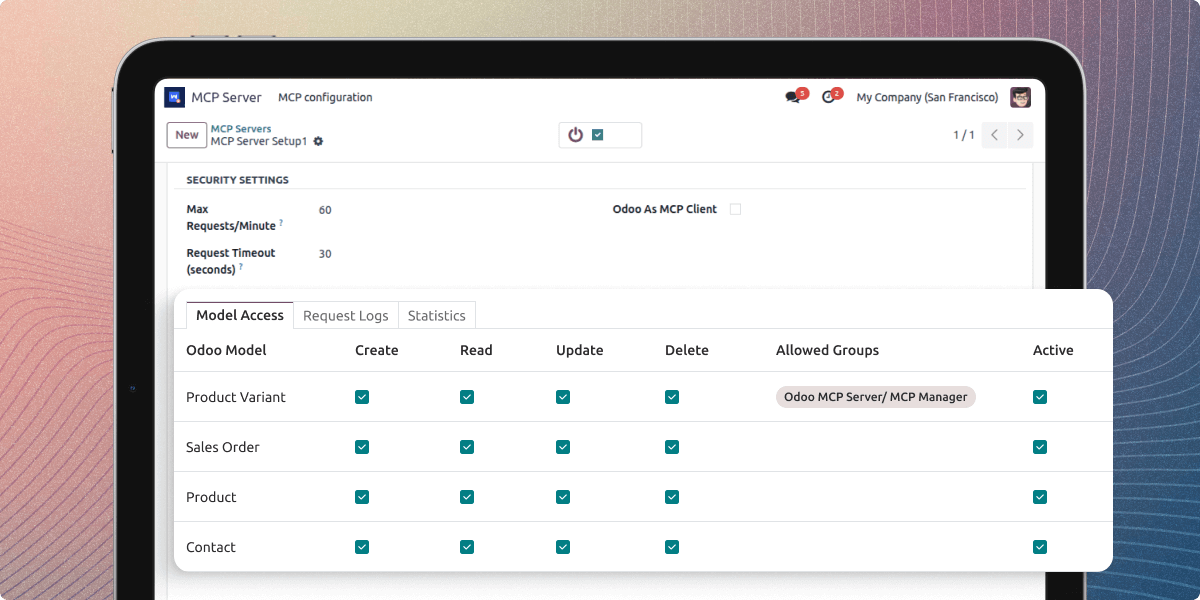
    • Select the models that AI is allowed to access.
    • Control Create, Read, Update, and Delete operations.
    • Apply access rules based on user groups.
    • Prevent unauthorized or unsafe actions.
    Model Access Control

    Support

    For any query or issue, please create a support ticket here CREATE A TICKET HERE

    You may also check our other top-quality Odoo Modules.

    Specifications

    Product Version1.0.0
    Released2 months ago
    CategoryOdoo AppsTool
    Last UpdatedJanuary 30, 2026 (1 month ago)
    Supported VersionsOdoo  18.x  19.x  
    Write a review

    FAQs

      Can multiple AI tools use the same MCP Server?
    Yes. One MCP Server can serve Odoo, VS Code AI, GitHub Copilot, and other MCP-compatible clients.
      Can AI actions be limited to certain models or tasks?
    Yes. You can choose which models AI can access and which CRUD actions it can perform.
      How is security handled for AI actions?
    All AI actions follow Odoo’s permissions, record rules, and access groups automatically.
      Can AI perform tasks instantly?
    Yes. Allowed actions are executed immediately, with responses shown in Odoo Discuss.
      Which LLM providers are supported in Odoo MCP Server Integration?
    OpenAI, Google Gemini, and Groq are supported.
      Are AI actions logged?
    Yes. Every action is tracked for auditing and compliance.

    Move to Cloud Today

    AWS Free tier hosting for one year by amazon web services, for more details please visit AWS Free Tier.

    GCP Free tier hosting for one year with 300 credit points by google cloud platform, for more details please visit GCP Free Tier.

    Azure free tier hosting for one year with 25+ always free services, for more details please visit Azure Free Tier.

    In our default configuration we will provide tremendous configuration for your eCommerce Website which is fast to load and response.

    Default Configuration Details of Server

    • 1 GB RAM
    • 1 Core Processor
    • 30 GB Hard Disk
    • DB with 1 GB RAM and 1 Core Processor

    * Server Configuration may vary as per application requirements.

    Want to know more how exactly we are going to power up your eCommerce Website with Cloud to fasten up your store. Please visit the Cloudkul Services.

    Get Started with Cloud
    Not Available


