Send Again
Close
Odoo MRP Alternative Component / Dynamic BOM makes manufacturing more flexible. If the main part is unavailable or needs other components, the user can easily use a different part in the BOM. This helps keep the production process running without delays.
When you pick a substitute part, the system updates the cost automatically. It adds the extra cost (if any) to the original price. You can see the full updated cost clearly in the Manufacturing Order (MO) screen.
During production, users can quickly pick from the list of substitute parts. The easy-to-use design and automatic cost updates help control spending, avoid slowdowns, and make manufacturing faster and smoother.

Odoo MRP Alternative Component / Dynamic BOM helps fix common production problems like out-of-stock parts or pick different components as per demand. It lets you use backup parts in the BOM, so production doesn’t stop when a main part isn’t available. This gives manufacturers the flexibility to keep things moving without doing extra work.
It also makes cost tracking easy and accurate. When you choose a different part, the system updates the cost automatically. This helps you stay on budget and see the right costs. The simple interface also reduces errors and saves time for the team.
Easily add backup parts to any BOM item or let user pick an alternate component. Odoo MRP Alternative Component / Dynamic BOM helps keep production going when the main part is not available or needs to change on demand.
Changes the cost automatically when you choose a backup part. It adds any extra price to help you track the real cost correctly.
See the updated costs right away on the Manufacturing Order page. This gives clear and complete information during production.
Admins can set different quantities and extra prices for each backup part. This gives better control based on what the production needs.
Add alternate parts directly in the BOM to handle shortages or changes. Each alternate can have its own quantity and extra cost.

The system automatically recalculates the total cost when substitute parts are selected in a manufacturing order. It adds the base price and any extra cost from the substitutes to give the final amount. This keeps cost reports accurate and up to date.
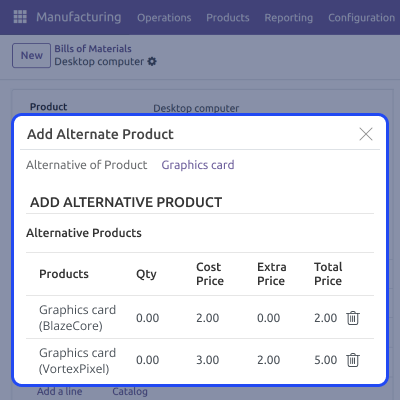
Alternate components can be selected instantly during production. Odoo MRP Alternative Component / Dynamic BOM lets you pick more than one substitute and adjust their quantities for better control. This helps you react quickly to changes in stock or quality.
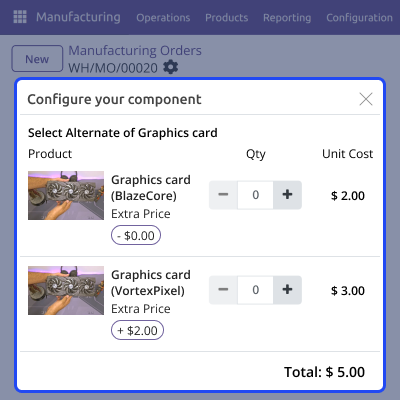
The module has a clean and easy-to-use design that makes setup simple. Admins can quickly manage quantities, prices, and alternate parts with minimal effort. This helps reduce mistakes in production planning and saves time.

For any query or issue, please create a support ticket here CREATE A TICKET HERE
You may also check our other top-quality Odoo Modules.
Detailed technical features and requirements to help you understand the module’s capabilities and ensure smooth integration with your system.
Detailed technical features and requirements to help you understand the module’s capabilities and ensure smooth integration with your system.
We’re partnered with top-tier, trusted providers!
Want to know more how exactly we are going to power up your eCommerce Website with Cloud to fasten up your store
* Server Configuration may vary as per application requirements.



