USD
  • EUR
  • INR
  • USD
Cart
Cart 0
  • You have no items in your shopping cart.
    Cart
    Cart 0
    • You have no items in your shopping cart.
    Hire a Developer
    ×
    Contact Us!
    Send Again
    Close
    Please Login to Write Your Review

    Odoo Multi Pricelist on Order

    Odoo Multi Pricelist on Order lets sales users choose different price lists for each quotation line and see price changes instantly without breaking the sales flow.


    • User-based pricelist access control

    • Change pricelist per quotation line

    • Instant price preview without reload

    • Safe currency-based pricelist filtering

    • One-click price update on lines

    • Independent pricing for each line

    Screenshots
    Odoo Multi Pricelist on Order Odoo Multi Pricelist on Order Odoo Multi Pricelist on Order Odoo Multi Pricelist on Order Odoo Multi Pricelist on Order Odoo Multi Pricelist on Order
    Show More Hide All
    $49.00

    * Required Fields

    Add To Cart
    $49.00
    Configure and Buy
    • Description
    • Reviews
    • FAQ
    • Customers ()
    • Specifications
    • Cloud Hosting
    • Changelog

    Odoo Multi Pricelist on Order helps sales teams use different pricelists on each quotation line. Users can see price changes fast and compare prices without refreshing the page. Everything updates smoothly and safely.

    It keeps the normal sales process the same. Taxes, currency rules, and order totals stay correct while users get flexible pricing control on every order line.
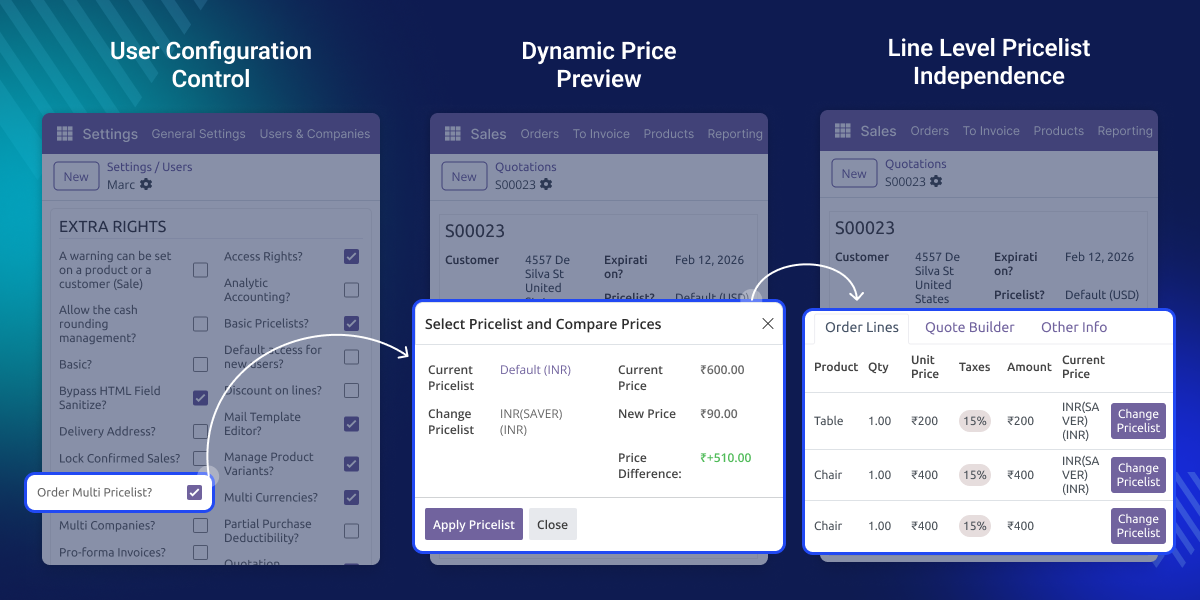
    Odoo Multi Pricelist on Order

    Why do we need Odoo Multi Pricelist on Order?

    Odoo Multi Pricelist on Order is useful when customers ask for different prices on different products in the same quotation. Sales users can adjust prices easily without creating multiple orders.

    Odoo Multi Pricelist on Order saves time and avoids mistakes. Sales teams can compare prices instantly and apply the best one with a single click while keeping full pricing accuracy.

    Highlighted Features of Odoo Multi Pricelist on Order

     User Access Control

    Only allowed sales users can use multiple pricelists, keeping pricing safe and fully controlled.

     Quick Pricelist Popup

    A small pop-up opens instantly to change the pricelist without reloading the page.

     Safe Currency Filtering

    The system shows only pricelists that match the order currency to avoid wrong pricing

     Draft Order Protection

    Pricelists can be changed only before order confirmation to prevent pricing mistakes.

    User Configuration Control

    Sales managers can choose which users can use multiple pricelists. This keeps pricing safe and gives full control to the sales manager.
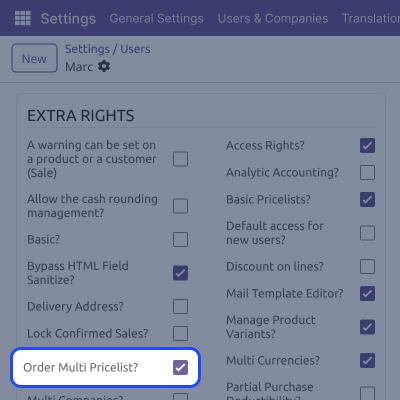
    • Enable multi pricelist per user
    • Keeps pricing access controlled
    • Other users stay unaffected
    • Easy setup from user settings
    • Works smoothly with sales flow
    User Configuration Control

    Change Pricelist on Order Lines

    Each quotation line gets its own button to change the pricelist. This helps sales users update prices easily without affecting other lines.
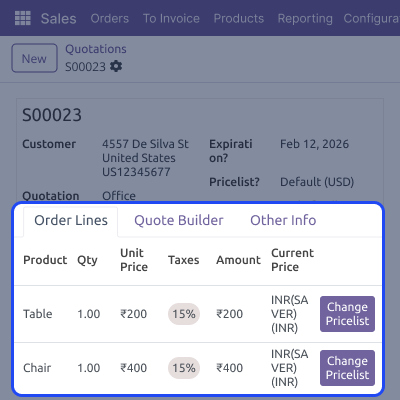
    • Dedicated “Change Pricelist” button
    • Visible only in the quotation stage
    • Hidden after order confirmation
    • No impact on order-level pricelist
    • Safe and simple to use
    Change Pricelist on Order Lines

    Real-Time Pricelist Wizard

    The pricelist window shows all important details in one place. Users can compare prices clearly without waiting or reloading the page.
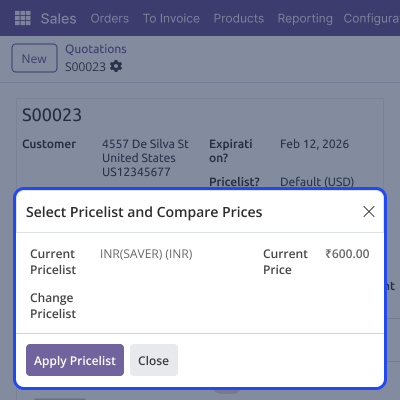
    • Shows current pricelist name
    • Displays existing unit price
    • Shows product quantity
    • Opens without page reload
    • Easy price comparison
    Real-Time Pricelist Wizard

    Dynamic Price Preview

    Users can see price changes before applying the new pricelist. Color indicators help users understand price changes quickly.
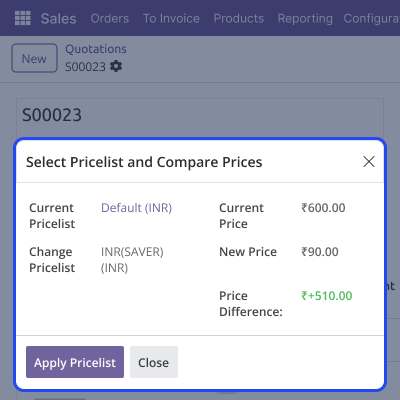
    • Shows the new calculated price
    • Displays exact price difference
    • Green color for price increase
    • Red color for price decrease
    • Helps avoid pricing mistakes
    Dynamic Price Preview

    One-Click Price Application

    Prices are applied instantly with just one click. All totals and taxes update automatically without extra steps.
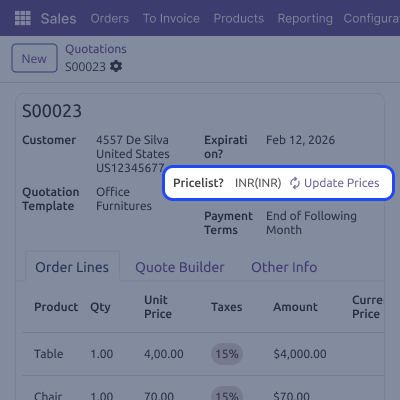
    • Updates unit price immediately
    • Recalculates line subtotal
    • Updates taxes automatically
    • Refresh not required
    • Saves sales team time
    One-Click Price Application

    Line-Level Pricelist Independence

    Odoo Multi Pricelist on Order lets each order line work separately with its own pricelist. Changes on one line do not affect other order lines or the order pricelist.

    • Different pricelist per line
    • One line does not affect others
    • Order pricelist remains unchanged
    • Manual price edits allowed
    • Full pricing flexibility
    Line-Level Pricelist Independence

    Support

    For any query or issue, please create a support ticket here CREATE A TICKET HERE

    You may also check our other top-quality Odoo Modules.

    Specifications

    Product Version1.0.0
    Released1 month ago
    CategoryOdoo AppsSales
    Last UpdatedJanuary 22, 2026 (1 month ago)
    Supported VersionsOdoo  16.x  17.x  18.x  19.x  
    Write a review

    FAQs

     What does Odoo Multi Pricelist on Order do?
    It allows sales users to apply different pricelists to each quotation line with instant price preview.
     Can I use multiple pricelists in one order?
    Yes, each order line can have its own pricelist without affecting others.
     When can the pricelist be changed?
    Pricelists can be changed only in the Quotation or Quotation Sent stage.
     Can all users access this feature?
    No, access is controlled per user for better security.
      Does it support currency and taxes?
    Yes, it filters pricelists by currency and recalculates taxes automatically.

    Move to Cloud Today

    AWS Free tier hosting for one year by amazon web services, for more details please visit AWS Free Tier.

    GCP Free tier hosting for one year with 300 credit points by google cloud platform, for more details please visit GCP Free Tier.

    Azure free tier hosting for one year with 25+ always free services, for more details please visit Azure Free Tier.

    In our default configuration we will provide tremendous configuration for your eCommerce Website which is fast to load and response.

    Default Configuration Details of Server

    • 1 GB RAM
    • 1 Core Processor
    • 30 GB Hard Disk
    • DB with 1 GB RAM and 1 Core Processor

    * Server Configuration may vary as per application requirements.

    Want to know more how exactly we are going to power up your eCommerce Website with Cloud to fasten up your store. Please visit the Cloudkul Services.

    Get Started with Cloud
    Not Available


