USD
  • EUR
  • INR
  • USD
Cart
Cart 0
  • You have no items in your shopping cart.
    Cart
    Cart 0
    • You have no items in your shopping cart.
    Hire a Developer
    ×
    Contact Us!
    Send Again
    Close
    Please Login to Write Your Review

    Odoo MultiChannel Email Marketing


    Odoo Multi-Channel Email Marketing allows you to connect and manage multiple email tools, like Mautic, keeping your campaigns and data seamlessly in sync.


    • Create and manage multiple email marketing channels.

    • Automatically sync data with external email tools.


    • Set API limits for importing large datasets.


    • Import and export campaign data with ease.


    • Organize marketing data using a segment-wise structure.


    • Configure each email channel with unique settings.


    • Sync channels in real-time using cron jobs.


    Screenshots
    Odoo MultiChannel Email Marketing Odoo MultiChannel Email Marketing Odoo MultiChannel Email Marketing Odoo MultiChannel Email Marketing Odoo MultiChannel Email Marketing Odoo MultiChannel Email Marketing Odoo MultiChannel Email Marketing
    Show More Hide All
    $99.00

    * Required Fields

    Add To Cart
    $99.00
    Configure and Buy
    • Description
    • Reviews
    • FAQ
    • Customers ()
    • Specifications
    • Cloud Hosting
    • Changelog

    Odoo MultiChannel Email Marketing manages multiple email marketing channels in one place. Users can create custom channels, connect tools like Mautic, and set rules to keep updated.

    This module helps to bring in and send out data like contacts and campaigns in Odoo. You can use filters, set limits, and handle data simply. It saves time and lessens manual work.

    With real-time syncing, it keeps the campaigns up to date without needing constant checks. Handle segments, templates, and more from your Odoo dashboard.
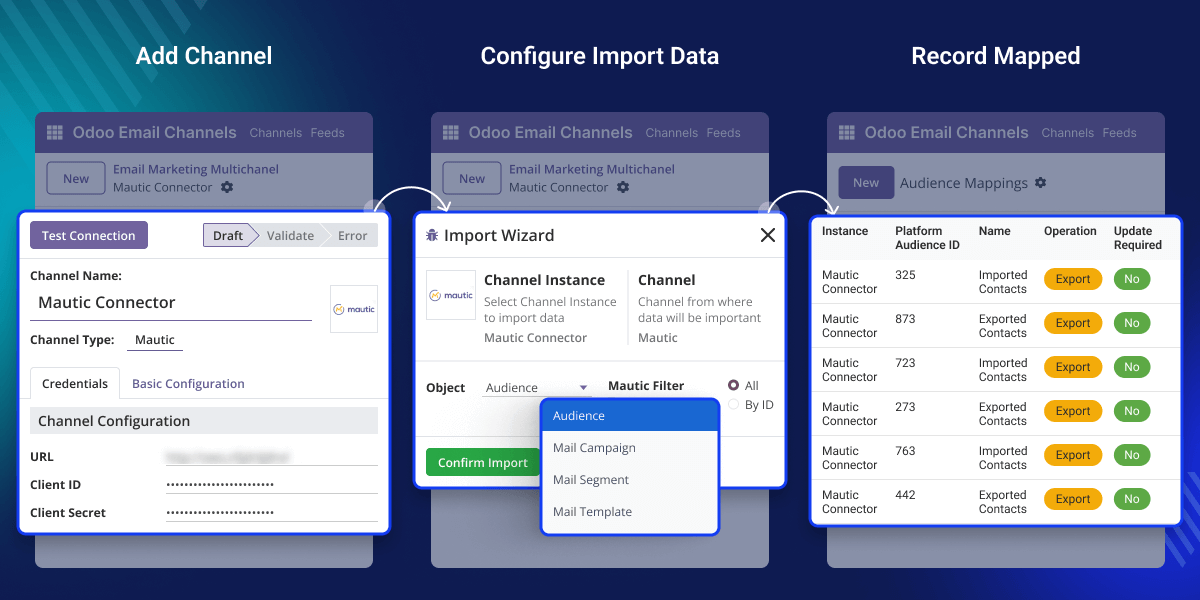
    Odoo MultiChannel Email Marketing

    Why do we need Odoo MultiChannel Email Marketing?

    Imagine a company using Mautic and Mailchimp for different product campaigns. Instead of switching between these tools, the marketing team uses Odoo MultiChannel Email Marketing to manage both from one dashboard.

    They create channels, sync data automatically, and update information quickly. When a new contact or template is added in Mautic, it shows up in Odoo without typing it again. It helps improve campaign results and saves a lot of time.

    This module simplifies that by offering channel creation, data sync, and campaign management. It avoids duplication and keeps data up to date.

    Highlighted Features of Odoo MultiChannel Email Marketing

    Email Channel Creation

    With Odoo Multi-Channel Email Marketing, users can set up named email channels to connect with tools like Mautic and Mailchimp.

    Auto Feed Evaluation

    Scheduled jobs (cron) run in the background at fixed times to keep your data updated. This means users don’t need to do it themselves.

    API Record Limit

    Scheduled jobs (cron) run in the background at fixed times to keep your data updated. This means users don’t need to do it themselves.

    Campaign Data Export

    Users can decide how many records to import at a time. This helps avoid system slowdowns and keeps everything running smoothly.

    View Mapped Record

    This section shows a summary of records that are already imported or exported through different channels. It helps track what data synced and what is pending.
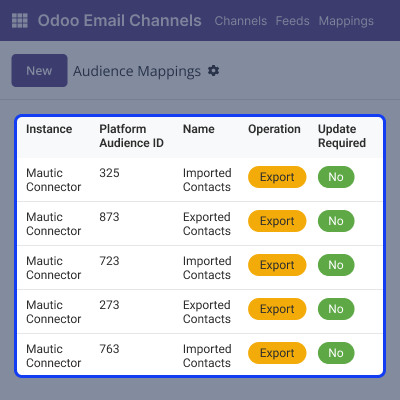
    • View mapped contacts, campaigns, and templatesAdd employees easily and quickly.
    • Filter records by channel and data type.
    • Check the status of each mapped entry.
    • Easy to review and manage existing data.
    View Mapped Record

    Channel Configuration

    With Odoo MultiChannel Email Marketing, users can create and set up many different email marketing channels. Each channel can connect to a different external tool like Mautic or Mailchimp.
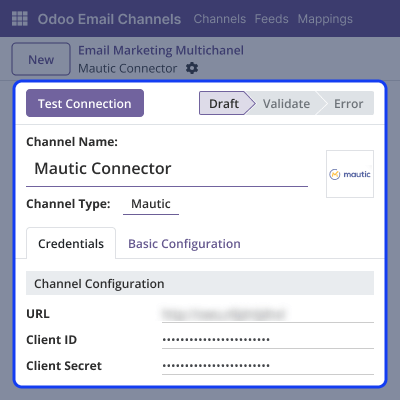
    • Assign unique names to each channel.
    • Choose channel types like Mautic or Mailchimp.
    • Enable or disable auto-evaluation as needed.
    • Manage all channels under one system.
    Channel Configuration

    Import and Export

    This module makes importing and exporting marketing data, such as contacts, campaigns, and email templates easy. It helps to keep all the marketing information up to date.
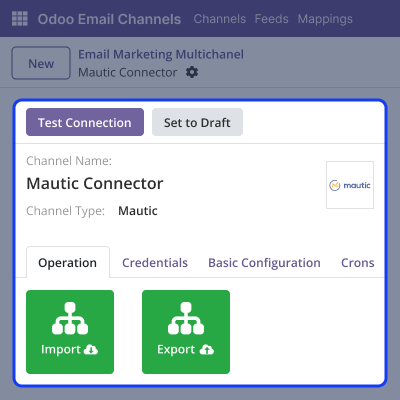
    • Import contacts, campaigns, and templates.
    • Export updated marketing data to external platforms.
    • Use filters to choose the data to import or export.
    • Handle large amounts of data quickly with bulk operations.
    Import and Export

    Channel Basic Configuration

    Users can set up basic settings that work for all email channels and data tasks. These settings help to control how the system works overall, making it easier to manage everything from one place.
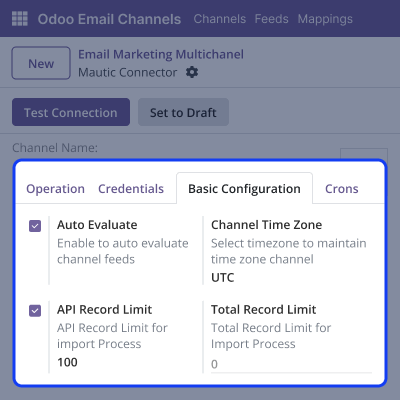
    • Turn channel auto-evaluation on or off to control sync behavior.
    • Set record limits per API call to avoid performance issues.
    • Handle errors smoothly with system responses.
    • Adjust settings to match the needs of connected platforms.
    Channel Basic Configuration

    Support

    For any query or issue, please create a support ticket here CREATE A TICKET HERE

    You may also check our other top-quality Odoo Modules.

    Specifications

    Product Version1.0.0
    Released7 months ago
    Last UpdatedOctober 7, 2025 (4 months ago)
    Supported VersionsOdoo  17.x  18.x  19.x  
    Write a review

    Frequently Asked Questions

      Can I connect more than one external email platform?
    Odoo MultiChannel Email Marketing supports many platforms like Mautic, Mailchimp, and others.
      What happens if I go over the API limit?
    You can set limits on how many records are imported to avoid overload or timeout problems during syncing.
      Can I import campaigns without contacts?
    It’s possible to import only campaigns, only contacts, or both by using filters.
     Can I turn off a specific channel without deleting it?
    Evaluation or syncing for any channel can be stopped without removing its settings.
     Can I use different settings for each email marketing channel?
    Different options can be set for each channel, including turning auto-evaluation on or off, setting sync rules, and changing API limits.

    Move to Cloud Today

    AWS Free tier hosting for one year by amazon web services, for more details please visit AWS Free Tier.

    GCP Free tier hosting for one year with 300 credit points by google cloud platform, for more details please visit GCP Free Tier.

    Azure free tier hosting for one year with 25+ always free services, for more details please visit Azure Free Tier.

    In our default configuration we will provide tremendous configuration for your eCommerce Website which is fast to load and response.

    Default Configuration Details of Server

    • 1 GB RAM
    • 1 Core Processor
    • 30 GB Hard Disk
    • DB with 1 GB RAM and 1 Core Processor

    * Server Configuration may vary as per application requirements.

    Want to know more how exactly we are going to power up your eCommerce Website with Cloud to fasten up your store. Please visit the Cloudkul Services.

    Get Started with Cloud
    Not Available


