USD
  • INR
  • USD
Cart
Cart 0
  • You have no items in your shopping cart.
    Cart
    Cart 0
    • You have no items in your shopping cart.
    Hire a Developer
    ×
    Contact Us!
    Send Again
    Close
    Please Login to Write Your Review

    Odoo OneDrive Backup


    Odoo OneDrive Backup safely keeps your Odoo data on Microsoft OneDrive, with automatic backups, easy restore, live tracking, and smart cleanup for safe, organized cloud storage


    • Safe and dependable cloud storage for your data

    • Automatic backups of Odoo data on a set schedule

    • Quick and easy restore from Microsoft OneDrive

    • See backup progress and status in real time

    • Connect and manage multiple OneDrive accounts easily

    • Keep only recent backups with automatic deletion

    • Get instant alerts if a backup fails


    Screenshots
    Odoo OneDrive Backup Odoo OneDrive Backup Odoo OneDrive Backup Odoo OneDrive Backup Odoo OneDrive Backup Odoo OneDrive Backup Odoo OneDrive Backup Odoo OneDrive Backup Odoo OneDrive Backup
    Show More Hide All
    $199.00

    * Required Fields

    Add To Cart
    $199.00
    Configure and Buy
    • Description
    • Reviews
    • FAQ
    • Customers ()
    • Specifications
    • Cloud Hosting
    • Changelog

    Odoo OneDrive Backup keeps your Odoo data safe on Microsoft OneDrive by automatically making backups. Your data stays updated and easy to access

    You can set backup times, watch progress, restore files anytime, organize folders, and keep only the latest backups. It makes managing your data safe, simple, and stress-free.

    When you link templates to your products or categories, quality checks are triggered automatically. Use Odoo OneDrive Backup dashboard to track tasks and check the team's work.
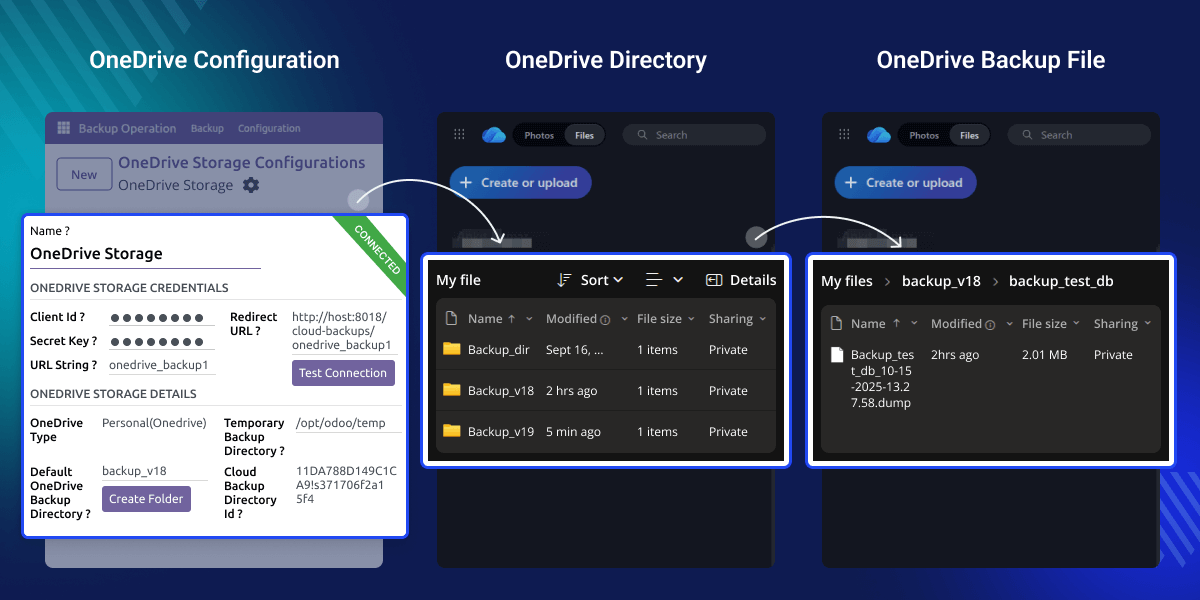
    Odoo OneDrive Backup

    Why do we need a Odoo OneDrive Backup?

    Odoo OneDrive Backup makes sure that all your Odoo Data is safe and secure with the help of secure Odoo and OneDrive integration.

    At the time of a crash or server down, when the chances of data loss are high, our module helps to store data to OneDrive and provides easy access to it for backups

    Our module has automatic data setup and retention, so the data is automatically stored and deleted from OneDrive directly from Odoo, so you don’t have to do it manually.

    Prerequisites for using Odoo OneDrive Backup

    Odoo OnDrive Backup works in conjunction with the following module:

    Odoo Database Backup

    You need to install the module mentioned above to use Odoo OneDrive Backup.

    Highlighted Features of Odoo OneDrive Backup

     Odoo OneDrive Backup Integration

    Safe and secure integration between Odoo and OneDrive to make sure your data is saved to the cloud easily.

     Backup Alerts on Failures

    Internal users will instantly receive email messages whenever a backup goes to a failed state with Odoo OneDrive Backup module

     Secure and Scalable Storage

    Save your Odoo Data with Microsoft OneDrive security and scale storage according to your requirements.

     Backup Status Tracking

    Track every state of your backups directly from Odoo, whether they are in a success, failed, or dropped state.

     Create Backups for SaaS Clients

    If you are an Odoo SaaS Kit user, you can also create backups for your SaaS Clients.

     Audit-Ready Records

    Keep complete notes and logs so it’s easy to pass audits and review quality later.

     Odoo & OneDrive Security

    Use graphs and visual reports to monitor team performance and inspection results.

    Odoo & OneDrive Security

    Keep your Odoo data safe by linking it to Microsoft OneDrive. Your backups are protected, so your information stays safe and secure.
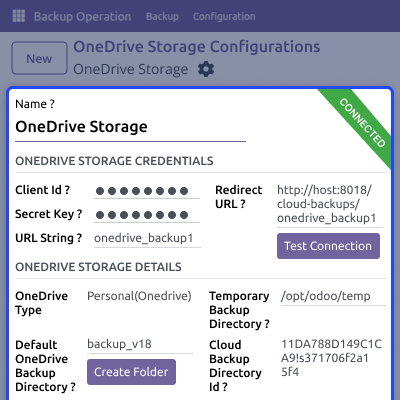
    • You can link multiple OneDrive accounts to keep everything organized.
    • Access and restore your backups anytime directly from OneDrive.
    • Easily manage backup folders and control where your files are stored.
    • Easily connect to OneDrive using Odoo’s simple interface.
    • OneDrive automatically selects the storage region based on your account.
    Odoo & OneDrive Security

    Automated Backup Process

    Make backups easy with automatic scheduling and retention settings to save your data without any manual work, and save your storage space.
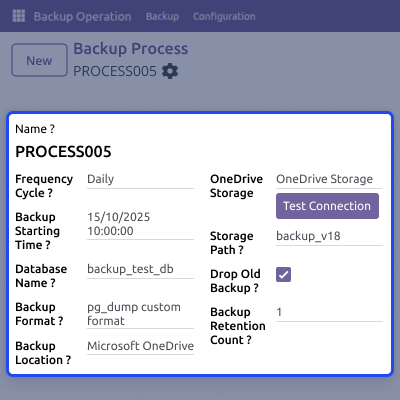
    • You can set backups to run daily, twice a day, or weekly.
    • Choose how many old backups to keep to save storage space.
    • Backups start automatically at the scheduled time without any manual work.
    • Old backups beyond the limit are deleted automatically.
    • This keeps your data safe with continuous, hands-free backup.
    Automated Backup Process

    Backup Control & Tracking

    With Odoo OneDrive Backup, you can watch and control all backup activities directly from Odoo, and easily access your backups to see past records.

    • Cancel any running backup instantly from Odoo interface.
    • Track the status of backups: success, failure, or dropped.
    • View detailed logs for every backup process.
    • Restore backups directly from OneDrive within Odoo.
    • Keep full visibility and control over all backup activities.
    Backup Control & Tracking

    Support

    For any query or issue, please create a support ticket here CREATE A TICKET HERE

    You may also check our other top-quality Odoo Modules.

    Specifications

    Product Version1.0.0
    Released7 days ago
    Last UpdatedNovember 26, 2025 (7 days ago)
    Supported VersionsOdoo  18.x  19.x  
    Write a review

    FAQs

      What is Odoo OneDrive Backup?
    Odoo OneDrive Backup is a tool that keeps your Odoo data safe on OneDrive. It makes automatic copies and lets you restore them easily
     Can I connect multiple OneDrive accounts?
    Yes, you can link more than one OneDrive account to keep backups for different databases or folders
      How does backup retention work?
    You can choose how many backups to keep. Older backups are deleted automatically to save space.
      Can I cancel a running backup?
    Yes, you can stop any backup while it is running without affecting other scheduled backups.
      How can I restore backups from OneDrive?
    You can open, download, and restore any backup from OneDrive directly in Odoo.
      Does Odoo OneDrive Backup notify if a backup fails?
    Yes, it sends instant alerts if a backup fails so you can fix it quickly
      Do I need technical skills to use this module?
    No, it is very easy to set up, run, and manage even if you don’t know much about computers.

    Move to Cloud Today

    AWS Free tier hosting for one year by amazon web services, for more details please visit AWS Free Tier.

    GCP Free tier hosting for one year with 300 credit points by google cloud platform, for more details please visit GCP Free Tier.

    Azure free tier hosting for one year with 25+ always free services, for more details please visit Azure Free Tier.

    In our default configuration we will provide tremendous configuration for your eCommerce Website which is fast to load and response.

    Default Configuration Details of Server

    • 1 GB RAM
    • 1 Core Processor
    • 30 GB Hard Disk
    • DB with 1 GB RAM and 1 Core Processor

    * Server Configuration may vary as per application requirements.

    Want to know more how exactly we are going to power up your eCommerce Website with Cloud to fasten up your store. Please visit the Cloudkul Services.

    Get Started with Cloud
    Not Available


