USD
  • EUR
  • INR
  • USD
Cart
Cart 0
  • You have no items in your shopping cart.
    Odoo Apps Extensions
    Cart
    Cart 0
    • You have no items in your shopping cart.
    Hire a Developer
    ×
    Contact Us!
    Send Again
    Close
    Please Login to Write Your Review
    Odoo PayLater Payment Acquirer-Qatar

    Odoo PayLater Payment Acquirer-Qatar

    x
    Free

    * Required Fields

    $69.00
    Add To Cart

    Odoo PayLater Payment Acquirer Qatar lets businesses accept secure PayLater payments at website checkout. Customers pay in QAR through a hosted payment page, and payments are confirmed on their own.


    • Accept PayLater payments during website checkout.

    • Support secure payments in Qatari Riyal (QAR).

    • Redirect customers to the PayLater hosted payment page.

    • Configure Merchant ID, Outlet ID, and API Key.

    • Switch between Test Mode and Live Mode.

    • Update payment status automatically after payment.

    • Store payment transactions in the backend.

    • Track payment references and transaction details.

    Odoo PayLater Payment Acquirer-Qatar
    Odoo PayLater Payment Acquirer-Qatar
    $69.00
    Check How It Works

    Need Help Deciding?

    Support answers within one business day.

    Open a ticket
    $69.00
    Configure and Buy
    X
    • Description
    • Reviews
    • FAQ
    • Customers ()
    • Specifications
    • Cloud Hosting
    • Changelog

    Odoo PayLater Payment Acquirer-Qatar adds the PayLater payment gateway to your checkout, making online payments easy and safe. Customers complete their payment on the secure PayLater payment page and return to the website after payment.

    Shops set up the gateway with a Merchant ID, Outlet ID, and API Key from the backend, and setup is quick, working in both Test Mode and Live Mode. Buyers pick PayLater at order time, tap the payment button, and go to the safe PayLater payment page to pay.

    Once payment works, buyers return on their own, payment status updates, and the order confirms with no extra steps. Each payment creates a record in the backend, so shops can check payment references, buyer details, amounts, and status at any time.

    The gateway works only in Qatari Riyal (QAR), which fits shops that serve buyers in Qatar and need local payment support. This module makes checkout smooth while keeping payments and records neat in one place.
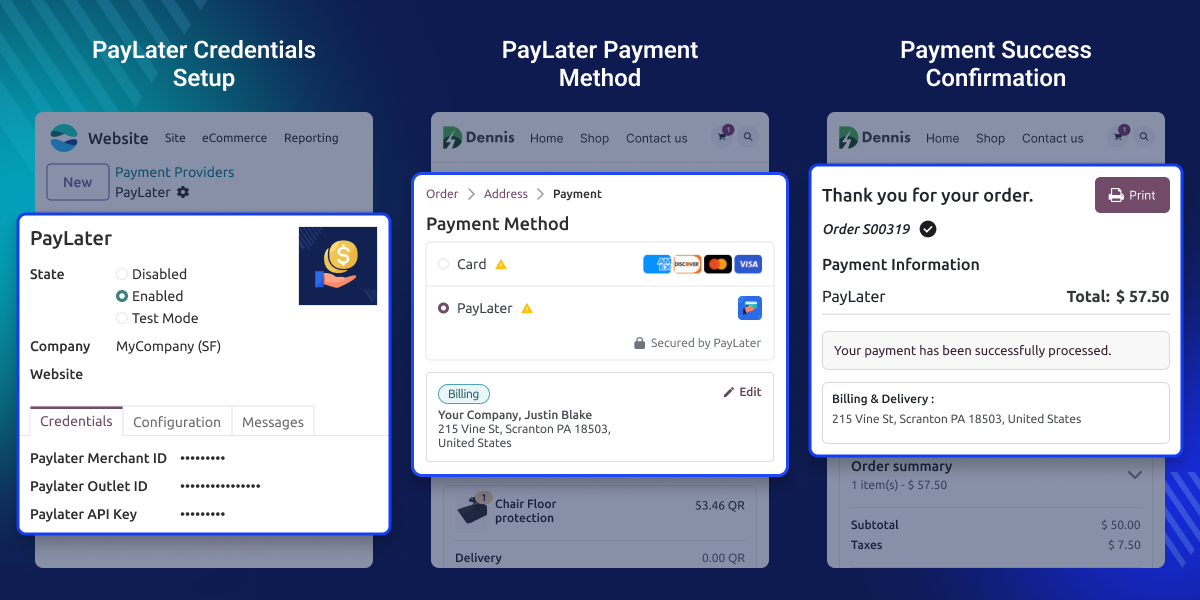
    Odoo PayLater Payment Acquirer

    Highlighted Features of Odoo PayLater Payment Acquirer-Qatar

    Hosted Payment Checkout

    Odoo PayLater Payment Acquirer sends buyers to the secure PayLater payment page to complete their payments online.

    Easy Gateway Setup

    Set up the Merchant ID, Outlet ID, and API Key from the backend to turn on PayLater quickly.

    Automatic Payment Updates

    Payment and order status updates on their own after each sale, saving staff time and effort.

    Secure Transaction Records

    Store full payment info, references, and buyer details so you can check them quickly whenever needed.

    QAR Payment Support

    Take safe online payments only in Qatari Riyal (QAR) through the trusted PayLater gateway.

    Simple Payment Tracking

    Watch payment status and transaction details right from the backend for easier management.

    Why do we need Odoo PayLater Payment Acquirer-Qatar?

    Many businesses in Qatar need a payment gateway that fits local payment rules and still gives customers a safe checkout. Default payment providers may not support PayLater. This leaves businesses stuck with unsupported tools or manual payment methods.

    Odoo PayLater Payment Acquirer adds PayLater right to the website checkout. Customers pay through a secure hosted payment page, and businesses manage every transaction from one place. The integration follows the standard payment workflow. This keeps payment processing simple, reliable, and easy to manage each day.

    Use cases of Odoo PayLater Payment Acquirer

      Qatar eCommerce Stores

    This module helps stores take safe QAR payments through PayLater

      Secure Website Checkout

    Buyers pay on the secure PayLater page and return on their own once payment is complete.

      Online Retail Businesses

    Offer PayLater as one more way to pay, giving buyers more choice at checkout.

      Payment Transaction Management

    Check payment status, transaction details, and provider refs from the backend with ease.

    PayLater Configuration

    Odoo PayLater Payment Acquirer helps you set up the PayLater payment gateway from the backend using your merchant details. The setup takes just a few steps and gets the gateway ready for website checkout.
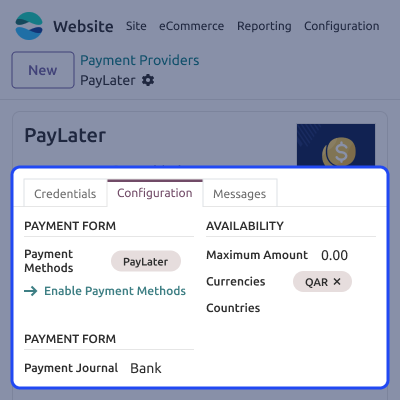
    • Configure Merchant ID, Outlet ID, and API Key.
    • Enable Test Mode or Live Mode.
    • Publish the payment provider for checkout.
    • Activate PayLater payments on the website.
    PayLater Configuration

    Payment Configuration

    The payment configuration lets you control how PayLater shows up during website checkout. Admins can manage payment settings and supported currencies from one place.
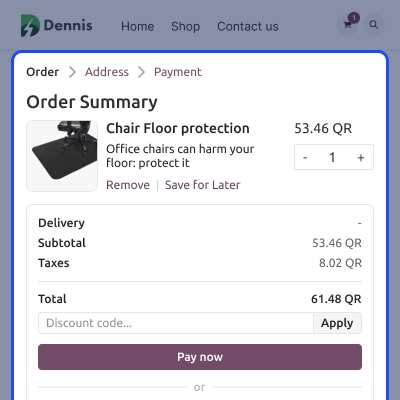
    • Configure PayLater as a payment method.
    • Select the payment journal.
    • Support payments only in QAR.
    • Manage payment availability settings.
    Payment Configuration

    Website Payment Flow

    After selecting PayLater at checkout, customers are redirected to a secure payment page to complete the transaction. Once payment succeeds, they return to the website on their own.
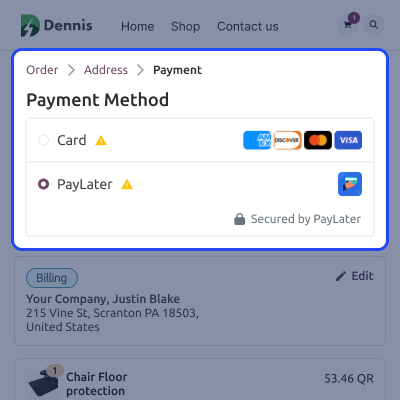
    • Select PayLater during checkout.
    • Redirect to the secure payment page.
    • Complete payments safely online.
    • Return to the website automatically.
    Website Payment Flow

    Transaction Management

    Every successful payment gets stored in the backend, making it easy to review transaction details and payment status whenever you need to.
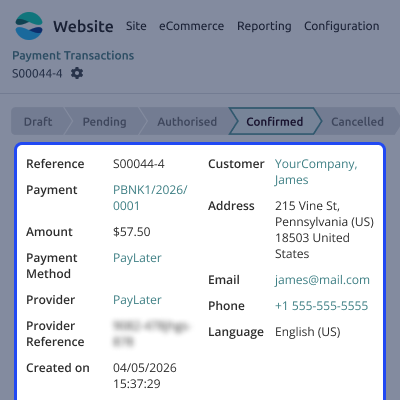
    • Record every payment automatically.
    • View payment status instantly.
    • Check transaction references.
    • Monitor payment details easily.
    Transaction Management

    Maintain Table Relationship

    Build simple and useful data models by connecting related tables in Odoo and Power BI to strengthen Power BI integration with Odoo reporting accuracy.

    • Easily link tables to understand your data better
    • Use many-to-one links to match how your business works
    • Keep table and dataset connections correct for accurate reports
    • Send data to Power BI with automatic links for easy reporting
    Maintain Table Relationship

    Support

    For any query or issue please create a support ticket here CREATE A TICKET HERE

    You may also check our other top-quality Odoo Modules.

    Specifications

    Product Version1.0.0
    ReleasedToday
    CategoryOdoo Apps, Payment, 
    Last UpdatedNovember 12, 2026 (Today)
    Supported Versions17.x  18.x  19.x  

    Ratings

    We'd love to hear your thoughts! Share your feedback and help us craft an even better experience tailored just for you.

    Write a review

    FAQs

     What is Odoo PayLater Payment Acquirer-Qatar?
    PayLater adds a new payment option to the website checkout smoothly. Customers can pay safely in QAR right at checkout, with no extra setup needed at all.
     Which currency does this module support?
    The gateway works only in QAR currency. So every single PayLater payment stays fully in QAR. There is no currency swap; it also keeps each payment secure.
     How do customers complete payments using PayLater?
    Customers pick PayLater at checkout, and they pay safely on the hosted page. Once payment works, they go back to your site right away on their own.
     What happens after a successful payment?
    Once payment works, customers go back to your website on their own. The order and payment status update at once, so no clicks are needed at all.
     Which credentials are required for configuration?
    You need a valid Merchant ID, Outlet ID, and API Key provided by PayLater to configure the payment gateway and process secure online payments successfully.
     Can I track payment transactions from the backend?
    Yes, the backend records payment status, transaction references, customer details, payment amounts, and other information for easy tracking and verification.
     Does the gateway update payment status automatically?
    Yes, payment status updates automatically after a successful transaction, helping businesses confirm orders and manage payment records more efficiently.

    Specification

    Detailed technical features and requirements to help you understand the module’s capabilities and ensure smooth integration with your system.

    Cloud Hosting

    Detailed technical features and requirements to help you understand the module’s capabilities and ensure smooth integration with your system.

    Default Configuration Details of Server

    1 GB
    RAM
    1 Core
    Processor
    30 GB
    Hard Disk
    1 GB RAM & 1 Core Processor
    Database

    Want to know more how exactly we are going to power up your eCommerce Website with Cloud to fasten up your store

    * Server Configuration may vary as per application requirements.

    Change Logs

    Not Available