USD
  • EUR
  • INR
  • USD
Cart
Cart 0
  • You have no items in your shopping cart.
    Cart
    Cart 0
    • You have no items in your shopping cart.
    Hire a Developer
    ×
    Contact Us!
    Send Again
    Close
    Please Login to Write Your Review

    Odoo Payment Payplug Apple Pay

    Odoo Payment Payplug Apple Pay adds Apple Pay to the website checkout using Payplug, so customers can complete payments quickly and easily on the same page.


    • Apple Pay payments on website checkout pages.

    • Inline Apple Pay checkout without page redirection.

    • Backend Apple Pay domain verification management tools.

    • Automatic Apple Pay payment status updates sync.

    • Native checkout and order confirmation workflow support

    • Centralized Apple Pay transaction records management panel.

    • Payplug-based Apple Pay payment integration module

    Screenshots
    Odoo Payment Payplug Apple Pay Odoo Payment Payplug Apple Pay Odoo Payment Payplug Apple Pay Odoo Payment Payplug Apple Pay Odoo Payment Payplug Apple Pay
    Show More Hide All
    $69.00

    * Required Fields

    Add To Cart
    $69.00
    Configure and Buy
    • Description
    • Reviews
    • FAQ
    • Customers ()
    • Specifications
    • Cloud Hosting
    • Changelog

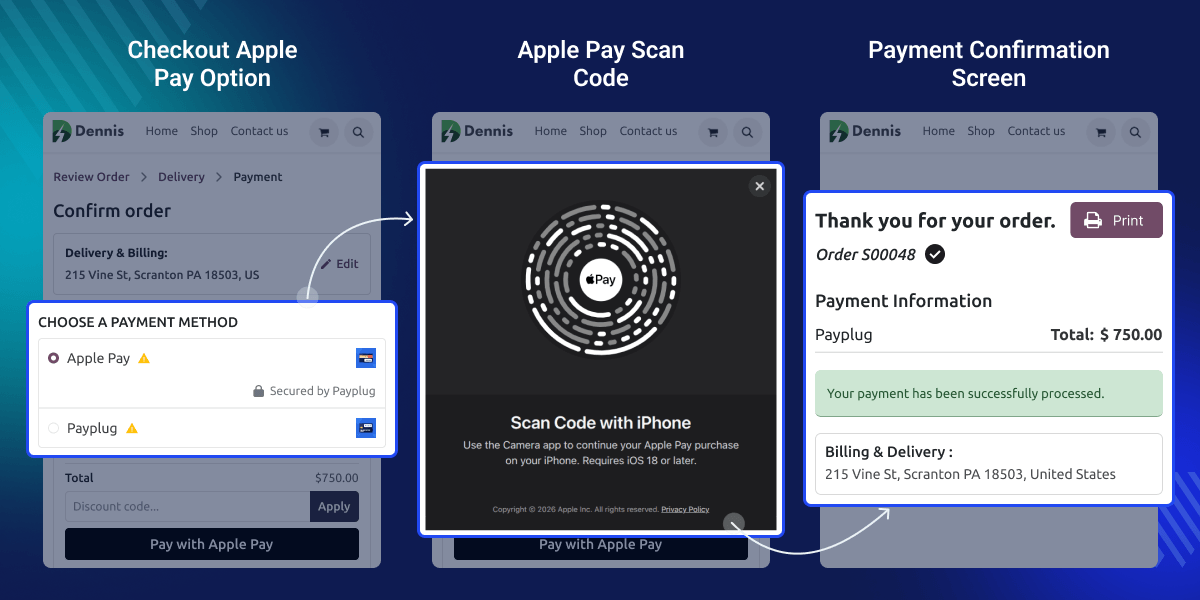
    Odoo Payment Payplug Apple Pay lets merchants accept Apple Pay payments on the website checkout using Payplug. Customers can pay with Apple Pay directly on the checkout page without leaving it.

    The module works with the existing Payplug payment provider and the normal checkout steps. It handles Apple Pay verification, payment start, and status updates automatically.
    Odoo Payment Payplug Apple Pay

    Why do we need Odoo Payment Payplug Apple Pay?

    Many customers like Apple Pay because it makes online payments quick and easy. A merchant using Payplug may want to offer Apple Pay on the website checkout.

    Odoo Payment Payplug Apple Pay lets the merchant add Apple Pay without changing the checkout setup. Customers can choose Apple Pay at checkout and pay in a simple way.

    The merchant uploads the Apple Pay verification file from the backend and turns it on. After setup, payments run smoothly, and orders confirm in the normal checkout flow.

    Prerequisites for using Odoo Payment Payplug Apple Pay

    Odoo Payment Payplug Apple Pay works in conjunction with the following module:

    Website Payplug Payment Gateway

    You need to install the module mentioned above to use Odoo Payment Payplug Apple Pay.

    Highlighted Features of Odoo Payment Payplug Apple Pay

    Domain Verification

    Upload and manage the Apple Pay verification file directly from the backend.

    Apple Pay Checkout

    Allows customers to pay with Apple Pay directly from the website checkout page.

    Automatic Updates

    Payment status updates automatically after each Apple Pay transaction.

    Native Workflow

    Works smoothly with the standard checkout and order confirmation flow.

    Apple Pay Configuration

    Odoo Payment Payplug Apple Pay lets you manage Apple Pay in Payplug settings. You can turn Apple Pay on or off anytime.
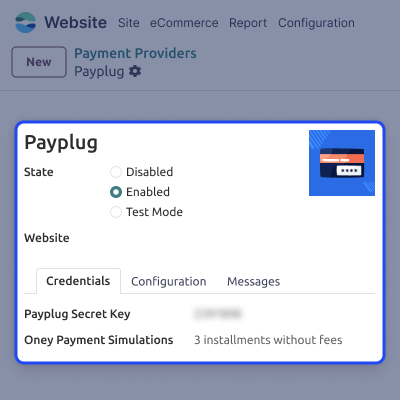
    • Turn Apple Pay on or off.
    • Manage from one page.
    • Use the same Payplug account.
    • No extra setup.
    • Easy settings control.
    Apple Pay Configuration

    Domain Verification Handling

    This module makes Apple Pay setup simple. Upload the Apple Pay file from the backend.
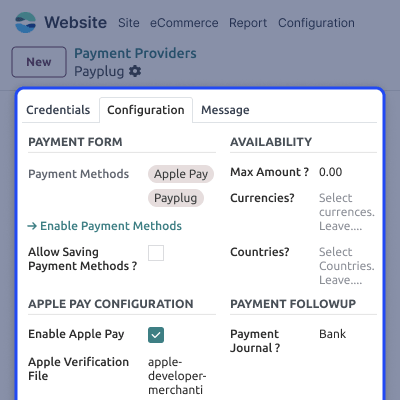
    • Upload file from backend.
    • No server or FTP access needed.
    • Automatic verification handling.
    • Faster Apple Pay activation.
    • Reduced technical effort.
    Domain Verification Handling

    Website Checkout Experience

    Apple Pay shows as a payment option at checkout. Customers can pay using Apple Pay right away.
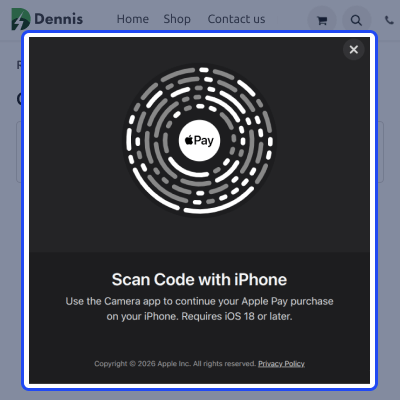
    • Apple Pay is shown at checkout.
    • Start payment from checkout.
    • Scan the code with your iPhone.
    • No page redirection.
    • Fast and smooth payment.
    Website Checkout Experience

    Support

    For any query or issue, please create a support ticket here CREATE A TICKET HERE

    You may also check our other top-quality Odoo Modules.

    Specifications

    Product Version1.0.0
    Released8 days ago
    CategoryOdoo AppsPayment
    Last UpdatedMarch 27, 2026 (1 day ago)
    Supported VersionsOdoo  17.x  18.x  
    Write a review

    FAQs

     Can Apple Pay work with my existing Payplug setup?
    Yes, the module uses the existing Payplug payment provider without changing credentials.
     Do customers leave the checkout page to pay?
    No, they pay on the same checkout page.
     How is Apple Pay domain verification handled?
    Merchants upload the verification file from the backend, and the module handles verification.
     What happens after a payment is successful?
    The payment status updates, and the order is confirmed.
     Do I need server access to use this module?
    No, all configuration is done from the backend without server access.
     Can Apple Pay be disabled after enabling it?
    Yes, Apple Pay can be turned on or off anytime from payment settings.

    Move to Cloud Today

    AWS Free tier hosting for one year by amazon web services, for more details please visit AWS Free Tier.

    GCP Free tier hosting for one year with 300 credit points by google cloud platform, for more details please visit GCP Free Tier.

    Azure free tier hosting for one year with 25+ always free services, for more details please visit Azure Free Tier.

    In our default configuration we will provide tremendous configuration for your eCommerce Website which is fast to load and response.

    Default Configuration Details of Server

    • 1 GB RAM
    • 1 Core Processor
    • 30 GB Hard Disk
    • DB with 1 GB RAM and 1 Core Processor

    * Server Configuration may vary as per application requirements.

    Want to know more how exactly we are going to power up your eCommerce Website with Cloud to fasten up your store. Please visit the Cloudkul Services.

    Get Started with Cloud
    Not Available


