USD
  • EUR
  • INR
  • USD
Cart
Cart 0
  • You have no items in your shopping cart.
    Cart
    Cart 0
    • You have no items in your shopping cart.
    Hire a Developer
    ×
    Contact Us!
    Send Again
    Close
    Please Login to Write Your Review

    Odoo Payment Provider Extra Fee

    Odoo Payment Provider Extra Fee helps you add extra charges to payments. You can set different fees for local or international payments for better control.


    • Turn on advanced extra fees easily

    • Set local and international payment fees

    • Automatically add fees at checkout

    • Easy setup with payment methods

    • Manage many payment methods quickly

    • Show fees clearly during payment

    Screenshots
    Odoo Payment Provider Extra Fee Odoo Payment Provider Extra Fee Odoo Payment Provider Extra Fee Odoo Payment Provider Extra Fee Odoo Payment Provider Extra Fee Odoo Payment Provider Extra Fee
    Show More Hide All
    $49.00

    * Required Fields

    Add To Cart
    $49.00
    Configure and Buy
    • Description
    • Reviews
    • FAQ
    • Customers ()
    • Specifications
    • Cloud Hosting
    • Changelog

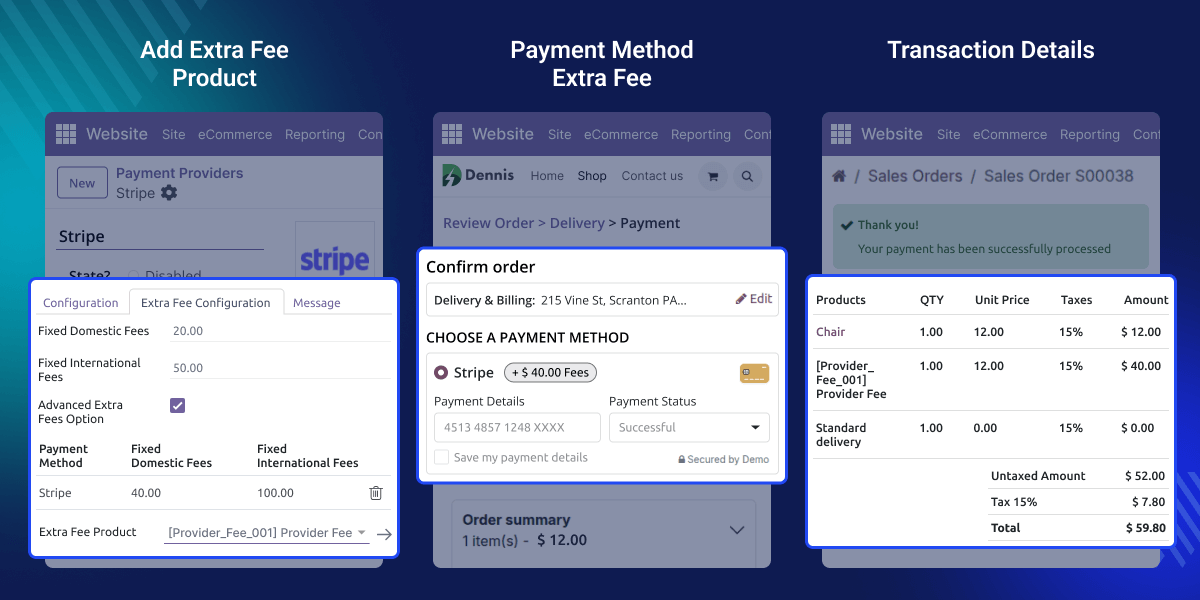
    Odoo Payment Provider Extra Fee helps businesses manage payment charges easily by adding extra costs to orders. You can set fixed domestic or international fees for each provider or use advanced settings to give each payment method its own fee.

    This module makes billing clear by automatically adding and showing the right fees at checkout. It works with all standard Odoo payment providers, giving control over payments and earnings.

    Odoo Payment Provider Extra Fee is perfect for businesses selling in different places. It automatically changes fees based on the buyer’s location, helping companies stay correct, follow rules, and make payment handling simple.
    Odoo Payment Provider Extra Fee

    Why do we need doo Payment Provider Extra Fee?

    Every business pay different costs based on where the buyer is or how they pay. Odoo Payment Provider Extra Fee helps manage these changes easily by allowing you set domestic and international fees.

    With the Advanced Extra Fees Option, You can assign a separate fee to each payment method. For example, if a shop takes local and international card payments, it can set different fees for each, keeping everything organised, fair, and simple to handle.

    Highlighted Features of Odoo Payment Provider Extra Fee

     Flexible Fee Structure

    You can set domestic and international fees for all payment methods of a payment provider. And can turn on advanced options to set different fees for each method.

     Advanced Extra Fees Option

    When this feature is turned on, you can set separate domestic and international fees for each payment method easily. It gives you better control over payment costs.

     Easy Payment Provider Integration

    Works with all standard Odoo payment providers like Wire Transfer, cards, and Stripe. You can set it up easily in the payment provider settings.

     Handle Multiple Payment Methods

    You can add many payment methods under each provider. Set separate domestic and international fees for each method quickly and easily.

    Enable Extra Fees Option

    Start managing extra payment charges by turning on the extra fee feature in the payment provider settings. Once enabled, you can easily set and control additional costs for different transactions.
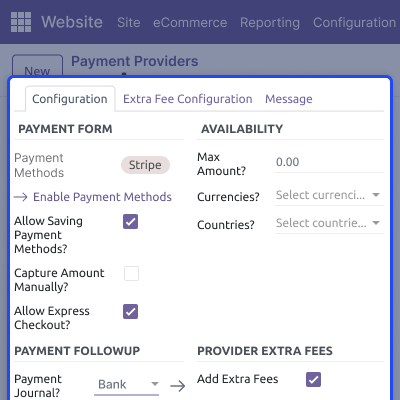
    • Turn on the “Add Extra Fees” option under the Extra Fees section.
    • Add or update fee amounts directly from this section.
    • Manage extra charges with ease for all payment providers.
    Enable Extra Fees Option

    Configure Provider-Level Fees

    You can set a fixed amount for domestic and international payments directly at the provider level in Odoo Payment Provider Extra Fee.
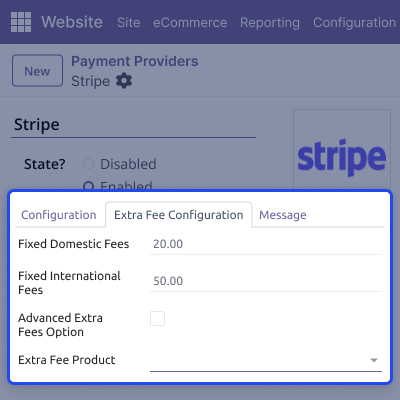
    • Add fixed domestic fees for payments made within the same country.
    • Set fixed international fees for payments received from other countries.
    • Update or modify fee amounts at any time from the same settings.
    Configure Provider-Level Fees

    Advanced Fee Configuration

    Use the Advanced Extra Fees Option to set different fees for each payment method. This helps you manage how much to charge for each type of payment conveniently.

    • You can set fee settings for every payment method.
    • Add domestic and international fees for each method.
    • Each method can have its own fee amount.
    Advanced Fee Configuration

    Support

    For any query or issue, please create a support ticket here CREATE A TICKET HERE

    You may also check our other top-quality Odoo Modules.

    Specifications

    Product Version1.0.0
    Released1 month ago
    CategoryOdoo AppsTool
    Last UpdatedJanuary 22, 2026 (1 month ago)
    Supported VersionsOdoo  18.x  19.x  
    Write a review

    FAQs

      Will chatter changes affect other users?
    No. Each user has their own saved model-level chatter settings, and one user’s changes never affect others.
      Can the chatter work differently on different screens?
    Yes. The chatter can behave differently for each model or screen based on saved settings.
      Does this module work on mobile and tablets?
    Yes. Odoo Advance Adjustable Chatter adjusts automatically and works smoothly on all devices.
      Will resizing or hiding the chatter break my work?
    No. The chatter changes only the screen view and does not affect Odoo’s normal workflow.
      Does the chatter open in the same size every time?
    Yes. The system remembers the chatter last size and opens the chatter exactly the same way.

    Move to Cloud Today

    AWS Free tier hosting for one year by amazon web services, for more details please visit AWS Free Tier.

    GCP Free tier hosting for one year with 300 credit points by google cloud platform, for more details please visit GCP Free Tier.

    Azure free tier hosting for one year with 25+ always free services, for more details please visit Azure Free Tier.

    In our default configuration we will provide tremendous configuration for your eCommerce Website which is fast to load and response.

    Default Configuration Details of Server

    • 1 GB RAM
    • 1 Core Processor
    • 30 GB Hard Disk
    • DB with 1 GB RAM and 1 Core Processor

    * Server Configuration may vary as per application requirements.

    Want to know more how exactly we are going to power up your eCommerce Website with Cloud to fasten up your store. Please visit the Cloudkul Services.

    Get Started with Cloud
    Not Available


