USD
  • EUR
  • INR
  • USD
Cart
Cart 0
  • You have no items in your shopping cart.
    Cart
    Cart 0
    • You have no items in your shopping cart.
    Hire a Developer
    ×
    Contact Us!
    Send Again
    Close
    Please Login to Write Your Review

    Odoo PayPal Payment Manual Capture


    Odoo PayPal Payment Manual Capture lets you approve PayPal payments first and capture or cancel them later from the backend for safer and controlled online payments.


    • Manual PayPal payment capture control.

    • Authorize PayPal payments before charging customers.

    • Capture or cancel authorized payment transactions.

    • Manage PayPal payments from backend records.

    • Track PayPal authorization status and IDs.

    • Reduce fraud with a secure payment workflow.

    Screenshots
    Odoo PayPal Payment Manual Capture Odoo PayPal Payment Manual Capture Odoo PayPal Payment Manual Capture Odoo PayPal Payment Manual Capture Odoo PayPal Payment Manual Capture Odoo PayPal Payment Manual Capture Odoo PayPal Payment Manual Capture Odoo PayPal Payment Manual Capture Odoo PayPal Payment Manual Capture Odoo PayPal Payment Manual Capture Odoo PayPal Payment Manual Capture Odoo PayPal Payment Manual Capture
    Show More Hide All
    $69.00

    * Required Fields

    Add To Cart
    $69.00
    Configure and Buy
    • Description
    • Reviews
    • FAQ
    • Customers ()
    • Specifications
    • Cloud Hosting
    • Changelog

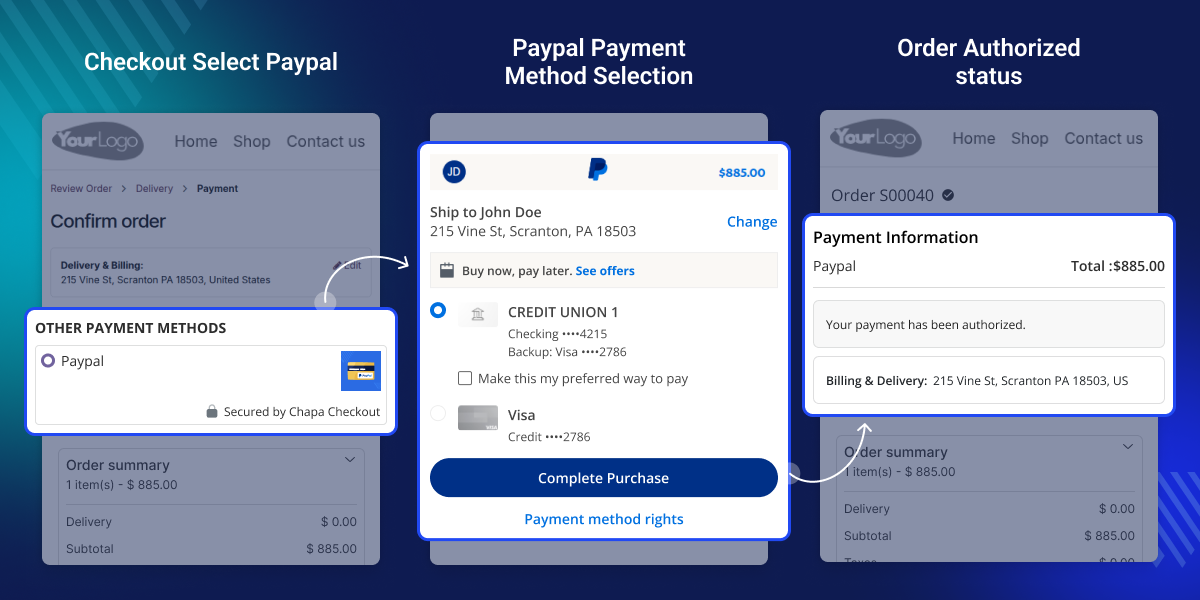
    Odoo PayPal Payment Manual Capture helps you manage PayPal Payments with more safety and control. It creates an Authorized Payment first so money is not taken right away.

    This manual capture flow gives admins time to check orders before charging customers. It helps prevent wrong orders and supports Secure Payment handling.
    Odoo PayPal Payment Manual Capture

    Why do we need a Odoo PayPal Payment Manual Capture?

    Sometimes you must check stock or shipping first. The system then saves the amount as an Authorized Payment. It does not charge the customer.

    From the Backend, the admin opens the Payment Transaction. The admin captures it when ready. If stock is missing, the admin uses Void Transaction.

    This keeps each Secure Payment under control. Odoo PayPal Payment Manual Capture reduces fraud, errors, and refunds.

    Highlighted Features of Odoo PayPal Payment Manual Capture

     Manual Capture Mode

    Control when PayPal Payments are captured from the Backend.

     Authorized Payment Flow

    Create Authorized Payment first without charging customers instantly.

     Capture Or Void

    Capture Transaction or use Void Transaction from Payment Transaction.

     Authorization Tracking

    Check PayPal authorization ID easily from Backend records.

    PayPal Manual Capture Setup

    This setup lets you enable manual capture in PayPal settings so payments are only authorized at checkout.
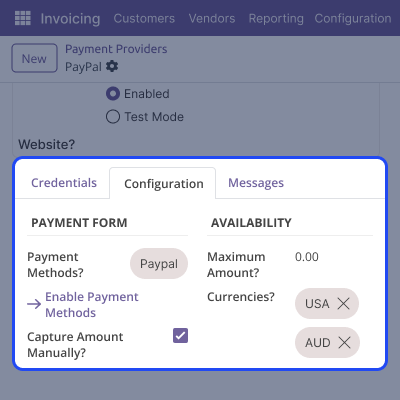
    • Enables manual capture from the PayPal provider
    • Works with PayPal test and live mode
    • Stops automatic payment capture
    • Supports a secure payment flow
    • Improves backend control
    PayPal Manual Capture Setup

    Website Payment Authorization

    Payments are authorized instead of charged instantly, while the checkout experience stays the same for customers.
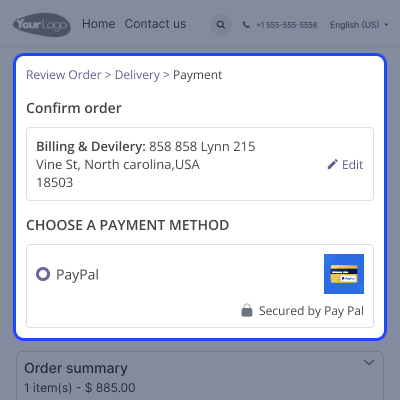
    • Customer selects PayPal payments
    • Redirects to the PayPal login page
    • An authorized payment is created
    • No money is charged immediately
    • Ensures a safe payment transaction flow
    Website Payment Authorization

    Backend Payment Control

    Admins can manage each Payment Transaction easily from the Backend without confusion.

    • Capture Transaction button available
    • Void Transaction option present
    • PayPal authorization ID stored
    • Status visible in the backend as Authorized
    • Works from Sales Order and Invoice
    Backend Payment Control

    Backend Capture And Void

    Odoo PayPal Payment Manual Capture lets admins manage PayPal Payments from the Backend easily.
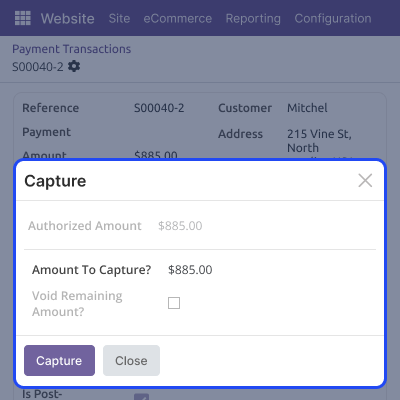
    • Capture the payment transaction at any time
    • Use the Void Transaction button
    • Cancel wrong orders
    • Complete a secure payment
    • Track every action
    Backend Capture And Void

    Payment Confirmation Handling

    Odoo PayPal Payment Manual Capture confirms payments only when admin decides.

    • Confirmed state after capture
    • PayPal capture ID saved
    • Captured amount shown
    • Full secure payment tracking
    • Clear payment transaction status
    Payment Confirmation Handling

    Support

    For any query or issue, please create a support ticket here CREATE A TICKET HERE

    You may also check our other top-quality Odoo Modules.

    Specifications

    Product Version1.0.0
    Released1 month ago
    CategoryOdoo AppsPayment
    Last UpdatedJanuary 27, 2026 (1 month ago)
    Supported VersionsOdoo  18.x  19.x  
    Write a review

    FAQs

     Does Odoo PayPal Payment Manual Capture charge customers instantly?
    No, it only creates an Authorized Payment during checkout.
     Can I cancel a PayPal Payment after authorization?
    Yes, use the Void Transaction option from the Backend.
     Where can I capture the Payment Transaction?
    You can capture it from Payment Transaction, Sale Order, or Invoice.
     Is the PayPal authorization ID saved?
    Yes, every Authorized Payment stores the authorization ID.
     Does this module support Secure Payment handling?
    Yes, it gives full control over PayPal Payments from the Backend.

    Move to Cloud Today

    AWS Free tier hosting for one year by amazon web services, for more details please visit AWS Free Tier.

    GCP Free tier hosting for one year with 300 credit points by google cloud platform, for more details please visit GCP Free Tier.

    Azure free tier hosting for one year with 25+ always free services, for more details please visit Azure Free Tier.

    In our default configuration we will provide tremendous configuration for your eCommerce Website which is fast to load and response.

    Default Configuration Details of Server

    • 1 GB RAM
    • 1 Core Processor
    • 30 GB Hard Disk
    • DB with 1 GB RAM and 1 Core Processor

    * Server Configuration may vary as per application requirements.

    Want to know more how exactly we are going to power up your eCommerce Website with Cloud to fasten up your store. Please visit the Cloudkul Services.

    Get Started with Cloud
    Not Available


