USD
  • EUR
  • INR
  • USD
Cart
Cart 0
  • You have no items in your shopping cart.
    Cart
    Cart 0
    • You have no items in your shopping cart.
    Hire a Developer
    ×
    Contact Us!
    Send Again
    Close
    Please Login to Write Your Review

    Odoo Portal Address Autocomplete

    Odoo Portal Address Autocomplete module makes address entry fast and easy. It shows real-time Google Places suggestions and fills all address fields instantly.


    • Google Places API shows real-time address suggestions instantly

    • Auto-fills street, city, country, and ZIP fields automatically

    • One-time API key setup is done in General Settings

    • Works perfectly with global international addresses

    • Google API key stays secure at the backend level

    • Provides a smooth and distraction-free user experience


    Screenshots
    $35.00

    * Required Fields

    Add To Cart
    $35.00
    Configure and Buy
    • Description
    • Reviews
    • FAQ
    • Customers ()
    • Specifications
    • Cloud Hosting
    • Changelog

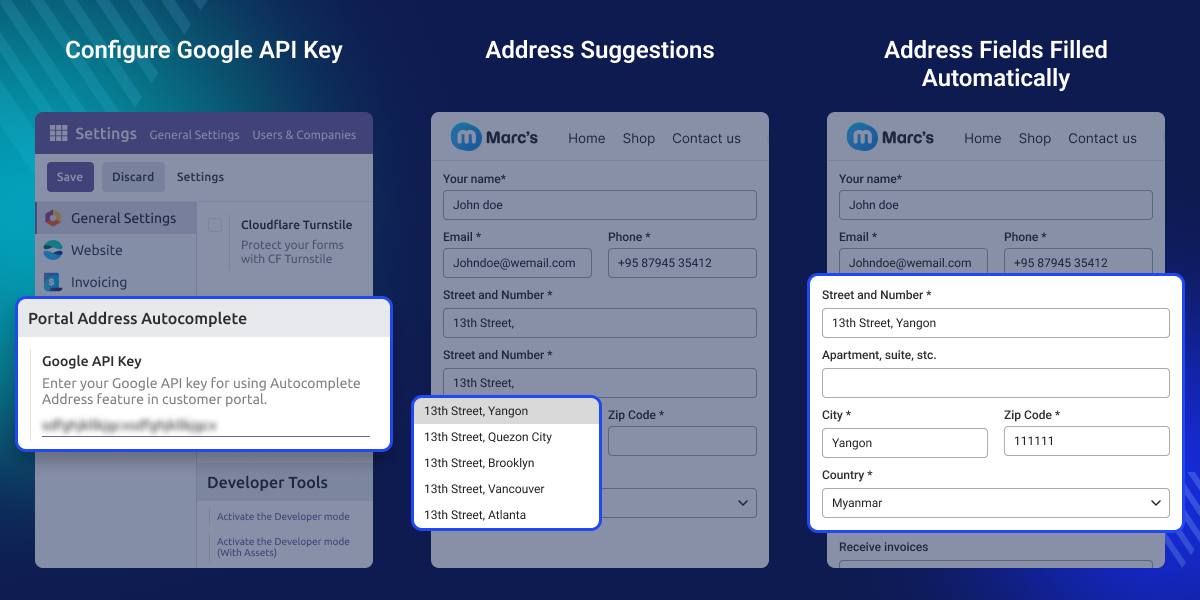
    Odoo Portal Address Autocomplete module helps portal users fill in their address details quickly and without errors. Users simply start typing in the street field, and relevant address suggestions appear instantly via the Google Places API.

    Selecting a suggestion fills all related fields automatically, including city, state, ZIP code, and country. This saves time and keeps your address data clean and accurate across all portal submissions.

    Admins only need to add the Google Places API key once in General Settings. After that, the module runs in the background and delivers a smooth experience to every portal user.
    Odoo Portal Address Autocomplete

    Why do we need Odoo Portal Address Autocomplete?

    Without the Odoo Portal Address Autocomplete module, customers have to fill in every address field by hand. This leads to typos, wrong data, and incomplete forms that slow down operations.

    With this module, users just pick an address from a dropdown. Every field fills in on its own, making the portal faster, cleaner, and easier to use.

    Highlighted Features of Odoo Portal Address Autocomplete

    Google API Integration

    Odoo Portal Address Autocomplete module links to the Google Places API and shows real-time address suggestions from locations all over the world.

    Smart Auto-Fill Fields

    Once a user picks a suggestion, all fields like city, state, ZIP, and country fill in at once, no extra input needed.

    Secure API Key Setup

    The API key is added just once in Odoo's General Settings. It stays at the backend level and is never visible to portal users.

    International Address Support

    No matter where a portal user is based, they get the same fast and accurate address suggestions through Google Places global coverage.

    Google API Configuration

    Odoo Portal Address Autocomplete module needs a one-time Google Places API key setup in Odoo's General Settings. Once saved, the autocomplete feature turns on for all portal users right away.
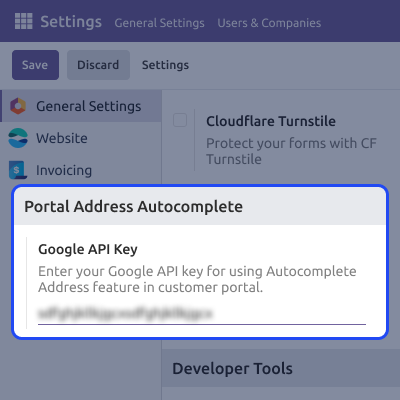
    • Admin adds the Google Places API key in General Settings
    • Needed to turn on the address autocomplete feature
    • Set up securely at the backend level only
    • One-time setup only – no repeated configuration needed
    Google API Configuration

    Auto-Fill Address Fields

    When a user types a place name in the street field, the Odoo Portal Address Autocomplete module shows matching suggestions right away. Picking one fills in all address fields automatically.
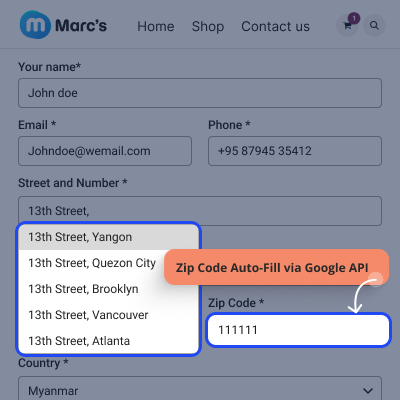
    • User types a place name in the street field
    • Module shows matching address suggestions in real time
    • User picks one address from the dropdown list
    • All related address fields get filled in automatically
    Auto-Fill Address Fields

    Support

    For any query or issue, please create a support ticket here CREATE A TICKET HERE

    You may also check our other top-quality Odoo Modules.

    Specifications

    Product Version1.0.0
    Released21 days ago
    Last UpdatedApril 2, 2026 (21 days ago)
    Supported VersionsOdoo  16.x  17.x  18.x  19.x  
    Write a review

    FAQs

     How does the autocomplete feature appear on the portal?
    When a user starts typing in the street field, a dropdown of address suggestions appears automatically. They click one, and all fields are filled in right away.
     Can the admin limit suggestions to a specific country?
    The current version does not include built-in region filtering. Suggestions are returned globally based on what the user types in the street field.
     What happens if the API key is invalid or hits its quota?
    Address suggestions will stop appearing for portal users. The admin should check the API key status and billing in the Google Cloud Console to restore the feature.
     Is the Google API key visible to portal users?
    No, The key is stored securely at the backend level in General Settings and is never exposed to portal users or the front-end interface.
     Will the module affect existing address records in Odoo?
    No, The module only adds autocomplete to new address entries on the portal. All existing address records in Odoo remain completely unchanged.
     What if some address fields are not filled after selecting a suggestion?
    This happens when Google Places does not return data for a specific component. The user can manually fill in any missing fields after selecting the suggestion.

    Move to Cloud Today

    AWS Free tier hosting for one year by amazon web services, for more details please visit AWS Free Tier.

    GCP Free tier hosting for one year with 300 credit points by google cloud platform, for more details please visit GCP Free Tier.

    Azure free tier hosting for one year with 25+ always free services, for more details please visit Azure Free Tier.

    In our default configuration we will provide tremendous configuration for your eCommerce Website which is fast to load and response.

    Default Configuration Details of Server

    • 1 GB RAM
    • 1 Core Processor
    • 30 GB Hard Disk
    • DB with 1 GB RAM and 1 Core Processor

    * Server Configuration may vary as per application requirements.

    Want to know more how exactly we are going to power up your eCommerce Website with Cloud to fasten up your store. Please visit the Cloudkul Services.

    Get Started with Cloud
    Not Available


