USD
  • EUR
  • INR
  • USD
Cart
Cart 0
  • You have no items in your shopping cart.
    Cart
    Cart 0
    • You have no items in your shopping cart.
    Hire a Developer
    ×
    Contact Us!
    Send Again
    Close
    Please Login to Write Your Review

    Odoo Portal Purchase Signature

    Odoo Portal Purchase Signature helps vendors sign purchase orders online from the portal. It saves time, removes paperwork, and helps businesses confirm orders quickly and safely.


    • Vendor can sign purchase orders.

    • Easy accept and sign process.

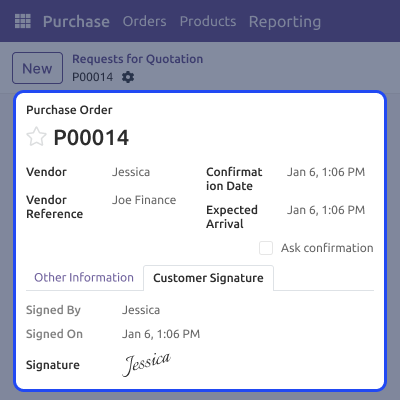
    • Signature saved with date.

    • Order updates automatically.

    • Vendor can reject orders.

    • Vendor can add comments.

    Screenshots
    Odoo Portal Purchase Signature Odoo Portal Purchase Signature Odoo Portal Purchase Signature Odoo Portal Purchase Signature Odoo Portal Purchase Signature Odoo Portal Purchase Signature Odoo Portal Purchase Signature Odoo Portal Purchase Signature Odoo Portal Purchase Signature Odoo Portal Purchase Signature Odoo Portal Purchase Signature
    Show More Hide All
    $49.00

    * Required Fields

    Add To Cart
    $49.00
    Configure and Buy
    • Description
    • Reviews
    • FAQ
    • Customers ()
    • Specifications
    • Cloud Hosting
    • Changelog

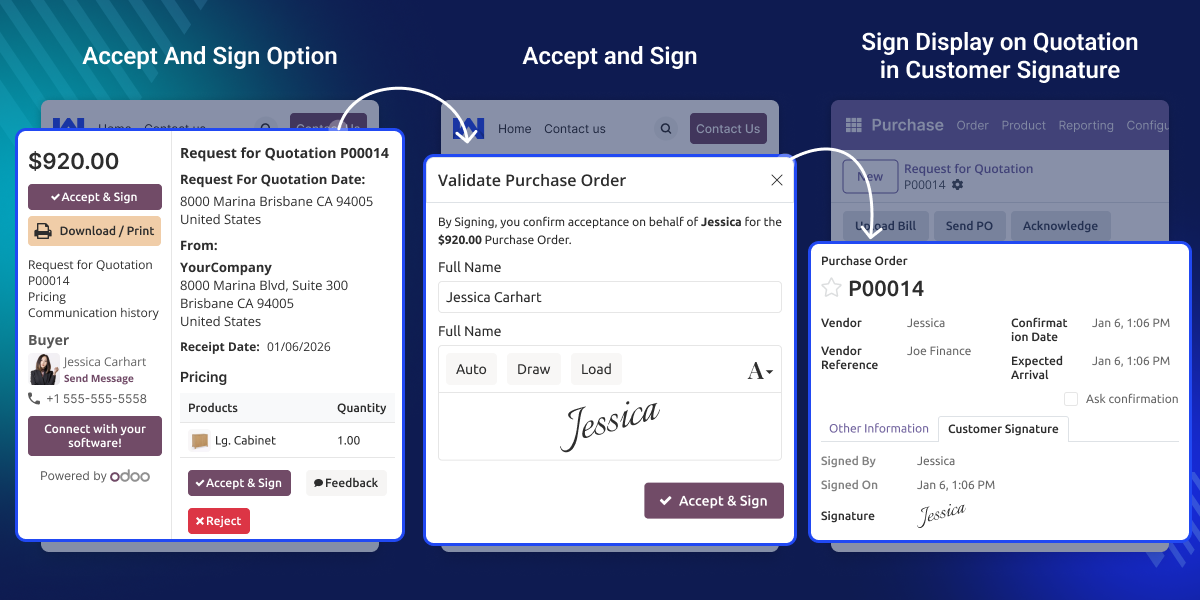
    Odoo Portal Purchase Signature lets vendors accept and sign purchase orders using the portal. Vendors do not need to print or send papers. Everything is done online in a simple way.

    The signing process works like signing a sales order. Vendors can easily see the order, accept it, and add their signature. The system saves the signature safely .

    This module helps businesses work faster. It keeps clear records of signed orders and makes it easy to check them later when needed.
    Odoo Portal Purchase Signature

    Why Do We Need Odoo Portal Purchase Signature?

    Paperwork takes time and can be confusing. Sometimes signed papers get lost or delayed. Odoo  Portal Purchase Signature removes these problems by using online signing.

    With this module, vendors can confirm orders quickly. Businesses get clear proof that the vendor has accepted the purchase order.

    A company sends a purchase order to a vendor. The vendor opens the portal, checks the order, and signs it online in just a few minutes.

    After signing, the order updates automatically. The company can see the signed order anytime and keep it ready for records or checks.

    Highlighted Features of Odoo Portal Purchase Signature

    Easy Portal Signing

    Vendors can open purchase orders from the portal and sign them online easily.

    Safe Signature Records

    Each signature is saved safely with the vendor name and signing date.

    Automatic Order Update

    The purchase order updates by itself after the vendor signs it.

    Vendor Actions

    Vendors can sign, reject, or add comments from the portal.

    Signature Process

    This feature lets vendors complete signing online in a few simple steps.
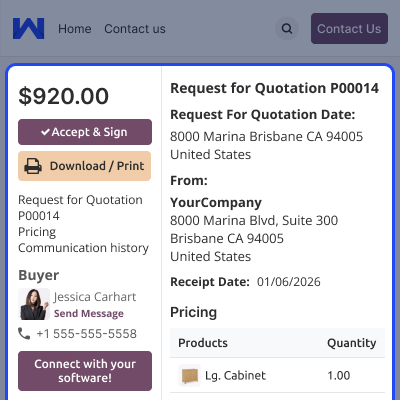
    • Vendors can sign purchase orders from the portal.
    • Vendors accept the order before signing.
    • Simple signature box with clear option.
    • Signed status shows after confirmation.
    • Signature saved safely.
    Signature Process

    Order Tracking

    All signed details are stored in the purchase order.
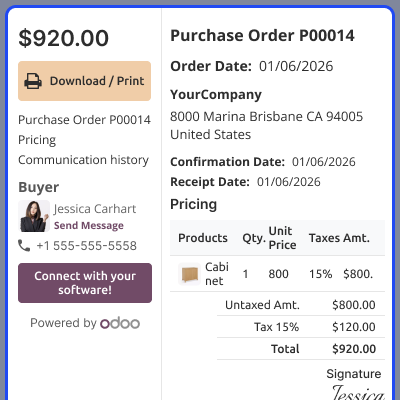
    • Save vendor signature in the order.
    • Store signing date and details.
    • Automatic activity log added.
    • Stop changes after signing.
    • Keep clear records.
    Order Tracking

    Vendor Portal Actions

    Vendors can manage purchase orders from their portal.
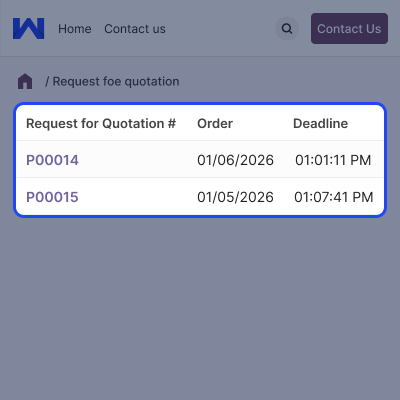
    • View purchase order details.
    • Accept and sign orders.
    • Reject orders with reason.
    • Add comments or feedback.
    • No backend access needed.
    Vendor Portal Actions

    Admin View

    %MCEPASTEBIN%

    Admins can easily manage signed orders.
    • View signed purchase orders
    • Download signed files
    • Check vendor history
    • Keep records for audits
    • Easy backend access
    Admin View

    Support

    For any query or issue, please create a support ticket here CREATE A TICKET HERE

    You may also check our other top-quality Odoo Modules.

    Specifications

    Product Version1.0.0
    Released1 month ago
    CategoryOdoo AppsTool
    Last UpdatedJanuary 22, 2026 (1 month ago)
    Supported VersionsOdoo  16.x  17.x  19.x  
    Write a review

    FAQs

      Can vendors sign purchase orders online?
    Yes, vendors can sign purchase orders online using the portal.
      Is the signing process easy?
    Yes, it is very simple and works like signing a sales order.
      Where is the signature saved?
    The signature is saved safely inside the purchase order.
      Can admins see signed orders?
    Yes, admins can view and download signed orders anytime.
      Does the order update after signing?
    Yes, the order updates automatically after signing.

    Move to Cloud Today

    AWS Free tier hosting for one year by amazon web services, for more details please visit AWS Free Tier.

    GCP Free tier hosting for one year with 300 credit points by google cloud platform, for more details please visit GCP Free Tier.

    Azure free tier hosting for one year with 25+ always free services, for more details please visit Azure Free Tier.

    In our default configuration we will provide tremendous configuration for your eCommerce Website which is fast to load and response.

    Default Configuration Details of Server

    • 1 GB RAM
    • 1 Core Processor
    • 30 GB Hard Disk
    • DB with 1 GB RAM and 1 Core Processor

    * Server Configuration may vary as per application requirements.

    Want to know more how exactly we are going to power up your eCommerce Website with Cloud to fasten up your store. Please visit the Cloudkul Services.

    Get Started with Cloud
    Not Available


