USD
  • EUR
  • INR
  • USD
Cart
Cart 0
  • You have no items in your shopping cart.
    Cart
    Cart 0
    • You have no items in your shopping cart.
    Hire a Developer
    ×
    Contact Us!
    Send Again
    Close
    Please Login to Write Your Review

    Odoo POS Additional Charges

    Odoo POS Additional Charges helps manage extra costs like delivery, packaging, or service fees during POS sales, ensuring transparent pricing and control across all stores.


    • Add custom delivery charges per transaction.

    • Set flexible packaging charges for products.

    • Create various service charges as needed.

    • Configure charges for individual specific products.

    • Apply charges for selected POS customers.

    • Print receipts reflecting all applied charges.

    • Support different charges across multiple shops.


    Screenshots
    Odoo POS Additional Charges Odoo POS Additional Charges Odoo POS Additional Charges Odoo POS Additional Charges Odoo POS Additional Charges Odoo POS Additional Charges
    Show More Hide All
    $49.00

    * Required Fields

    Add To Cart
    $49.00
    Configure and Buy
    • Description
    • Reviews
    • FAQ
    • Customers ()
    • Specifications
    • Cloud Hosting
    • Changelog

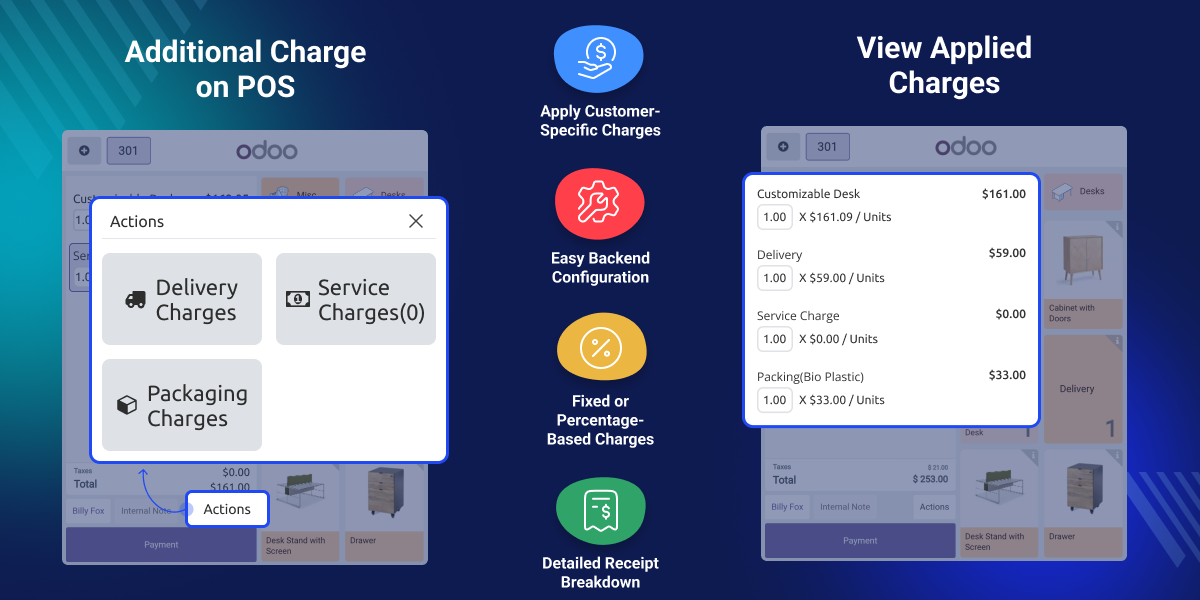
    Many businesses add costs for delivery, packaging, or special services at checkout. Odoo POS Additional Charges helps handle these fees in Odoo POS without slowing sales.

    Merchants can apply charges as fixed amounts or percentages, and the system calculates them automatically to save time. Whether it’s takeaway orders in restaurants or choosing eco-friendly packaging, this module keeps you flexible.

    Customers receive receipts that clearly show all charges, helping prevent confusion and build trust. Whether used in a single store or across multiple locations, the module ensures pricing stays transparent and easy to manage.
    Odoo POS Restaurant Restrictions and Validations

    Why do we need Odoo POS Additional Charges?

    Retailers and restaurants often incur additional costs for fast delivery, eco-friendly packaging, or other special services. Typing in these charges by hand takes time and can lead to mistakes at checkout.

    In a restaurant, a dine-in customer might decide to take home leftover food to avoid waste. With Odoo POS Additional Charges, staff can swiftly change orders to takeaway and apply packaging fees clearly and smoothly.

    Customers can see a clear list of charges on their receipts, which helps avoid confusion and builds trust. Whether it’s for one store or many, this module keeps pricing transparent and easy to manage.

    Highlighted Features of Odoo POS Additional Charges

    Customizable Charge Settings

    You can easily manage delivery, service, and packaging fees from the POS settings and adjust them to fit your business needs.

    Customer-Specific Charges

    You can add extra charges for a customer when needed, for example, to cover special services or offer a loyalty benefit.

    Threshold-Based Rules

    You can set a minimum order amount so extra charges only apply to purchases above that value, helping avoid small fees on low-cost orders.

    Dedicated Charge Sections

    Separate sections for delivery, packaging, and service charges keep your backend tidy. They also make updating charges simple and error-free.

    Flexible Charge Types

    You can choose whether charges are fixed amounts or percentages, giving you full flexibility in how you apply extra costs.

    Receipt Transparency

    Print clear receipts showing all added charges, ensuring customers always know exactly what they’re paying for.

    Configuration of Additional Charges

    The backend settings help merchants easily control how extra charges are set up and managed for their business. You can quickly turn delivery, service, or packaging charges on or off and link them to specific products for accurate tracking.
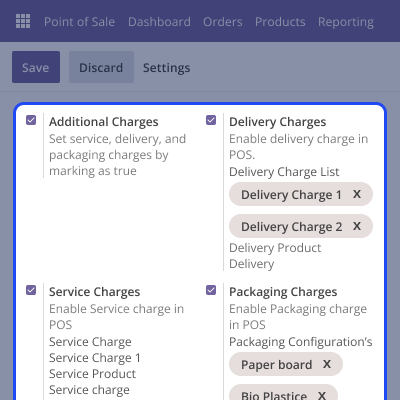
    • Enable or disable charges with simple toggles.
    • Create multiple options for delivery, service, or packaging.
    • Link charges to specific products for clear accounting.
    • Update charge details easily without disrupting sales flow.
    Configuration of Additional Charges

    Personalized Customer Charges

    Businesses can add charges for each customer to keep pricing fair and deliver personalized service. This approach makes it simple to handle special requests and manage unique fees.
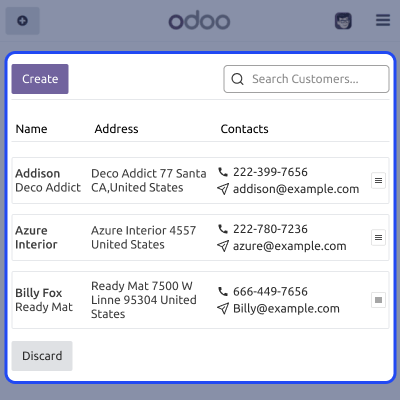
    • Apply charges for selected customers as needed.
    • Offer premium services tied to loyal customer profiles.
    • Add new customers directly during POS transactions.
    • Keep payment history linked to each customer record.
    Personalized Customer Charges

    Detailed Receipts and Billing

    Clear communication builds trust. Odoo POS Additional Charges ensures all extra fees appear clearly on customer receipts. Merchants can print detailed bills showing products, added fees, and total amounts.
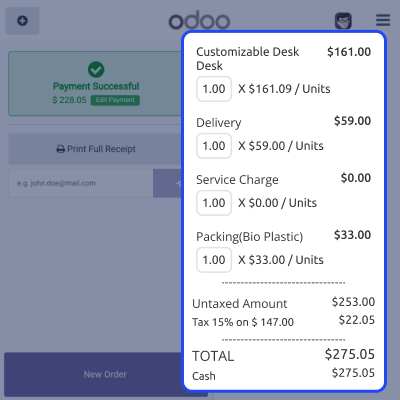
    • List all extra charges separately on receipts.
    • Display both product prices and applied charges.
    • Print or reprint receipts for customer assurance.
    • Prevent disputes with clear, detailed transaction records.
    Detailed Receipts and Billing

    Flexible Charge Types

    Odoo POS Additional Charges allows defining extra charges either as fixed amounts or as a percentage of the order total. This flexibility suits different business types and helps automate fee calculations during sales.
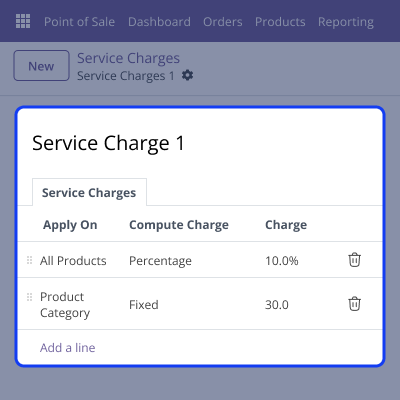
    • Create fixed charges for standard extra costs.
    • Define percentage-based fees for variable services.
    • Auto-calculate charges without manual input.
    • Apply different charge types per product or service.
    Flexible Charge Types

    Support

    For any query or issue, please create a support ticket here CREATE A TICKET HERE

    You may also check our other top-quality Odoo Modules.

    Specifications

    Product Version1.0.0
    Released6 months ago
    Last UpdatedNovember 20, 2025 (3 months ago)
    Supported VersionsOdoo  14.x  15.x  16.x  17.x  18.x  19.x  
    Write a review

    Frequently Asked Questions

      Can I choose different packaging materials and costs?
    Yes! You can set up charges for any packaging materials you use, each with its own price, giving you flexibility for your products and customers.
     Is it necessary to set charges as fixed amounts?
    No, it’s not necessary. You can choose to set charges either as fixed amounts or as percentages of the order total, depending on what best fits your business needs.
     Can I turn off certain charges if I don’t need them?
    Yes. With Odoo POS Additional Charges, you can easily manage delivery, packaging, and service fees in the backend. You can turn each charge on or off whenever your business needs change.
      Are all charges visible on customer receipts?
    Yes. Receipts clearly show all added charges, including delivery, service, and packaging. This keeps pricing transparent and builds customer trust.
     How does the takeaway option work in restaurants?
    If a dine-in customer wants to take leftover food home, you can switch the order to takeaway and add the packaging charge directly from the POS.

    Move to Cloud Today

    AWS Free tier hosting for one year by amazon web services, for more details please visit AWS Free Tier.

    GCP Free tier hosting for one year with 300 credit points by google cloud platform, for more details please visit GCP Free Tier.

    Azure free tier hosting for one year with 25+ always free services, for more details please visit Azure Free Tier.

    In our default configuration we will provide tremendous configuration for your eCommerce Website which is fast to load and response.

    Default Configuration Details of Server

    • 1 GB RAM
    • 1 Core Processor
    • 30 GB Hard Disk
    • DB with 1 GB RAM and 1 Core Processor

    * Server Configuration may vary as per application requirements.

    Want to know more how exactly we are going to power up your eCommerce Website with Cloud to fasten up your store. Please visit the Cloudkul Services.

    Get Started with Cloud
    Not Available


