USD
  • EUR
  • INR
  • USD
Cart
Cart 0
  • You have no items in your shopping cart.
    Cart
    Cart 0
    • You have no items in your shopping cart.
    Hire a Developer
    ×
    Contact Us!
    Send Again
    Close
    Please Login to Write Your Review

    Odoo Pos Dine-In and Takeaway

    Odoo POS Dine-In and Takeaway helps restaurants handle dine-in and takeaway orders directly from the POS. Staff can easily choose the order type while placing orders.


    • Choose between dine-in and takeaway orders directly in Odoo POS

    • Set flexible rules to manage packaging charges

    • Apply default packaging charges automatically

    • Use packaging charges for takeaway as well as dine-in orders

    • Manage orders using the visual POS interface with tables and floors

    • Simple configuration for quick and smooth order processing

    Screenshots
    Odoo Pos Dine-In and Takeaway Odoo Pos Dine-In and Takeaway Odoo Pos Dine-In and Takeaway Odoo Pos Dine-In and Takeaway Odoo Pos Dine-In and Takeaway Odoo Pos Dine-In and Takeaway
    Show More Hide All
    $39.00

    * Required Fields

    Add To Cart
    $39.00
    Configure and Buy
    • Description
    • Reviews
    • FAQ
    • Customers ()
    • Specifications
    • Cloud Hosting
    • Changelog

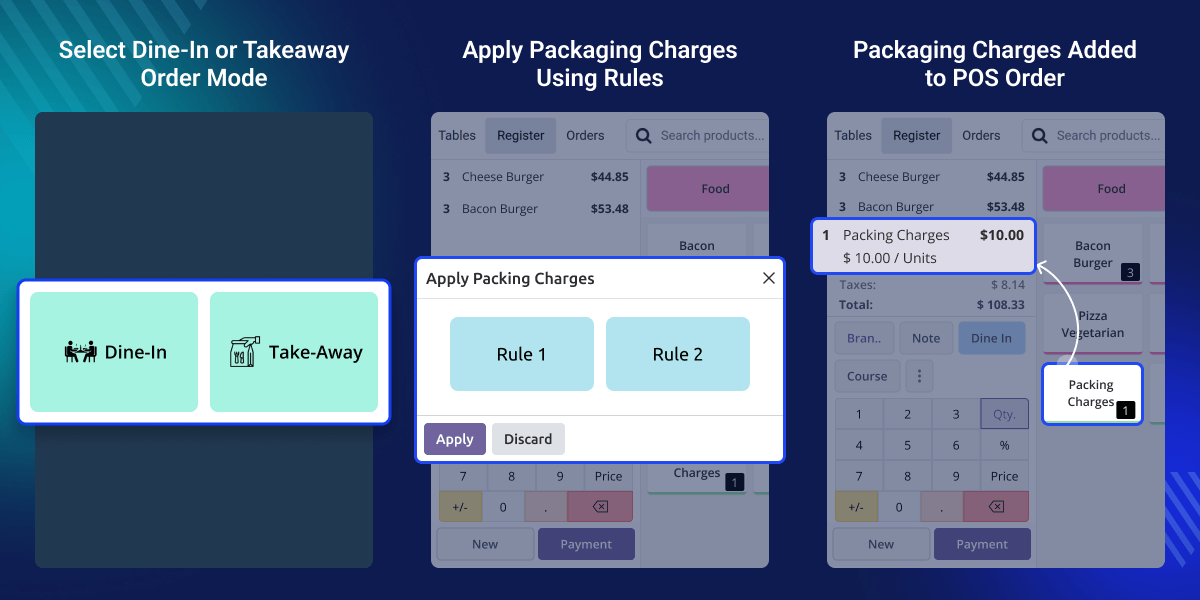
    Odoo POS Dine-In and Takeaway helps restaurants manage dine-in and takeaway orders directly from the POS interface. Staff can quickly choose the order type and continue with order processing.

    For dine-in orders, users can select tables and floors from the restaurant view. For takeaway orders, staff can process orders quickly with packaging options. The module adds dedicated Dine-In and Takeaway buttons to make order handling simple.

    Admins can also set packaging rules and default packaging charges from the backend. These charges can be applied automatically when needed, making order management easier and more efficient.
    Odoo POS Dine-In and Takeaway

    Why do we need Odoo Pos Dine-In and Takeaway?

    Restaurants serve both dine-in and takeaway customers every day. Managing these orders manually in POS can sometimes confuse staff, and packaging charges may be missed.

    Odoo POS Dine-In and Takeaway streamlines this process. It provides clear options for dine-in and takeaway orders, automatically applying packaging charges to help restaurants manage orders smoothly and maintain accurate billing.

    Highlighted Features of Odoo POS Dine-In and Takeaway

    Packaging Charges Management

    Admins can easily set packaging rules or add default packaging charges from the backend.

    Dine-In and Takeaway Order Options

    POS users can quickly choose between dine-in and takeaway while creating an order.

    Automatic Packaging Charges

    Packaging charges are added automatically based on the rules set in the system.

    Packaging for Dine-In Orders

    Packaging charges can also be applied to dine-in orders when packaging is needed.

    Manage Packaging Charges

    Odoo POS Dine-In and Takeaway allows admins to easily manage packaging rules and set default packaging charges from the backend.
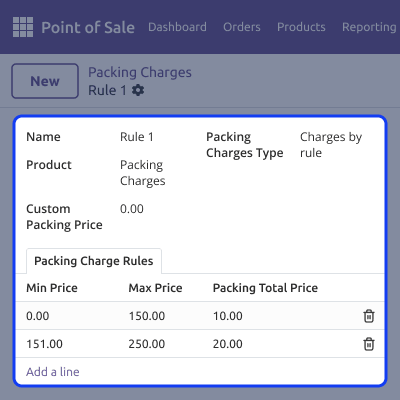
    • Create packaging rules based on business needs
    • Set default packaging charges for takeaway orders
    • Automatically apply packaging charges in POS orders
    • Ensure accurate billing for orders that include packaging
    Manage Packaging Charges

    Separate Dine-In and Takeaway Order Modes

    The module adds clear order options in the POS interface, making it easy for staff to choose the correct order type.
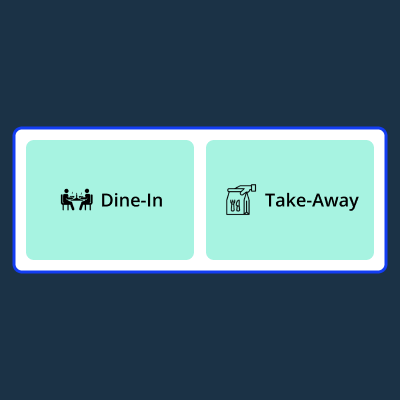
    • Select dine-in mode for customers eating at the restaurant
    • Choose takeaway mode for quick takeaway orders
    • Reduce confusion during busy restaurant hours
    • Make the POS ordering process simple and smooth
    Separate Dine-In and Takeaway Order Modes

    Packaging Charges Using Rules

    Odoo POS Dine-In and Takeaway lets POS users easily manage packaging charges directly from the POS screen.
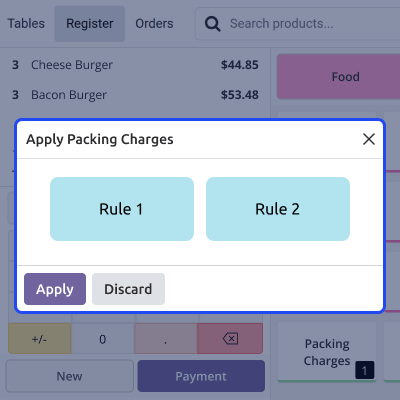
    • Apply packaging charges using the configured packaging rules in POS
    • Select the appropriate packaging rule while processing an order
    • Automatically add packaging charges to the order total
    • Ensure accurate billing for orders that require packaging
    Packaging Charges Using Rules

    Easy Packaging Application in Orders

    Packaging charges can be applied automatically based on the order type and the rules set by the admin.
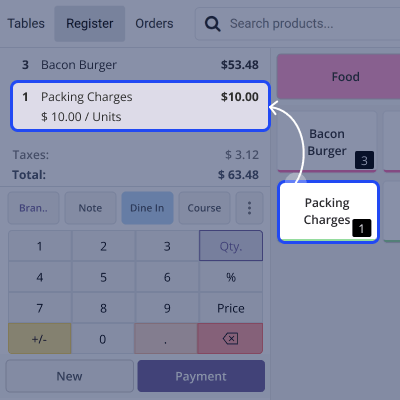
    • Automatically add packaging charges to takeaway orders
    • Use packaging charges for dine-in orders when packaging is needed
    • Reduce manual work for POS users
    • Make order processing faster and easier
    Easy Packaging Application in Orders

    Support

    For any query or issue, please create a support ticket here CREATE A TICKET HERE

    You may also check our other top-quality Odoo Modules.

    Specifications

    Product Version1.0.0
    ReleasedToday
    Last UpdatedMarch 20, 2026 (Today)
    Supported VersionsOdoo  14.x  15.x  16.x  17.x  18.x  19.x  
    Write a review

    FAQs

     Can packaging charges be applied automatically for takeaway orders?
    Yes, Administrators can define packaging rules, and the system will apply packaging charges automatically for takeaway orders.
     Can packaging charges also be used for dine-in orders?
    Yes, Packaging charges can also be added to dine-in orders when packaging is required.
     Does the module support restaurant table management?
    Yes, In dine-in mode, the POS displays restaurant floors and tables, making it easy to manage table-based orders.
     Can administrators configure packaging charges from the backend?
    Yes, Administrators can set packaging rules and default charges directly from the backend settings.
     Is it easy to switch between dine-in and takeaway orders in POS?
    Yes, POS users can quickly switch between dine-in and takeaway using dedicated buttons in the POS interface.

    Move to Cloud Today

    AWS Free tier hosting for one year by amazon web services, for more details please visit AWS Free Tier.

    GCP Free tier hosting for one year with 300 credit points by google cloud platform, for more details please visit GCP Free Tier.

    Azure free tier hosting for one year with 25+ always free services, for more details please visit Azure Free Tier.

    In our default configuration we will provide tremendous configuration for your eCommerce Website which is fast to load and response.

    Default Configuration Details of Server

    • 1 GB RAM
    • 1 Core Processor
    • 30 GB Hard Disk
    • DB with 1 GB RAM and 1 Core Processor

    * Server Configuration may vary as per application requirements.

    Want to know more how exactly we are going to power up your eCommerce Website with Cloud to fasten up your store. Please visit the Cloudkul Services.

    Get Started with Cloud
    Not Available


