USD
  • EUR
  • INR
  • USD
Cart
Cart 0
  • You have no items in your shopping cart.
    Cart
    Cart 0
    • You have no items in your shopping cart.
    Hire a Developer
    ×
    Contact Us!
    Send Again
    Close
    Please Login to Write Your Review

    Odoo POS Direct Print

    Odoo POS Direct Print allows you to print receipts and invoices directly from the POS screen without downloading files. It enables instant receipt printing without extra tools, and supports network, USB, and Bluetooth printers for fast, reliable, and IoT-free operation.


    • Direct printing from POS without downloads

    • Supports ESC/POS and network printers

    • No IoT box or third-party tools required

    • Automatically prints when the printer reconnects

    • Automatic cash drawer opening after configuration

    • Works on Windows, Linux, macOS, Android, and iOS

    • One-time payment with no subscription fees

    • Fast, simple, and reliable POS printing


    Screenshots
    Odoo POS Direct Print Odoo POS Direct Print Odoo POS Direct Print Odoo POS Direct Print Odoo POS Direct Print Odoo POS Direct Print Odoo POS Direct Print Odoo POS Direct Print
    Show More Hide All
    $59.00

    * Required Fields

    Add To Cart
    $59.00
    Configure and Buy
    • Description
    • Reviews
    • FAQ
    • Customers ()
    • Specifications
    • Cloud Hosting
    • Changelog

    Odoo POS Direct Print makes printing from POS quick and easy. You can print receipts and invoices directly from the POS screen without downloading files or using any extra tools. It supports ESC/POS and network printers, so you can start printing instantly after validating an order.

    If the host machine is offline, Odoo POS Direct Print saves the print jobs in the queue and automatically prints them once the connection is back. It helps keep your POS running smoothly without any issues.

    Odoo POS Direct Print supports automatic cash drawer opening after proper setup in the printer configuration. It makes checkout faster and helps cashiers handle transactions more efficiently, especially in busy retail and restaurant environments.
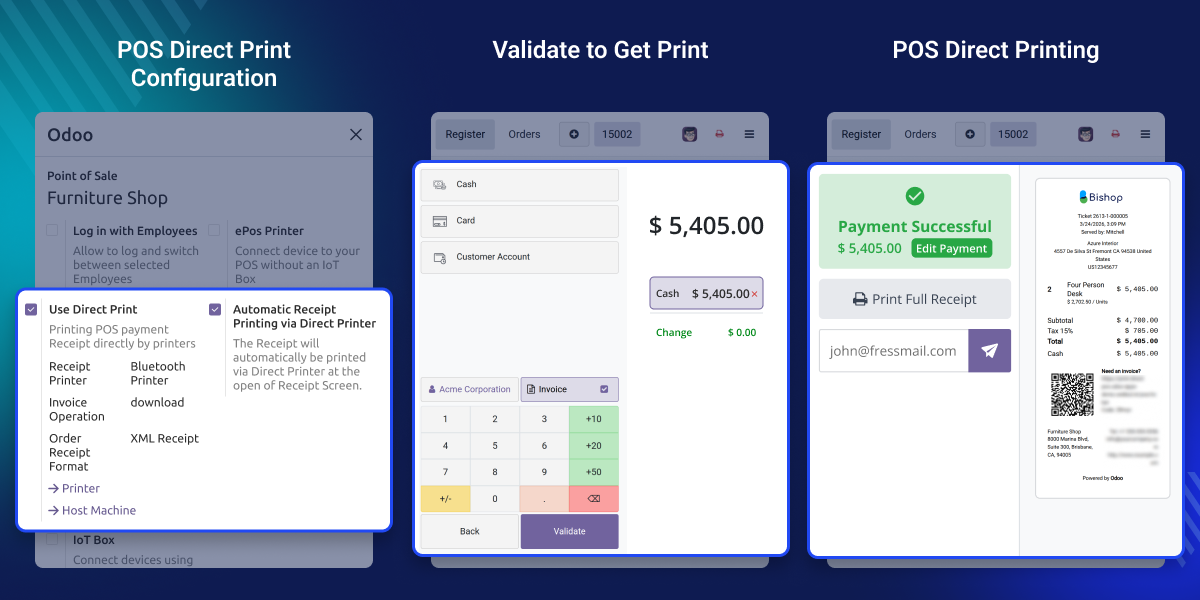
    Odoo POS Direct Print

    Why do we need Odoo POS Direct Print?

    In standard Odoo POS, printing usually takes a few extra steps. You often need to generate and download the receipt before printing, which slows down the checkout process, especially during busy hours

    Odoo POS Direct Print removes these extra steps by letting you print directly from the POS screen. This makes billing faster, reduces waiting time, and helps improve overall efficiency. It also works smoothly on Windows, Linux, macOS, Android, and iOS, so you can use it on desktops, tablets, or mobile devices without any compatibility issues.

     Prerequisites For Using Odoo POS Direct Print

    Odoo POS Direct Print works in conjunction with the following module:

    You need to install the above module first for Odoo POS Direct Print to work properly.

    To use this module, install the Desktop/Mobile application provided by our Webkul team.

    Please contact us at [email protected] for desktop applications.

    Android App: Play Store

    iOS App: App Store

    Highlighted Features of Odoo POS Direct Print

    Direct POS Printing

    Print receipts and invoices instantly from the POS screen without downloading files or using any IoT hardware.

    Auto Cash Drawer Opening

    Automatically open the cash drawer when a payment is completed after setting it up in the printer configuration.

    Print Jobs in Queue

    Save print jobs in the queue when host machine is offline and print them automatically once the connection is back.

    Works Across All Devices

    The module works smoothly on Windows, Linux, macOS, Android, and iOS. You can use it on desktops, tablets, or mobile devices without any issues.

    Easy Setup & One-Time Cost

    The setup is quick and simple, and there are no subscription fees. You only pay once.

    Multiple Machine & Printer Support

    You can connect multiple host machines and set up different printers for different POS sessions. It supports ESC/POS and network printers.

    No Extra Software Required

    Printing works directly from Odoo without any third-party tools or extra software. Everything you need is included.

    Image and ESC/POS Printing

    Supports both image-based printing and ESC/POS receipt printing, making it compatible with different types of printers.

    Direct POS Printing

    Odoo POS Direct Print makes POS printing fast and simple by sending print commands directly from the POS screen to the printer without extra steps or delays
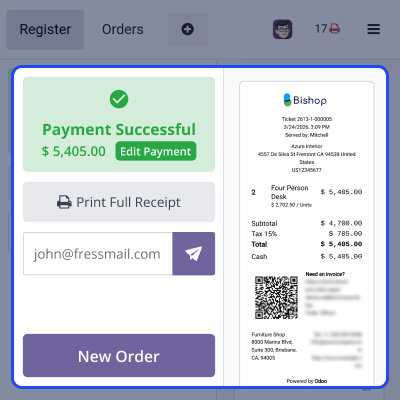
    • Print receipts and invoices instantly after order validation.
    • Avoid downloading or previewing PDFs before printing.
    • Reduce customer waiting time during checkout with faster direct printing.
    • Print directly from Android and iOS devices connected to supported printers.
    Direct POS Printing

    Multi-Printer Support

    It allows businesses to connect and manage multiple printers for different POS operations, improving flexibility and workflow efficiency.
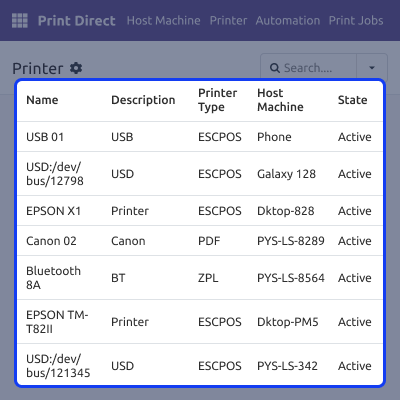
    • Configure different printers for different POS use cases.
    • Supports ESC/POS, ZPL, PDF, and network printers for flexible setups.
    • Use printers across desktops, tablets, and mobile devices.
    • Helps manage printing smoothly in multi-counter or multi-location setups.
    Multi-Printer Support

    Smart Cash Drawer Integration

    Odoo POS Direct Print helps manage your cash drawer directly from POS by linking it with your printer for faster and more efficient checkout operations.
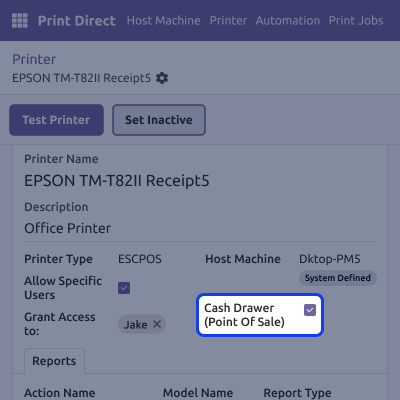
    • Automatically opens the cash drawer on payment validation after configuration.
    • Connect the cash drawer using ESC/POS compatible printers.
    • Reduce manual effort for cashiers during transactions.
    • Improve checkout speed and overall billing efficiency.
    Smart Cash Drawer Integration

    Reliable Offline Queueing

    It ensures reliable printing by handling print jobs even when Host machine is offline, keeping your POS operations smooth.
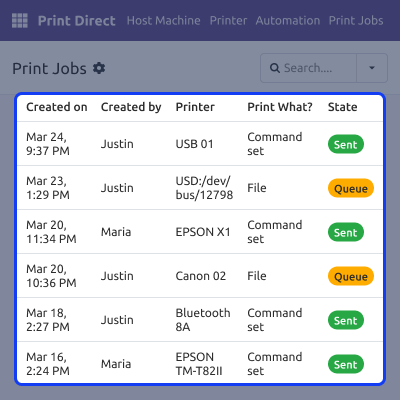
    • Stores print jobs when the host machine is offline.
    • Automatically prints all pending jobs once the connection is restored.
    • Helps prevent data loss and missed print operations.
    • Maintains a smooth and continuous POS workflow during network issues.
    Reliable Offline Queueing

    Support

    For any query or issue please create a support ticket here CREATE A TICKET HERE

    You may also check our other top-quality Odoo Modules.

    Specifications

    Product Version1.0.6
    Released1 year ago
    Last UpdatedApril 9, 2026 (Today)
    Supported Versions16.x  Odoo  11.x  12.x  13.x  14.x  15.x  17.x  18.x  19.x  
    Write a review

    FAQ’s

      Is this a subscription-based module or a one-time purchase?
    Odoo POS Direct Print is a one-time purchase module with no recurring charges.
      Do I need an IoT box for printing?
    No, this module works without any IoT box or additional hardware.
      What printers are supported?
    Odoo POS Direct Print supports ESC/POS, network, USB, and Bluetooth printers.
      Can I print receipts automatically?
    Yes, receipts and invoices can be printed automatically after order validation.
      Does it support cash drawer integration?
    Yes, the cash drawer opens automatically on payment validation after proper configuration.

    Move to Cloud Today

    AWS Free tier hosting for one year by amazon web services, for more details please visit AWS Free Tier.

    GCP Free tier hosting for one year with 300 credit points by google cloud platform, for more details please visit GCP Free Tier.

    Azure free tier hosting for one year with 25+ always free services, for more details please visit Azure Free Tier.

    In our default configuration we will provide tremendous configuration for your eCommerce Website which is fast to load and response.

    Default Configuration Details of Server

    • 1 GB RAM
    • 1 Core Processor
    • 30 GB Hard Disk
    • DB with 1 GB RAM and 1 Core Processor

    * Server Configuration may vary as per application requirements.

    Want to know more how exactly we are going to power up your eCommerce Website with Cloud to fasten up your store. Please visit the Cloudkul Services.

    Get Started with Cloud
    Not Available


