USD
  • EUR
  • INR
  • USD
Cart
Cart 0
  • You have no items in your shopping cart.
    Cart
    Cart 0
    • You have no items in your shopping cart.
    Hire a Developer
    ×
    Contact Us!
    Send Again
    Close
    Please Login to Write Your Review

    Odoo POS Disable Financial Data

    Odoo POS Disable Financial Data hides sensitive financial details in the POS system. It limits what cashiers can see and helps prevent misuse of totals, cash data, and reports.


    • Hide financial data in the POS closing screen to limit visibility.


    • Prevent users from seeing totals and other financial details.


    • Hide the cash in/out button during POS closing.


    • Restrict access to daily sales reports in the POS session.


    • Hide the total number of orders from the POS screen.


    • Option to hide only cash-related financial details.


    • Improve control by limiting access to financial data.


    • Simple settings to enable or disable each option.


    • Reduce the risk of misuse or unwanted changes by POS users.


    Screenshots
    Odoo POS Disable Financial Data Odoo POS Disable Financial Data Odoo POS Disable Financial Data Odoo POS Disable Financial Data Odoo POS Disable Financial Data Odoo POS Disable Financial Data Odoo POS Disable Financial Data Odoo POS Disable Financial Data Odoo POS Disable Financial Data Odoo POS Disable Financial Data
    Show More Hide All
    $49.00

    * Required Fields

    Add To Cart
    $49.00
    Configure and Buy
    • Description
    • Reviews
    • FAQ
    • Customers ()
    • Specifications
    • Cloud Hosting
    • Changelog

    Odoo POS Disable Financial Data helps you control what financial information is shown in your POS system. It is made to hide sensitive data from users like cashiers.

    In many stores, POS users handle daily sales but do not need to see profit, totals, or other financial details. Showing this data can cause confusion or misuse.

    This module lets you hide financial data directly from the POS screen. It makes sure that only authorized users can see important financial information.

    You can control items like total orders, cash details, and daily reports. This gives you better control over what your staff can access.

    The module also lets you hide actions like cash in/out from the closing screen. This helps prevent unwanted changes during POS operations.

    With simple settings, you can easily enable or disable each option. This makes it useful for businesses that want better control without changing how their POS works.

    By limiting access to financial data, the module helps reduce the risk of misuse. It keeps your POS system simple, secure, and focused on daily work.
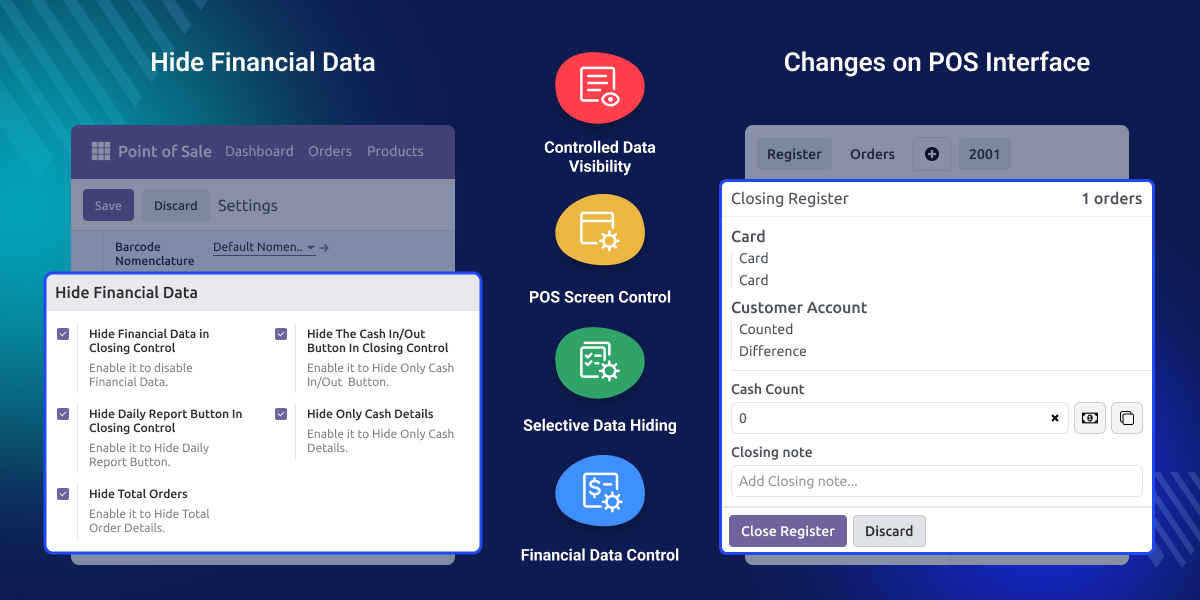
    Odoo POS Disable Financial Data

    Why do we need Odoo POS Disable Financial Data ?

    In many businesses, the POS is used by cashiers or staff who do not need to see financial details. Showing totals, reports, or cash data can create risk.

    Without proper control, staff may see or misuse sensitive data like total orders or cash movements. This can lead to confusion, mistakes, or internal issues.

    Odoo POS Disable Financial Data solves this by hiding financial data and limiting access based on user roles. It makes sure only the right people can see important information.

    Keep your POS simple for staff and protect your financial data from unnecessary access.

    Highlighted Features of Odoo POS Disable Financial Data

    Hide Financial Data

    Hide sensitive financial details from POS closing screen to restrict visibility.

    Hide Cash In/Out Button

    Disable cash in/out option in closing control to prevent manual cash actions.

    Hide Daily Report Access

    Remove access to daily reports from POS to limit financial insights.

    Hide Total Orders Count

    Hide total order details from POS interface to avoid data exposure.

    Hide Only Cash Details

    Option to hide only cash-related data while keeping other details visible.

    Simple Configuration Control

    Enable or disable each setting easily from backend configuration.

    POS Financial Data Control

    This module helps you control what financial data is visible in the POS. It ensures that sensitive information is not shown to unauthorized users.

    Hide financial data from POS closing screen

    Restrict visibility of totals and financial details

    Keep POS interface focused on operations

    Avoid exposing sensitive business data

    Improve control over financial visibility
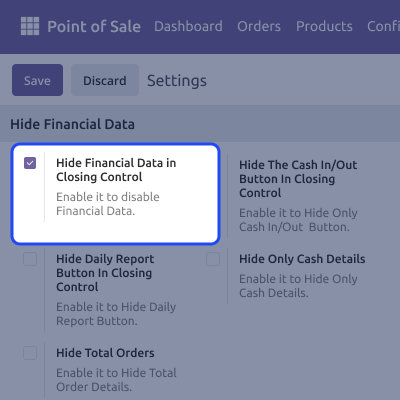
    POS Financial Data Control

    Cash Operation Restrictions

    You can limit user access to cash-related actions in the POS. This helps prevent unwanted changes during daily operations.

    Hide cash in/out button from POS.

    Prevent manual cash adjustments by staff.

    Reduce risk of incorrect cash entries.

    Maintain controlled cash handling process.

    Ensure only authorized actions are allowed.
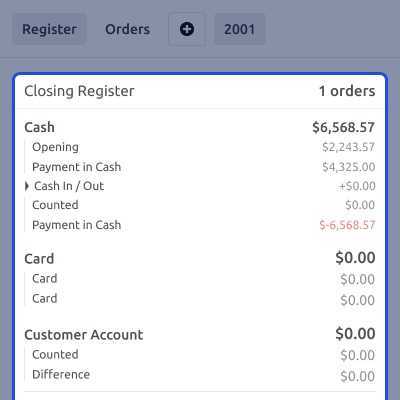
    Cash Operation Restrictions

    Report and Data Visibility Control

    The module allows you to limit access to reports and order data. This helps protect important business insights from general POS users.

    Hide the daily report option in POS.

    Restrict access to the total order count.

    Prevent exposure of sales data.

    Keep reports accessible only to authorized users.

    Avoid misuse of business information.
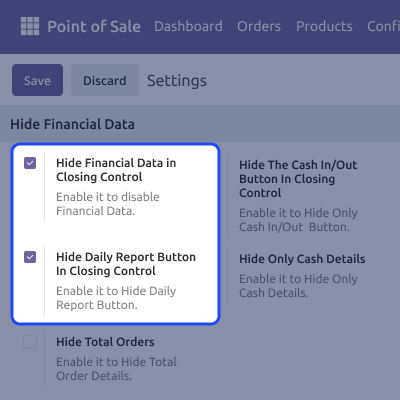
    Report and Data Visibility Control

    Controlled POS Interface Experience

    The module keeps the POS interface simple by removing unnecessary financial details. This helps staff focus only on required tasks.

    Show only necessary POS options to users.

    Reduce confusion caused by extra data.

    Improve focus on billing and order handling.

    Create a cleaner POS interface.

    Limit access to non-essential features.
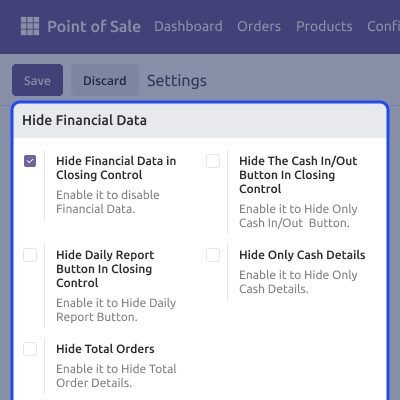
    Controlled POS Interface Experience

    Support

    For any query or issue, please create a support ticket here CREATE A TICKET HERE

    You may also check our other top-quality Odoo Modules.

    Specifications

    Product Version1.0.0
    Released4 days ago
    Last UpdatedMay 13, 2026 (Today)
    Supported VersionsOdoo  17.x  18.x  19.x  
    Write a review

    FAQ’s

     Can this module prevent internal misuse by staff?
    Yes, by restricting access to financial data, staff cannot view or act on sensitive information, reducing chances of manipulation or errors.
     Will this affect normal POS operations like billing?
    No, billing and order processing remain the same. The module only hides financial data, not core POS functionality.
     Can I choose what financial data to hide?
    Yes, you can enable or disable specific options like total orders, cash details, reports, and cash in/out from the backend.
     Is this useful for businesses with multiple cashiers?
    Yes, it is especially useful where multiple staff use POS. It ensures all users have limited and controlled access.
     Can I hide only cash-related details and keep other data visible?
    Yes, the module provides an option to hide only cash-related information while keeping other data accessible.
     Does this module require technical knowledge to configure?
    No, it has simple settings in the backend. You can configure it easily without any technical skills.
     Will this help in maintaining better financial control?
    Yes, by limiting visibility, only authorized users can access financial data, helping maintain better control and reducing internal risks.
     Why should I hide financial data in POS?
    If cashiers can see totals, cash details, or reports, they may misuse or misunderstand the data. This module hides such details to reduce risk and keep control.

    Move to Cloud Today

    AWS Free tier hosting for one year by amazon web services, for more details please visit AWS Free Tier.

    GCP Free tier hosting for one year with 300 credit points by google cloud platform, for more details please visit GCP Free Tier.

    Azure free tier hosting for one year with 25+ always free services, for more details please visit Azure Free Tier.

    In our default configuration we will provide tremendous configuration for your eCommerce Website which is fast to load and response.

    Default Configuration Details of Server

    • 1 GB RAM
    • 1 Core Processor
    • 30 GB Hard Disk
    • DB with 1 GB RAM and 1 Core Processor

    * Server Configuration may vary as per application requirements.

    Want to know more how exactly we are going to power up your eCommerce Website with Cloud to fasten up your store. Please visit the Cloudkul Services.

    Get Started with Cloud
    Not Available


