Send Again
Close
Odoo POS Interface View All Orders helps POS users see paid orders created from other POS sessions. By default, POS shows only its own orders, but this module expands visibility across all POS.
Once enabled, users can view paid orders from every POS and process refunds easily. This saves time and avoids switching between different POS sessions.
Odoo POS Interface View All Orders also allows returning orders from another POS with a confirmation step. This ensures controlled and secure order management across POS interfaces.
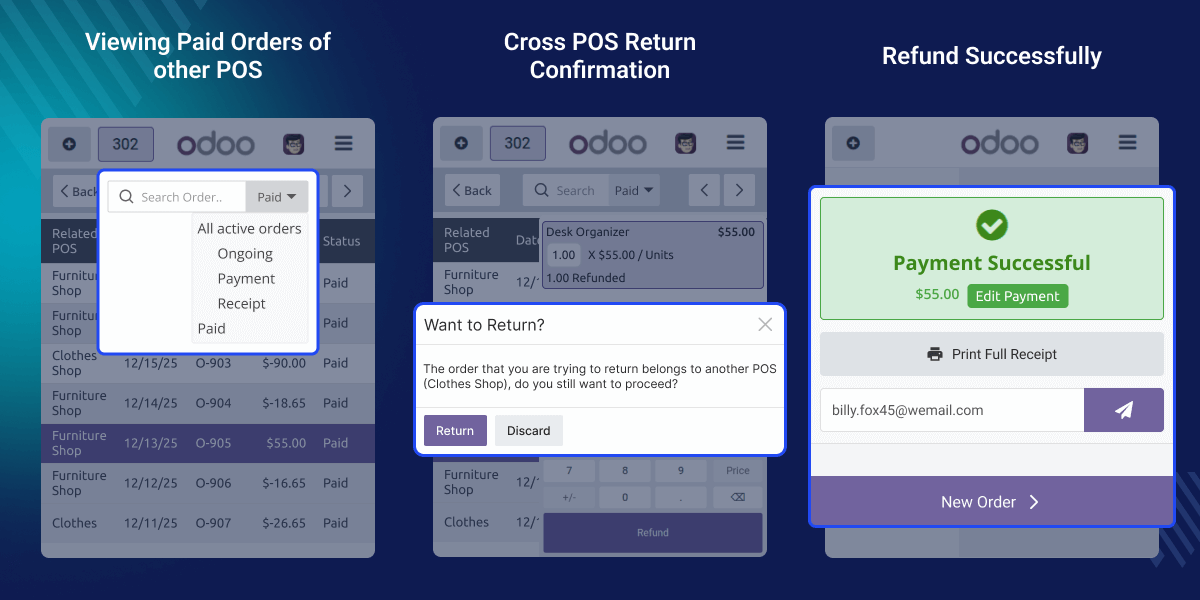
Businesses using multiple POS systems often need access to orders from different counters. Odoo POS Interface View All Orders allows staff to view and manage those orders from a single POS.
For example, if a customer wants a refund at a different counter, the staff can easily process it. This improves flexibility and customer satisfaction.
Allows viewing paid orders from all POS sessions together in a single POS interface.
Helps refund paid orders created from another POS quickly and without switching sessions.
Shows a confirmation message when returning orders created from a different POS.
Enable or disable the feature easily from the POS Interface settings when required.
A dedicated setting is available under the POS Interface to control the functionality of Odoo POS Interface View All Orders.
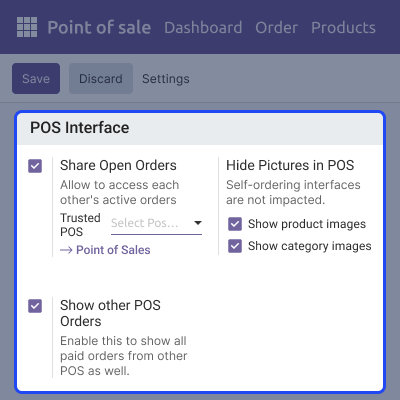
When enabled, the POS displays paid orders from all POS sessions instead of only the current one.

POS users can refund paid orders created from other POS sessions directly from the current POS.

If the order belongs to another POS, the system asks for confirmation before proceeding.

For any query or issue, please create a support ticket here CREATE A TICKET HERE
You may also check our other top-quality Odoo Modules.
Detailed technical features and requirements to help you understand the module’s capabilities and ensure smooth integration with your system.
Detailed technical features and requirements to help you understand the module’s capabilities and ensure smooth integration with your system.
We’re partnered with top-tier, trusted providers!
Want to know more how exactly we are going to power up your eCommerce Website with Cloud to fasten up your store
* Server Configuration may vary as per application requirements.



